
NSFetchedResultController与UITableView
 1 #import "AppDelegate.h"

 #import "Book.h"

 @interface AppDelegate ()

 @end

 @implementation AppDelegate

 -(void)addBookWithTitle:(NSString *)title andAuthor:(NSString *)author andPrice:(NSNumber *)price

 {

     Book *book = [NSEntityDescription insertNewObjectForEntityForName:NSStringFromClass([Book class]) inManagedObjectContext:self.managedObjectContext];

     book.title = title;

     book.author = author;

     book.price = price;

 }

 - (BOOL)application:(UIApplication *)application didFinishLaunchingWithOptions:(NSDictionary *)launchOptions {

     //如果不想每次执行时测试数据都重新插入一遍,可以使用偏好设置,如果已经存在了,就不再进行插入了。

     NSUserDefaults *userDefaults = [NSUserDefaults standardUserDefaults];

     BOOL isInserted = [userDefaults boolForKey:@"inInserted"];

     if (!isInserted)

     {

         //插入数据

         [self addBookWithTitle:@"*文*" andAuthor:@"徐" andPrice:@10000.1];

         [self addBookWithTitle:@"西游记" andAuthor:@"吴承恩" andPrice:@20.5];

         [self addBookWithTitle:@"水浒传" andAuthor:@"施耐庵" andPrice:@5.1];

         [self addBookWithTitle:@"三国演义" andAuthor:@"罗贯中" andPrice:@10.2];

         [self addBookWithTitle:@"史记" andAuthor:@"司马迁" andPrice:@45.3];

         [self addBookWithTitle:@"资治通鉴" andAuthor:@"司马光" andPrice:@56.5];

         [self saveContext];

         //保存偏好设置

         [userDefaults setBool:YES forKey:@"inInserted"];

         //自动步更新

         [userDefaults synchronize];

     }

     return YES;

 }
 #import "BookTableViewController.h"

 #import "Book.h"

 #import "AppDelegate.h"

 @interface BookTableViewController ()<NSFetchedResultsControllerDelegate>

 @property(strong,nonatomic)NSFetchedResultsController *fetchedRC;

 @property(strong,nonatomic)NSManagedObjectContext *managedObjectContext;

 @end

 @implementation BookTableViewController

 - (void)viewDidLoad {

     [super viewDidLoad];

     //获取应用代理

     AppDelegate *delegate = [[UIApplication sharedApplication]delegate];

     //本次案例需要对CoreData的内容进行修改,涉及到managedObjectContext,但是magagedObjetContext属于Appdelegate的属性,此处使用协议获取创建新的managedObjectContext;

     self.managedObjectContext = delegate.managedObjectContext;

     //使用fetchedRC获取数据

     NSError *error = nil;

     [self.fetchedRC performFetch:&error];

     if (error) {

         NSLog(@"NSFetchedResultsController获取数据失败");

     }

 }

 -(NSFetchedResultsController *)fetchedRC

 {

     //判断fetchRC是否存在,如果不存在则创建新的,否则直接返回

     if (!_fetchedRC) {

         //使用NSFetchRequest进行获取数据

         NSFetchRequest *request = [NSFetchRequest fetchRequestWithEntityName:NSStringFromClass([Book class])];

         request.fetchBatchSize = ;

         //设置以某个字段进行排序,此案例以:price价格大小进行排序

         NSSortDescriptor *priceSort = [NSSortDescriptor sortDescriptorWithKey:@"price" ascending:YES];

         //对获取的数据进行排序

         [request setSortDescriptors:@[priceSort]];

         //创建新的fetchedRC

         _fetchedRC = [[NSFetchedResultsController alloc]initWithFetchRequest:request managedObjectContext:self.managedObjectContext sectionNameKeyPath:nil cacheName:nil];

         _fetchedRC.delegate = self;

     }

     return _fetchedRC;

 }

 #pragma mark - Table view data source

 //设置tableView的分组数

 - (NSInteger)numberOfSectionsInTableView:(UITableView *)tableView

 {

     //分组的数据取决于创建sectionNameKeyPath的设置;

     return self.fetchedRC.sections.count;

 }

 //设置tableView每组有多少行

 - (NSInteger)tableView:(UITableView *)tableView numberOfRowsInSection:(NSInteger)section {

     id sectionsInfo = [self.fetchedRC.sections objectAtIndex:section];

     return [sectionsInfo numberOfObjects];

 }

 //自定义方法,设置单元格的显示内容

 -(void)configCell:(UITableViewCell *)cell andIndexPath:(NSIndexPath *)indexPath

 {

     //获取选中的对象

     Book *book = [self.fetchedRC objectAtIndexPath:indexPath];

     cell.textLabel.text = [NSString stringWithFormat:@"%@ %@",book.title,book.author];

     cell.detailTextLabel.text = [NSString stringWithFormat:@"%@",book.price];

 }

 -(UITableViewCell *)tableView:(UITableView *)tableView cellForRowAtIndexPath:(NSIndexPath *)indexPath

 {

     //1.根据reuseindentifier先到对象池中去找重用的单元格

     static NSString *reuseIndetifier = @"bookCell";

     UITableViewCell *cell = [tableView dequeueReusableCellWithIdentifier:reuseIndetifier];

     //2.如果没有找到需要自己创建单元格对象

     if (cell == nil) {

         cell = [[UITableViewCell alloc]initWithStyle:UITableViewCellStyleSubtitle reuseIdentifier:reuseIndetifier];

     }

     //3.设置单元格对象的内容

     [self configCell:cell andIndexPath:indexPath];

     return cell;

 }

 // Override to support conditional editing of the table view.

 - (BOOL)tableView:(UITableView *)tableView canEditRowAtIndexPath:(NSIndexPath *)indexPath {

     // Return NO if you do not want the specified item to be editable.

     return YES;

 }

 // Override to support editing the table view.

 - (void)tableView:(UITableView *)tableView commitEditingStyle:(UITableViewCellEditingStyle)editingStyle forRowAtIndexPath:(NSIndexPath *)indexPath {

     if (editingStyle == UITableViewCellEditingStyleDelete)

     {

         Book *book = [self.fetchedRC objectAtIndexPath:indexPath];

         //1.先删除CoreData中的相应数据

         [self.managedObjectContext deleteObject:book];

         //插入新的记录

         AppDelegate *delegate = [[UIApplication sharedApplication]delegate];

         [delegate addBookWithTitle:@"唐诗三百首" andAuthor:@"李白等" andPrice:@12.3];

         book.price = @([book.price doubleValue]+);

         NSError *error = nil;

         [self.managedObjectContext save:&error];

         if(error) {

             NSLog(@"失败");

         }

     } else if (editingStyle == UITableViewCellEditingStyleInsert)

     {

     }

 }

 #pragma mark - NSFetchedResultsController代理方法

 -(void)controllerWillChangeContent:(NSFetchedResultsController *)controller

 {

     [self.tableView beginUpdates];

 }

 -(void)controllerDidChangeContent:(NSFetchedResultsController *)controller

 {

     [self.tableView endUpdates];

 }

 /**

  * 以下方法共进行了两项操作:

     1.判断操作的类型

     2.对修改的数据、或新插入的数据位置进行局部刷新

  */

 -(void)controller:(NSFetchedResultsController *)controller didChangeObject:(id)anObject atIndexPath:(NSIndexPath *)indexPath forChangeType:(NSFetchedResultsChangeType)type newIndexPath:(NSIndexPath *)newIndexPath

 {

     if (type == NSFetchedResultsChangeDelete)//删除操作

     {

         [self.tableView deleteRowsAtIndexPaths:@[indexPath] withRowAnimation:UITableViewRowAnimationAutomatic];

     }

     else if (type == NSFetchedResultsChangeInsert)//插入操作

     {

         [self.tableView insertRowsAtIndexPaths:@[newIndexPath] withRowAnimation:UITableViewRowAnimationAutomatic];

     }

     else if (type == NSFetchedResultsChangeUpdate)//更新操作

     {

         //首先获取cell;

         UITableViewCell *cell = [self.fetchedRC objectAtIndexPath:indexPath];

         //调用configCell方法

         [self configCell:cell andIndexPath:indexPath];

         //重新加载指定行

         [self.tableView reloadRowsAtIndexPaths:@[indexPath] withRowAnimation:UITableViewRowAnimationAutomatic];

     }

 }

 @end
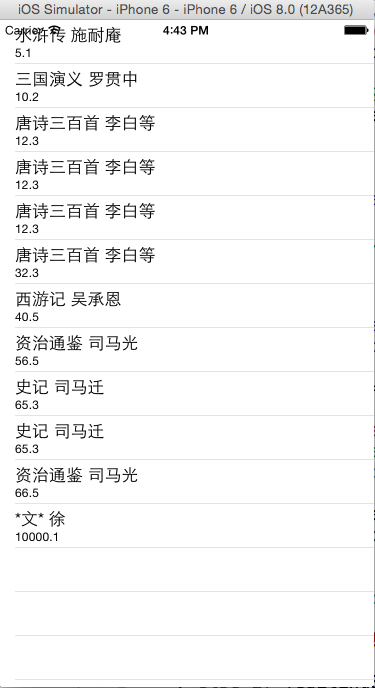
一般来说,你会创建一个NSFetchedResultsController实例作为tableview的成员变量。初始化的时候,你提供四个参数:
1。 一个fetchrequest.必须包含一个sortdescriptor用来给结果集排序。
2。 一个managedobject context。 控制器用这个context来执行取数据的请求。
3。 一个可选的keypath作为sectionname。控制器用keypath来把结果集拆分成各个section。(传nil代表只有一个section)
//初始化fetchedRC必须要排序
request.fetchBatchSize = 20;
NSSortDescriptor *priceSort = [NSSortDescriptor sortDescriptorWithKey:@"price" ascending:YES];
AppDelegate *appDelegate = [[UIApplication sharedApplication]delegate];
//如果要对上下文内容进行修改,可managedObjectContent存在于Appdelegate中,须通过协议进行引用。
NSFetchedResultController与UITableView的更多相关文章
- iOS UITableView 与 UITableViewController
很多应用都会在界面中使用某种列表控件:用户可以选中.删除或重新排列列表中的项目.这些控件其实都是UITableView 对象,可以用来显示一组对象,例如,用户地址薄中的一组人名.项目地址. UITab ...
- UITableView(二)
#import "ViewController.h" @interface ViewController () @end @implementation ViewControlle ...
- iOS: 在UIViewController 中添加Static UITableView
如果你直接在 UIViewController 中加入一个 UITableView 并将其 Content 属性设置为 Static Cells,此时 Xcode 会报错: Static table ...
- iOS 编辑UITableView(根据iOS编程编写)
上个项目我们完成了 JXHomepwner 简单的应用展示,项目地址.本节我们需要在上节项目基础上,增加一些响应用户操作.包括添加,删除和移动表格. 编辑模式 UITableView 有一个名为 e ...
- 使用Autolayout实现UITableView的Cell动态布局和高度动态改变
本文翻译自:stackoverflow 有人在stackoverflow上问了一个问题: 1 如何在UITableViewCell中使用Autolayout来实现Cell的内容和子视图自动计算行高,并 ...
- iOS - UITableView中Cell重用机制导致Cell内容出错的解决办法
"UITableView" iOS开发中重量级的控件之一;在日常开发中我们大多数会选择自定Cell来满足自己开发中的需求, 但是有些时候Cell也是可以不自定义的(比如某一个简单的 ...
- UITableView cell复用出错问题 页面滑动卡顿问题 & 各杂七杂八问题
UITableView 的cell 复用机制节省了内存,但是有时对于多变的自定义cell,重用时会出现界面出错(例如复用出错,出现cell混乱重影).滑动卡顿等问题,这里只简单敲下几点复用出错时的解决 ...
- UITableview delegate dataSource调用探究
UITableview是大家常用的UIKit组件之一,使用中我们最常遇到的就是对delegate和dataSource这两个委托的使用.我们大多数人可能知道当reloadData这个方法被调用时,de ...
- UITableView点击每个Cell,Cell的子内容的收放
关于点击TableviewCell的子内容收放问题,拿到它的第一个思路就是, 方法一: 运用UITableview本身的代理来处理相应的展开收起: 1.代理:- (void)tableView:(UI ...
随机推荐
- spring入门之JdbcTemplate 操作crud
Spring 通过调用 JdbcTemplate来实现对数据库的增删改查,主要用到JdbcTemplate类的4个方法,首先,配置数据库信息,创建对象,代码通用: //设置数据库信息 DriverMa ...
- 关于JAVA编译时找不到自定义包的问题
这两天照网上的教程,学习JSP/SERVLET/JAVABEAN,写了几个JAVA文件,目录放在TOMCAT的WEBAPPS下面,通过javac编译时,老提示找不到指定的包: 下图是我的目录路径: 通 ...
- iOS - url中文和特殊字符转码###
- (NSString *)generateUrl:(NSString *)url{ /** 第一个参数:NULL 第二个参数:C语言的字符串 第三个参数:NULL 第四个参数:要转义的字符串,不要乱 ...
- windows下用py2exe打包脚本为可双击运行程序
文件夹结构: ├── readme.txt ├── settings.py #程序参数 ├── settings.pyc ├── setup.py #安装文件 ├── spider.ico ...
- WebApi~通过HttpClient来调用Web Api接口
异步请求 ///<summary> /// HttpClient实现Post请求(异步) /// </summary> static async void dooPost() ...
- CodeIgniter框架——CI的执行流程
应用程序流程图 CodeIgniter执行流程 源码分析——CI到底做了些什么 (由welcome的例子出发——讲解index.php——讲解CodeIgniter.php) (load_class的 ...
- codevs1044 拦截导弹==洛谷 P1020 导弹拦截
P1020 导弹拦截 题目描述 某国为了防御敌国的导弹袭击,发展出一种导弹拦截系统.但是这种导弹拦截系统有一个缺陷:虽然它的第一发炮弹能够到达任意的高度,但是以后每一发炮弹都不能高于前一发的高度.某天 ...
- JavaScript数据结构与算法-链表练习
链表的实现 一. 单向链表 // Node类 function Node (element) { this.element = element; this.next = null; } // Link ...
- ASP-Command-SQL格式
conn.open constrSet c=Server.CreateObject("ADODB.Command")With cSet .ActiveConnection = co ...
- 关于:before :after
首先要明白一种思想:结构和样式分离. 结构和样式分离,就意味着:没有样式表,HTML文档也是一个完整的文档:没有样式表,也能正常阅读用HTML表达的所有内容.明白这种思想就能很好理解样式表中使用--- ...