
Shiro——MD5加密
一、shiro默认密码的比对
通过 AuthenticatingRealm 的 credentialsMatcher 属性来进行的密码的比对
/**源码org.apache.shiro.realm.AuthenticatingRealm

* Asserts that the submitted {@code AuthenticationToken}'s credentials match the stored account

* {@code AuthenticationInfo}'s credentials, and if not, throws an {@link AuthenticationException}.

*

* @param token the submitted authentication token

* @param info  the AuthenticationInfo corresponding to the given {@code token}

* @throws AuthenticationException if the token's credentials do not match the stored account credentials.

*/

    protected void assertCredentialsMatch(AuthenticationToken token, AuthenticationInfo info)
    throws AuthenticationException {

        CredentialsMatcher cm = getCredentialsMatcher();

        if (cm != null) {

            if (!cm.doCredentialsMatch(token, info)) {

                //not successful - throw an exception to indicate this:

                String msg = "";

                throw new IncorrectCredentialsException(msg);

            }

        } else {

            throw new AuthenticationException("");

        }

    }
调试技巧:在org.apache.shiro.authc.UsernamePasswordToken的getPassword()方法中添加断点
①、接口CredentialsMatcher
源码

package org.apache.shiro.authc.credential;

import org.apache.shiro.authc.AuthenticationInfo;

import org.apache.shiro.authc.AuthenticationToken;

public interface CredentialsMatcher {

    boolean doCredentialsMatch(AuthenticationToken token, AuthenticationInfo info);

}
②、接口CredentialsMatcher的继承关系
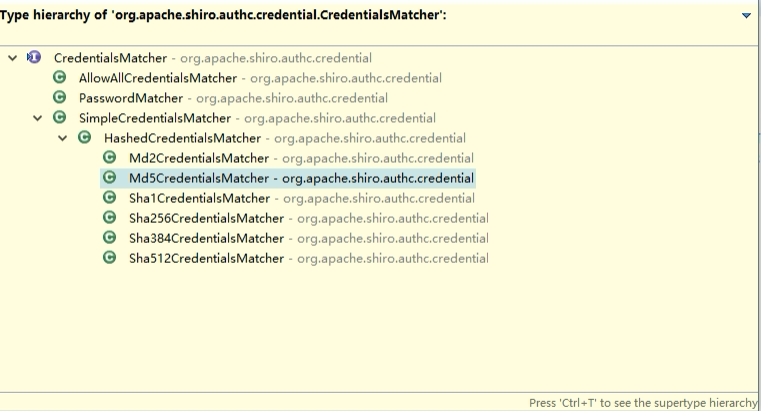
shiro默认是用org.apache.shiro.authc.credential.SimpleCredentialsMatcher进行密码比较
//SimpleCredentialsMatcher.doCredentialsMatch()
public boolean doCredentialsMatch(AuthenticationToken token, AuthenticationInfo info) {

        Object tokenCredentials = getCredentials(token);

        Object accountCredentials = getCredentials(info);

        return equals(tokenCredentials, accountCredentials);

    }
二、MD5加密
使用 new SimpleHash(hashAlgorithmName, credentials, salt, hashIterations) 来计算盐值加密后的密码的值
import org.apache.shiro.crypto.hash.SimpleHash;

import org.apache.shiro.util.ByteSource;
public static void  main(String[] args){

        //加密方式

        String hashAlgorithmName = "MD5";

        //明文密码

        Object credentials = "1234";

        //盐值

        Object salt = ByteSource.Util.bytes("nchu");

        int hashIterations = 1024;

        Object result = new SimpleHash(hashAlgorithmName, credentials, salt, hashIterations);
     //加密后的密码

        System.out.println(result);

    }
三、Shiro密码加密
①、在spring核心配置文件中配置自定义Realm
    <!-- 自定义Realm -->

    <bean id="MD5Realm" class="com.nchu.shiro.MD5Realm">

       <!-- 更改自定义Realm的默认credentialsMatcher属性-->

        <property name="credentialsMatcher" >

            <bean class="org.apache.shiro.authc.credential.HashedCredentialsMatcher">

                <!--指定加密算法-->

                <property name="hashAlgorithmName" value="MD5"></property>

                <!--设置加密次数-->

                <property name="hashIterations" value="1024"></property>

            </bean>

        </property>

    </bean>

    <!-- 安全管理器 -->

    <bean id="securityManager" class="org.apache.shiro.web.mgt.DefaultWebSecurityManager">

        <property name="realms">

            <list>

                <ref bean="MD5Realm"/>

            </list>

        </property>

    </bean>
替换当前 Realm 的 credentialsMatcher 属性. 直接使用 HashedCredentialsMatcher 对象, 并设置加密算法即可
②、自定义Realm
使用shiro MD5加密前提数据库存储的密码是经过MD5加密的
import com.nchu.mvc.dao.ShiroRealmMapper;

import org.apache.shiro.authc.*;

import org.apache.shiro.crypto.hash.SimpleHash;

import org.apache.shiro.realm.AuthenticatingRealm;

import org.apache.shiro.util.ByteSource;

import org.springframework.beans.factory.annotation.Autowired;

/**

 * Created by yangshijing on 2018/1/16 0016.

 */

public class MD5Realm extends AuthenticatingRealm {

    @Autowired

    ShiroRealmMapper shiroRealmMapper;

    @Override

    protected AuthenticationInfo doGetAuthenticationInfo(AuthenticationToken token) throws AuthenticationException {

        System.out.println("----->"+token.hashCode());

        //1. 把 AuthenticationToken 转换为 UsernamePasswordToken

        UsernamePasswordToken upToken = (UsernamePasswordToken) token;

        //2. 从 UsernamePasswordToken 中来获取 username

        String username = upToken.getUsername();

        //3. 调用数据库的方法, 从数据库中查询 username 对应的用户记录

        System.out.println("从数据库中获取 username: " + username + " 所对应的用户信息.");

        String password  = shiroRealmMapper.login(username);

        //4. 若用户不存在, 则可以抛出 UnknownAccountException 异常

        if(password==null){

            throw new UnknownAccountException("用户不存在!");

        }

        //5. 根据用户信息的情况, 决定是否需要抛出其他的 AuthenticationException 异常.

        /*  if("monster".equals(username)){

            throw new LockedAccountException("用户被锁定");

        }*/

        //6. 根据用户的情况, 来构建 AuthenticationInfo 对象并返回.
     //通常使用的实现类为: SimpleAuthenticationInfo

        //以下信息是从数据库中获取的.

        //1). principal: 认证的实体信息. 可以是 username, 也可以是数据表对应的用户的实体类对象.

        Object principal = username;

        //2). hashedCredentials: 加密后的密码.

        Object hashedCredentials = password;

        //3). realmName: 当前 realm 对象的 name. 调用父类的 getName() 方法即可

        String realmName = getName();

        //4). 加密盐值

        ByteSource credentialsSalt = ByteSource.Util.bytes("nchu");

        SimpleAuthenticationInfo info = //new SimpleAuthenticationInfo(principal, credentials, realmName);

        new SimpleAuthenticationInfo(principal,hashedCredentials,credentialsSalt,realmName);

        return info;

    }
注意:在 doGetAuthenticationInfo 方法返回值创建 SimpleAuthenticationInfo 对象的时候, 需要使用SimpleAuthenticationInfo(principal, credentials, credentialsSalt, realmName) 构造器
Shiro——MD5加密的更多相关文章
- shiro密码的比对,密码的MD5加密,MD5盐值加密,多个Relme
有具体问题的可以参考之前的关于shiro的博文,关于shiro的博文均是一次工程的内容 密码的比对 通过AuthenticatingRealm的CredentialsMatcher方法 密码的加密 ...
- Apache Shiro(三)-登录认证和权限管理MD5加密
md5 加密 在前面的例子里,用户密码是明文的,这样是有巨大风险的,一旦泄露,就不好了.所以,通常都会采用非对称加密,什么是非对称呢?就是不可逆的,而 md5 就是这样一个算法.如代码所示 123 用 ...
- shiro系列五、shiro密码MD5加密
Shiro-密码的MD5加密 1.密码的加密 在数据表中存的密码不应该是123456,而应该是123456加密之后的字符串,而且还要求这个加密算法是不可逆的,即由加密后的字符串不能反推回来原来的密 ...
- Shiro-密码的MD5加密
1.密码的加密 在数据表中存的密码不应该是123456,而应该是123456加密之后的字符串,而且还要求这个加密算法是不可逆的,即由加密后的字符串不能反推回来原来的密码,如果能反推回来那这个加密是没有 ...
- 使用JAVA进行MD5加密后所遇到的一些问题
前言:这几天在研究apache shiro如何使用,这好用到了给密码加密的地方,就碰巧研究了下java的MD5加密是如何实现的,下面记录下我遇到的一些小问题. 使用java进行MD5加密非常的简单,代 ...
- 255.Spring Boot+Spring Security:使用md5加密
说明 (1)JDK版本:1.8 (2)Spring Boot 2.0.6 (3)Spring Security 5.0.9 (4)Spring Data JPA 2.0.11.RELEASE (5)h ...
- Shiro-Base64加密解密,Md5加密
Shiro权限框架中自带的加密方式有Base64加密,MD5加密 在Maven项目的pom.xml中添加shiro的依赖: <dependency> <groupId>org. ...
- Shiro密码加密
Shiro密码加密 相关类 org.apache.shiro.authc.credential.CredentialsMatcher org.apache.shiro.authc.credential ...
- SpringBoot整合Shiro+MD5+Salt+Redis实现认证和动态权限管理|前后端分离(下)----筑基后期
写在前面 在上一篇文章<SpringBoot整合Shiro+MD5+Salt+Redis实现认证和动态权限管理(上)----筑基中期>当中,我们初步实现了SpringBoot整合Shiro ...
随机推荐
- php无wsdl webservice服务用法
服务端: <?php class test { function add($a,$b) { return $a+$b; } } function getUserInfo($name) { ret ...
- IE9以上版本无法更換会员头像
解决方法一:把网址加入"信任的網站" 就可以了 解决方法二:打开IE8的窗口-工具-- Intelnet选项-- 安全-- 自定义级别把“将文件上传到服务器时包含本地目录路径”这一 ...
- CSS冷门但有用的知识整合
1. 滚动条样式设置 The ::-webkit-scrollbar CSS pseudo-element(伪元素) affects the style of the scrollbar of an ...
- firstModel权限问题
laravel根目录下没有 .env , 执行 cp .env.example .envstorage和bootstrap/cache 没有给写入权限, 执行 chmod -R 777 storage ...
- Android之Application类用法
Application和Activity,Service一样是Android框架的一个系统组件,当Android程序启动时系统会创建一个Application对象,用来存储系统的一些信息. Andro ...
- 【转】学习使用Jmeter做压力测试(二)--压力测试的实施
JMeter测试步骤: 1.建立测试计划 2.添加线程组 3.添加HTTP请求 4.增加监听器 5.执行测试计划 6.根据JMeter提供的报告分析结果 一.目标 测试访问目标服务器网站首页的每秒查询 ...
- mysql安装及基本操作(mysql作业)
1 官网下载,链接 https://www.mysql.com/downloads/ Download MySQL Community Server 默认为你选好了Mac OS X 平台 选择的是. ...
- 温故而知新java事务
一.什么是Java事务 通常的观念认为,事务仅与数据库相关. 事务必须服从ISO/IEC所制定的ACID原则.ACID是原子性(atomicity).一致性(consistency).隔离性 (iso ...
- python中常用模块详解一
1.time 模块 import time s = time.localtime() # 把时间转化成格式化的时间,通过. 取得里面的年月日等 struct_time 格式 time.struct_t ...
- Centos7 SSH公钥生成及配置
1.你可以按如下命令来生成 sshkey: ssh-keygen -t rsa -C "xxxxx@xxxxx.com" 2.按照提示完成三次回车,即可生成 ssh key.通过查 ...