
shiro密码的比对,密码的MD5加密,MD5盐值加密,多个Relme
有具体问题的可以参考之前的关于shiro的博文,关于shiro的博文均是一次工程的内容
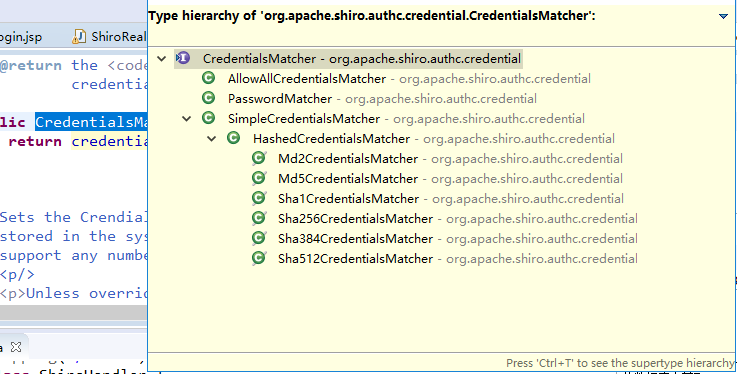
使用其提供的接口实现
    <!--

            .配置Realm

            .1直接实现Realm接口的bean

          -->

    <bean id="jdbcRealm"  class="com.MrChengs.shiro.realms.ShiroRealm">

        <property name="credentialsMatcher">

            <bean  class="org.apache.shiro.authc.credential.HashedCredentialsMatcher">

                 <!-- 加密的方法 -->

                 <property name="hashAlgorithmName"  value="MD5"></property>

                 <!-- 指定加密的次数 -->

                 <property name="hashIterations"  value=""></property>

            </bean>

        </property>

    </bean>
看源码:
public SimpleHash(String algorithmName, Object source, Object  salt, int hashIterations)

            throws CodecException, UnknownAlgorithmException {

        if (!StringUtils.hasText(algorithmName)) {

            throw new NullPointerException("algorithmName  argument cannot be null or empty.");

        }

        this.algorithmName = algorithmName;

        this.iterations = Math.max(DEFAULT_ITERATIONS,  hashIterations);

        ByteSource saltBytes = null;

        if (salt != null) {

            saltBytes = convertSaltToBytes(salt);

            this.salt = saltBytes;

        }

        ByteSource sourceBytes = convertSourceToBytes(source);

        hash(sourceBytes, saltBytes, hashIterations);

    }
测试加密:
     public static void main(String[] args) {

           String hash="MD5";

           Object cred = "";

           Object salt = null;

           int hashInter = ;

           //加密的类

           System.out.println(new SimpleHash(hash, cred, salt,  hashInter));

     }
fc1709d0a95a6be30bc5926fdb7f22f4
MD5盐值加密
      //盐值

           ByteSource credentialsSalt =  ByteSource.Util.bytes(username);
此时放置的不在是明文的密码
ShiroRealm.java
 //6.根据用户的情况来构建AuthenticationInfo并且返回

           //以下信息是从数据库中获取的

           //principal:认证的实体信息,可以是username,也可以是数据表对应的实体对象

           Object principal = username;

           //credentials:密码

           Object credentials = null;

           if("user".equals(username)){

                //计算后user密码为123456的盐值

                credentials =  "2044dc18864ca3bc408359a0fb13c2a7";

           }else if("admin".equals(username)){

                //计算和admin密码为123456的盐值

                credentials =  "30beaf2a87d54ebe889cfccc076247ad";

           }

           //realmName:当前realm对象为name,调用父类的getName()方法即可

           String realmName = getName();

           //盐值

           ByteSource credentialsSalt =  ByteSource.Util.bytes(username);

           SimpleAuthenticationInfo info = null;//new  SimpleAuthenticationInfo(principal, credentials, realmName);

           info = new SimpleAuthenticationInfo(principal,  credentials, credentialsSalt, realmName);

           return info;

     }
盐值的计算:
public static void main(String[] args) {

           String hash="MD5";

           Object cred = "";

           Object salt = "admin";

           int hashInter = ;

           //加密的类

           System.out.println(new SimpleHash(hash, cred, salt,  hashInter));

           //new SimpleHash(algorithmName, source, salt,  hashIterations)

     }
在测试中,只有用户名为user/admin 密码为123456才能成功登陆
多Realm
创建新的类
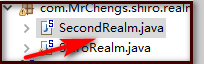
SecondRealm。java
public class SecondRealm extends AuthenticatingRealm {

     @Override

     protected AuthenticationInfo  doGetAuthenticationInfo(AuthenticationToken arg0) throws  AuthenticationException {

           System.out.println("SecondRealm-->");

           //1.把AuthenticationToken转为UsernamePasswordToken

           UsernamePasswordToken  upToken =  (UsernamePasswordToken) arg0;

           //2.从UsernamePasswordToken获取username

           String username = upToken.getUsername();

           //3.调用数据库的方法,从数据库查询username对应的用户记录

           System.out.println("从数据库中获取username:" +  username);

           //4.若用户不存在可以抛出异常 UnKnownAccountException异常

           if("unknow".equals(username)){

                throw new UnknownAccountException("username 不存在");

           }

           //5.根据用户信息的清空决定是否需要抛出其他的异常

           if("monster".equals(username)){

                throw new LockedAccountException("用户被锁定");

           }

           //6.根据用户的情况来构建AuthenticationInfo并且返回

           //以下信息是从数据库中获取的

           //principal:认证的实体信息,可以是username,也可以是数据表对应的实体对象

           Object principal = username;

           //credentials:密码

           Object credentials = null;

           if("user".equals(username)){

                credentials =  "6e3be0247455b9298f47eac8e57a07214ef84115";

           }else if("admin".equals(username)){

                credentials =  "ff9633d047eaaf9861984ed86e5f73f904647716";

           }

           //realmName:当前realm对象为name,调用父类的getName()方法即可

           String realmName = getName();

           //盐值

           ByteSource credentialsSalt =  ByteSource.Util.bytes(username);

           SimpleAuthenticationInfo info = null;//new  SimpleAuthenticationInfo(principal, credentials, realmName);

           info = new SimpleAuthenticationInfo(principal,  credentials, credentialsSalt, realmName);

           return info;

     }

     public static void main(String[] args) {

           String hash="SHA1";

           Object cred = "";

           Object salt = "user";

           int hashInter = ;

           //加密的类

           System.out.println(new SimpleHash(hash, cred, salt,  hashInter));

           //new SimpleHash(algorithmName, source, salt,  hashIterations)

     }

}
加密方式是SHA1
     <!--

      .配置SecurityManager

      -->

    <bean id="securityManager"  class="org.apache.shiro.web.mgt.DefaultWebSecurityManager">

        <property name="cacheManager" ref="cacheManager"/>

      <!--  此时这个属性需要注释使用下面的属性配置

        <property name="realm" ref="jdbcRealm"/>

      -->

        <property name="authenticator"  ref="autheniicator"></property>

    </bean>
     <!-- 认证器 -->

         <bean id="autheniicator"  class="org.apache.shiro.authc.pam.ModularRealmAuthenticator">

            <property name="realms">

                 <list>

                      <ref bean="jdbcRealm"/>

                      <ref bean="SecondRealm"/>

                 </list>

            </property>

         </bean>

         <!--

            .配置Realm

            .1直接实现Realm接口的bean

          -->

    <bean id="jdbcRealm"  class="com.MrChengs.shiro.realms.ShiroRealm">

        <property name="credentialsMatcher">

            <bean  class="org.apache.shiro.authc.credential.HashedCredentialsMatcher">

                 <!-- 加密的方法 -->

                 <property name="hashAlgorithmName"  value="MD5"></property>

                 <!-- 指定加密的次数 -->

                 <property name="hashIterations"  value=""></property>

            </bean>

        </property>

    </bean>

    <bean id="SecondRealm"  class="com.MrChengs.shiro.realms.SecondRealm">

        <property name="credentialsMatcher">

            <bean  class="org.apache.shiro.authc.credential.HashedCredentialsMatcher">

                 <!-- 加密的方法 -->

                 <property name="hashAlgorithmName"  value="SHA1"></property>

                 <!-- 指定加密的次数 -->

                 <property name="hashIterations"  value=""></property>

            </bean>

        </property>

    </bean>
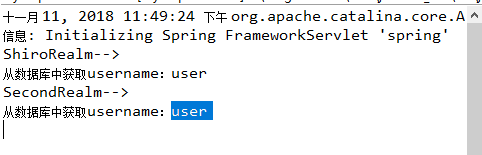
执行的顺序和list的顺序有关
<bean id="autheniicator"  class="org.apache.shiro.authc.pam.ModularRealmAuthenticator">

            <property name="realms">

                 <list>

                      <ref bean="jdbcRealm"/>

                      <ref bean="SecondRealm"/>

                 </list>

            </property>

         </bean>
shiro密码的比对,密码的MD5加密,MD5盐值加密,多个Relme的更多相关文章
- Java和JS MD5加密-附盐值加密demo
JAVA和JS的MD5加密 经过测试:字母和数据好使,中文不好使. 源码如下: ** * 类MD5Util.java的实现描述: * */public class MD5Util { // 获得MD5 ...
- Spring Security中的MD5盐值加密
在 spring Security 文档中有这么一句话: "盐值的原理非常简单,就是先把密码和盐值指定的内容合并在一起,再使用md5对合并后的内容进行演算,这样一来,就算密码是一个很常见的字 ...
- c# MD5及盐值加密
using System;using System.Collections.Generic;using System.Linq;using System.Security.Cryptography;u ...
- c# MD5盐值加密
using System; using System.Collections.Generic; using System.Linq; using System.Security.Cryptograph ...
- shiro盐值加密并验证
在数据表中存的密码不应该是123456,而应该是123456加密之后的字符串,而且还要求这个加密算法是不可逆的,即由加密后的字符串不能反推回来原来的密码,如果能反推回来那这个加密是没有意义的.著名的加 ...
- MD5盐值加密
加密思路 思路解析:(数据解析过程基于16进制来处理的,加密后为16进制字符串) 加密阶段: 对一个字符串进行MD5加密,我们需要使用到MessageDigest(消息摘要对象),需要一个盐值(sal ...
- shiro 密码的MD5盐值加密
- hashlib 文件校验,MD5动态加盐返回加密后字符
hashlib 文件校验 # for循环校验 import hashlib def check_md5(file): ret = hashlib.md5() with open(file, mode= ...
- 给MD5加上salt随机盐值加密算法实现密码安全的php实现
给MD5加上salt随机盐值加密算法实现密码安全的php实现 如果直接对密码进行散列,那么黑客可以对通过获得这个密码散列值,然后通过查散列值字典(例如MD5密码破解网站),得到某用户的密码.加上sal ...
随机推荐
- Linux定时任务crontab使用指南
crontab命令被用来提交和管理用户的需要周期性执行的任务,与windows下的计划任务类似,当安装完成操作系统后,默认会安装此服务工具,并且会自动启动crond进程,crond进程每分钟会定期检查 ...
- Freemarker 最简单的例子程序
首先导入包,freemarker.jar 下载地址: freemarker-2.3.18.tar.gz http://cdnetworks-kr-1.dl.sourceforge.net/pro ...
- Java - 让1+1的结果变成3
原出处是国外某论坛某帖子中楼主提问:如何让1+1=3?于是出现了各种语言实现的各种机制的答案,当然其中也包括直接用字符串输出"1+1=3"...最后被采纳的是用Java语言实现的答 ...
- cygwin 的安装和配置
Cygwin是一个在windows平台上运行的类UNIX模拟环境,是cygnus solutions公司开发的自由软件(该公司开发的著名工具还有eCos,不过现已被Redhat收购).它对于 ...
- Spring课程 Spring入门篇 7-1 Aspect介绍及PointCut注解应用
本节主要是理论型: 关键看下节实操. 这个其实只要理解一点:使用AspectJ进行Spring AOP 编程,其实就是使用了JAVA注解的风格进行配置和使用. 不像之前讲的那样在配置文件中配置使用.
- python中循环删除list和dict类型注意事项
列表和字典在循环操作(增删)时,其长度会改变 # 删除 li = [11, 22, 33, 44, 'rock']中索引为单数的元素 # 方法一 del li[1::2] print(li) # [1 ...
- Java读取粘贴板内容
package com.test.jvm.oom.design; import java.awt.Image; import java.awt.Toolkit; import java.awt.dat ...
- replace的坑
问题:html中代码段包含了$,在使用replace替换时,$直接被替换了解决:先把文本中的$全部替换成自己定义的标签,最后在还原回去原因:在介绍replace的文档中,$&代表插入匹配的子串 ...
- CSS3,transform3D立体可拖拽正方体实现原理
---恢复内容开始--- 今天咱们来说一下,CSS中的3D效果 .如果你把transform真的掌握的和纯熟的话,就可以直接通过CSS做出很多很炫酷的效果,甚至.轮播图和选项卡都可以通过CSS来做,咱 ...
- iOS线程和进程的区别和联系
线程和进程的区别主要在于它们是不同的操作系统资源管理方式.进程有独立的地址空间,一个进程崩溃后,在保护模式的影响下不会对其他进程产生影响,而线程只是一个进程中的不同执行路径.线程有自己的堆栈和局部变量 ...