
centos7用docker安装单节点redis4.0.11
[root@localhost conf]# docker search redis
INDEX NAME DESCRIPTION STARS OFFICIAL AUTOMATED
docker.io docker.io/redis Redis is an open source key-value store th... 6146 [OK]
docker.io docker.io/bitnami/redis Bitnami Redis Docker Image 97 [OK]
docker.io docker.io/sameersbn/redis 74 [OK]
docker.io docker.io/grokzen/redis-cluster Redis cluster 3.0, 3.2, 4.0 & 5.0 39
docker.io docker.io/hypriot/rpi-redis Raspberry Pi compatible redis image 34
docker.io docker.io/kubeguide/redis-master redis-master with "Hello World!" 27
docker.io docker.io/kubeguide/guestbook-redis-slave Guestbook redis slave 22
docker.io docker.io/redislabs/redis Clustered in-memory database engine compat... 16
docker.io docker.io/rediscommander/redis-commander Alpine image for redis-commander - Redis m... 15 [OK]
docker.io docker.io/arm32v7/redis Redis is an open source key-value store th... 11
docker.io docker.io/webhippie/redis Docker images for redis 9 [OK]
docker.io docker.io/oliver006/redis_exporter Prometheus Exporter for Redis Metrics. Su... 7
docker.io docker.io/rtoma/logspout-redis-logstash Logspout including Redis adapter for sendi... 5
docker.io docker.io/centos/redis-32-centos7 Redis in-memory data structure store, used... 4
docker.io docker.io/arm64v8/redis Redis is an open source key-value store th... 3
docker.io docker.io/frodenas/redis A Docker Image for Redis 2 [OK]
docker.io docker.io/wodby/redis Redis container image with orchestration 2 [OK]
docker.io docker.io/circleci/redis CircleCI images for Redis 1 [OK]
docker.io docker.io/google/guestbook-python-redis A simple guestbook example written in Pyth... 1
docker.io docker.io/kilsoo75/redis-master This image is for the redis master of SK C... 1
docker.io docker.io/tiredofit/redis Redis Server w/ Zabbix monitoring and S6 O... 1 [OK]
docker.io docker.io/anchorfree/redis redis cache server for logging 0
docker.io docker.io/cflondonservices/redis Docker image for running redis 0
docker.io docker.io/iadvize/redis 0
docker.io docker.io/xetamus/redis-resource forked redis-resource 0 [OK]
[root@localhost conf]# docker pull redis:4.0.11
Trying to pull repository docker.io/library/redis ...
4.0.11: Pulling from docker.io/library/redis
a5a6f2f73cd8: Already exists
a6d0f7688756: Pull complete
53e16f6135a5: Pull complete
106da5e40edc: Pull complete
f7cb8ce75c46: Pull complete
059508063f4f: Pull complete
Digest: sha256:ee891094f0bb1a76d11cdca6e33c4fdce5cba1f13234c5896d341f6d741034b1
Status: Downloaded newer image for docker.io/redis:4.0.11
[root@localhost conf]# docker images
REPOSITORY TAG IMAGE ID CREATED SIZE
docker.io/redis 4.0.11 a38ee13679d8 10 days ago 83.4 MB
docker.io/mysql 5.7.24 ae6b78bedf88 10 days ago 372 MB
创建目录和配置文件redis.conf(如果不事先创建好redis.conf则docker run的时候会自己创建一个redis.conf目录,无法自动创建配置文件)
mkdir -p /usr/local/redis/conf
cd /usr/local/redis/conf
touch redis.conf
切记redis.conf中注释掉:#daemonize yes 否则无法启动容器
[root@localhost conf]# docker run -p 6379:6379 --name redis4_0_11 --privileged=true -v /usr/local/redis/data:/data -v /usr/local/redis/conf/redis.conf:/etc/redis/redis.conf -d redis:4.0.11 redis-server /etc/redis/redis.conf --requirepass "123456" --appendonly yes
2f7358ea6c6798186058712457ad8670c4c06cd2e1bbe439670c7df28b696d2b
[root@localhost conf]# docker ps -a
CONTAINER ID IMAGE COMMAND CREATED STATUS PORTS NAMES
2f7358ea6c67 redis:4.0.11 "docker-entrypoint..." 4 seconds ago Up 4 seconds 0.0.0.0:6379->6379/tcp redis4_0_11
080d8084681c mysql:5.7.24 "docker-entrypoint..." 4 hours ago Up 2 hours 0.0.0.0:3306->3306/tcp, 33060/tcp mysql5_7_24
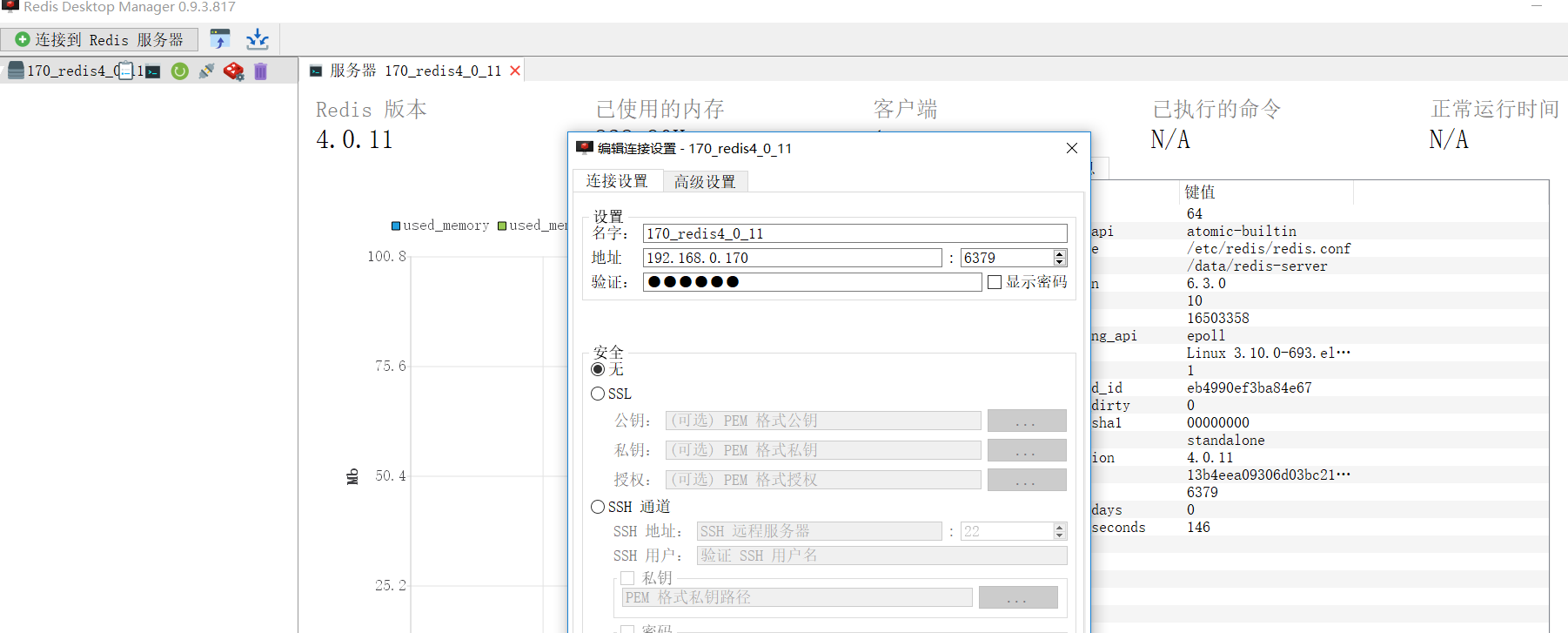
最后创建完后使用Redis Desktop Manager来进行测试,没问题

[root@localhost ~]# docker inspect redis4_0_11|grep -i add
"CapAdd": null,
"GroupAdd": null,
"LinkLocalIPv6Address": "",
"SecondaryIPAddresses": null,
"SecondaryIPv6Addresses": null,
"GlobalIPv6Address": "",
"IPAddress": "172.17.0.3",
"MacAddress": "02:42:ac:11:00:03",
"IPAddress": "172.17.0.3",
"GlobalIPv6Address": "",
"MacAddress": "02:42:ac:11:00:03"
[root@localhost ~]# docker exec -it redis4_0_11 redis-cli -h 172.17.0.3
172.17.0.3:6379> get test
(error) NOAUTH Authentication required.
172.17.0.3:6379> get list111
(error) NOAUTH Authentication required.
172.17.0.3:6379> auth 123456
OK
172.17.0.3:6379> get test
"121k2k12k"
172.17.0.3:6379> get list111
(error) WRONGTYPE Operation against a key holding the wrong kind of value
172.17.0.3:6379> lrange list111 1 2
1) "aaa"
172.17.0.3:6379> lrange list111 0 2
1) "bbb"
2) "aaa"
centos7用docker安装单节点redis4.0.11的更多相关文章
- redis-4.0.11主从配置初步探究
redis-4.0.11相较于以前版本,新增了几个安全措施,稍稍研究了6379.conf配置文件,在这里记录一下. 实验环境: centos7.4 redis:redis-4.0.11 1. redi ...
- centos7多节点部署redis4.0.11集群
1.服务器集群服务器 redis节点node-i(192.168.0.168) 7001,7002node-ii(192.168.0.169) 7003,7004node-iii(192.168.0. ...
- centos7.5 安装 redis-4.0.11
1.下载redis包 wget wget http://download.redis.io/releases/redis-4.0.11.tar.gz 2.解压安装 #解压 .tar.gz #安装 cd ...
- CENTOS7下安装REDIS4.0.11
拷贝收藏私用,别无他意,原博客地址: https://www.cnblogs.com/zuidongfeng/p/8032505.html 1.安装redis 第一步:下载redis安装包 wget ...
- centos7用docker安装kafka
参考之前的文章安装zookeeper集群 https://www.cnblogs.com/xiaohanlin/p/10124674.html 如果是测试环境也可以简单安装单节点的zookeeper ...
- Cloudera Manager安装之利用parcels方式安装单节点集群(包含最新稳定版本或指定版本的安装)(添加服务)(CentOS6.5)(四)
不多说,直接上干货! 福利 => 每天都推送 欢迎大家,关注微信扫码并加入我的4个微信公众号: 大数据躺过的坑 Java从入门到架构师 人工智能躺过的坑 ...
- (一)Hadoop1.2.1安装——单节点方式和单机伪分布方式
Hadoop1.2.1安装——单节点方式和单机伪分布方式 一. 需求部分 在Linux上安装Hadoop之前,需要先安装两个程序: 1)JDK 1.6(或更高版本).Hadoop是用Java编写的 ...
- docker启动单节点server模式的consul | Bitdoom
原文:docker启动单节点server模式的consul | Bitdoom docker启动单节点server模式的consul 2017-09-07 环境:MacOSX, consul_0.9. ...
- CentOS7利用docker安装MySQL5.7
CentOS7利用docker安装MySQL5.7 前提条件 centos7 且内核版本高于3.10, 可通过以下命令查看内核版本 uname -r 利用yum 安装docker 安装一些必要的系统工 ...
随机推荐
- Android 4.4 外置卡
虾米.酷狗.百度地图.UC浏览器 下载 可以设置下载路径保存到外置SD卡上. 其他的软件目前还不支持. 最终Android 4.2是可以选择的,后来Android禁用了外置卡,以上软件是如何实现的?
- redis-win7
http://blog.csdn.net/renfufei/article/details/38474435
- fgets、gets和scanf的区别
gets()从stdin流中读取字符串,直至接受到换行符或EOF时停止,并将读取的结果存放在buffer指针所指向的字符数组中.换行符不作为读取串的内容,读取的换行符被转换为null值,并由此来结束字 ...
- 刷题向》关于搜索+tarjan的奇怪组合题 BZOJ1194 (normal+)
关于这道题,其实看懂了的话还是比较好写的,只是题目实在又臭又长,没有让人读下去的勇气. 给出题目翻译: 给你S张图, 每张图有M个点,其中M个点中有N个是特殊单位,会给出. 每个点又有0.1两条边指向 ...
- 刷题向》DP》关于基础DP(easy)
openjudge 8464 这道题其实很简单,算是DP的基础题,比较适合开拓DP思维. 题目比较有欺骗性,其实稍微想想就可以解决,因为题意说第一次卖出后才能买入,所以我们可以考虑枚举断点,所以题目 ...
- box-shadow 内阴影
1.盒子阴影样式单词:box-shadow 2.语法 代表边框间距靠左0 靠上0 和1px阴影范围 阴影颜色为黑色(#000),有inset 代表框内阴影 ,不带inset 代表框外阴影. 注意:bo ...
- python if __name__ == '__main__' 作用
转载:https://stackoverflow.com/questions/419163/what-does-if-name-main-do When your script is run by p ...
- Log4J 配置 详解
Log4J的配置文件(Configuration File)就是用来设置记录器的级别.存放器和布局的,它可接key=value格式的设置或xml格式的设置信息.通过配置,可以创建出Log4J的运行环境 ...
- 洛谷P2569 [SCOI2010]股票交易
P2569 [SCOI2010]股票交易 题目描述 最近lxhgww又迷上了投资股票,通过一段时间的观察和学习,他总结出了股票行情的一些规律. 通过一段时间的观察,lxhgww预测到了未来T天内某只股 ...
- rest-framework之序列化组件
一:django自带序列化组件 Django内置的serializers(把对象序列化成json字符串) from django.core import serializers def test(re ...