
HCNA修改OSPF基准带宽
1、拓扑图
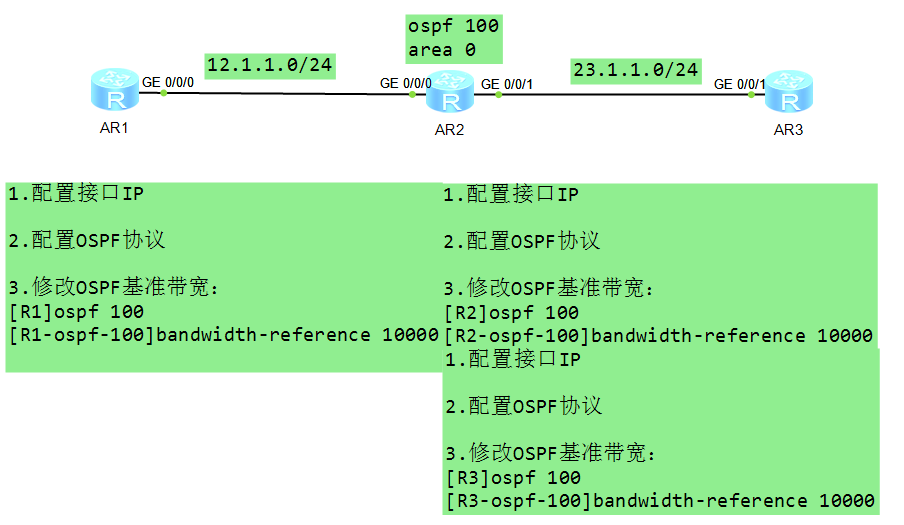
2、R1配置ip开启OSPF
The device is running!
<Huawei>sys
Enter system view, return user view with Ctrl+Z.
[Huawei]sysn R1
[R1]int
[R1]interface g0/0/0
[R1]interface g0/0/0
[R1-GigabitEthernet0/0/0]ip add 12.1.1.1 24
[R1-GigabitEthernet0/0/0]
Dec 11 2017 19:00:27-08:00 R1 %%01IFNET/4/LINK_STATE(l)[0]:The line protocol IP
on the interface GigabitEthernet0/0/0 has entered the UP state.
[R1-GigabitEthernet0/0/0]q
[R1]os
[R1]ospf
Please check whether system data has been changed, and save data in time
Configuration console time out, please press any key to log on
<R1>
<R1>
<R1>
<R1>dis ip rou
<R1>dis ip routing-table
Route Flags: R - relay, D - download to fib
------------------------------------------------------------------------------
Routing Tables: Public
Destinations : 7 Routes : 7
Destination/Mask Proto Pre Cost Flags NextHop Interface
12.1.1.0/24 Direct 0 0 D 12.1.1.1 GigabitEthernet
0/0/0
12.1.1.1/32 Direct 0 0 D 127.0.0.1 GigabitEthernet
0/0/0
12.1.1.255/32 Direct 0 0 D 127.0.0.1 GigabitEthernet
0/0/0
127.0.0.0/8 Direct 0 0 D 127.0.0.1 InLoopBack0
127.0.0.1/32 Direct 0 0 D 127.0.0.1 InLoopBack0
127.255.255.255/32 Direct 0 0 D 127.0.0.1 InLoopBack0
255.255.255.255/32 Direct 0 0 D 127.0.0.1 InLoopBack0
<R1>dis int
GigabitEthernet0/0/0 current state : UP
Line protocol current state : UP
Last line protocol up time : 2017-12-11 19:00:27 UTC-08:00
Description:HUAWEI, AR Series, GigabitEthernet0/0/0 Interface
Route Port,The Maximum Transmit Unit is 1500
Internet Address is 12.1.1.1/24
IP Sending Frames' Format is PKTFMT_ETHNT_2, Hardware address is 00e0-fc7d-761e
Last physical up time : 2017-12-11 18:59:04 UTC-08:00
Last physical down time : 2017-12-11 18:58:53 UTC-08:00
Current system time: 2017-12-11 19:06:00-08:00
Port Mode: FORCE COPPER
Speed : 1000, Loopback: NONE
Duplex: FULL, Negotiation: ENABLE
Mdi : AUTO
Last 300 seconds input rate 0 bits/sec, 0 packets/sec
Last 300 seconds output rate 0 bits/sec, 0 packets/sec
Input peak rate 0 bits/sec,Record time: -
Output peak rate 96 bits/sec,Record time: 2017-12-11 19:00:33
Input: 0 packets, 0 bytes
Unicast: 0, Multicast: 0
Broadcast: 0, Jumbo: 0
Discard: 0, Total Error: 0
<R1>dis ip int br
<R1>dis ip int brief
*down: administratively down
^down: standby
(l): loopback
(s): spoofing
The number of interface that is UP in Physical is 2
The number of interface that is DOWN in Physical is 2
The number of interface that is UP in Protocol is 2
The number of interface that is DOWN in Protocol is 2
Interface IP Address/Mask Physical Protocol
GigabitEthernet0/0/0 12.1.1.1/24 up up
GigabitEthernet0/0/1 unassigned down down
GigabitEthernet0/0/2 unassigned down down
NULL0 unassigned up up(s)
<R1>dis int br
<R1>dis int brief
PHY: Physical
*down: administratively down
(l): loopback
(s): spoofing
(b): BFD down
^down: standby
(e): ETHOAM down
(d): Dampening Suppressed
InUti/OutUti: input utility/output utility
Interface PHY Protocol InUti OutUti inErrors outErrors
GigabitEthernet0/0/0 up up 0% 0% 0 0
GigabitEthernet0/0/1 down down 0% 0% 0 0
GigabitEthernet0/0/2 down down 0% 0% 0 0
NULL0 up up(s) 0% 0% 0 0
<R1>sys
Enter system view, return user view with Ctrl+Z.
[R1]ospf
[R1]ospf 100 rou
[R1]ospf 100 router-id 1.1.1.1
[R1-ospf-100]net
[R1-ospf-100]net
[R1-ospf-100]are
[R1-ospf-100]area 0
[R1-ospf-100-area-0.0.0.0]net
[R1-ospf-100-area-0.0.0.0]network 12.1.1.1 0.0.0.0
[R1-ospf-100-area-0.0.0.0]q
[R1-ospf-100]q
3、R2配置IP开启OSPF
The device is running!
<Huawei>
Please check whether system data has been changed, and save data in time
Configuration console time out, please press any key to log on
<Huawei>sys
Enter system view, return user view with Ctrl+Z.
[Huawei]sysn
[Huawei]sysname R2
[R2]int
[R2]interface g0/0/0
[R2-GigabitEthernet0/0/0]ip add 12.1.1.2 24
Dec 11 2017 19:08:16-08:00 R2 %%01IFNET/4/LINK_STATE(l)[0]:The line protocol IP
on the interface GigabitEthernet0/0/0 has entered the UP state.
[R2-GigabitEthernet0/0/0]q
[R2]int
[R2]interface g 0/0/1
[R2-GigabitEthernet0/0/1]ip add 23.1.1.2 24
Dec 11 2017 19:08:28-08:00 R2 %%01IFNET/4/LINK_STATE(l)[1]:The line protocol IP
on the interface GigabitEthernet0/0/1 has entered the UP state.
[R2-GigabitEthernet0/0/1]q
[R2]ospf 100 rou
[R2]ospf 100 router-id 2.2.2.2
[R2-ospf-100]are
[R2-ospf-100]area 0
[R2-ospf-100-area-0.0.0.0]net
[R2-ospf-100-area-0.0.0.0]network 12.1.1.0 0.0.0.255
4、R3配置IP开启OSPF
The device is running!
<Huawei>
Please check whether system data has been changed, and save data in time
Configuration console time out, please press any key to log on
<Huawei>
<Huawei>
<Huawei>
<Huawei>sys
Enter system view, return user view with Ctrl+Z.
[Huawei]sysn
[Huawei]sysname R3
[R3]int
[R3]interface g0/0/1
[R3-GigabitEthernet0/0/1]ip add 23.1.1.3 24
[R3-GigabitEthernet0/0/1]
Dec 11 2017 19:09:50-08:00 R3 %%01IFNET/4/LINK_STATE(l)[0]:The line protocol IP
on the interface GigabitEthernet0/0/1 has entered the UP state.
[R3-GigabitEthernet0/0/1]q
[R3]ospf 100 rou
[R3]ospf 100 router-id 3.3.3.3
[R3-ospf-100]are
[R3-ospf-100]area 0
[R3-ospf-100-area-0.0.0.0]net
[R3-ospf-100-area-0.0.0.0]network 23.1.1.0 0.0.0.255
[R3-ospf-100-area-0.0.0.0]q
5、R1查看OSPF默认开销值
Please check whether system data has been changed, and save data in time
Configuration console time out, please press any key to log on
<R1>dis ip rou
<R1>dis ip routing-table pro
<R1>dis ip routing-table protocol os
<R1>dis ip routing-table protocol ospf
Route Flags: R - relay, D - download to fib
------------------------------------------------------------------------------
Public routing table : OSPF
Destinations : 1 Routes : 1
OSPF routing table status : <Active>
Destinations : 1 Routes : 1
Destination/Mask Proto Pre Cost Flags NextHop Interface
23.1.1.0/24 OSPF 10 2 D 12.1.1.2 GigabitEthernet
0/0/0
OSPF routing table status : <Inactive>
Destinations : 0 Routes : 0
开销值为2
因为默认基准带宽为100Mbps
R1R2R3实际接口都为1000Mbps
100/1000=0.1
100/1000=0.1
开销值不能为小数,变成整数为1 所以开销值为2
6、更改R1R2R3基准带宽为1000Mbps查看COST值
6.1更改R1基准带宽
<R1>sys
Enter system view, return
user view with Ctrl+Z.
[R1]ospf 100
[R1-ospf-100]bi
[R1-ospf-100]b
[R1-ospf-100]ban
[R1-ospf-100]bandwidth-reference ?
INTEGER<1-2147483648> The reference bandwidth (Mbits/s)
[R1-ospf-100]ban
[R1-ospf-100]bandwidth-reference 1000
Info: Reference bandwidth is changed. Please ensure that the reference bandwidth
that is configured for all the routers are the same.
6.2更改R2基准带宽
<R2>sys
Enter system view, return user view with Ctrl+Z.
[R2]ospf 100
[R2-ospf-100]ban
[R2-ospf-100]bandwidth-reference 1000
Info: Reference bandwidth is changed. Please ensure that the reference bandwidth
that is configured for all the routers are the same.
[R2-ospf-100]
6.3更改R3基准带宽
[R3]ospf 100
[R3-ospf-100]ban
[R3-ospf-100]bandwidth-reference 1000
Info: Reference bandwidth is changed. Please ensure that the reference bandwidth
that is configured for all the routers are the same.
6.4R1上查看开销值
<R1>dis ip routing-table protocol ospf
Route Flags: R - relay, D - download to fib
------------------------------------------------------------------------------
Public routing table : OSPF
Destinations : 1 Routes : 1
OSPF routing table status : <Active>
Destinations : 1 Routes : 1
Destination/Mask Proto Pre Cost Flags NextHop Interface
23.1.1.0/24 OSPF 10 2 D 12.1.1.2 GigabitEthernet
0/0/0
OSPF routing table status : <Inactive>
Destinations : 0 Routes : 0
开销值仍是2 因为1000/1000+1000/1000=2
7、现在将R1R2基准带宽全改为10000Mbps,R3基准带宽仍为1000Mbps,再查看开销值
7.1更改R1基准带宽
<R1>sys
Enter system view, return user view with Ctrl+Z.
[R1]ospf 100
[R1-ospf-100]ban
[R1-ospf-100]bandwidth-reference 10000
Info: Reference bandwidth is changed. Please ensure that the reference bandwidth
that is configured for all the routers are the same.
[R1-ospf-100]q
7.2更改R2基准带宽
<R2>sys
Enter system view, return user view with Ctrl+Z.
[R2]ospf 100
[R2-ospf-100]ban
[R2-ospf-100]bandwidth-reference 10000
Info: Reference bandwidth is changed. Please ensure that the reference bandwidth
that is configured for all the routers are the same.
[R2-ospf-100]q
7.3查看R1上ospf开销值
[R1]dis ip routing-table protocol ospf
Route Flags: R - relay, D - download to fib
------------------------------------------------------------------------------
Public routing table : OSPF
Destinations : 1 Routes : 1
OSPF routing table status : <Active>
Destinations : 1 Routes : 1
Destination/Mask Proto Pre Cost Flags NextHop Interface
23.1.1.0/24 OSPF 10 20 D 12.1.1.2 GigabitEthernet
0/0/0
OSPF routing table status : <Inactive>
Destination
s : 0 Routes : 0
注意开销值为20
即:10000/1000+10000/1000=10+10=20
7.4查看R3上OSPF开销值
<R3>dis ip routing-table protocol ospf
Route Flags: R - relay, D - download to fib
------------------------------------------------------------------------------
Public routing table : OSPF
Destinations : 1 Routes : 1
OSPF routing table status : <Active>
Destinations : 1 Routes : 1
Destination/Mask Proto Pre Cost Flags NextHop Interface
12.1.1.0/24 OSPF 10 11 D 23.1.1.2 GigabitEthernet
0/0/1
OSPF routing table status : <Inactive>
Destinations : 0 Routes : 0
注意开销值11
1000/1000+10000/1000=1+10=11
总结:实际使用时将基准带宽调整一致,改为网络中的最大带宽,这样计算的值才有意义
HCNA修改OSPF基准带宽的更多相关文章
- hadoop 修改datanode balance带宽使用限制
前段时间,一个客户现场的Hadoop看起来很不正常,有的机器的存储占用达到95%,有的机器只有40%左右,刚好前任的负责人走了,这边还没有明确接班人的时候. 我负责的大数据计算部分,又要依赖Hadoo ...
- HCNA实验OSPF基础
1.拓扑图 方法: 1.配置接口IP 2.配置OSPF协议: [R2]ospf 100 [R2-ospf-100]area 0 [R2-ospf-100-area-0.0.0.0]network 12 ...
- HCNA Routing&Switching之OSPF度量值和基础配置命令总结
前文我们了解了OSPF的网络类型,OSPF中的DR和BDR的选举规则.作用等相关话题,回顾请参考https://www.cnblogs.com/qiuhom-1874/p/15054938.html: ...
- OSPF相关知识与实例配置【第一部分】
OSPF相关知识与实例配置[基本知识及多区域配置] OSPF(开放式最短路径优先协议)是一个基于链路状态的IGP,相比于RIP有无环路:收敛快:扩展性好等优点,也是现在用的最多的:所以这次实验就针对于 ...
- OSPF详解
OSPF 详解 (1) [此博文包含图片] (2013-02-04 18:02:33) 转载 ▼ 标签: 端的 第二 以太 第一个 正在 目录 序言 初学乍练 循序渐进学习OSPF 朱皓 入门之前 了 ...
- ospf 提升 二 ---LSA
ospf ABR和ASBR的区别 官方建议中大型网络的规模参考 根据spf算法 而不是路由器的硬件性能强弱 a ABR最多关联3个区域 b 单区域内路由器最多50台 c 一台运行ospf的路由 ...
- 1.4-动态路由协议OSPF②
LAB2.通过反掩码控制有哪些接口,在运行OSPF ~~~~~~~~~~~~~~~~~~~~~~~~~~~~~~~~~~~~~~~~~~ step1:启动OSPF,并宣告网络: R1(config ...
- OSPF配置实验(一)
单区域OSPF 命令: R1(config)#router ospf 1 //启动OSPF进程 R1(config-router)#router-id 1.1.1.1 // ...
- 动态路由 - OSPF 一文详解
动态路由 在之前的文章中,介绍了基于距离矢量的路由协议.而在今天这这一部分中会主要讲解链路状态的路由协议,对于动态的路由协议来说,需要具备如下的能力: 发现远端网络 路由器可以直接获得直连路由,这是由 ...
随机推荐
- Unix或Linux中&、jobs、fg、bg等命令的使用方法
[From] http://blog.sina.com.cn/nenutechnology fg.bg.jobs.&.ctrl + z都是跟系统任务有关的,虽然现在基本上不怎么需要用到这些命令 ...
- poj1318 Word Amalgamation 字符串排序(qsort)
Word Amalgamation Time Limit: 1000MS Memory Limit: 10000K Total Submissions: 9794 Accepted: 4701 ...
- 如何添加网页QQ在线组件
免费开通QQ推广服务 复制代码到你想要展示的位置 粘贴,完成.
- AutoFac之 Named and Keyed 方式注入
AutoFac是.net framework下一个高效的ioc容器,传说中的效率最快(我偷偷看了几篇测试博文,确实这个容器的效率遥遥领先). 好了废话不多说,AutoFac的使用方式请看:http:/ ...
- nginx location 配置阐述优先级别使用说明
使用nginx 有大半年了,它的高性能,稳定性表现很好. 这里也得到很多人的认可. 其中它的配置,有点像写程序一样,每行命令结尾一个";"号,语句块用"{}"括 ...
- 数据库SQL优化百万级数据库优化方案
1.对查询进行优化,要尽量避免全表扫描,首先应考虑在 where 及 order by 涉及的列上建立索引. 2.应尽量避免在 where 子句中对字段进行 null 值判断,否则将导致引擎放弃使用索 ...
- js- 引用和复制(传值和传址)
js- 引用和复制(传值和传址) 好像一般很少人讲到js中的引用和复制,不过弄清楚这个概念可以帮助理解很多东西 先讲一下很基础的东西,看看js中几种数据类型分别传的什么引用:对象.数组.函数复制:数字 ...
- one-vs-all案例
使用one-vs-all初始手写字母识别 数据特点 每一个图片都是20 x 20的像素矩阵,但是在输入的样本中是一个1 x 400的向量,标签y在{0, 1, 2, ..., 9}之间取值 共有500 ...
- 【Elasticsearch】深入Elasticsearch集群
7.1 节点发现启动Elasticsearch的时候,该节点会寻找有相同集群名字且课件的主节点,如果有加入,没有自己成为主节点,负责发现的模块两个目的 选出主节点以及发现集群的新节点7.1.1发现的类 ...
- JS常用的设计模式(6)——桥接模式
桥接模式的作用在于将实现部分和抽象部分分离开来, 以便两者可以独立的变化.在实现api的时候, 桥接模式特别有用.比如最开始的singleton的例子. var singleton = functio ...