
HCNA实验OSPF基础
1、拓扑图
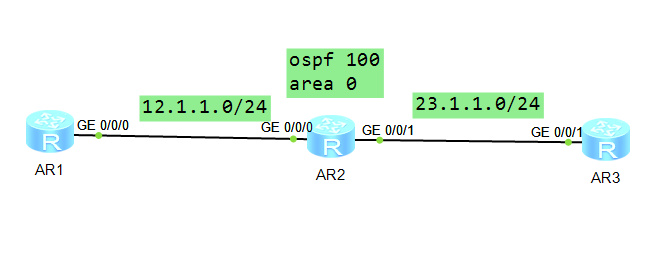
方法:
1.配置接口IP

2.配置OSPF协议:

[R2]ospf 100

[R2-ospf-100]area 0

[R2-ospf-100-area-0.0.0.0]network 12.1.1.0 0.0.0.255

[R2-ospf-100-area-0.0.0.0]network 23.1.1.0 0.0.0.255

[R2-ospf-100-area-0.0.0.0]quit
2、R1配置
 The device is running!

 ####################

 <Huawei>

 Dec   ::-: Huawei %%01IFPDT//IF_STATE(l)[]:Interface GigabitEt

 hernet0// has turned into UP state.

 <Huawei>sys

 Enter system view, return user view with Ctrl+Z.

 [Huawei]sysn R1

 [R1]int

 [R1]interface g0//

 [R1-GigabitEthernet0//]ip add 12.1.1.1

 Dec   ::-: R1 %%01IFNET//LINK_STATE(l)[]:The line protocol IP

 on the interface GigabitEthernet0// has entered the UP state.

 [R1-GigabitEthernet0//]q

 [R1]

 [R1]

 [R1]

 [R1]osfp

     ^

 Error: Unrecognized command found at '^' position.

 [R1]os

 [R1]ospf

 [R1-ospf-]are

 [R1-ospf-]area

 [R1-ospf--area-0.0.0.0]net

 [R1-ospf--area-0.0.0.0]network 12.1.1.0 0.0.0.255

 [R1-ospf--area-0.0.0.0]q

 [R1-ospf-]q

 [R1]

 Dec   ::-: R1 %%01OSPF//NBR_CHANGE_E(l)[]:Neighbor changes eve

 nt: neighbor status changed. (ProcessId=, NeighborAddress=2.1.1.12, Neighbo

 rEvent=HelloReceived, NeighborPreviousState=Down, NeighborCurrentState=Init)

 [R1]

 Dec   ::-: R1 %%01OSPF//NBR_CHANGE_E(l)[]:Neighbor changes eve

 nt: neighbor status changed. (ProcessId=, NeighborAddress=2.1.1.12, Neighbo

 rEvent=2WayReceived, NeighborPreviousState=Init, NeighborCurrentState=ExStart)

 [R1]

 Dec   ::-: R1 %%01OSPF//NBR_CHANGE_E(l)[]:Neighbor changes eve

 nt: neighbor status changed. (ProcessId=, NeighborAddress=2.1.1.12, Neighbo

 rEvent=NegotiationDone, NeighborPreviousState=ExStart, NeighborCurrentState=Exch

 ange)

 [R1]

 Dec   ::-: R1 %%01OSPF//NBR_CHANGE_E(l)[]:Neighbor changes eve

 nt: neighbor status changed. (ProcessId=, NeighborAddress=2.1.1.12, Neighbo

 rEvent=ExchangeDone, NeighborPreviousState=Exchange, NeighborCurrentState=Loadin

 g)

 [R1]

 Dec   ::-: R1 %%01OSPF//NBR_CHANGE_E(l)[]:Neighbor changes eve

 nt: neighbor status changed. (ProcessId=, NeighborAddress=2.1.1.12, Neighbo

 rEvent=LoadingDone, NeighborPreviousState=Loading, NeighborCurrentState=Full)

 [R1]

   Please check whether system data has been changed, and save data in time

   Configuration console time out, please press any key to log on
3、R2配置
 The device is running!

 ######

 <Huawei>sys

 Enter system view, return user view with Ctrl+Z.

 [Huawei]sysn R2

 [R2]int

 [R2]interface g0//

 [R2-GigabitEthernet0//]ip add 12.1.1.2

 Dec   ::-: R2 %%01IFNET//LINK_STATE(l)[]:The line protocol IP

 on the interface GigabitEthernet0// has entered the UP state.

 [R2-GigabitEthernet0//]

 [R2-GigabitEthernet0//]int

 [R2-GigabitEthernet0//]int g0//

 [R2-GigabitEthernet0//]ip add 23.1.1.2

 Dec   ::-: R2 %%01IFNET//LINK_STATE(l)[]:The line protocol IP

 on the interface GigabitEthernet0// has entered the UP state.

 [R2-GigabitEthernet0//]q

 [R2]osf

 [R2]osp

 [R2]ospf

 [R2-ospf-]are

 [R2-ospf-]area

 [R2-ospf--area-0.0.0.0]net

 [R2-ospf--area-0.0.0.0]network 12.1.1.0 0.0.0.255

 [R2-ospf--area-0.0.0.0]

 Dec   ::-: R2 %%01OSPF//NBR_CHANGE_E(l)[]:Neighbor changes eve

 nt: neighbor status changed. (ProcessId=, NeighborAddress=1.1.1.12, Neighbo

 rEvent=HelloReceived, NeighborPreviousState=Down, NeighborCurrentState=Init)

 [R2-ospf--area-0.0.0.0]

 Dec   ::-: R2 %%01OSPF//NBR_CHANGE_E(l)[]:Neighbor changes eve

 nt: neighbor status changed. (ProcessId=, NeighborAddress=1.1.1.12, Neighbo

 rEvent=2WayReceived, NeighborPreviousState=Init, NeighborCurrentState=2Way)

 [R2-ospf--area-0.0.0.0]

 Dec   ::-: R2 %%01OSPF//NBR_CHANGE_E(l)[]:Neighbor changes eve

 nt: neighbor status changed. (ProcessId=, NeighborAddress=1.1.1.12, Neighbo

 rEvent=AdjOk?, NeighborPreviousState=2Way, NeighborCurrentState=ExStart)

 [R2-ospf--area-0.0.0.0]

 Dec   ::-: R2 %%01OSPF//NBR_CHANGE_E(l)[]:Neighbor changes eve

 nt: neighbor status changed. (ProcessId=, NeighborAddress=1.1.1.12, Neighbo

 rEvent=NegotiationDone, NeighborPreviousState=ExStart, NeighborCurrentState=Exch

 ange)

 [R2-ospf--area-0.0.0.0]

 Dec   ::-: R2 %%01OSPF//NBR_CHANGE_E(l)[]:Neighbor changes eve

 nt: neighbor status changed. (ProcessId=, NeighborAddress=1.1.1.12, Neighbo

 rEvent=ExchangeDone, NeighborPreviousState=Exchange, NeighborCurrentState=Loadin

 g)

 [R2-ospf--area-0.0.0.0]

 Dec   ::-: R2 %%01OSPF//NBR_CHANGE_E(l)[]:Neighbor changes eve

 nt: neighbor status changed. (ProcessId=, NeighborAddress=1.1.1.12, Neighbo

 rEvent=LoadingDone, NeighborPreviousState=Loading, NeighborCurrentState=Full)

 [R2-ospf--area-0.0.0.0]

 [R2-ospf--area-0.0.0.0]net

 [R2-ospf--area-0.0.0.0]network 23.1.1.0 0.0.0.255

 [R2-ospf--area-0.0.0.0]q

 [R2-ospf-]q

 [R2]

 Dec   ::-: R2 %%01OSPF//NBR_CHANGE_E(l)[]:Neighbor changes ev

 ent: neighbor status changed. (ProcessId=, NeighborAddress=3.1.1.23, Neighb

 orEvent=HelloReceived, NeighborPreviousState=Down, NeighborCurrentState=Init)

 [R2]

 Dec   ::-: R2 %%01OSPF//NBR_CHANGE_E(l)[]:Neighbor changes ev

 ent: neighbor status changed. (ProcessId=, NeighborAddress=3.1.1.23, Neighb

 orEvent=2WayReceived, NeighborPreviousState=Init, NeighborCurrentState=ExStart)

 [R2]

 Dec   ::-: R2 %%01OSPF//NBR_CHANGE_E(l)[]:Neighbor changes ev

 ent: neighbor status changed. (ProcessId=, NeighborAddress=3.1.1.23, Neighb

 orEvent=NegotiationDone, NeighborPreviousState=ExStart, NeighborCurrentState=Exc

 hange)

 [R2]

 Dec   ::-: R2 %%01OSPF//NBR_CHANGE_E(l)[]:Neighbor changes ev

 ent: neighbor status changed. (ProcessId=, NeighborAddress=3.1.1.23, Neighb

 orEvent=ExchangeDone, NeighborPreviousState=Exchange, NeighborCurrentState=Loadi

 ng)

 [R2]

 Dec   ::-: R2 %%01OSPF//NBR_CHANGE_E(l)[]:Neighbor changes ev

 ent: neighbor status changed. (ProcessId=, NeighborAddress=3.1.1.23, Neighb

 orEvent=LoadingDone, NeighborPreviousState=Loading, NeighborCurrentState=Full)

 [R2]
4、R3配置
The device is running!

######################

<Huawei>sys

Enter system view, return user view with Ctrl+Z.

[Huawei]sysname

                ^

Error:Incomplete command found at '^' position.

[Huawei]sysname R3

[R3]int

[R3]interface g0//

[R3-GigabitEthernet0//]ip add 23.1.1.3

Dec   ::-: R3 %%01IFNET//LINK_STATE(l)[]:The line protocol IP

on the interface GigabitEthernet0// has entered the UP state.

[R3-GigabitEthernet0//]q

[R3]os

[R3]ospf

[R3-ospf-]ar

[R3-ospf-]are

[R3-ospf-]area

[R3-ospf--area-0.0.0.0]net

[R3-ospf--area-0.0.0.0]network 23.1.1.0 0.0.0.255

[R3-ospf--area-0.0.0.0]

Dec   ::-: R3 %%01OSPF//NBR_CHANGE_E(l)[]:Neighbor changes eve

nt: neighbor status changed. (ProcessId=, NeighborAddress=2.1.1.23, Neighbo

rEvent=HelloReceived, NeighborPreviousState=Down, NeighborCurrentState=Init)

[R3-ospf--area-0.0.0.0]

Dec   ::-: R3 %%01OSPF//NBR_CHANGE_E(l)[]:Neighbor changes eve

nt: neighbor status changed. (ProcessId=, NeighborAddress=2.1.1.23, Neighbo

rEvent=2WayReceived, NeighborPreviousState=Init, NeighborCurrentState=2Way)

[R3-ospf--area-0.0.0.0]

Dec   ::-: R3 %%01OSPF//NBR_CHANGE_E(l)[]:Neighbor changes eve

nt: neighbor status changed. (ProcessId=, NeighborAddress=2.1.1.23, Neighbo

rEvent=AdjOk?, NeighborPreviousState=2Way, NeighborCurrentState=ExStart)

[R3-ospf--area-0.0.0.0]

Dec   ::-: R3 %%01OSPF//NBR_CHANGE_E(l)[]:Neighbor changes eve

nt: neighbor status changed. (ProcessId=, NeighborAddress=2.1.1.23, Neighbo

rEvent=NegotiationDone, NeighborPreviousState=ExStart, NeighborCurrentState=Exch

ange)

[R3-ospf--area-0.0.0.0]

Dec   ::-: R3 %%01OSPF//NBR_CHANGE_E(l)[]:Neighbor changes eve

nt: neighbor status changed. (ProcessId=, NeighborAddress=2.1.1.23, Neighbo

rEvent=ExchangeDone, NeighborPreviousState=Exchange, NeighborCurrentState=Loadin

g)

[R3-ospf--area-0.0.0.0]

Dec   ::-: R3 %%01OSPF//NBR_CHANGE_E(l)[]:Neighbor changes eve

nt: neighbor status changed. (ProcessId=, NeighborAddress=2.1.1.23, Neighbo

rEvent=LoadingDone, NeighborPreviousState=Loading, NeighborCurrentState=Full)

[R3-ospf--area-0.0.0.0]q

[R3-ospf-]q

[R3]
5、测试结果
R1
<R1>dis ospf peer

     OSPF Process 100 with Router ID 12.1.1.1
         Neighbors

 Area 0.0.0.0 interface 12.1.1.1(GigabitEthernet0/0/0)'s neighbors
 Router ID: 12.1.1.2         Address: 12.1.1.2
   State: Full  Mode:Nbr is  Master  Priority: 1
   DR: 12.1.1.1  BDR: 12.1.1.2  MTU: 0
   Dead timer due in 39  sec
   Retrans timer interval: 5
   Neighbor is up for 00:06:44
   Authentication Sequence: [ 0 ]

<R1>dis ip rou
<R1>dis ip routing-table
Route Flags: R - relay, D - download to fib
------------------------------------------------------------------------------
Routing Tables: Public
         Destinations : 8        Routes : 8

Destination/Mask    Proto   Pre  Cost      Flags NextHop         Interface

       12.1.1.0/24  Direct  0    0           D   12.1.1.1        GigabitEthernet
0/0/0
       12.1.1.1/32  Direct  0    0           D   127.0.0.1       GigabitEthernet
0/0/0
     12.1.1.255/32  Direct  0    0           D   127.0.0.1       GigabitEthernet
0/0/0
       23.1.1.0/24  OSPF    10   2           D   12.1.1.2        GigabitEthernet
0/0/0
      127.0.0.0/8   Direct  0    0           D   127.0.0.1       InLoopBack0
      127.0.0.1/32  Direct  0    0           D   127.0.0.1       InLoopBack0
127.255.255.255/32  Direct  0    0           D   127.0.0.1       InLoopBack0
255.255.255.255/32  Direct  0    0           D   127.0.0.1       InLoopBack0

<R1>dis ip rou
<R1>dis ip routing-table pro
<R1>dis ip routing-table protocol ospf
Route Flags: R - relay, D - download to fib
------------------------------------------------------------------------------
Public routing table : OSPF
         Destinations : 1        Routes : 1

OSPF routing table status : <Active>
         Destinations : 1        Routes : 1

Destination/Mask    Proto   Pre  Cost      Flags NextHop         Interface

       23.1.1.0/24  OSPF    10   2           D   12.1.1.2        GigabitEthernet
0/0/0

OSPF routing table status : <Inactive>
         Destinations : 0        Routes : 0

<R1>
r2
<R2>dis ospf peer


     OSPF Process  with Router ID 12.1.1.2

         Neighbors

 Area 0.0.0.0 interface 12.1.1.2(GigabitEthernet0//)'s neighbors

 Router ID: 12.1.1.1         Address: 12.1.1.1

   State: Full  Mode:Nbr is  Slave  Priority:

   DR: 12.1.1.1  BDR: 12.1.1.2  MTU:

   Dead timer due in   sec

   Retrans timer interval:

   Neighbor is up for ::

   Authentication Sequence: [  ]

         Neighbors

 Area 0.0.0.0 interface 23.1.1.2(GigabitEthernet0//)'s neighbors

 Router ID: 23.1.1.3         Address: 23.1.1.3

   State: Full  Mode:Nbr is  Master  Priority:

   DR: 23.1.1.2  BDR: 23.1.1.3  MTU:

   Dead timer due in   sec

   Retrans timer interval:

   Neighbor is up for ::

   Authentication Sequence: [  ]
R3
[R3]dis ip routing-table

Route Flags: R - relay, D - download to fib

------------------------------------------------------------------------------

Routing Tables: Public

         Destinations : 8        Routes : 8

Destination/Mask    Proto   Pre  Cost      Flags NextHop         Interface

       12.1.1.0/24  OSPF    10   2           D   23.1.1.2        GigabitEthernet

0/0/1

       23.1.1.0/24  Direct  0    0           D   23.1.1.3        GigabitEthernet

0/0/1

       23.1.1.3/32  Direct  0    0           D   127.0.0.1       GigabitEthernet

0/0/1

     23.1.1.255/32  Direct  0    0           D   127.0.0.1       GigabitEthernet

0/0/1

      127.0.0.0/8   Direct  0    0           D   127.0.0.1       InLoopBack0

      127.0.0.1/32  Direct  0    0           D   127.0.0.1       InLoopBack0

127.255.255.255/32  Direct  0    0           D   127.0.0.1       InLoopBack0

255.255.255.255/32  Direct  0    0           D   127.0.0.1       InLoopBack0

[R3]dis ospf pee

[R3]dis ospf peer

	 OSPF Process 100 with Router ID 23.1.1.3

		 Neighbors

 Area 0.0.0.0 interface 23.1.1.3(GigabitEthernet0/0/1)'s neighbors

 Router ID: 12.1.1.2         Address: 23.1.1.2

   State: Full  Mode:Nbr is  Slave  Priority: 1

   DR: 23.1.1.2  BDR: 23.1.1.3  MTU: 0

   Dead timer due in 38  sec

   Retrans timer interval: 5

   Neighbor is up for 00:08:44

   Authentication Sequence: [ 0 ]

[R3]dis ip rou

[R3]dis ip routing-table pr

[R3]dis ip routing-table protocol ospf

Route Flags: R - relay, D - download to fib

------------------------------------------------------------------------------

Public routing table : OSPF

         Destinations : 1        Routes : 1

OSPF routing table status : <Active>

         Destinations : 1        Routes : 1

Destination/Mask    Proto   Pre  Cost      Flags NextHop         Interface

       2.1.1.0/24  OSPF    10   2           D   23.1.1.2        GigabitEthernet

0/0/1

OSPF routing table status : <Inactive>

         Destinations : 0        Routes : 0
HCNA实验OSPF基础的更多相关文章
- OSPF基础介绍
OSPF基础介绍 一.RIP的缺陷 1.以跳数评估的路由并非最优路径 2.最大跳数16导致网络尺度小 3.收敛速度慢 4.更新发送全部路由表浪费网络资源 二.OSPF基本原理 1.什么是OSPF a& ...
- OSPF 基础实验
一.环境准备 1. 软件:GNS3 2. 路由:c7200 二.实验操作 实验要求: 1.掌握多区域的 OSPF 配置方法. 2.区别不同区域的路由. 3.掌握 OSPF 的路由汇总配置. 4.掌握 ...
- HCNA Routing&Switching之动态路由协议OSPF基础(二)
前文我们主要了解了OSPF的区域.区域分类.路由器类型.OSPF的核心工作流程,回顾请参考:https://www.cnblogs.com/qiuhom-1874/p/15025533.html:今天 ...
- HCNA Routing&Switching之动态路由协议OSPF基础(一)
前文我们了解了基于路径矢量算法的动态路由协议RIP防环以及度量值的修改相关话题,回顾请参考https://www.cnblogs.com/qiuhom-1874/p/15012895.html:今天我 ...
- 实验楼实验——LINUX基础入门
第一节 Linux简介 一.Linux的历史: 1965 年,Bell 实验室.MIT.GE(通用电气公司)准备开发 Multics 系统,为了同时支持 300 个终端访问主机,但是 1969 年失败 ...
- 路由器基础配置之ospf基础配置
我们将以上面的拓扑图进行本次ospf的实验,目的是能当三台pc机互通 先配置好pc机的IP地址,注意一定要给pc机设置好网关,接下来配置路由器的IP地址 router4 enable 进入特权模式 c ...
- Linux 实验一 基础实践
Linux 实践一 1:软件源的维护方法 删掉DEB打头的 在命令行中输入命令时,可以用命令补全的方法. 下载完成后,使用sudo dpkg-i skype.deb 来完成安装. 2:掌握Linux ...
- HCNA修改OSPF基准带宽
1.拓扑图 2.R1配置ip开启OSPF The device is running! <Huawei>sysEnter system view, return user view wit ...
- java实验程序基础中的问题总结 java图形化界面
一,课程中的问题 1,知道程序实现的大体框架,但是不能具体到每一个细节,这需要平时的积累. 2,在不同文件夹中定义的类之间有没有联系,类与类之间可以通过接口相互联系. 3,如何在一个对话框中显示文本, ...
随机推荐
- P1353_[USACO08JAN]跑步Running 我死了。。。
我死了...被绿题虐...看来我的水平有待提高...QWQ 好吧,就是跑步的时候只能从跑步的状态转移过来 休息的时候可以从上一次休息时转移过来,也可以从某次跑步的时转移过来,需要枚举从哪一个状态转移来 ...
- UVA - 10125 哈希
题意:求集合中最大的\(d\)使得\(a+b=d-c\) 学习一下哈希的姿势(原来所谓链地址法就是直接跑个图啊) 哈希真有趣,全靠xjb乱搞 就叫这套hash为xjb-fibonacci-lpy-ha ...
- 1137 Final Grading (25 分)
For a student taking the online course "Data Structures" on China University MOOC (http:// ...
- FileSearch.java
!=fileList.size()) { ]) { fileOutputStream.write(bytes; i < files.length; i++) {// 将其中的文件夹遍历出来,并调 ...
- MAC 下 STF 的环境搭建和运行
STF --WEB 端批量移动设备管理控制工具 安装各种包 (首先安装Macport,因为后面需要用到port:http://www.ccvita.com/434.html) linux的基本包安装, ...
- zabbix-proxy 层级制监控
一,zabbix服务规划 zabbix-server 10.0.0.71 zabbix-proxy 10.0.0.72 172.16.1.72 web01 172.16.1.7 二,zabbix 客 ...
- NPOI开发手记
目录 注意事项 读取Excel 创建Excel表 保存Excel 行 列 单元格样式 添加公式 Dataset.DataGridView转换Excel帮助类 NPOI其实就是POI的.NET移植 项目 ...
- Apache Beam中的函数式编程理念
不多说,直接上干货! Apache Beam中的函数式编程理念 Apache Beam的编程范式借鉴了函数式编程的概念,从工程和实现角度向命令式妥协. 编程的领域里有三大流派:函数式.命令式.逻辑式. ...
- 线程同步(windows平台):信号量
一:介绍 信号量也是系统核心对象,它允许多个线程同一时刻访问同一资源,但需限制同一时刻访问资源的最大线程数目. 信号量遵循规则:1.当前资源计数大于0,信号量有效.2.当前资源计数等于0,信号量无效. ...
- xampp安装步骤及启动
1 chmod 755 xampp-linux-*-installer.run 2 sudo ./xampp-linux-*-installer.run 启动停止 3 sudo /opt/lampp ...