
将TensorFlow模型变为pb——官方本身提供API,直接调用即可
TensorFlow: How to freeze a model and serve it with a python API
参考:https://blog.metaflow.fr/tensorflow-how-to-freeze-a-model-and-serve-it-with-a-python-api-d4f3596b3adc
官方的源码:https://github.com/tensorflow/tensorflow/blob/master/tensorflow/python/tools/freeze_graph.py
We are going to explore two parts of using a ML model in production:
- How to export a model and have a simple self-sufficient file for it
- How to build a simple python server (using flask) to serve it with TF
Note: if you want to see the kind of graph I save/load/freeze, you can here
How to freeze (export) a saved model
If you wonder how to save a model with TensorFlow, please have a look at my previous article before going on.
let’s start from a folder containing a model, it probably looks something like this:

Screenshot of the result folder before freezing our model
The important files here are the “.chkp” ones. If you remember well, for each pair at different timesteps, one is holding the weights (“.data”) and the other one (“.meta”) is holding the graph and all its metadata (so you can retrain it etc…)
But when we want to serve a model in production, we don’t need any special metadata to clutter our files, we just want our model and its weights nicely packaged in one file. This facilitate storage, versioning and updates of your different models.
Luckily in TF, we can easily build our own function to do it. Let’s explore the different steps we have to perform:
- Retrieve our saved graph: we need to load the previously saved meta graph in the default graph and retrieve its graph_def (the ProtoBuf definition of our graph)
- Restore the weights: we start a Session and restore the weights of our graph inside that Session
- Remove all metadata useless for inference: Here, TF helps us with a nice helper function which grab just what is needed in your graph to perform inference and returns what we will call our new “frozen graph_def”
- Save it to the disk, Finally we will serialize our frozen graph_def ProtoBuf and dump it to the disk
Note that the two first steps are the same as when we load any graph in TF, the only tricky part is actually the graph “freezing” and TF has a built-in function to do it!
I provide a slightly different version which is simpler and that I found handy. The original freeze_graph function provided by TF is installed in your bin dir and can be called directly if you used PIP to install TF. If not you can call it directly from its folder (see the commented import in the gist).
So let’s see:
Now we can see a new file in our folder: “frozen_model.pb”.
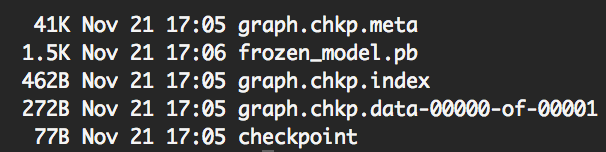
Screenshot of the result folder after freezing our model
As expected, its size is bigger than the weights file size and lower than the sum of the two checkpoints files sizes.
Note: In this very simple case, the weights size is very small, but it is usually multiple Mbs.
How to use the frozen model
Naturally, after knowing how to freeze a model, one might wonder how to use it.
The little trick to have in mind is to understand that what we dumped to the disk was a graph_def ProtoBuf. So to import it back in a python script we need to:
- Import a graph_def ProtoBuf first
- Load this graph_def into a actual Graph
We can build a convenient function to do so:
Now that we built our function to load our frozen model, let’s create a simple script to finally make use of it:
Note: when loading the frozen model, all operations got prefixed by “prefix”. This is due to the parameter “name” in the “import_graph_def” function, by default it prefix everything by “import”.
This can be useful to avoid name collisions if you want to import your graph_def in an existing Graph.
How to build a (very) simple API
For this part, I will let the code speaks for itself, after all this is a TF series about TF and not so much about how to build a server in python. Yet it felt kind of unfinished without it, so here you go, the final workflow:
Note: We are using flask in this example
TensorFlow best practice series
This article is part of a more complete series of articles about TensorFlow. I’ve not yet defined all the different subjects of this series, so if you want to see any area of TensorFlow explored, add a comment! So far I wanted to explore those subjects (this list is subject to change and is in no particular order):
- A primer
- How to handle shapes in TensorFlow
- TensorFlow saving/restoring and mixing multiple models
- How to freeze a model and serve it with python (this one!)
- TensorFlow: A proposal of good practices for files, folders and models architecture
- TensorFlow howto: a universal approximator inside a neural net
- How to optimise your input pipeline with queues and multi-threading
- Mutating variables and control flow
- How to handle input data with TensorFlow.
- How to control the gradients to create custom back-prop or fine-tune my models.
- How to monitor my training and inspect my models to gain insight about them.
Note: TF is evolving fast right now, those articles are currently written for the 1.0.0 version.
References
使用TensorFlow C++ API构建线上预测服务 - 第二篇
之前的一篇文章中使用TensorFlow C++ API构建线上预测服务 - 第一篇,详细讲解了怎样用TensorFlow C++ API导入模型做预测,但模型c = a * b比较简单,只有模型结构,并没有参数,所以文章中并没讲到怎样导入参数。本文使用一个复杂的模型讲解,包括以下几个方面:
- 针对稀疏数据的数据预处理
- 训练中保存模型和参数
- TensorFlow C++ API导入模型和参数
- TensorFlow C++ API构造Sparse Tensor做模型输入
稀疏数据下的数据预处理
稀疏数据下,一般会调用TensorFlow的embedding_lookup_sparse。
|
1
2
|
embedding_variable = tf.Variable(tf.truncated_normal([input_size, embedding_size], stddev=0.05), name='emb')
embedding = tf.nn.embedding_lookup_sparse(embedding_variable, sparse_id, sparse_value, "mod", combiner="sum")
|
上面代码中,embedding_variable就是需要学习的参数,其中input_size是矩阵的行数,embedding_size是矩阵的列数,比如我们有100万个稀疏id,每个id要embedding到50维向量,那么矩阵的大小是[1000000, 50]。sparse_id是要做向量化的一组id,用SparseTensor表示,sparse_value是每个id对用的一个value,用作权重,也用SparseTensor表示。
这里要注意,如果id是用hash生成的,不保证id是0,1,2,3, ...这种连续表示,需要先把id排序后转成连续的,并且把input_size设成大于排序后最大的id,为了节省空间往往设成排序后最大id+1。因为用id去embedding_variable矩阵查询命中哪行的时候,使用id mod Row(embedding_variable)或其他策略作为命中的行数,如果不保证id连续,可能会出现多个id命中同一行的错误情况。另外,如果不把id排序后转成连续id,那input_size需要设成原始id中的最大id,如果是hash生成的那么最大id值非常大,做成矩阵非常大存不下和矩阵存在空间浪费,因为有些行肯定不会被命中。
另外一个点,目前TensorFlow不支持sparse方式的查询和参数更新,每次查询更新都要pull&push一个矩阵全量数据,造成网络的堵塞,速度过慢,所以一般来说不要使用太大的embedding矩阵。
训练中保存模型和参数
TensorFlow保存模型时分为两部分,网络结构和参数是分开保存的。
保存网络结构
运行以下命令,成功后会看到一个名为graph.pb的pb二进制文件。后续如果使用TensorFlow官方提供的freeze_graph.py工具时必需这个文件,当然,如果对freeze_graph.py的代码比较熟悉,可以使用比较trick的方式,这样只需要参数文件,而不需要graph.pb了。
|
1
|
tf.train.write_graph(sess.graph.as_graph_def(), FLAGS.model_dir, 'graph.pb', as_text=False)
|
保存模型参数
运行以下命令,会在FLAGS.model_dir目录下保存多个前缀为model.checkpoint的文件。
|
1
2
|
saver = tf.train.Saver()
saver.save(sess, FLAGS.model_dir + "/model.checkpoint")
|
比如,成功后在FLAGS.model_dir目录下会看到以下几个文件。其中,model.checkpoint.meta包含了网络结构和一些其他信息,所以也包含了上面提到的graph.pb;model.checkpoint.data-00000-of-00001保存了模型参数,其他两个文件辅助作用。
|
1
2
3
4
|
-rw-r--r-- 1 user staff 89 10 11 11:32 checkpoint
-rw-r--r-- 1 user staff 225136 10 11 11:32 model.checkpoint.data-00000-of-00001
-rw-r--r-- 1 user staff 1506 10 11 11:32 model.checkpoint.index
-rw-r--r-- 1 user staff 369379 10 11 11:32 model.checkpoint.meta
|
TensorFlow C++ API导入模型和参数
主要有两种方法:
- 分别导入网络结构和模型参数
- 线下先把网络结构和模型参数整合成一个文件,只用导入这个文件即可
分别导入网络结构和模型参数
导入网络结构
以上文的graph.pb为例
|
1
2
3
4
5
6
7
8
9
10
11
12
|
// 导入网络结构
GraphDef graph_def;
status = ReadBinaryProto(Env::Default(), std::string("graph.pb"), &graph_def);
if (!status.ok()) {
throw runtime_error("Error loading graph: " + status.ToString());
}
// 把网络设置到Session里
status = session->Create(graph_def);
if (!status.ok()) {
throw runtime_error("Error set graph to session: " + status.ToString());
}
|
导入模型参数
这里注意要传入模型路径,既上文的FLAGS.model_dir。以FLAGS.model_dir="your_checkpoint_path"为例
|
1
2
3
4
5
6
7
8
9
10
11
|
// 导入模型参数
Tensor checkpointPathTensor(DT_STRING, TensorShape());
checkpointPathTensor.scalar<std::string>()() = std::string("your_checkpoint_path");
status = session->Run(
{{ graph_def.saver_def().filename_tensor_name(), checkpointPathTensor },},
{},
{graph_def.saver_def().restore_op_name()},
nullptr);
if (!status.ok()) {
throw runtime_error("Error loading checkpoint: " + status.ToString());
}
|
网络结构和模型参数整合成一个文件
One confusing part about this is that the weights usually aren’t stored inside the file format during training. Instead, they’re held in separate checkpoint files, and there are Variable ops in the graph that load the latest values when they’re initialized. It’s often not very convenient to have separate files when you’re deploying to production, so there’s the freeze_graph.py script that takes a graph definition and a set of checkpoints and freezes them together into a single file.
使用多个文件部署比较麻烦,如果能整个成一个独立文件会方便很多,因此,TensorFlow官方提供了freeze_graph.py工具。如果已经安装了TensorFlow,则在安装目录下可以找到,否则可以直接使用源码tensorflow/python/tools路径下freeze_graph.py。运行例子为:
|
1
2
3
4
5
|
python ${TF_HOME}/tensorflow/python/tools/freeze_graph.py \
--input_graph="graph.pb" \
--input_checkpoint="your_checkpoint_path/checkpoint_prefix" \
--output_graph="your_checkpoint_path/freeze_graph.pb" \
--output_node_names=Softmax
|
其中,input_graph为网络结构pb文件,input_checkpoint为模型参数文件名前缀,output_graph为我们的目标文件,output_node_names为目标网络节点名称,因为网络包括前向和后向网络,在预测时后向网络其实是多余的,指定output_node_names后只保存从输入节点到这个节点的部分网络。如果不清楚自己想要的节点output_node_names是什么,可以用下面的代码把网络里的全部节点名字列出来,然后找到自己想要的那个就行了。
|
1
2
|
for op in tf.get_default_graph().get_operations():
print(op.name)
|
得到freeze_graph.pb后,只导入网络结构即可,不再需要另外导入模型参数。
|
1
2
|
GraphDef graph_def;
status = ReadBinaryProto(Env::Default(), std::string("freeze_graph.pb"), &graph_def);
|
freeze_graph.py的更多参数可以看它的代码。
官方的freeze_graph.py工具需要在训练时同时调用tf.train.write_graph保存网络结构和tf.train.Saver()保存模型参数,之前讲过tf.train.Saver()保存的meta文件里其实已经包含了网络结构,所以就不用调用tf.train.write_graph保存网络结构,不过这时就不能直接调用官方的freeze_graph.py了,需要使用一点trick的方式将网络结构从meta文件里提取出来,具体代码可见https://github.com/formath/tensorflow-predictor-cpp/blob/master/python/freeze_graph.py,使用例子如下,其中checkpoint_dir的即上文的FLAGS.model_dir目录,output_node_names和官方freeze_graph.py的意思一致。
|
1
2
3
4
5
|
# this freeze_graph.py is https://github.com/formath/tensorflow-predictor-cpp/blob/master/python/freeze_graph.py
python ../../python/freeze_graph.py \
--checkpoint_dir='./checkpoint' \
--output_node_names='predict/add' \
--output_dir='./model'
|
TensorFlow C++ API构造Sparse Tensor
以LibFM格式数据为例,label fieldid:featureid:value ...。假如一个batch中有以下4条样本:
|
1
2
3
4
|
0 1:384:1 8:734:1
0 3:73:1
1 2:449:1 0:31:1
0 5:465:1
|
四个label可以表示成一个稠密Tensor,即
|
1
|
auto label_tensor = test::AsTensor<float32>({0, 0, 1, 0});
|
剩余还有三个部分,分别是fieldid、featureid、value,每个部分都可以表示成一个SparseTensor,每个SparseTensor由3个Tensor组成。
|
1
2
3
4
5
|
Instance | SparseFieldId | SparseFeatureId | SparseValue |
0 | 1, 8 | 384, 734 | 1.0, 1.0 |
1 | 3 | 73 | 1.0 |
2 | 2, 0 | 449, 31 | 1.0, 1.0 |
3 | 5 | 465 | 1.0 |
|
以SparseFieldId部分为例,SparseTensor中的第一个Tensor表示每个id的行列坐标,比如Instance=0的FieldId=1为<0, 0="">,Instance=0的FieldId=8为<0, 1="">,Instance=2的FieldId=0为<2, 1="">,总共6对,每对是个二元组,所以第一个Tensor为
|
1
2
|
auto fieldid_tensor_indices =
test::AsTensor<int64>({0, 0, 0, 1, 1, 0, 2, 0, 2, 1, 3, 0}, {6, 2});
|
SparseTensor中的第二个Tensor表示id值,即
|
1
|
auto fieldid_tensor_values = test::AsTensor<int64>({1, 8, 3, 2, 0, 5});
|
第三个Tensor表示样本行数和每条样本里最多有多少个id,所以是
|
1
|
auto fieldid_tensor_shape = TensorShape({4, 2});
|
最后,fieldid部分的SparseTensor表示为
|
1
2
|
sparse::SparseTensor fieldid_sparse_tensor(
fieldid_tensor_indices, fieldid_tensor_values, fieldid_tensor_shape);
|
其他两个部分,featureid和value同样可以用SparseTensor表示。最后,一个batch的libfm数据可以由4份数据来表示,这4份数据作为网络的input,运行Session.run即可得到输出。当然,线上预测时就没有label这一部分输入了。
- label的
Tensor - fieldid的
SparseTensor - featureid的
SparseTensor - value的
SparseTensor
参考
将TensorFlow模型变为pb——官方本身提供API,直接调用即可的更多相关文章
- tensorflow 模型前向传播 保存ckpt tensorbard查看 ckpt转pb pb 转snpe dlc 实例
参考: TensorFlow 自定义模型导出:将 .ckpt 格式转化为 .pb 格式 TensorFlow 模型保存与恢复 snpe tensorflow 模型前向传播 保存ckpt tensor ...
- Tensorflow模型的格式
转载:https://cloud.tencent.com/developer/article/1009979 tensorflow模型的格式通常支持多种,主要有CheckPoint(*.ckpt).G ...
- 移动端目标识别(2)——使用TENSORFLOW LITE将TENSORFLOW模型部署到移动端(SSD)之TF Lite Developer Guide
TF Lite开发人员指南 目录: 1 选择一个模型 使用一个预训练模型 使用自己的数据集重新训练inception-V3,MovileNet 训练自己的模型 2 转换模型格式 转换tf.GraphD ...
- tensorflow 模型保存与加载 和TensorFlow serving + grpc + docker项目部署
TensorFlow 模型保存与加载 TensorFlow中总共有两种保存和加载模型的方法.第一种是利用 tf.train.Saver() 来保存,第二种就是利用 SavedModel 来保存模型,接 ...
- 使用tensorflow-serving部署tensorflow模型
使用docker部署模型的好处在于,避免了与繁琐的环境配置打交道.使用docker,不需要手动安装Python,更不需要安装numpy.tensorflow各种包,直接一个docker就包含了全部.d ...
- 转 tensorflow模型保存 与 加载
使用tensorflow过程中,训练结束后我们需要用到模型文件.有时候,我们可能也需要用到别人训练好的模型,并在这个基础上再次训练.这时候我们需要掌握如何操作这些模型数据.看完本文,相信你一定会有收获 ...
- TensorFlow 模型优化工具包 — 训练后整型量化
模型优化工具包是一套先进的技术工具包,可协助新手和高级开发者优化待部署和执行的机器学习模型.自推出该工具包以来, 我们一直努力降低机器学习模型量化的复杂性 (https://www.tensorfl ...
- Tensorflow 模型线上部署
获取源码,请移步笔者的github: tensorflow-serving-tutorial 由于python的灵活性和完备的生态库,使得其成为实现.验证ML算法的不二之选.但是工业界要将模型部署到生 ...
- 移动端目标识别(1)——使用TensorFlow Lite将tensorflow模型部署到移动端(ssd)之TensorFlow Lite简介
平时工作就是做深度学习,但是深度学习没有落地就是比较虚,目前在移动端或嵌入式端应用的比较实际,也了解到目前主要有 caffe2,腾讯ncnn,tensorflow,因为工作用tensorflow比较多 ...
随机推荐
- Android基础TOP4:Tost的使用
Activity: <RelativeLayout xmlns:android="http://schemas.android.com/apk/res/android" xm ...
- echarts交叉关系图一
想要做一个公司-人员关系图,官网echarts图graph webkit dep 稍微改了一下, 也是有点恶心自己,调了一个数据最多的去改,如果正好有人需要就不用去改了 说明:此图没有坐标,可以设置图 ...
- JS——dom
节点的获取 <script> var div = document.getElementById("box");//返回指定标签 var div = document. ...
- JS——事件基础应用
直接写在html标签里: <h1 onclick="this.innerHTML='谢谢!'">请点击该文本</h1> 另外一种在脚本里调用: <!D ...
- Java我来了
七天的C#集训,第一天接触Java,觉得很多相似的地方,尝试用eclipse码了几句(有些差别,毕竟没有写C#那么流畅),总体来说觉得还不错,对自己接下来要求是,更加熟练并且牢记Java的命令,更加深 ...
- HDU_1285_拓扑排序(优先队列)
确定比赛名次 Time Limit: 2000/1000 MS (Java/Others) Memory Limit: 65536/32768 K (Java/Others)Total Subm ...
- ES6 Array返回只出现一次的元素
234
- CAD动态绘制带面积周长的圆(com接口)
CAD绘制图像的过程中,画圆的情况是非常常见的,用户可以在控件视区点取任意一点做为圆心,再动态点取半径绘制圆. 主要用到函数说明: _DMxDrawX::DrawCircle 绘制一个圆.详细说明如下 ...
- zTree 模糊搜索
/** * 搜索树,高亮显示并展示[模糊匹配搜索条件的节点s] * @param treeId * @param searchConditionId 搜索条件Id */ function search ...
- Lua中返回值的丢失问题
Lua中返回值的丢失问题 -- 如果函数调用所得的多个返回值是另外一个函数的最后一个参数,或者是多指派表达式中的最后一个参数时,所有返回值将被传入或使用. -- 否则只有第一个返回值被使用或指定. T ...