
iOS 自适应高度,改变字体颜色
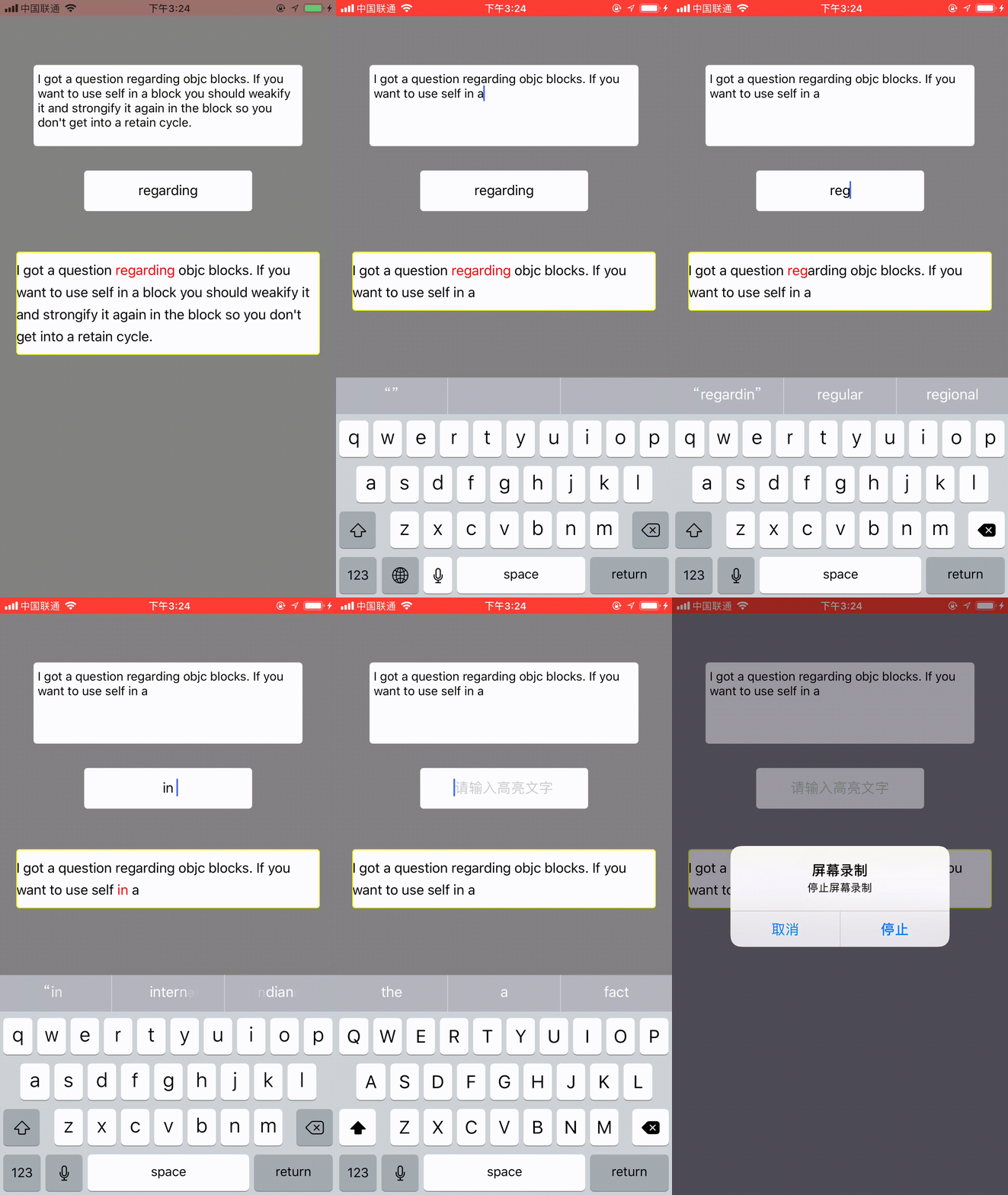
#define kMainBoundsWidth    ([UIScreen mainScreen].bounds).size.width //屏幕的宽度

#define kFont               [UIFont systemFontOfSize:17.f] //字体大小

#define kLineSpacing        7 //行间距
- (void)viewDidLoad {

    [super viewDidLoad];

    //将view背景颜色变更为黄色

    self.view.backgroundColor = [UIColor grayColor];

    self.textView.text = @"I got a question regarding objc blocks. If you want to use self in a block you should weakify it and strongify it again in the block so you don't get into a retain cycle.";//文字内容

    self.textField.text = @"regarding";//高亮内容

    self.lableContent.text = self.textView.text;//显示内容

    @weakify(self);

    [self.textView.rac_textSignal subscribeNext:^(NSString * _Nullable x) {

        @strongify(self);

        self.lableContent.text = x;

        [self layoutLableContent:self.textField.text content:x];

    }];

    //高亮文字

    [self.textField.rac_textSignal subscribeNext:^(NSString * _Nullable x) {

        [self layoutLableContent:self.textField.text content:self.lableContent.text];

    }];

}

/** 文字内容 */

-(UITextView *)textView{

    if (!_textView) {

        _textView = [[UITextView alloc] init];

        _textView.font = [UIFont systemFontOfSize:.f];

        _textView.showsHorizontalScrollIndicator = YES;

        _textView.layer.cornerRadius = .f;

        _textView.layer.masksToBounds = YES;

        [self.view addSubview:_textView];

        [_textView mas_makeConstraints:^(MASConstraintMaker *make) {

            make.top.equalTo(self.view).offset();

            make.centerX.equalTo(self.view);

            make.width.equalTo(self.view).multipliedBy(0.8);

            make.height.offset();

        }];

    }

    return _textView;

}

/** 高亮文字 */

-(UITextField *)textField{

    if (!_textField) {

        _textField = [UITextField new];

        _textField.placeholder = @"请输入高亮文字";

        _textField.layer.cornerRadius = .f;

        _textField.layer.masksToBounds = YES;

        _textField.textAlignment = NSTextAlignmentCenter;

        _textField.backgroundColor = [UIColor whiteColor];

        _textField.keyboardType = UITextAutocorrectionTypeNo;

        [self.view addSubview:_textField];

        [_textField mas_makeConstraints:^(MASConstraintMaker *make) {

            make.top.equalTo(_textView.mas_bottom).offset();

            make.centerX.equalTo(self.view);

            make.width.equalTo(self.view).multipliedBy(0.5);

            make.height.offset();

        }];

    }

    return _textField;

}

/** 目标文字 */

-(UILabel *)lableContent{

    if (!_lableContent) {

        _lableContent = [UILabel new];

        _lableContent.font = kFont;

        _lableContent.layer.cornerRadius = .f;

        _lableContent.layer.masksToBounds = YES;

        _lableContent.layer.borderColor = [UIColor yellowColor].CGColor;

        _lableContent.layer.borderWidth = .f;

        _lableContent.backgroundColor = [UIColor whiteColor];

        _lableContent.numberOfLines = ;

        [self.view addSubview:_lableContent];

        [_lableContent mas_makeConstraints:^(MASConstraintMaker *make) {

            make.top.equalTo(_textField.mas_bottom).offset();

            make.centerX.equalTo(self.view);

            make.width.offset(kMainBoundsWidth-);

            make.height.offset();

        }];

    }

    return _lableContent;

}

/** 更新数据 */

-(void)layoutLableContent:(NSString *)keyWord content:(NSString *)content{

    CGFloat width = kMainBoundsWidth-;

    CGSize contentSize = [self adaptContentStringSizeWithFont:kFont withWidth:width content:content];

    CGSize size = CGSizeMake(width, contentSize.height+);

    [self.lableContent mas_updateConstraints:^(MASConstraintMaker *make) {

        make.height.offset(size.height);

    }];

    //必须调用此方法,才能出动画效果

    [self.view layoutIfNeeded];

    NSMutableAttributedString *attributedStrContent = [[NSMutableAttributedString alloc]initWithString:self.lableContent.text];

    NSMutableParagraphStyle * paragraphStyle = [[NSMutableParagraphStyle alloc] init];

    paragraphStyle.lineSpacing = kLineSpacing;

    [attributedStrContent addAttribute:NSParagraphStyleAttributeName value:paragraphStyle range:NSMakeRange(, [attributedStrContent length])];

    [self addAttributeColorOfSubString:keyWord inString:content tatgetString:attributedStrContent];

    self.lableContent.attributedText = attributedStrContent;

}

/** 在指定字符串的颜色属性 */

- (void)addAttributeColorOfSubString:(NSString*)subStr inString:(NSString*)content tatgetString:(NSMutableAttributedString*)attributedString {

    NSString*string1 = [content stringByAppendingString:subStr];

    NSString *temp;

    bool iscnChar = NO;

    int cnIndex = ;

    for(int i =; i < content.length; i++) {

        temp = [string1 substringWithRange:NSMakeRange(i, subStr.length)];

        if ([temp isEqualToString:subStr]) {

            NSRange range = {i,subStr.length};

            [attributedString addAttribute:NSForegroundColorAttributeName value:[UIColor redColor] range:range];

            [attributedString addAttribute:NSFontAttributeName value:kFont range:range];

        }

        unichar c = [string1 characterAtIndex:i];

        if (c >=0x4E00 && c <=0x9FA5){

            cnIndex = i;

            iscnChar = YES;

            NSRange range = {i, };

            [attributedString addAttribute:NSForegroundColorAttributeName value:[UIColor blueColor] range:range];

        }

    }

}

- (CGSize)adaptContentStringSizeWithFont:(UIFont*)font withWidth:(CGFloat)width content:(NSString *)content

{

    //行间距

    NSMutableParagraphStyle * paragraphStyle = [[NSMutableParagraphStyle alloc] init];

    paragraphStyle.lineSpacing = kLineSpacing;

    NSDictionary *attributes = @{

                                 NSFontAttributeName:font,

                                 NSParagraphStyleAttributeName:paragraphStyle

                                 };

    CGSize contentSize = [content boundingRectWithSize:CGSizeMake(width, MAXFLOAT)

                                               options:NSStringDrawingUsesLineFragmentOrigin

                                            attributes:attributes

                                               context:nil].size;

    return contentSize;

}

//取消键盘

-(void)touchesBegan:(NSSet<UITouch *> *)touches withEvent:(UIEvent *)event{

    [self.textView resignFirstResponder];

    [self.textField resignFirstResponder];

    [self.lableContent resignFirstResponder];

}
iOS 自适应高度,改变字体颜色的更多相关文章
- markdown改变字体颜色和大小
markdown中改变字体颜色与大小方法同html 先看例子 <font face="黑体">我是黑体字</font> 我是黑体字 <font fac ...
- 色彩缤纷的python(改变字体颜色及样式不完全版)
色彩缤纷的python(改变字体颜色及样式) *补上昨天随笔中提到的改变字体颜色样式的方法,昨日随笔https://www.cnblogs.com/Du704/p/11265958.html 在项目过 ...
- 色彩缤纷的Python(改变字体颜色及样式)
色彩缤纷的python(改变字体颜色及样式) 在项目过程中,我们常常会因为输出信息的颜色与样式过于单调以至于让人在视觉上感到很杂乱,所以看下文: 在Linux终端中,使用转义序列来进行如上所述的显示, ...
- Android NumberPicker 修改分割线颜色和高度及字体颜色大小
(1)重写NumberPicker已达到修改显示字体颜色大小 public class TextColorNumberPicker extends NumberPicker { public Text ...
- RadioGroup 的 RadioButton 选择改变字体颜色和背景颜色
RadioGroup <RadioGroup android:id="@+id/client_charge_radiogroup" android:layout_width= ...
- Android 改变字体颜色的三种方法
在TextView中添加文本时有时需要改变一些文本字体的颜色,今天学到了三种方法,拿出来分享一下 1.在layout文件下的配置xml文件中直接设置字体颜色,通过添加android:textc ...
- Android RadioGroup的RadioButton 选择改变字体颜色和背景颜色
RadioGroup <RadioGroup android:id="@+id/client_charge_radiogroup" android:layout_width= ...
- iOS 设置不同的字体颜色
//设置不同字体颜色 -(void)fuwenbenLabel:(UILabel *)labell FontNumber:(UIFont *)font AndRange:(NSRange)range ...
- iOS设置状态栏的字体颜色
设置statusBar的[前景色部分] 1.plist设置statusBar 在plist里增加一行 UIStatusBarStyle(或者是“Status bar style”也可以),这里可以设置 ...
- 关于richtextbox改变字体颜色,加下划线
参考了三份有用的资料: 1.关于richtextbox设置字体颜色的问题 http://biancheng.dnbcw.net/c/180381.html 2.C#Winform使用扩展方法自定义富文 ...
随机推荐
- Persistent connections CONN_MAX_AGE django
Persistent connections¶ Persistent connections avoid the overhead of re-establishing a connection to ...
- [转]VC++中操作XML(MFC、SDK)
XML在Win32程序方面应该没有在Web方面应用得多,很多Win32程序也只是用XML来存存配置信息而已,而且没有足够的好处的话还不如用ini.VC++里操作XML有两个库可以用:MSXML和Xml ...
- hdu 2899 Strange fuction —— 模拟退火
题目:http://acm.hdu.edu.cn/showproblem.php?pid=2899 模拟退火: 怎么也过不了,竟然是忘了写 lst = tmp ... 还是挺容易A的. 代码如下: # ...
- 宿主机 && docker 常用命令
宿主机 && docker 常用命令 1.如果你想快速发现在该主机上使用最多资源的容器(或是最近的所有systemd服务),我推荐systemd-cgtop命令: 2.
- html中调用本地exe应用程序
<!DOCTYPE html PUBLIC "-//W3C//DTD XHTML 1.0 Transitional//EN" "http://www.w3.org/ ...
- http://blog.sina.com.cn/s/blog_6145ed810102vr8k.html
http://blog.sina.com.cn/s/blog_6145ed810102vr8k.html
- ORM框架SQLAlchemy学习
一.基本介绍 以下介绍来自维基百科,自由的百科全书. SQLAlchemy是Python编程语言下的一款开源软件.提供了SQL工具包及对象关系映射(ORM)工具,使用MIT许可证发行. SQLAlch ...
- HDU1010 Tempter of the Bone【小狗是否能逃生----DFS奇偶剪枝(t时刻恰好到达)】
Tempter of the Bone Time Limit:1000MS Memory Limit:32768KB 64bit IO Format:%I64d & %I64u ...
- PostgreSQL 务实应用(二/5)插入冲突
在项目中,有时会动态地按周期(如按月)封存统计数据,通常需要做这样的处理: 以按月封存为例,当月数据到达时,先需要检查该月是否有过记录,有则以更新的方式累加统计数字,无则添加一条记录. 假设我们创建以 ...
- 7 二分搜索树的原理与Java源码实现
1 折半查找法 了解二叉查找树之前,先来看看折半查找法,也叫二分查找法 在一个有序的整数数组中(假如是从小到大排序的),如果查找某个元素,返回元素的索引. 如下: int[] arr = new in ...