
function declarations are hoisted and class declarations are not 变量提升
Classes - JavaScript | MDN https://developer.mozilla.org/en-US/docs/Web/JavaScript/Reference/Classes
Hoisting
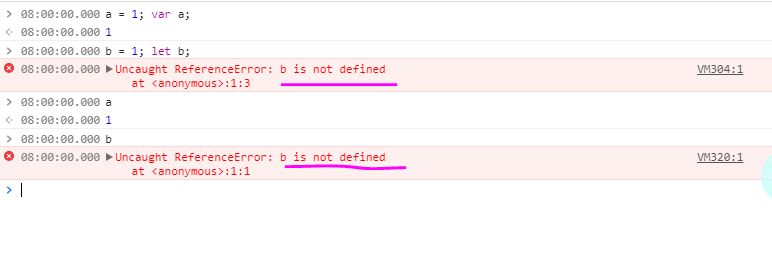
An important difference between function declarations and class declarations is that function declarations are hoisted and class declarations are not. You first need to declare your class and then access it, otherwise code like the following will throw aReferenceError:
const p = new Rectangle(); // ReferenceError

class Rectangle {}

https://developer.mozilla.org/en-US/docs/Glossary/Hoisting
Hoisting
Hoisting is a term you will not find used in any normative specification prose prior to ECMAScript® 2015 Language Specification. Hoisting was thought up as a general way of thinking about how execution contexts (specifically the creation and execution phases) work in JavaScript. However, the concept can be a little confusing at first.
Conceptually, for example, a strict definition of hoisting suggests that variable and function declarations are physically moved to the top of your code, but this is not in fact what happens. Instead, the variable and function declarations are put into memory during the compile phase, but stay exactly where you typed them in your code.
Learn moreSection
Technical exampleSection
One of the advantages of JavaScript putting function declarations into memory before it executes any code segment is that it allows you to use a function before you declare it in your code. For example:
function catName(name) {

  console.log("My cat's name is " + name);

}

catName("Tigger");

/*

The result of the code above is: "My cat's name is Tigger"

*/
The above code snippet is how you would expect to write the code for it to work. Now, let's see what happens when we call the function before we write it:
catName("Chloe");

function catName(name) {

  console.log("My cat's name is " + name);

}

/*

The result of the code above is: "My cat's name is Chloe"

*/
Even though we call the function in our code first, before the function is written, the code still works. This is because of how context execution works in JavaScript.
Hoisting works well with other data types and variables. The variables can be initialized and used before they are declared.
Only declarations are hoistedSection
JavaScript only hoists declarations, not initializations. If a variable is declared and initialized after using it, the value will be undefined. For example:
console.log(num); // Returns undefined

var num;

num = 6;
If you declare the variable after it is used, but initialize it beforehand, it will return the value:
num = 6;

console.log(num); // returns 6

var num;
The below two examples demonstrate the same behavior.
var x = 1; // Initialize x

console.log(x + " " + y); // '1 undefined'

var y = 2; // Initialize y

// The above example is implicitly understood as this:

var x; // Declare x

var y; // Declare y

// End of the hoisting.

x = 1; // Initialize x

console.log(x + " " + y); // '1 undefined'

y = 2; // Initialize y
Technical referenceSection
- JavaScript: Understanding the Weird Parts — Udemy.com Course
- var statement — MDN
- function statement — MDN
Document Tags and Contributors
function declarations are hoisted and class declarations are not 变量提升的更多相关文章
- JS中的函数声明和函数表达式的区别,即function(){}和var function(){},以及变量提升、作用域和作用域链
一.前言 Uncaught TypeError: ... is not a function function max(){}表示函数声明,可以放在代码的任何位置,也可以在任何地方成功调用: var ...
- JavaScript 风格指导(Airbnb版)
JavaScript 风格指导(Airbnb版) 用更合理的方式写 JavaScript 原文 翻译自 Airbnb JavaScript Style Guide . 目录 类型 引用 对象 数组 解 ...
- Airbnb JavaScript Style Guide
Airbnb JavaScript Style Guide() { 用更合理的方式写 JavaScript ES5 的编码规范请查看版本一,版本二. 翻译自 Airbnb JavaScrip ...
- ES6 开发规范-最佳实践
ES6 开发规范(最佳实践) 本文为开发规范,收集方便日后查看. [开发规范]https://blog.csdn.net/zzzkk2009/article/details/53171058?utm_ ...
- ES6 学习笔记(1)
恰逢换工作之际,新公司的是以 ES6 + webpack + vue 为技术栈, 正好ES6是我下个学习目标, 因此买了阮老师的 ES6标准入门,也当是支持阮老师了. 笔记将会照着这本书的阅读展开而做 ...
- Javascript 优化项目代码技巧之语言基础(一)
Javascript的弱类型以及函数作用域等规则使用编写Javascript代码极为容易,但是编写可维护.高质量的代码却变得十分困难,这个系列的文章将总结在项目开发过程中,能够改善代码可读性. ...
- ( 译、持续更新 ) JavaScript 上分小技巧(四)
后续如有内容,本篇将会照常更新并排满15个知识点,以下是其他几篇译文的地址: 第一篇地址:( 译.持续更新 ) JavaScript 上分小技巧(一) 第二篇地址:( 译.持续更新 ) JavaScr ...
- Javascript 优化
Javascript 优化 作者:@gzdaijie本文为作者原创,转载请注明出处:http://www.cnblogs.com/gzdaijie/p/5324489.html 目录 1.全局变量污染 ...
- JavaScript(五):函数(闭包,eval)
1.函数的申明:三种方法: function命令 函数表达式:变量赋值 Function构造函数 //method 1: function命令 function test(){ console.log ...
随机推荐
- 记一次kubernetes集群异常: kubelet连接apiserver超时
Background kubernetes是master-slave结构,master node是集群的大脑, 当master node发生故障时整个集群都"out of control&q ...
- JavaScript中的普通函数和箭头函数
最近被问到了一个问题: javaScript 中的箭头函数 ( => ) 和普通函数 ( function ) 有什么区别? 我当时想的就是:这个问题很简单啊~(flag),然后做出了错误的回答 ...
- Scut游戏服务器引擎之新手入门
1. 开发语言:Scut提供C#或Python两种脚本语言开发,Python脚本的性能会比较差,建议使用编译执行的C#代码: 2. 运行平台:Scut可以Window与Linux平台上运行,Linux ...
- Json格式化工具 JsonViewer下载
免安装版,分享链接永久有效~! 云盘下载地址: http://cloud.suning.com/cloud-web/share/link.htm?sk=401f784782751055ddc21cdb ...
- Web开发人员不容错过的10个HTML5工具
HTML5已经成为当今世界的一个必定组成部分.由于World Wide Web万维网是使用超文本标记语言来架构和呈现的,于是HTML5成为了最流行的编程语言之中的一个.随着网络的不断扩张,Web开发者 ...
- 香蕉派(or 皮?)上手初体验 -- 外观鉴赏,安装,配置&总结
一.前言及简单介绍 watermark/2/text/aHR0cDovL2Jsb2cuY3Nkbi5uZXQvbG9uZ2Vyem9uZQ==/font/5a6L5L2T/fontsize/400/f ...
- <LeetCode OJ> 257. Binary Tree Paths
257. Binary Tree Paths Total Accepted: 29282 Total Submissions: 113527 Difficulty: Easy Given a bina ...
- 值得推荐的android开发框架简单介绍
一些总结出来的Android高速开发框架,所有都是开源框架,附带项目地址,是开发学习的绝佳资料. Direct-Load-apk项目 项目主页地址:http://www.kymjs.com/ 功能:D ...
- uboot移植rtc
uboot中可能会有需求提供rtc的支持目的达到uboot启动也能够进行墙上时间的显示和后面推断.大部分rtc支持的一个必要条件就是已经有i2c的支持.由于非常多的rtc是i2c接口控制的.uboot ...
- Java千百问_05面向对象(006)_is-a,has-a,like-a是什么
点击进入_很多其它_Java千百问 1.is-a,has-a,like-a是什么 在面向对象设计的领域里,有若干种设计思路,主要有例如以下三种: is-a.has-a.like-a java中在类.接 ...