
Azure Key Vault (3) 在Azure Windows VM里使用Key Vaule
《Windows Azure Platform 系列文章目录》
本章我们介绍如何在Azure Windows VM里面,使用.NET使用Azure Key Vault
我们需要对Key Vault进行身份验证,所以需要提供凭据。因此,在启动过程中,这是一个难以兼顾的典型问题。 托管服务标识 (MSI) 提供简化该过程的启动标识,可以解决此问题。
为 Azure 服务(例如 Azure 虚拟机、Azure 应用服务或 Azure Functions)启用 MSI 时,Azure 会创建一个服务主体。 MSI 针对 Azure Active Directory (Azure AD) 中的服务实例提供启动标识,并将服务主体凭据注入该实例。
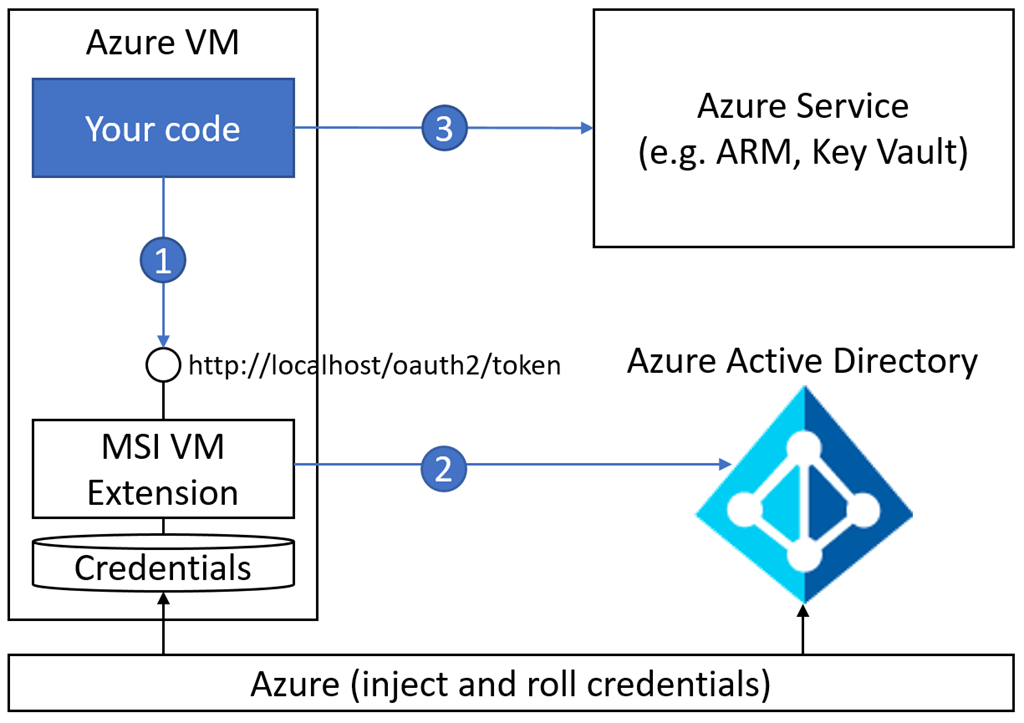
我们需要准备以下内容:
1.创建一个资源组,命名为:keyvault-rg
2.创建1个Key Vault,并创建Secret Vaule
3.创建1台Windows VM,在这台Windows VM安装Visual Studio (这台VM必须与KeyVault在同一个资源组)
4.安装并运行Azure CLI
az cloud set --name AzureChinaCloud

az login
5.在弹出的输入框中,输入Azure China的用户名和密码
6.如果我们有多个订阅,首先需要选择订阅:
az account set --subscription 订阅ID
7.为VM分配Identity
az vm identity assign --name VMName --resource-group VM所在的资源组名称
8.执行完毕后,显示的结果如下:
我们把systemAssignedIdentity后面的信息保存下来
{

  "systemAssignedIdentity": "xxxxxxxx-xxxx-xxxx-xxxx-xxxxxxxxxxxx",

  "userAssignedIdentities": {}

}
9.为VM分配权限
我们执行下面的命令:
az keyvault set-policy --name VM的名称 --object-id 步骤8中显示的systemAssignedIdentity值 --secret-permissions get list
10.登录到虚拟机,创建1个Windows Console Project。选择NuGet,增加Newtonsoft Package
11.增加如下的代码:
using System;

using System.Collections.Generic;

using System.Linq;

using System.Text;

using System.Threading.Tasks;

using Newtonsoft.Json;

using Newtonsoft.Json.Linq;

using System.Net;

using System.IO;

namespace ConsoleApp1

{

    class Program

    {

        static void Main(string[] args)

        {

            // Step 1: Get a token from the local (URI) Managed Service Identity endpoint, which in turn fetches it from Azure AD

            var token = GetToken();

            // Step 2: Fetch the secret value from your key vault

            System.Console.WriteLine(FetchSecretValueFromKeyVault(token));

        }

        static string GetToken()

        {

            //169.254.169.254是Azure Instance Metadata service endpoint

            WebRequest request = WebRequest.Create("http://169.254.169.254/metadata/identity/oauth2/token?api-version=2018-02-01&resource=https://vault.azure.cn");

            request.Headers.Add("Metadata", "true");

            WebResponse response = request.GetResponse();

            return ParseWebResponse(response, "access_token");

        }

        static string FetchSecretValueFromKeyVault(string token)

        {

            //这里需要修改两个部分:

            //你的KeyVault名称

            //你的SecretName

            WebRequest kvRequest = WebRequest.Create("https://你的KeyVault名称.vault.azure.cn/secrets/你的SecretName?api-version=2016-10-01");

            kvRequest.Headers.Add("Authorization", "Bearer " + token);

            WebResponse kvResponse = kvRequest.GetResponse();

            return ParseWebResponse(kvResponse, "value");

        }

        private static string ParseWebResponse(WebResponse response, string tokenName)

        {

            string token = String.Empty;

            using (Stream stream = response.GetResponseStream())

            {

                StreamReader reader = new StreamReader(stream, Encoding.UTF8);

                String responseString = reader.ReadToEnd();

                JObject joResponse = JObject.Parse(responseString);

                JValue ojObject = (JValue)joResponse[tokenName];

                token = ojObject.Value.ToString();

            }

            return token;

        }

    }

}
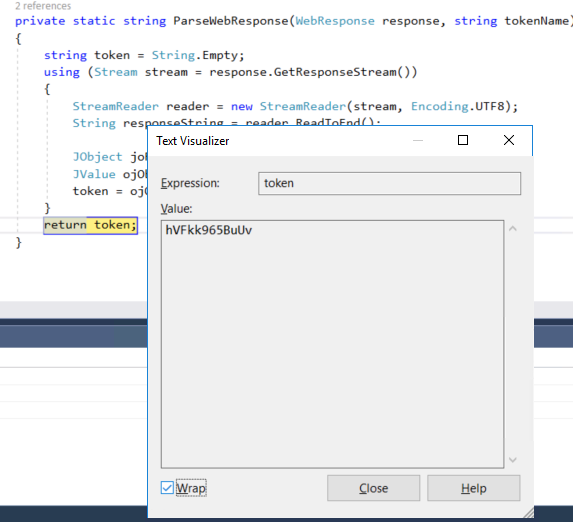
12.运行完毕后,我们就可以在Azure VM里面显示Key Vault里面Secret的值
Azure Key Vault (3) 在Azure Windows VM里使用Key Vaule的更多相关文章
- Azure Key Vault (2) 使用Azure Portal创建和查看Azure Key Vault
<Windows Azure Platform 系列文章目录> 请注意: 文本仅简单介绍如何在Azure Portal创建和创建Key Vault,如果需要结合Application做二次 ...
- 使用 Azure PowerShell 模块创建和管理 Windows VM
Azure 虚拟机提供完全可配置的灵活计算环境. 本教程介绍 Azure 虚拟机的基本部署项目,例如选择 VM 大小.选择 VM 映像和部署 VM. 你将学习如何执行以下操作: 创建并连接到 VM 选 ...
- 【Azure Developer】Python代码通过AAD认证访问微软Azure密钥保管库(Azure Key Vault)中机密信息(Secret)
关键字说明 什么是 Azure Active Directory?Azure Active Directory(Azure AD, AAD) 是 Microsoft 的基于云的标识和访问管理服务,可帮 ...
- 排查在 Azure 中新建 Windows VM 时遇到的部署问题
尝试创建新的 Azure 虚拟机 (VM) 时,遇到的常见错误是预配失败或分配失败. 当由于准备步骤不当,或者在从门户捕获映像期间选择了错误的设置而导致 OS 映像无法加载时,将发生预配失败. 当群集 ...
- 【Azure 环境】Azure Key Vault (密钥保管库)中所保管的Keys, Secrets,Certificates是否可以实现数据粒度的权限控制呢?
问题描述 Key Vault (密钥保管库) 能不能针对用户授权实现指定用户只能访问某个或某些特定的key? 如当前有两个用户(User1, User2),在Key Vault中有10个Key,Use ...
- Azure Key Vault(二)- 入门简介
一,引言 在介绍 Azure Key Vault 之前,先简单介绍一下 HSM(硬件安全模块). -------------------- 我是分割线 -------------------- 1,什 ...
- 如何加密 Windows VM 上的虚拟磁盘
为了增强虚拟机 (VM) 的安全性以及符合性,可以加密 Azure 中的虚拟磁盘. 磁盘是使用 Azure 密钥保管库中受保护的加密密钥加密的. 可以控制这些加密密钥,以及审核对它们的使用. 本文详细 ...
- 【应用服务 App Service】App Service证书导入,使用Key Vault中的证书
问题描述 正常情况下,如果需要为应用服务安装SSL证书,可以在证书准备好的情况,通过门户上传即可,详细步骤可以参考微软官方文档(在 Azure 应用服务中添加 TLS/SSL 证书:https://d ...
- Azure Key Vault (1) 入门
<Windows Azure Platform 系列文章目录> 为什么要使用Azure Key Vault? 我们假设在微软云Azure上有1个场景,在Windows VM里面有1个.NE ...
随机推荐
- Spring核心(ioc控制反转)
IoC,Inversion Of Control 即控制反转,由容器来管理业务对象之间的依赖关系,而非传统方式中的由代码来管理. 其本质.即将控制权由应用程序代码转到了外部容器,控制权的转移就是 ...
- python 图像识别转文字
rom PIL import Image import pytesseract #上面都是导包,只需要下面这一行就能实现图片文字识别 #text=pytesseract.image_to_string ...
- STP 根桥、根port、指定port是怎样选举的
学习CCNA过程中,对交换机的根桥.跟port以及指定port选举有些迷糊.也度娘了一番,总认为一部分人解释的不够全面精细.通过细致研究终于有了自己的理解,分享给大家,假设纰漏,欢迎指正. STP收敛 ...
- UVA 10526 - Intellectual Property (后缀数组)
UVA 10526 - Intellectual Property 题目链接 题意:给定两个问题,要求找出第二个文本抄袭第一个文本的全部位置和长度,输出前k个,按长度从大到小先排.长度一样的按位置从小 ...
- uboot 命令
1.清除前一次的编译结果: make distclean 2.配置makefile:选择开发板 make smdk6410_config 3.编译 make 注意::编译时,打开的文档文件,目录都要 ...
- Ubuntu 16.04 引导修复(Boot Repair)----lianwang----anzhuang windows hou(双系统修复一)
2016-01-26 20:54 12548人阅读 评论(1) 收藏 举报 分类: =======学习心得=======(23) 版权声明:本文为博主原创文章,未经博主允许不得转载. 目录(?)[+] ...
- OpenCV 的四大模块
前言 我们都知道 OpenCV 是一个开源的计算机视觉库,那么里面到底有哪些东西?本文将为你解答这个问题. 模块一:CV 这个模块是 OpenCV 的核心,它包含了基本的图像处理函数和高级的计算机视觉 ...
- 简化Android的startActivityForResult调用
一个是解决在onActivityResult 中判断requestCode的问题,第二个是让调用代码的地方就知道我是如何处理对方activity 的返回的. 首先我们有一个ResultActivity ...
- 怎么样获得泛型T的Class对象?
public class GenClass<T> { private Class<T> entityClass; } public class Test { public st ...
- Cocos2d-x之LayerMultiplex的使用
1.用处 用于管理Layer的切换,而不用切换场景. 2.代码 1).h文件 #include "cocos2d.h" #include "ui/CocosGUI.h&q ...