
java poi3.10.1基本excel使用
比较好的实现方式是通过提前做好excel文件,然后使用这个做好的excel文件作为模板,使用poi读入这个文件,将需要的值填入;这样就不要编程来设置行宽的样式;
效果:
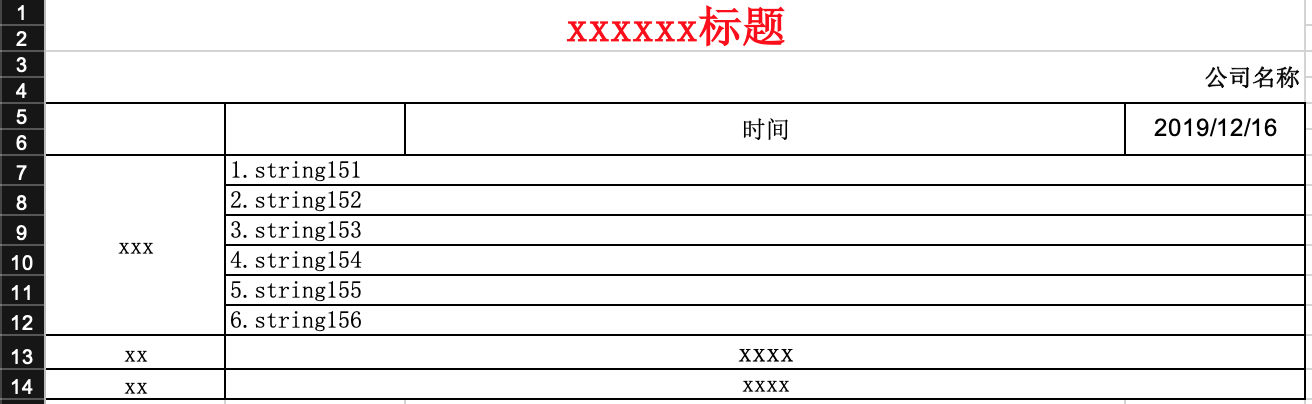
代码:
//时间

		String checkTime = "yyyy/MM/dd";

		//人员查询

		Set preParticipantNames = new HashSet();

		HSSFWorkbook wb = new HSSFWorkbook();

		// 生成一个样式

		HSSFCellStyle style = wb.createCellStyle();

		this.setHSSFCellBorder(style);

		style.setAlignment(HSSFCellStyle.ALIGN_CENTER);// 设置单元格为水平对齐的类型

		style.setVerticalAlignment(HSSFCellStyle.VERTICAL_CENTER);

		HSSFFont songFont = createSongFont(wb);

		style.setFont(songFont);

		HSSFCellStyle songPoint14FontStyle = wb.createCellStyle();

		this.setHSSFCellBorder(songPoint14FontStyle);

		songPoint14FontStyle.setVerticalAlignment(HSSFCellStyle.VERTICAL_CENTER);

		songPoint14FontStyle.setAlignment(HSSFCellStyle.ALIGN_CENTER);// 设置单元格为水平对齐的类型

		HSSFFont songPoint14Font = createSongFont(wb);

		songPoint14Font.setFontHeightInPoints((short) 14); //设置字号

		songPoint14FontStyle.setFont(songPoint14Font);

		HSSFCellStyle arialFontStyle = wb.createCellStyle();

		this.setHSSFCellBorder(arialFontStyle);

		arialFontStyle.setVerticalAlignment(HSSFCellStyle.VERTICAL_CENTER);

		arialFontStyle.setAlignment(HSSFCellStyle.ALIGN_CENTER);// 设置单元格为水平对齐的类型

		HSSFFont arialFont = createSongFont(wb);

		arialFont.setFontName("Arial");

		arialFontStyle.setFont(arialFont);

		HSSFCellStyle rightBoldStyle = wb.createCellStyle();

		rightBoldStyle.setVerticalAlignment(HSSFCellStyle.VERTICAL_CENTER);

		rightBoldStyle.setAlignment(HSSFCellStyle.ALIGN_RIGHT);// 设置单元格为水平对齐的类型

		HSSFFont boldSongFont = createSongFont(wb);

		boldSongFont.setBoldweight(HSSFFont.BOLDWEIGHT_BOLD);//粗体显示

		rightBoldStyle.setFont(boldSongFont);

		HSSFCellStyle songPoint22RedFontStyle = wb.createCellStyle();

		songPoint22RedFontStyle.setVerticalAlignment(HSSFCellStyle.VERTICAL_CENTER);

		songPoint22RedFontStyle.setAlignment(HSSFCellStyle.ALIGN_CENTER);// 设置单元格为水平对齐的类型

		HSSFFont songPoint22RedFont = createSongFont(wb);

		songPoint22RedFont.setFontHeightInPoints((short) 22); //设置字号

		songPoint22RedFont.setBoldweight(HSSFFont.BOLDWEIGHT_BOLD);//粗体显示

		songPoint22RedFont.setColor(HSSFColor.RED.index);

		songPoint22RedFontStyle.setFont(songPoint22RedFont);

		HSSFCellStyle contentDefaultStyle = wb.createCellStyle();

		this.setHSSFCellBorder(contentDefaultStyle);

		contentDefaultStyle.setVerticalAlignment(HSSFCellStyle.VERTICAL_CENTER);

		contentDefaultStyle.setFont(songFont);

		HSSFCellStyle verticalStyle = wb.createCellStyle();

		this.setHSSFCellBorder(verticalStyle);

		verticalStyle.setAlignment(HSSFCellStyle.ALIGN_CENTER);// 设置单元格为水平对齐的类型

		verticalStyle.setVerticalAlignment(HSSFCellStyle.VERTICAL_CENTER);

		verticalStyle.setFont(songFont);

		// 建立新的sheet对象(excel的表单)

		HSSFSheet sheet = wb.createSheet(excelFileName);

		sheet.setColumnWidth(0,15* 256);

		sheet.setColumnWidth(1,15* 256);

		sheet.setColumnWidth(2,60* 256);

		sheet.setColumnWidth(3,15* 256);

		sheet.addMergedRegion(new CellRangeAddress(0,1,0,3));

		sheet.addMergedRegion(new CellRangeAddress(2,3,0,3));

		sheet.addMergedRegion(new CellRangeAddress(4,5,0,0));

		sheet.addMergedRegion(new CellRangeAddress(4,5,1,1));

		sheet.addMergedRegion(new CellRangeAddress(4,5,2,2));

		sheet.addMergedRegion(new CellRangeAddress(4,5,3,3));

		int beginRowIndex = 6;

		int endRowIndex = 6;

		//要获总记录,下一步来确定合并的单元格的数量

		List<TbCheckSamplEventReportVo> detailList = this.checkCountDao.getCheckResultDaily(checkEventCountDto);

		if (detailList != null && detailList.size() > 0) {

			endRowIndex += detailList.size() -1;

			log.info("detailList.size() " + detailList.size());

		}

		sheet.addMergedRegion(new CellRangeAddress(beginRowIndex,endRowIndex,0,0));

		int sumScore = 0;

		for (int i = beginRowIndex; i <= endRowIndex; i++) {

			int j = i - beginRowIndex;

			sheet.addMergedRegion(new CellRangeAddress(i,i,1,3));

			HSSFRow row = sheet.createRow(i);

			if (i == beginRowIndex) {

				HSSFCell problemTextCell = row.createCell(0);

				problemTextCell.setCellValue("问题");

				problemTextCell.setCellStyle(verticalStyle);

			}

			StringBuilder contentDetail = new StringBuilder();

			if (detailList != null && detailList.size() > 0) {

				BigDecimal checkScore = detailList.get(j).getCheckScore() == null ? null : detailList.get(j).getCheckScore();

				if (checkScore != null) {

					sumScore += checkScore.intValue();

				}

				if (detailList.get(j).getPreParticipantName() != null) {

					preParticipantNames.add(detailList.get(j).getPreParticipantName());

				}

				contentDetail.append(j+1).append(".").append(detailList.get(j).getDesc()).append(" ").append("xxx").append(checkScore == null ? "" : checkScore.intValue())

						.append("xxx(").append(detailList.get(j).getCheckTypeName()).append(")");

			}

			HSSFCell cell = row.createCell(1);

			cell.setCellValue(contentDetail.toString());

			cell.setCellStyle(contentDefaultStyle);

			HSSFCell cell2 = row.createCell(2);

			cell2.setCellStyle(contentDefaultStyle);

			HSSFCell cell3 = row.createCell(3);

			cell3.setCellStyle(contentDefaultStyle);

		}

		//合计

		sheet.addMergedRegion(new CellRangeAddress(endRowIndex+1,endRowIndex+1,1,3));

		//人员

		sheet.addMergedRegion(new CellRangeAddress(endRowIndex+2,endRowIndex+2,1,3));

		HSSFRow row0 = sheet.createRow(0);

		HSSFCell row0Cell0 = row0.createCell(0);

		row0Cell0.setCellValue("xxxxxx");

		row0Cell0.setCellStyle(songPoint22RedFontStyle);

		HSSFRow row1 = sheet.createRow(2);

		HSSFCell row1Cell0 = row1.createCell(0);

		row1Cell0.setCellValue(checkEventCountDto.getCompanyName());

		row1Cell0.setCellStyle(rightBoldStyle);

		//5行

		HSSFRow row2 = sheet.createRow(4);

		HSSFCell row2Cell0 = row2.createCell(0);

		row2Cell0.setCellStyle(style);

		HSSFCell row2Cell1 = row2.createCell(1);

		row2Cell1.setCellStyle(style);

		HSSFCell row2Cell2 = row2.createCell(2);

		row2Cell2.setCellStyle(style);

		row2Cell2.setCellValue("时间");

		HSSFCell row2Cell3 = row2.createCell(3);

		row2Cell3.setCellValue(checkTime);

		row2Cell3.setCellStyle(arialFontStyle);

		//6行

		HSSFRow row3 = sheet.createRow(5);

		HSSFCell row3Cell0 = row3.createCell(0);

		row3Cell0.setCellStyle(style);

		HSSFCell row3Cell1 = row3.createCell(1);

		row3Cell1.setCellStyle(style);

		HSSFCell row3Cell2 = row3.createCell(2);

		row3Cell2.setCellStyle(style);

		HSSFCell row3Cell3 = row3.createCell(3);

		row3Cell3.setCellStyle(style);

		//xxxxx

		HSSFRow row5 = sheet.createRow(endRowIndex+1);

		HSSFCell row5Cell0 = row5.createCell(0);

		row5Cell0.setCellValue("合计");

		row5Cell0.setCellStyle(style);

		HSSFCell row5Cell1 = row5.createCell(1);

		row5Cell1.setCellValue(new StringBuilder("xx").append(sumScore).append("xxx").toString());

		row5Cell1.setCellStyle(songPoint14FontStyle);

		HSSFCell row5Cell2 = row5.createCell(2);

		row5Cell2.setCellStyle(songPoint14FontStyle);

		HSSFCell row5Cell3 = row5.createCell(3);

		row5Cell3.setCellStyle(songPoint14FontStyle);

		//人员

		HSSFRow row6 = sheet.createRow(endRowIndex+2);

		HSSFCell row6Cell0 = row6.createCell(0);

		row6Cell0.setCellValue("人员");

		row6Cell0.setCellStyle(style);

		StringBuilder tmpNames = new StringBuilder();

		if (preParticipantNames.size() > 0){

			preParticipantNames.forEach(item -> tmpNames.append(item).append(","));

		}

		HSSFCell row6Cell1 = row6.createCell(1);

		row6Cell1.setCellValue(tmpNames.toString().length() > 0 ? (tmpNames.toString().substring(0,tmpNames.toString().length() -1)) : "");

		row6Cell1.setCellStyle(style);

		HSSFCell row6Cell2 = row6.createCell(2);

		row6Cell2.setCellStyle(style);

		HSSFCell row6Cell3 = row6.createCell(3);

		row6Cell3.setCellStyle(style);

		return wb;
代码里面的问题:
1、关于cell的style可以使用for循环来做,代码更加简洁;
2、每列的宽度没有做子适应展开,现在四列是用了固定值来设置列宽的。
3、...
java poi3.10.1基本excel使用的更多相关文章
- (6) 如何用Apache POI操作Excel文件-----POI-3.10的一个和注解(comment)相关的另外一个bug
如果POI-3.10往一个工作表(sheet)里面插入数据的话,需要注意了,其有一个不太被容易发现的bug. 被插入的工作表(sheet)里面的单元格没有包含任何的注解(comment)的时候,插入一 ...
- [转]Java中导入、导出Excel
原文地址:http://blog.csdn.net/jerehedu/article/details/45195359 一.介绍 当前B/S模式已成为应用开发的主流,而在企业办公系统中,常常有客户这样 ...
- Java中导入、导出Excel
原文:Java中导入.导出Excel 一.介绍 当前B/S模式已成为应用开发的主流,而在企业办公系统中,常常有客户这样子要求:你要把我们的报表直接用Excel打开(电信系统.银行系统).或者是:我们已 ...
- 我是陌生人 Java中导入、导出Excel
我是陌生人 Java中导入.导出Excel 一.介绍 当前B/S模式已成为应用开发的主流,而在企业办公系统中,常常有客户这样子要求:你要把我们的报表直接用Excel打开(电信系统.银行系统).或者是: ...
- java的poi技术读取Excel数据到MySQL
这篇blog是介绍java中的poi技术读取Excel数据,然后保存到MySQL数据中. 你也可以在 : java的poi技术读取和导入Excel了解到写入Excel的方法信息 使用JXL技术可以在 ...
- Java利用POI导入导出Excel中的数据
首先谈一下今天发生的一件开心的事,本着一颗android的心我被分配到了PB组,身在曹营心在汉啊!好吧,今天要记录和分享的是Java利用POI导入导出Excel中的数据.下面POI包的下载地 ...
- java的poi技术读取Excel数据
这篇blog主要是讲述java中poi读取excel,而excel的版本包括:2003-2007和2010两个版本, 即excel的后缀名为:xls和xlsx. 读取excel和MySQL相关: ja ...
- java的poi技术写Excel的Sheet
在这之前写过关于java读,写Excel的blog如下: Excel转Html java的poi技术读,写Excel[2003-2007,2010] java的poi技术读取Excel[2003-20 ...
- java的poi技术读取Excel[2003-2007,2010]
这篇blog主要是讲述java中poi读取excel,而excel的版本包括:2003-2007和2010两个版本, 即excel的后缀名为:xls和xlsx. 读取excel和MySQL相关: ja ...
随机推荐
- java中int 和String相互转换
一.String转为int int i=Integer.parseInt(string):int i=Integer.valueOf(s).intValue(); 二.int转为String Stri ...
- java——反射
http://www.cnblogs.com/hxsyl/archive/2013/03/23/2977593.html
- 【转】Linux下软件安装的几种方式
转自Linux下软件安装的几种方式 Linux 系统的/usr目录 Linux 软件安装到哪里合适,目录详解 Linux 的软件安装目录是也是有讲究的,理解这一点,在对系统管理是有益的 /usr:系统 ...
- mybatis设置Map空值返回
mybatis时,设置Map返回,当值为空时属性也会没有 在application.properties中加入下面配置,将会解决这个问题. #当查询数据为空时字段返回为null,不加这个查询数据为空时 ...
- SparkConf和SparkContext
任何Spark程序都是SparkContext开始的,SparkContext的初始化需要一个SparkConf对象,SparkConf包含了Spark集群配置的各种参数. 初始化后,就可以使用Spa ...
- 使用python显示当前系统中的所有进程并关闭某一进程
环境: Windows 10操作系统 python idle 原理: 调用windows系统自带的命令task,该命令使用方式: 第一步.调用cmd命令行,显示当前系统中所有进程: Win+R-> ...
- 安卓P2P开源项目
https://github.com/LinYaoTian/P2PChat 一个基于局域网的 Android P2P 聊天系统 https://github.com/ddssingsong/webrt ...
- Web安全测试检查点
Web安全测试检查点 上传功能 1.绕过文件上传检查功能 2.上传文件大小和次数限制 注册功能 1.注册请求是否安全传输 2.注册时密码复杂度是否后台检验 3.激活链接测试 4.重复注册 5.批量注册 ...
- ISO/IEC 9899:2011 条款6.3.2——其它操作数
6.3.2 其它操作数 6.3.2.1 左值,数组,与函数指派符 1.一个左值是潜在地指派一个对象的一个表达式(具有一个对象类型,而不是void):[注:名字“左值”源自于赋值表达式E1 = E2,在 ...
- php 获得访问者的IP
<?php $user_IP = ($_SERVER["HTTP_VIA"]) ? $_SERVER["HTTP_X_FORWARDED_FOR"] : ...