
idea使用maven私服
nexus3中央仓库改为阿里云/
参考:这里写链接内容
找到中央仓库
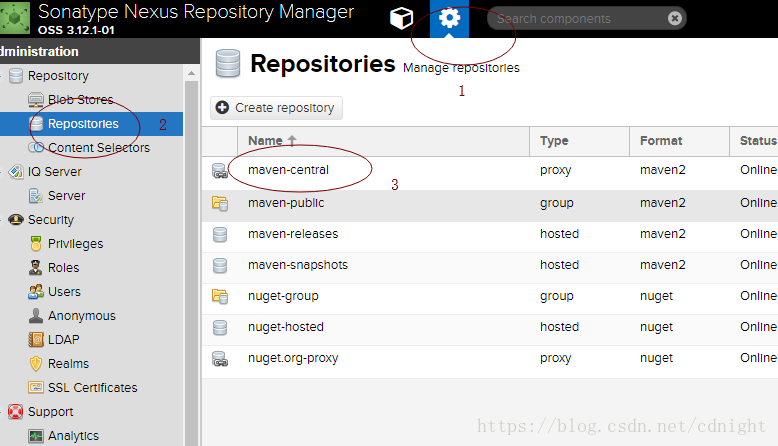
然后修改成:
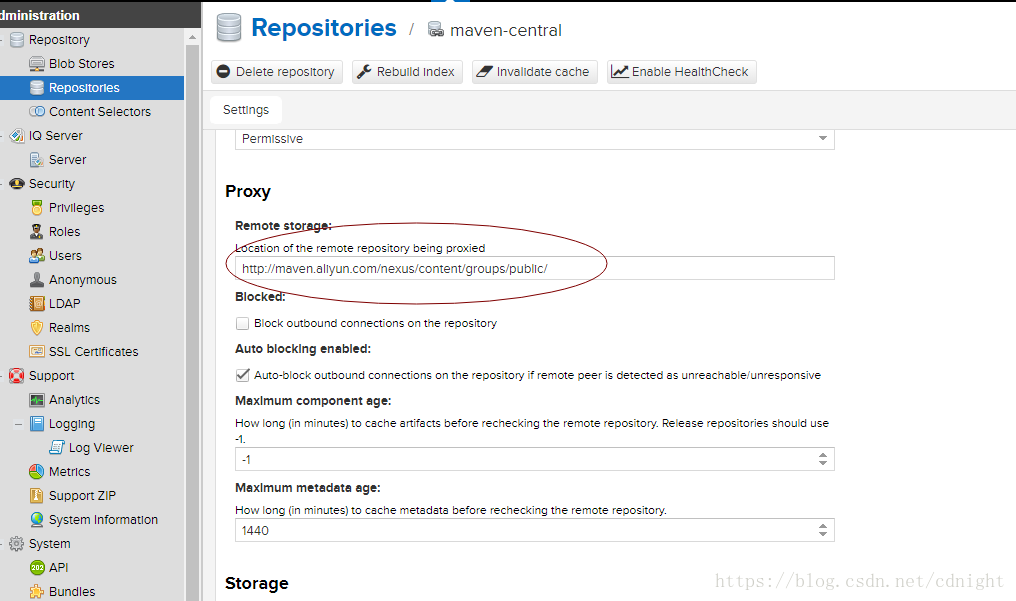
http://maven.aliyun.com/nexus/content/groups/public/- 1
idea使用私服maven及对应配置
参考:
这里写链接内容
首先,新建一个maven项目—自己新建吧。
然后,
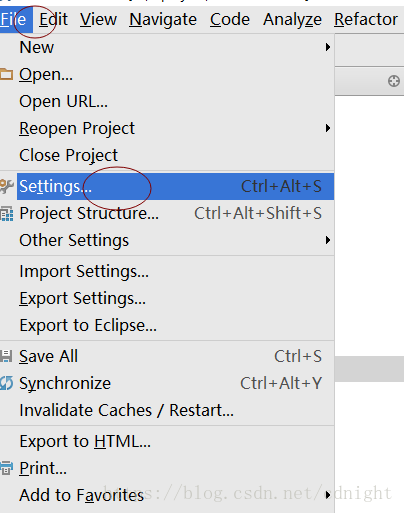
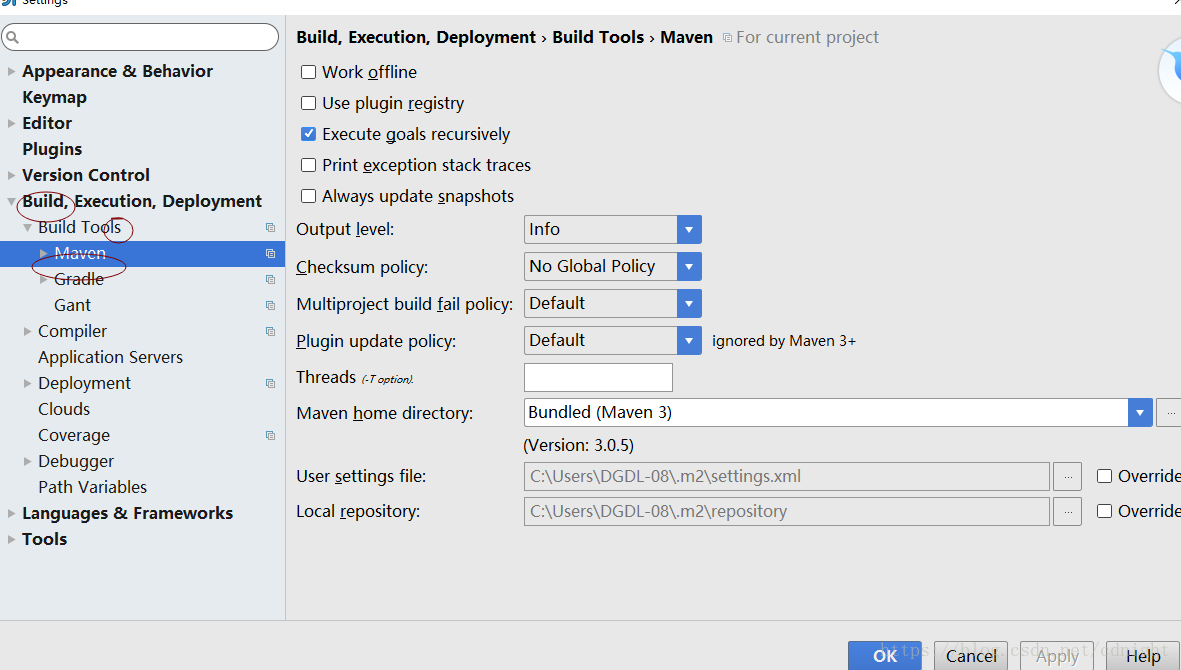
看到本机的maven 配置文件,

打开来,然后: 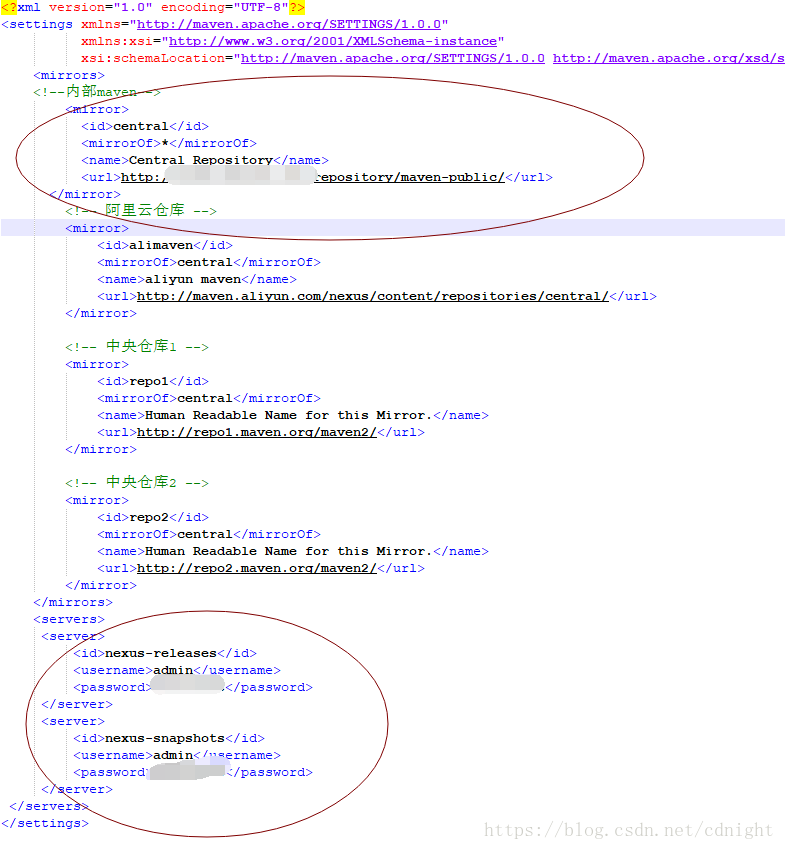
添加我们的maven私服及servers—用来发布类库的。
格式如下:
- <?xml version="1.0" encoding="UTF-8"?>
- <settings xmlns="http://maven.apache.org/SETTINGS/1.0.0"
- xmlns:xsi="http://www.w3.org/2001/XMLSchema-instance"
- xsi:schemaLocation="http://maven.apache.org/SETTINGS/1.0.0 http://maven.apache.org/xsd/settings-1.0.0.xsd">
- <mirrors>
- <!--内部maven-->
- <mirror>
- <id>central</id>
- <mirrorOf>*</mirrorOf>
- <name>Central Repository</name>
- <url>http://你仓库的地址/repository/maven-public/</url>
- </mirror>
- <!-- 阿里云仓库 -->
- <mirror>
- <id>alimaven</id>
- <mirrorOf>central</mirrorOf>
- <name>aliyun maven</name>
- <url>http://maven.aliyun.com/nexus/content/repositories/central/</url>
- </mirror>
- <!-- 中央仓库1 -->
- <mirror>
- <id>repo1</id>
- <mirrorOf>central</mirrorOf>
- <name>Human Readable Name for this Mirror.</name>
- <url>http://repo1.maven.org/maven2/</url>
- </mirror>
- <!-- 中央仓库2 -->
- <mirror>
- <id>repo2</id>
- <mirrorOf>central</mirrorOf>
- <name>Human Readable Name for this Mirror.</name>
- <url>http://repo2.maven.org/maven2/</url>
- </mirror>
- </mirrors>
- <servers>
- <server>
- <id>nexus-releases</id>
- <username>admin</username>
- <password>你的密码</password>
- </server>
- <server>
- <id>nexus-snapshots</id>
- <username>admin</username>
- <password>你的密码</password>
- </server>
- </servers>
- </settings>
发布快照及正式版本
maven(15),快照与发布,RELEASE与SNAPSHOT
在pom.xml文件最后添加distributionManagement发布管理节点:
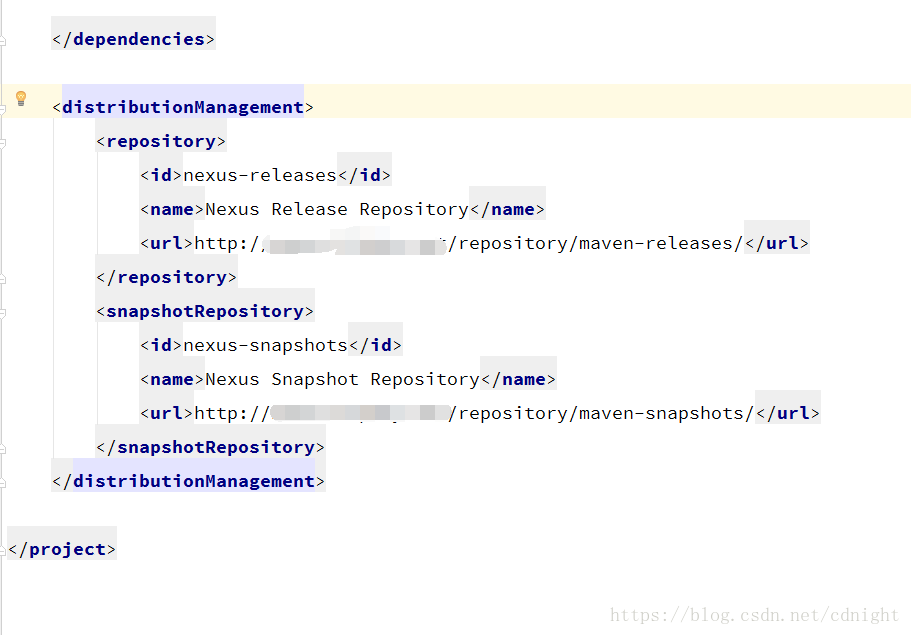
例如:
- <distributionManagement>
- <repository>
- <id>nexus-releases</id>
- <name>Nexus Release Repository</name>
- <url>http://你的maven地址/repository/maven-releases/</url>
- </repository>
- <snapshotRepository>
- <id>nexus-snapshots</id>
- <name>Nexus Snapshot Repository</name>
- <url>http://你的maven地址/repository/maven-snapshots/</url>
- </snapshotRepository>
- </distributionManagement>
- 注意一下
- <groupId>net.funfunle</groupId>
- <artifactId>baselib</artifactId>
- <!--<version>1.0-SNAPSHOT</version>-->
- <version>1.0.1-RELEASE</version>
groupid这些,
- <groupId>net.funfunle</groupId>
- <artifactId>baselib</artifactId>
- <!--<version>1.0-SNAPSHOT</version>-->
- <version>1.0.1-RELEASE</version>
决定发布的是正式版本release还是快照snapshot的是
- <!--<version>1.0-SNAPSHOT</version>-->
- <version>1.0.1-RELEASE</version>
版本号及发布类型,有一点也需要注意,snapshot快照允许重复发布更新同一个版本,而release是不允许的,release每次发布版本号都要加的。
发布方式:
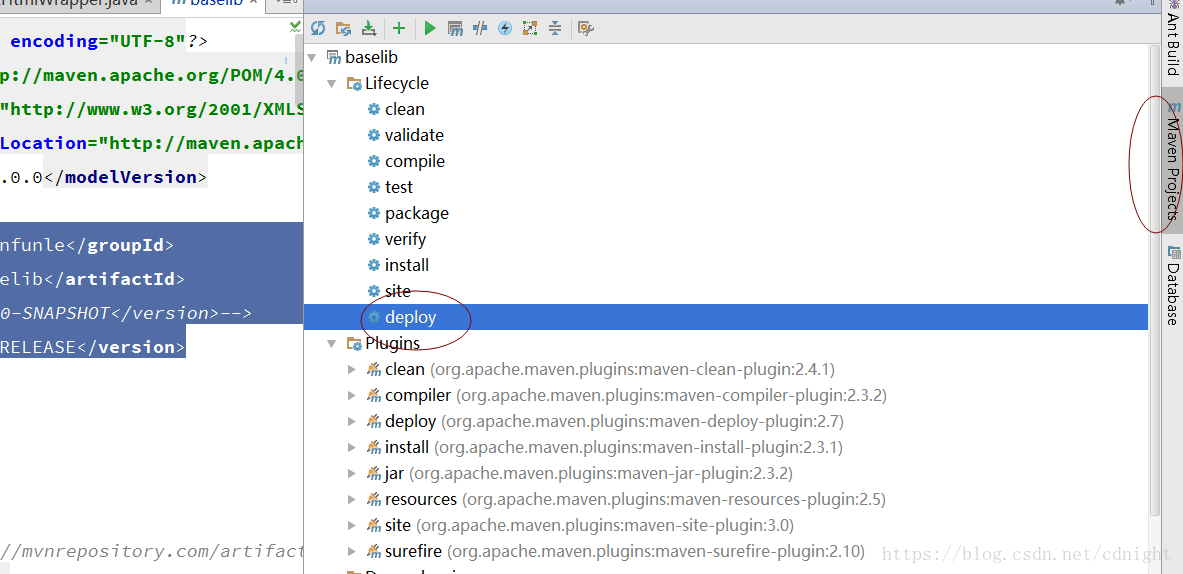
在mavenproject点击发布deploy。
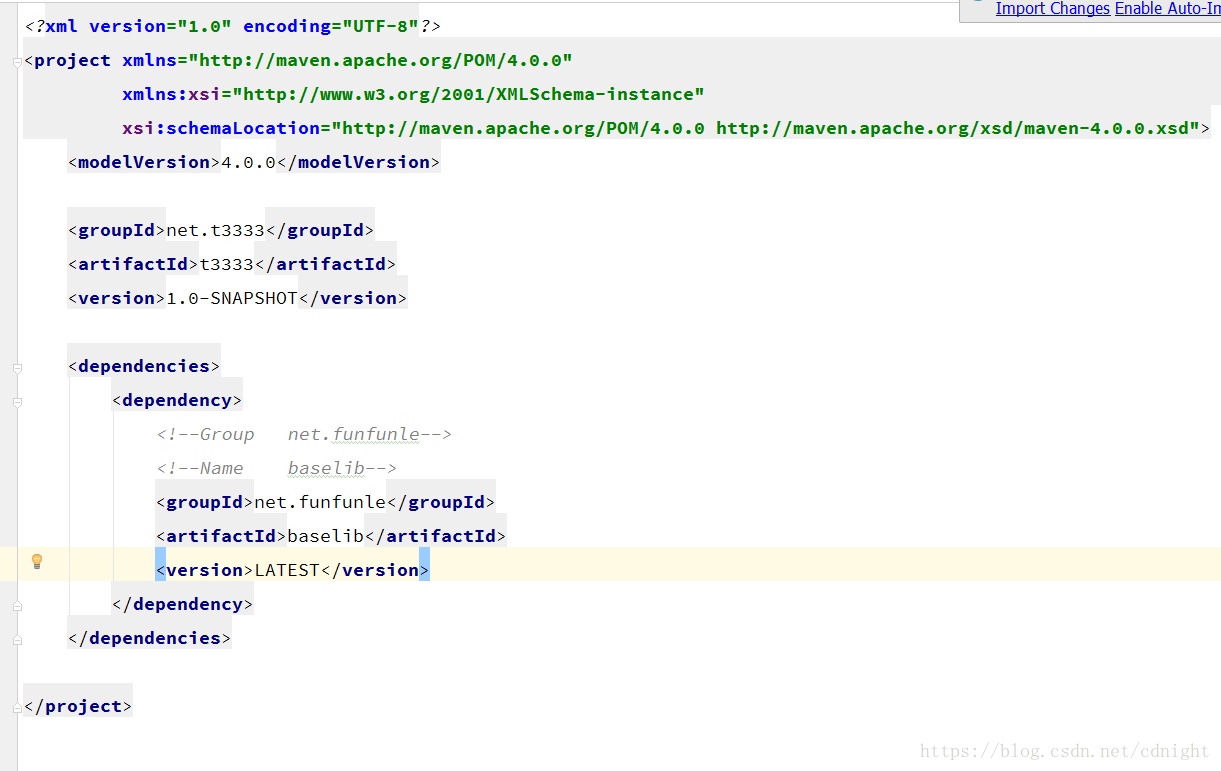
新项目中引用发布的类库
maven2获取最新版本方式。
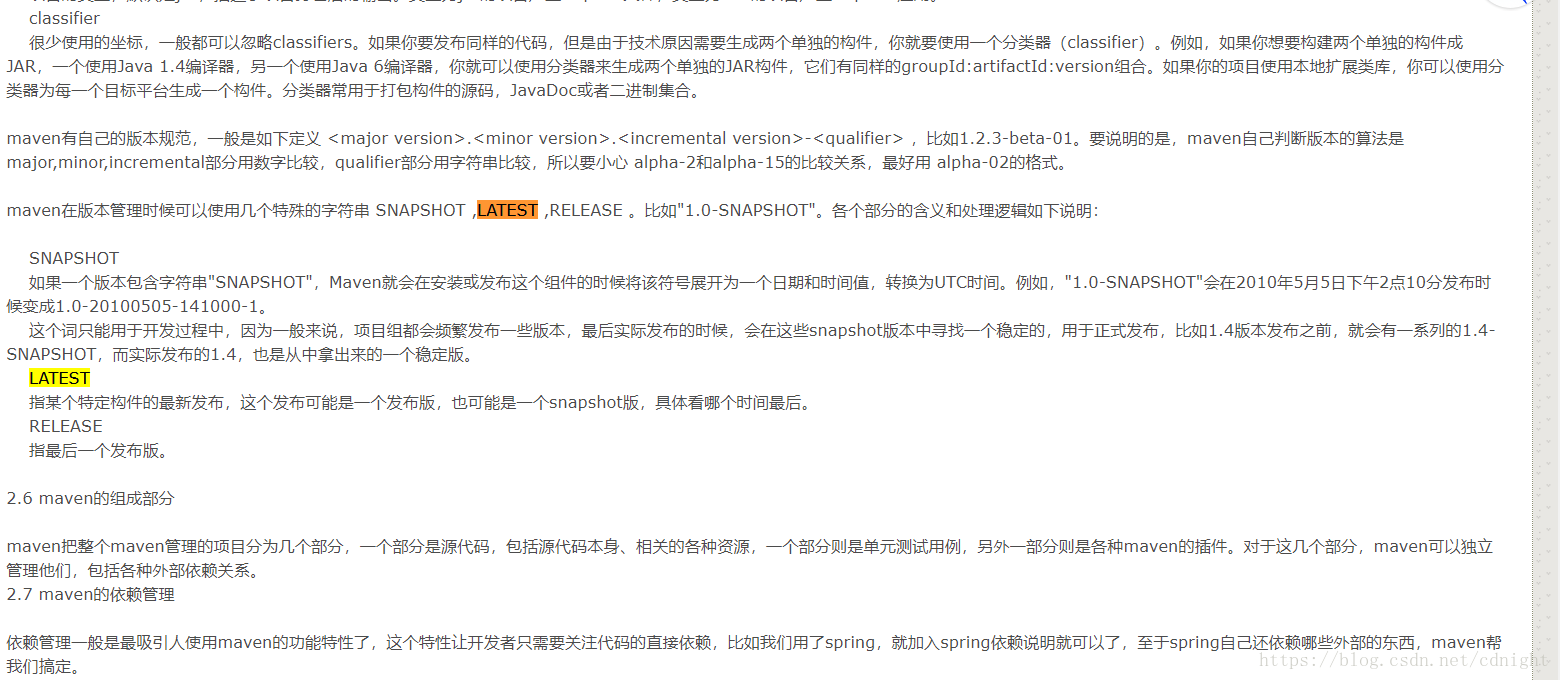
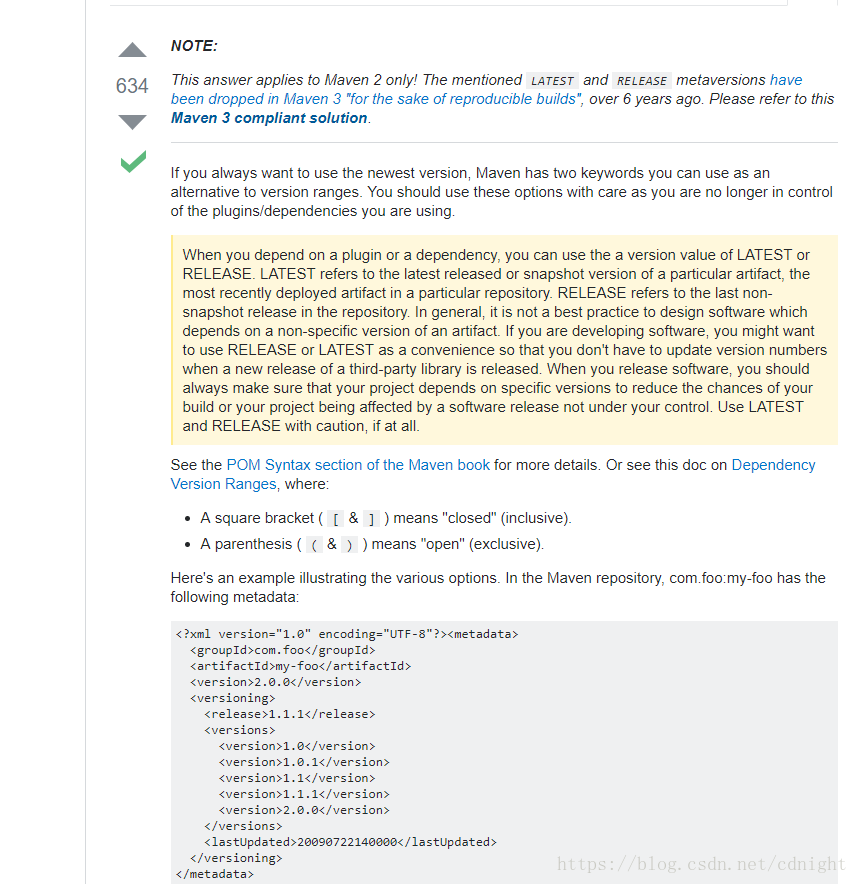
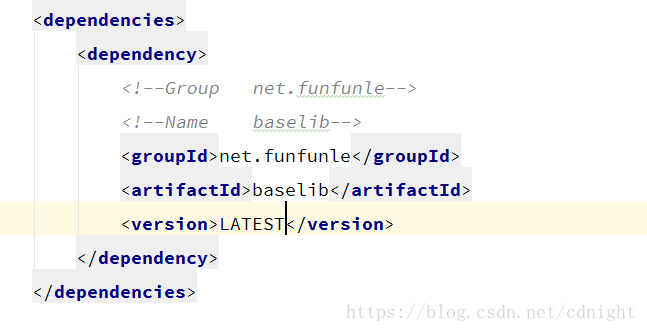
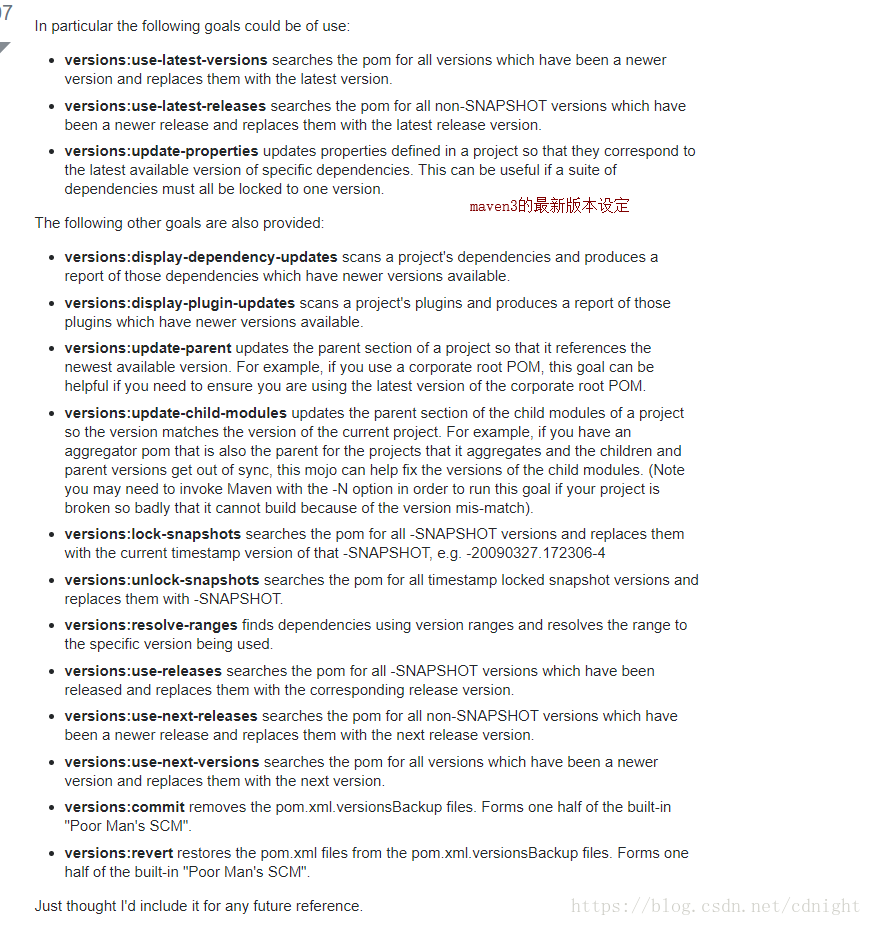
maven3获取最新版本方式
这里写链接内容
- Now I know this topic is old, but reading the question and the OP supplied answer it seems the Maven Versions Plugin might have actually been a better answer to his question:
- In particular the following goals could be of use:
- versions:use-latest-versions searches the pom for all versions which have been a newer version and replaces them with the latest version.
- versions:use-latest-releases searches the pom for all non-SNAPSHOT versions which have been a newer release and replaces them with the latest release version.
- versions:update-properties updates properties defined in a project so that they correspond to the latest available version of specific dependencies. This can be useful if a suite of dependencies must all be locked to one version.
- The following other goals are also provided:
- versions:display-dependency-updates scans a project's dependencies and produces a report of those dependencies which have newer versions available.
- versions:display-plugin-updates scans a project's plugins and produces a report of those plugins which have newer versions available.
- versions:update-parent updates the parent section of a project so that it references the newest available version. For example, if you use a corporate root POM, this goal can be helpful if you need to ensure you are using the latest version of the corporate root POM.
- versions:update-child-modules updates the parent section of the child modules of a project so the version matches the version of the current project. For example, if you have an aggregator pom that is also the parent for the projects that it aggregates and the children and parent versions get out of sync, this mojo can help fix the versions of the child modules. (Note you may need to invoke Maven with the -N option in order to run this goal if your project is broken so badly that it cannot build because of the version mis-match).
- versions:lock-snapshots searches the pom for all -SNAPSHOT versions and replaces them with the current timestamp version of that -SNAPSHOT, e.g. -20090327.172306-4
- versions:unlock-snapshots searches the pom for all timestamp locked snapshot versions and replaces them with -SNAPSHOT.
- versions:resolve-ranges finds dependencies using version ranges and resolves the range to the specific version being used.
- versions:use-releases searches the pom for all -SNAPSHOT versions which have been released and replaces them with the corresponding release version.
- versions:use-next-releases searches the pom for all non-SNAPSHOT versions which have been a newer release and replaces them with the next release version.
- versions:use-next-versions searches the pom for all versions which have been a newer version and replaces them with the next version.
- versions:commit removes the pom.xml.versionsBackup files. Forms one half of the built-in "Poor Man's SCM".
- versions:revert restores the pom.xml files from the pom.xml.versionsBackup files. Forms one half of the built-in "Poor Man's SCM".
- Just thought I'd include it for any future reference.
譬如:
idea使用maven私服的更多相关文章
- maven私服搭建
一.软件安装 地址:http://www.sonatype.org/nexus/thank-you-for-downloading/?dl=tgz 解压: 启动: >> nexus sta ...
- maven私服搭建(centOS6.5)
maven的好处和私服的应用本文不赘述,私服搭建如下: MAVEN 私服搭建(centOS 6.5 环境) 1. 准备环境,搭建centOS6.5系统环境,略 2. 准备对应的软件包如下: A. ...
- Centos 基础开发环境搭建之Maven私服nexus
hmaster 安装nexus及启动方式 /usr/local/nexus-2.6.3-01/bin ./nexus status Centos 基础开发环境搭建之Maven私服nexus . 软件 ...
- 搭建Maven私服-续
前几天搭建了Maven私服,但是想在外网访问只能通过ip地址,因为公司用的不是固定ip所以,ip地址每次不一样,都要先打开极路由查看一下当前ip才能用,更恶心的是,代码check out只能一次,下次 ...
- 搭建Maven私服
最近从SVN下载的代码,在本地构建时出现了诸多问题,部分依赖下载超时,就想起在局域网搭建Maven私服,废话不说了,在测试服务器上建的已经成功,就随便找台机子再练习一遍顺道写个日志.1.前往http: ...
- Maven私服Nexus3.x环境构建操作记录
Maven介绍Apache Maven是一个创新的软件项目管理和综合工具.Maven提供了一个基于项目对象模型(POM)文件的新概念来管理项目的构建,可以从一个中心资料片管理项目构建,报告和文件.Ma ...
- Maven学习 (四) 使用Nexus搭建Maven私服
为什么要搭建nexus私服,原因很简单,有些公司都不提供外网给项目组人员,因此就不能使用maven访问远程的仓库地址,所以很有必要在局域网里找一台有外网权限的机器,搭建nexus私服,然后开发人员连到 ...
- Maven-004-使用 Nexus 搭建 maven 私服
从去年至今,自己一直在学习自动化测试工具,想利用自动化工具尽可能的将重复的.关键的.耗时耗力的工作实现自动化,减轻日常测试工作,提升测试效率.在学习的过程中,将 maven 作为了项目开发管理工具,进 ...
- 使用Nexus创建Maven私服
Nexus是一个强大的Maven仓库管理器,它极大地简化了自己内部仓库的维护和外部仓库的访问.利用Nexus你可以只在一个地方就能够完全控制访问和部署在你所维护仓库中的每个Artifact.Nexus ...
- SONATYPE NEXUS搭建MAVEN私服
1.为什么使用Nexus如果没有私服,我们所需的所有构件都需要通过maven的中央仓库和第三方的Maven仓库下载到本地,而一个团队中的所有人都重复的从maven仓库下载构件无疑加大了仓库的负载和浪费 ...
随机推荐
- shell 大型脚本工具开发实战
拆分脚本功能,抽象函数 1.function get_all_group 返回进程组列表字符串 2.function get_all_process 返回进程名列表字符串"nginx htt ...
- Python函数Day5
一.内置函数 globals() 将全部的全局变量以字典的形式返回 locals() 将当前作用域的所有变量以字典的形式返回 a = 1 b = 2 def func(x): c = ...
- visual studio调试exe程序
标题:How to debug and profile any EXE with Visual Studio 文章:https://devblogs.microsoft.com/visualstudi ...
- 利用socketserver模块的简单功能来完成一个多线程消息传递
客户端:客户端的代码无需改动 import socket client = socket.socket() client.connect(("127.0.0.1",8777)) w ...
- P2921 [USACO08DEC]在农场万圣节[SCC缩点]
题目描述 每年,在威斯康星州,奶牛们都会穿上衣服,收集农夫约翰在N(1<=N<=100,000)个牛棚隔间中留下的糖果,以此来庆祝美国秋天的万圣节. 由于牛棚不太大,FJ通过指定奶牛必须遵 ...
- yum安装出现No package crontabs available解决办法
其意思是:yum中不存在这个包 所以解决办法是 1.更新yum 更新yum仓库: yum -y update 2.查看包名在yum中是什么 yum search all crontabs
- sql 存储过程set nocount on 的作用
在存储过程中,经常用到SET NOCOUNT ON: 作用:阻止在结果集中返回显示受T-SQL语句或则usp影响的行计数信息.当SET ONCOUNT ON时候,不返回计数,当SET NOCOUNT ...
- Yarn 配置阿里源
1.查看一下当前源 yarn config get registry 2.切换为淘宝源 yarn config set registry https://registry.npm.taobao.org ...
- 十五.DNS子域授权、分离解析、缓存DNS服务器
1.搭建基本DNS服务器 pc7: 1.1 安装软件包 ]# yum -y install bind-chroot bind bind //域名服务包 bind-chroot //提 ...
- Python多线程笔记(三),queue模块
尽管在Python中可以使用各种锁和同步原语的组合编写非常传统的多线程程序,但有一种首推的编程方式要优于其他所有编程方式即将多线程程序组织为多个独立人物的集合,这些任务之间通过消息队列进行通信 que ...