
0005SpringBoot中用Junit测试实体类中绑定yml中的值
1、编写SpringBoot的引导类
package springboot_test.springboot_test;

import org.springframework.boot.SpringApplication;
import org.springframework.boot.autoconfigure.SpringBootApplication;
import org.springframework.boot.context.properties.EnableConfigurationProperties;

@SpringBootApplication
public class SpringbootTestApplication {

    public static void main(String[] args) {
        SpringApplication.run(SpringbootTestApplication.class, args);
    }

}
2、编写普通实体Dog
package springboot_test.springboot_test.bean;

import org.springframework.boot.context.properties.ConfigurationProperties;
import org.springframework.stereotype.Component;

//普通实体,会做为Person类中的属性使用,不需要加任何注解
//@ConfigurationProperties(prefix = "person.dog")
//@Component
public class Dog {
    private String name;
    private String color;

    public String getName() {
        return name;
    }

    public void setName(String name) {
        this.name = name;
    }

    public String getColor() {
        return color;
    }

    public void setColor(String color) {
        this.color = color;
    }

    @Override
    public String toString() {
        return "Dog{" +
                "name='" + name + '\'' +
                ", color='" + color + '\'' +
                '}';
    }
}
3、编写需要绑定yml文件中的值的配置类Person
package springboot_test.springboot_test.bean;

import org.springframework.boot.context.properties.ConfigurationProperties;
import org.springframework.boot.context.properties.EnableConfigurationProperties;
import org.springframework.boot.context.properties.NestedConfigurationProperty;
import org.springframework.stereotype.Component;

import java.util.Date;
import java.util.List;
import java.util.Map;

//prefix指定使用yml配置文件中的哪部分开头的数据
@ConfigurationProperties(prefix = "person")
//该类也做为组件才能使用容器中的其他组件,即才能使用@ConfigurationProperties
@Component
public class Person {
    private String name;
    private String age;
    private Date birthDay;

    private Map map;
    private List list;
    //类中含有其他类的对象,想让dog在yml编写的时候也给提示,需要加上该属性
    @NestedConfigurationProperty
    private Dog dog;

    public String getName() {
        return name;
    }

    public void setName(String name) {
        this.name = name;
    }

    public String getAge() {
        return age;
    }

    public void setAge(String age) {
        this.age = age;
    }

    public Date getBirthDay() {
        return birthDay;
    }

    public void setBirthDay(Date birthDay) {
        this.birthDay = birthDay;
    }

    public Map getMap() {
        return map;
    }

    public void setMap(Map map) {
        this.map = map;
    }

    public List getList() {
        return list;
    }

    public void setList(List list) {
        this.list = list;
    }

    public Dog getDog() {
        return dog;
    }

    public void setDog(Dog dog) {
        this.dog = dog;
    }

    @Override
    public String toString() {
        return "Person{" +
                "name='" + name + '\'' +
                ", age='" + age + '\'' +
                ", birthDay=" + birthDay +
                ", map=" + map +
                ", list=" + list +
                ", dog=" + dog +
                '}';
    }
}

4、配置pom.xml文件
<?xml version="1.0" encoding="UTF-8"?>
<project xmlns="http://maven.apache.org/POM/4.0.0" xmlns:xsi="http://www.w3.org/2001/XMLSchema-instance"
         xsi:schemaLocation="http://maven.apache.org/POM/4.0.0 https://maven.apache.org/xsd/maven-4.0.0.xsd">
    <modelVersion>4.0.0</modelVersion>
    <!--依赖的父项目,父项目中还会依赖其他父项目来决定使用的jar包的版本-->
    <parent>
        <groupId>org.springframework.boot</groupId>
        <artifactId>spring-boot-starter-parent</artifactId>
        <version>2.2.1.RELEASE</version>
        <relativePath/> <!-- lookup parent from repository -->
    </parent>
    <groupId>springboot_test</groupId>
    <artifactId>springboot_test</artifactId>
    <version>0.0.1-SNAPSHOT</version>
    <name>springboot_test</name>
    <description>Demo project for Spring Boot</description>

    <properties>
        <java.version>1.8</java.version>
    </properties>
    <!--用于引进springmvc等相关jar包,可通过页面访问-->
    <dependencies>
        <dependency>
            <groupId>org.springframework.boot</groupId>
            <artifactId>spring-boot-starter-web</artifactId>
        </dependency>
        <!--用于junit测试-->
        <dependency>
            <groupId>org.springframework.boot</groupId>
            <artifactId>spring-boot-starter-test</artifactId>
            <scope>test</scope>
        </dependency>

        <!--用于热部署-->
        <dependency>
            <groupId>org.springframework.boot</groupId>
            <artifactId>spring-boot-devtools</artifactId>
        </dependency>

        <!--配置处理器,当类上加@ConfigurationProperties注解时,需要配置-->
        <dependency>
            <groupId>org.springframework.boot</groupId>
            <artifactId>spring-boot-configuration-processor</artifactId>
            <optional>true</optional>
        </dependency>
    </dependencies>

    <!--用于使用maven的package功能进行打包-->
    <build>
        <plugins>
            <plugin>
                <groupId>org.springframework.boot</groupId>
                <artifactId>spring-boot-maven-plugin</artifactId>
            </plugin>
        </plugins>
    </build>

</project>

5、编写application.yml文件
person:
  name: zhangsan
  age: 18
  birth-day: 2019/11/19
  map: {k1: v1,k2: v2}
  list:
    - pig
    - cat
  dog:
    color: black
    name: 小狗

6、编写PersonTest.java测试类
import org.junit.Test;
import org.junit.runner.RunWith;
import org.springframework.beans.factory.annotation.Autowired;
import org.springframework.boot.test.context.SpringBootTest;
import org.springframework.test.context.junit4.SpringRunner;
import springboot_test.springboot_test.SpringbootTestApplication;
import springboot_test.springboot_test.bean.Person;

@SpringBootTest(classes = SpringbootTestApplication.class)
@RunWith(SpringRunner.class)
public class PersonTest {
    @Autowired
    private Person person;

    @Test
    public void getPerson(){
        System.out.println(person);
    }
}

另外在测试的时候出现了报错java.lang.Exception: No runnable methods,原因为@Test注解引入的类不对,应该引入org.junit.Test;
还有一个可能的原因是没有在方法上写@Test注解

另外,如果绑定的值是在application.properties中配置的,而不是在yml中配置的,则会出现打印结果中文乱码的问题,application.properties配置如下:
person.name=张三
person.age=18
person.birth-day= 2019/11/19
person.list=a,b,c
person.map.k1=v1
person.map.k2=v2
person.dog.name=小狗
person.dog.color=black
可通过如下所示
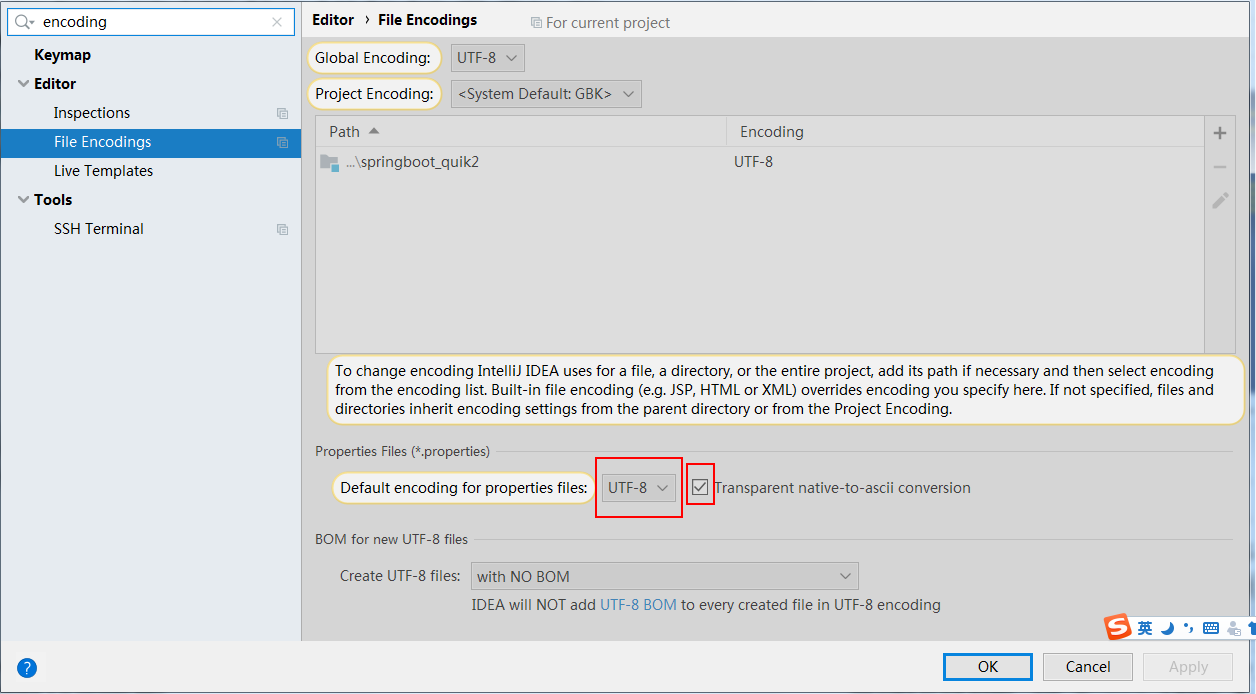
另外为了通过配置文件给某个类绑定某个属性值,不应该通过application.properties去绑定,而应该单独配置一个properties,
但是单独配置的properties,SpringBoot是无法识别的,需要在绑定的类Person.java上加上如下注解:
@PropertySource(value = "classpath:person.properties"),即
1、resources下新建person.properties文件内容如下:
person.name=张三
person.age=18
person.birth-day= 2019/11/19
person.list=a,b,c
person.map.k1=v1
person.map.k2=v2
person.dog.name=小黄
person.dog.color=black

2、Person.java改为如下:
package springboot_test.springboot_test.bean;

import org.springframework.boot.context.properties.ConfigurationProperties;
import org.springframework.boot.context.properties.EnableConfigurationProperties;
import org.springframework.boot.context.properties.NestedConfigurationProperty;
import org.springframework.context.annotation.PropertySource;
import org.springframework.stereotype.Component;

import java.util.Date;
import java.util.List;
import java.util.Map;

//prefix指定使用yml配置文件中的哪部分开头的数据
@ConfigurationProperties(prefix = "person")
//该类也做为组件才能使用容器中的其他组件,即才能使用@ConfigurationProperties
@Component
//作用是使其可以与person.properties文件中的内容,但是,若application.properties中也存在可绑定的内容,
// 则以application.properties中的内容为准,若不存在,才会以person.properties中的内容为准
@PropertySource(value = "classpath:person.properties")
public class Person {
    private String name;
    private String age;
    private Date birthDay;

    private Map map;
    private List list;
    //类中含有其他类的对象,想让dog在yml编写的时候也给提示,需要加上该属性
    @NestedConfigurationProperty
    private Dog dog;

    public String getName() {
        return name;
    }

    public void setName(String name) {
        this.name = name;
    }

    public String getAge() {
        return age;
    }

    public void setAge(String age) {
        this.age = age;
    }

    public Date getBirthDay() {
        return birthDay;
    }

    public void setBirthDay(Date birthDay) {
        this.birthDay = birthDay;
    }

    public Map getMap() {
        return map;
    }

    public void setMap(Map map) {
        this.map = map;
    }

    public List getList() {
        return list;
    }

    public void setList(List list) {
        this.list = list;
    }

    public Dog getDog() {
        return dog;
    }

    public void setDog(Dog dog) {
        this.dog = dog;
    }

    @Override
    public String toString() {
        return "Person{" +
                "name='" + name + '\'' +
                ", age='" + age + '\'' +
                ", birthDay=" + birthDay +
                ", map=" + map +
                ", list=" + list +
                ", dog=" + dog +
                '}';
    }
}
如有理解不到位的地方,望指教!
0005SpringBoot中用Junit测试实体类中绑定yml中的值的更多相关文章
- 实体类在Windows程序中的高级应用--------------------》》心境是一种境界。
一.事务 我们在大家学到这,或多或少对事务都有一些理解了.今天的我也对事务有了更深一层的理解对我来说,我想与大家一起分享一下. 解析: 1.ADO.NET提供了事务处理功能 2.C#中开启事务 3.在 ...
- WPF——传实体类及绑定实体类属性
public class User: private string _User; public string User1 { get { return _User; } set { _User = v ...
- 泛型实体类List<>绑定到repeater
后台代码: private void bindnewslist() { long num = 100L; List<Model.news> news = _news.GetList(out ...
- 关于mybatis对实体类参数绑定参数的问题
dao层的代码: public interface SupplierMapper extends BaseMapper<SupplierDbo>{ /*List<SupplierDb ...
- java中遍历实体类属性和类型,属性值
public static void testReflect(Object model) throws NoSuchMethodException, IllegalAccessException, I ...
- list<实体类>互相嵌套和前台取值问题
list<实体类>嵌套list<实体类>,必须保证嵌套的实体类里面有这个list对象,把这个list<实体类>当做一个对象 这是需要解析的数据,并把这些数据封装成l ...
- Mybatis实体类的映射文件中select,insert语句使用
id:在命名空间中唯一的标识符,可以被用来引用这条语句. parameterType:设置传入这条语句的参数的数据类型,如int,String...... resultType:设置从这条语句中返回数 ...
- 实体类调用泛型父类中的静态方法中执行CRUD——第二版
using System; using System.Collections.Generic; using System.Data.Entity; using System.Linq; namespa ...
- C#获取一个实体类的属性名称、属性值
using System.Reflection; Type t = obj.GetType();//获得该类的Type foreach (PropertyInfo pi in t.GetPropert ...
随机推荐
- 移动架构-手写ButterKnife框架
ButterKnife在实际开发中有着大量运用,其强大的view绑定和click事件处理,使得开发效率大大提高,同时增加了代码的阅读性又不影响其执行效率 注解的分类 注解主要有两种分类,一个是运行时, ...
- eclipse界面
Eclipse工作空间的基本配置 A:行号的显示和隐藏 显示:在代码区域的最左边的空白区域,右键 -- Show Line Numbers即可. 隐藏:把上面的动作再做一次. B:字体大小及颜色 a: ...
- 创建SSH密钥
Step1: 检查SSH密钥 首先,打开终端,输入以下指令,查看是否已经生成SSH密钥. cd ~/.ssh ls # Lists the files in your .ssh directory 在 ...
- Hadoop学习(6)-HBASE的安装和命令行操作和java操作
使用HABSE之前,要先安装一个zookeeper 我以前写的有https://www.cnblogs.com/wpbing/p/11309761.html 先简单介绍一下HBASE HBASE是一个 ...
- 缓存利器之Ehcache
EhCache 是一个纯Java的进程内缓存框架,具有快速.精干等特点.是一种广泛使用的开源Java分布式缓存.主要面向通用缓存,Java EE和轻量级容器.另外Spring 提供了对缓存功能的抽象: ...
- JS 通过注册表调用启动本地软件
(关键点:所有软件安装的注册表路径是不会变化的,这个注册表路径需沟通软件商家获取或者通过自己安装在注册表中查找得到) // 调用 注册表编辑类 方法 function run_jxpgj(){//进项 ...
- JVM —— 类文件结构(上)
一.概述 实现语言无关性的基础仍然是虚拟机和字节码存储格式.java虚拟机不和包括java在内的任何语言绑定,它只与“Class文件”这种特定的二进制文件格式所关联,Class文件中包含了java虚拟 ...
- WUST 设计模式 实验一 单例模式的应用
实验一 单例模式的应用 实验目的 1.掌握单例模式(Singleton)的特点: 2.分析具体问题,使用单例模式进行设计. 实验内容和要求 很多应用项目都有配置文件,这些配置文件里面定义一些应用需要的 ...
- [Python爬虫] 使用 Beautiful Soup 4 快速爬取所需的网页信息
[Python爬虫] 使用 Beautiful Soup 4 快速爬取所需的网页信息 2018-07-21 23:53:02 larger5 阅读数 4123更多 分类专栏: 网络爬虫 版权声明: ...
- vscode安装
vscode是一个很好用而且开源的编辑器,支持多种编程语言,这里稍微总结一下使用,省的以后再安装时候再百度查 下载地址:https://code.visualstudio.com/,打开以后点击dow ...