
0005SpringBoot中用Junit测试实体类中绑定yml中的值
1、编写SpringBoot的引导类
package springboot_test.springboot_test;

import org.springframework.boot.SpringApplication;
import org.springframework.boot.autoconfigure.SpringBootApplication;
import org.springframework.boot.context.properties.EnableConfigurationProperties;

@SpringBootApplication
public class SpringbootTestApplication {

    public static void main(String[] args) {
        SpringApplication.run(SpringbootTestApplication.class, args);
    }

}
2、编写普通实体Dog
package springboot_test.springboot_test.bean;

import org.springframework.boot.context.properties.ConfigurationProperties;
import org.springframework.stereotype.Component;

//普通实体,会做为Person类中的属性使用,不需要加任何注解
//@ConfigurationProperties(prefix = "person.dog")
//@Component
public class Dog {
    private String name;
    private String color;

    public String getName() {
        return name;
    }

    public void setName(String name) {
        this.name = name;
    }

    public String getColor() {
        return color;
    }

    public void setColor(String color) {
        this.color = color;
    }

    @Override
    public String toString() {
        return "Dog{" +
                "name='" + name + '\'' +
                ", color='" + color + '\'' +
                '}';
    }
}
3、编写需要绑定yml文件中的值的配置类Person
package springboot_test.springboot_test.bean;

import org.springframework.boot.context.properties.ConfigurationProperties;
import org.springframework.boot.context.properties.EnableConfigurationProperties;
import org.springframework.boot.context.properties.NestedConfigurationProperty;
import org.springframework.stereotype.Component;

import java.util.Date;
import java.util.List;
import java.util.Map;

//prefix指定使用yml配置文件中的哪部分开头的数据
@ConfigurationProperties(prefix = "person")
//该类也做为组件才能使用容器中的其他组件,即才能使用@ConfigurationProperties
@Component
public class Person {
    private String name;
    private String age;
    private Date birthDay;

    private Map map;
    private List list;
    //类中含有其他类的对象,想让dog在yml编写的时候也给提示,需要加上该属性
    @NestedConfigurationProperty
    private Dog dog;

    public String getName() {
        return name;
    }

    public void setName(String name) {
        this.name = name;
    }

    public String getAge() {
        return age;
    }

    public void setAge(String age) {
        this.age = age;
    }

    public Date getBirthDay() {
        return birthDay;
    }

    public void setBirthDay(Date birthDay) {
        this.birthDay = birthDay;
    }

    public Map getMap() {
        return map;
    }

    public void setMap(Map map) {
        this.map = map;
    }

    public List getList() {
        return list;
    }

    public void setList(List list) {
        this.list = list;
    }

    public Dog getDog() {
        return dog;
    }

    public void setDog(Dog dog) {
        this.dog = dog;
    }

    @Override
    public String toString() {
        return "Person{" +
                "name='" + name + '\'' +
                ", age='" + age + '\'' +
                ", birthDay=" + birthDay +
                ", map=" + map +
                ", list=" + list +
                ", dog=" + dog +
                '}';
    }
}

4、配置pom.xml文件
<?xml version="1.0" encoding="UTF-8"?>
<project xmlns="http://maven.apache.org/POM/4.0.0" xmlns:xsi="http://www.w3.org/2001/XMLSchema-instance"
         xsi:schemaLocation="http://maven.apache.org/POM/4.0.0 https://maven.apache.org/xsd/maven-4.0.0.xsd">
    <modelVersion>4.0.0</modelVersion>
    <!--依赖的父项目,父项目中还会依赖其他父项目来决定使用的jar包的版本-->
    <parent>
        <groupId>org.springframework.boot</groupId>
        <artifactId>spring-boot-starter-parent</artifactId>
        <version>2.2.1.RELEASE</version>
        <relativePath/> <!-- lookup parent from repository -->
    </parent>
    <groupId>springboot_test</groupId>
    <artifactId>springboot_test</artifactId>
    <version>0.0.1-SNAPSHOT</version>
    <name>springboot_test</name>
    <description>Demo project for Spring Boot</description>

    <properties>
        <java.version>1.8</java.version>
    </properties>
    <!--用于引进springmvc等相关jar包,可通过页面访问-->
    <dependencies>
        <dependency>
            <groupId>org.springframework.boot</groupId>
            <artifactId>spring-boot-starter-web</artifactId>
        </dependency>
        <!--用于junit测试-->
        <dependency>
            <groupId>org.springframework.boot</groupId>
            <artifactId>spring-boot-starter-test</artifactId>
            <scope>test</scope>
        </dependency>

        <!--用于热部署-->
        <dependency>
            <groupId>org.springframework.boot</groupId>
            <artifactId>spring-boot-devtools</artifactId>
        </dependency>

        <!--配置处理器,当类上加@ConfigurationProperties注解时,需要配置-->
        <dependency>
            <groupId>org.springframework.boot</groupId>
            <artifactId>spring-boot-configuration-processor</artifactId>
            <optional>true</optional>
        </dependency>
    </dependencies>

    <!--用于使用maven的package功能进行打包-->
    <build>
        <plugins>
            <plugin>
                <groupId>org.springframework.boot</groupId>
                <artifactId>spring-boot-maven-plugin</artifactId>
            </plugin>
        </plugins>
    </build>

</project>

5、编写application.yml文件
person:
  name: zhangsan
  age: 18
  birth-day: 2019/11/19
  map: {k1: v1,k2: v2}
  list:
    - pig
    - cat
  dog:
    color: black
    name: 小狗

6、编写PersonTest.java测试类
import org.junit.Test;
import org.junit.runner.RunWith;
import org.springframework.beans.factory.annotation.Autowired;
import org.springframework.boot.test.context.SpringBootTest;
import org.springframework.test.context.junit4.SpringRunner;
import springboot_test.springboot_test.SpringbootTestApplication;
import springboot_test.springboot_test.bean.Person;

@SpringBootTest(classes = SpringbootTestApplication.class)
@RunWith(SpringRunner.class)
public class PersonTest {
    @Autowired
    private Person person;

    @Test
    public void getPerson(){
        System.out.println(person);
    }
}

另外在测试的时候出现了报错java.lang.Exception: No runnable methods,原因为@Test注解引入的类不对,应该引入org.junit.Test;
还有一个可能的原因是没有在方法上写@Test注解

另外,如果绑定的值是在application.properties中配置的,而不是在yml中配置的,则会出现打印结果中文乱码的问题,application.properties配置如下:
person.name=张三
person.age=18
person.birth-day= 2019/11/19
person.list=a,b,c
person.map.k1=v1
person.map.k2=v2
person.dog.name=小狗
person.dog.color=black
可通过如下所示
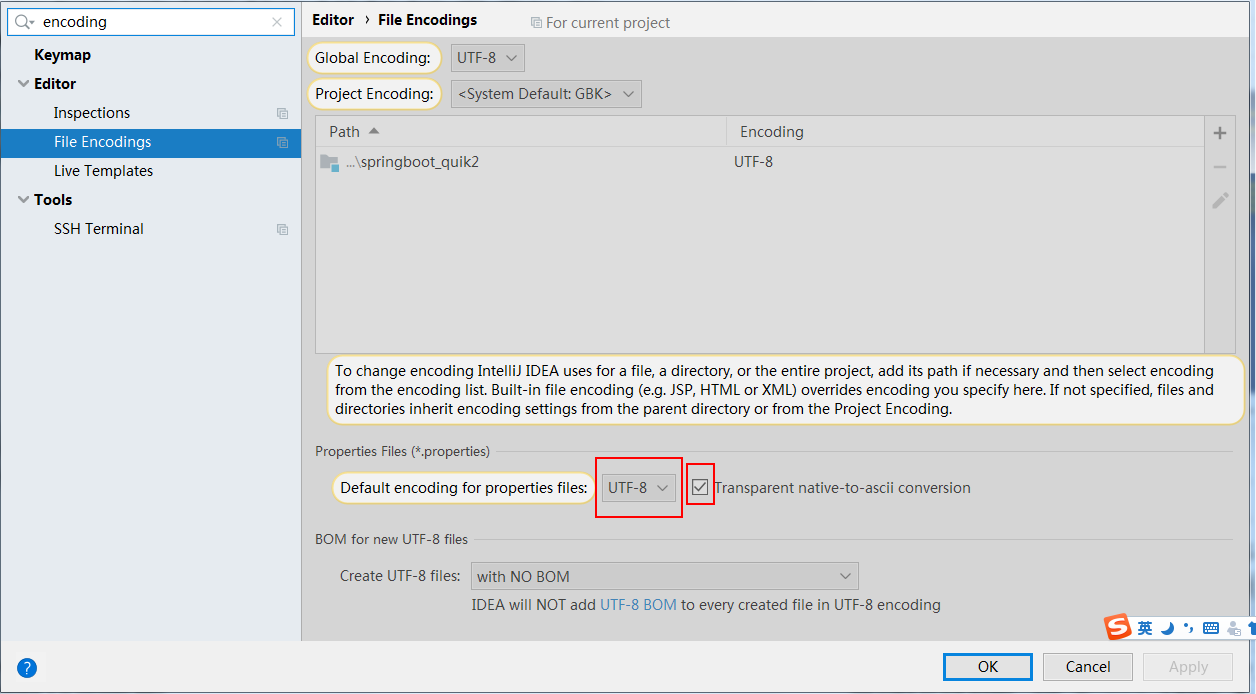
另外为了通过配置文件给某个类绑定某个属性值,不应该通过application.properties去绑定,而应该单独配置一个properties,
但是单独配置的properties,SpringBoot是无法识别的,需要在绑定的类Person.java上加上如下注解:
@PropertySource(value = "classpath:person.properties"),即
1、resources下新建person.properties文件内容如下:
person.name=张三
person.age=18
person.birth-day= 2019/11/19
person.list=a,b,c
person.map.k1=v1
person.map.k2=v2
person.dog.name=小黄
person.dog.color=black

2、Person.java改为如下:
package springboot_test.springboot_test.bean;

import org.springframework.boot.context.properties.ConfigurationProperties;
import org.springframework.boot.context.properties.EnableConfigurationProperties;
import org.springframework.boot.context.properties.NestedConfigurationProperty;
import org.springframework.context.annotation.PropertySource;
import org.springframework.stereotype.Component;

import java.util.Date;
import java.util.List;
import java.util.Map;

//prefix指定使用yml配置文件中的哪部分开头的数据
@ConfigurationProperties(prefix = "person")
//该类也做为组件才能使用容器中的其他组件,即才能使用@ConfigurationProperties
@Component
//作用是使其可以与person.properties文件中的内容,但是,若application.properties中也存在可绑定的内容,
// 则以application.properties中的内容为准,若不存在,才会以person.properties中的内容为准
@PropertySource(value = "classpath:person.properties")
public class Person {
    private String name;
    private String age;
    private Date birthDay;

    private Map map;
    private List list;
    //类中含有其他类的对象,想让dog在yml编写的时候也给提示,需要加上该属性
    @NestedConfigurationProperty
    private Dog dog;

    public String getName() {
        return name;
    }

    public void setName(String name) {
        this.name = name;
    }

    public String getAge() {
        return age;
    }

    public void setAge(String age) {
        this.age = age;
    }

    public Date getBirthDay() {
        return birthDay;
    }

    public void setBirthDay(Date birthDay) {
        this.birthDay = birthDay;
    }

    public Map getMap() {
        return map;
    }

    public void setMap(Map map) {
        this.map = map;
    }

    public List getList() {
        return list;
    }

    public void setList(List list) {
        this.list = list;
    }

    public Dog getDog() {
        return dog;
    }

    public void setDog(Dog dog) {
        this.dog = dog;
    }

    @Override
    public String toString() {
        return "Person{" +
                "name='" + name + '\'' +
                ", age='" + age + '\'' +
                ", birthDay=" + birthDay +
                ", map=" + map +
                ", list=" + list +
                ", dog=" + dog +
                '}';
    }
}
如有理解不到位的地方,望指教!
0005SpringBoot中用Junit测试实体类中绑定yml中的值的更多相关文章
- 实体类在Windows程序中的高级应用--------------------》》心境是一种境界。
一.事务 我们在大家学到这,或多或少对事务都有一些理解了.今天的我也对事务有了更深一层的理解对我来说,我想与大家一起分享一下. 解析: 1.ADO.NET提供了事务处理功能 2.C#中开启事务 3.在 ...
- WPF——传实体类及绑定实体类属性
public class User: private string _User; public string User1 { get { return _User; } set { _User = v ...
- 泛型实体类List<>绑定到repeater
后台代码: private void bindnewslist() { long num = 100L; List<Model.news> news = _news.GetList(out ...
- 关于mybatis对实体类参数绑定参数的问题
dao层的代码: public interface SupplierMapper extends BaseMapper<SupplierDbo>{ /*List<SupplierDb ...
- java中遍历实体类属性和类型,属性值
public static void testReflect(Object model) throws NoSuchMethodException, IllegalAccessException, I ...
- list<实体类>互相嵌套和前台取值问题
list<实体类>嵌套list<实体类>,必须保证嵌套的实体类里面有这个list对象,把这个list<实体类>当做一个对象 这是需要解析的数据,并把这些数据封装成l ...
- Mybatis实体类的映射文件中select,insert语句使用
id:在命名空间中唯一的标识符,可以被用来引用这条语句. parameterType:设置传入这条语句的参数的数据类型,如int,String...... resultType:设置从这条语句中返回数 ...
- 实体类调用泛型父类中的静态方法中执行CRUD——第二版
using System; using System.Collections.Generic; using System.Data.Entity; using System.Linq; namespa ...
- C#获取一个实体类的属性名称、属性值
using System.Reflection; Type t = obj.GetType();//获得该类的Type foreach (PropertyInfo pi in t.GetPropert ...
随机推荐
- 最新 多益网络java校招面经 (含整理过的面试题大全)
从6月到10月,经过4个月努力和坚持,自己有幸拿到了网易雷火.京东.去哪儿. 多益网络等10家互联网公司的校招Offer,因为某些自身原因最终选择了 多益网络.6.7月主要是做系统复习.项目复盘.Le ...
- 最新 阿里java校招面经 (含整理过的面试题大全)
从6月到10月,经过4个月努力和坚持,自己有幸拿到了网易雷火.京东.去哪儿.阿里等10家互联网公司的校招Offer,因为某些自身原因最终选择了阿里.6.7月主要是做系统复习.项目复盘.LeetCode ...
- AOP实践—ASP.NET MVC5 使用Filter过滤Action参数防止sql注入,让你代码安全简洁
在开发程序的过程中,稍微不注意就会隐含有sql注入的危险.今天我就来说下,ASP.NET mvc 5使用Filter过滤Action参数防止sql注入,让你代码安全简洁.不用每下地方对参数的值都进行检 ...
- 华为eNSP上的NAT地址转换配置
NAT是将IP数据报文报头中的IP地址转换为另一个IP地址的过程,主要用于实现内部网络(私有IP地址)访问外部网络(公有IP地址)的功能. 1.实验拓扑 地址表: 1.完成各个接口基本配置之后使用pi ...
- storm是如何保证at least once语义的?
storm中的一些原语: 要说明上面的问题,得先了解storm中的一些原语,比如: tuple和messagetuple:在storm中,消息是通过tuple来抽象表示的,每个tuple知道它从哪里来 ...
- Linux centos 7下搭建mosquitto
Centos7安装 1.网卡名改为enth0 A: vim /etc/sysconfig/grub B: 第三行添加"net.ifnames=0 biosdevname=0" ...
- 笔记-6:mysql索引
1.索引概述 建立索引的目的:加快数据库检索的速度. mysql中索引主要分为: 普通索引:使用index或key关键字创建,其索引列值可以取空值或重复值. 唯一性索引:使用关键字UNIQUE创建,其 ...
- 体验Managed Extensibility Framework精妙的设计
MEF(Managed Extensibility Framework)是.NET Framework 4.0一个重要的库,Visual Studio 2010 Code Editor的扩展支持也是基 ...
- SAS学习笔记18 length、lengthn、lengthc函数
- 修改feign解析器替换json
@Bean public Logger.Level getFeignLoggerLevel() { return Logger.Level.FULL ; } @Bean public Response ...