
Qt5鼠标事件及实例
mainwindow.h
#ifndef MAINWINDOW_H

#define MAINWINDOW_H

#include <QMainWindow>

#include <QLabel>

#include <QStatusBar>

#include <QMouseEvent>

class MainWindow : public QMainWindow

{

    Q_OBJECT

public:

    MainWindow(QWidget *parent = 0);

    ~MainWindow();

protected:

    //重定义了QWidget类的鼠标事件方法

    void mousePressEvent(QMouseEvent *e);

    void mouseMoveEvent(QMouseEvent *e);

    void mouseReleaseEvent(QMouseEvent *e);

    void mouseDoubleClickEvent(QMouseEvent *e);

private:

    QLabel *statusLabel;

    QLabel *MousePosLabel;

};

#endif // MAINWINDOW_H
mainwindow.cpp
#include "mainwindow.h"

MainWindow::MainWindow(QWidget *parent)

    : QMainWindow(parent)

{

    setWindowTitle(tr("鼠标事件"));

    statusLabel=new QLabel;

    statusLabel->setText(tr("当前位置:"));

    statusLabel->setFixedWidth(100);

    MousePosLabel=new QLabel;

    MousePosLabel->setText(tr(""));

    MousePosLabel->setFixedWidth(100);

    //在QMainWindow的状态栏中加入控件

    statusBar()->addPermanentWidget(statusLabel);

    statusBar()->addPermanentWidget(MousePosLabel);

    //设置窗体追踪鼠标

    this->setMouseTracking(true);

    resize(400,200);

}

//mousePressEvent()函数为鼠标按下事件响应函数

void MainWindow::mousePressEvent(QMouseEvent *e)

{

    if(e->button() == Qt::LeftButton)

    {

        statusBar()->showMessage(tr("左键"));

    }

    else if(e->button() == Qt::RightButton)

    {

        statusBar()->showMessage(tr("右键"));

    }

    else if(e->button() == Qt::MidButton)

    {

        statusBar()->showMessage(tr("中键"));

    }

}

//mouseMoveEvent()函数为鼠标移动事件响应函数

void MainWindow::mouseMoveEvent(QMouseEvent *e)

{

    MousePosLabel->setText("("+QString::number(e->x())+","+QString::number(e->y())+")");

}

//mouseReleaseEvent()函数为鼠标松开事件响应函数

void MainWindow::mouseReleaseEvent(QMouseEvent *e)

{

}

//mouseDoubleClickEvent()函数为鼠标双击事件响应函数

void MainWindow::mouseDoubleClickEvent(QMouseEvent *e)

{

}

MainWindow::~MainWindow()

{

}
main.cpp
#include "mainwindow.h"

#include <QApplication>

int main(int argc, char *argv[])

{

    QApplication a(argc, argv);

    MainWindow w;

    w.show();

    return a.exec();

}
运行效果
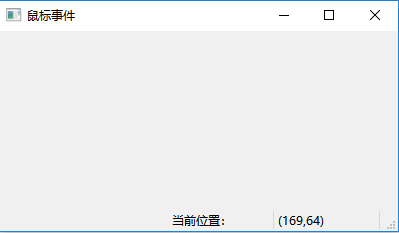
鼠标移动时,显示鼠标的坐标
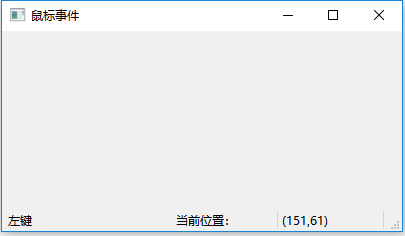
当鼠标左键按下时,显示左键按下
参考资料
《Qt5开发及实例》
Qt5鼠标事件及实例的更多相关文章
- c#全局鼠标事件以及鼠标事件模拟
最近在编写Max插件时,其主容器FlowLayoutPanel由于隐藏了滚动条,要实现按住鼠标中键上下拖动的功能,因此尝试了全局鼠标事件.以及鼠标勾子,可惜由于Max不争气?都未能实现,于是代码报废, ...
- JavaScript学习笔记3之 数组 & arguments(参数对象)& 数字和字符串转换 & innerText/innerHTML & 鼠标事件
一.Array数组 1.数组初始化(Array属于对象类型) /*关于数组的初始化*/ //1.创建 Array 对象--方法1: var arr1=[]; arr1[0]='aa';//给数组元素赋 ...
- winform中键盘和鼠标事件的捕捉和重写(转)
在 编写winform应用程序时,有时需要无论在哪个控件获取焦点时,对某一个键盘输入或者鼠标事件都进行同样的操作.比如编写一个处理图片的应用程序时, 希望无论当前哪个控件获得焦点,当用户按上.下.左. ...
- Js学习笔记一(鼠标事件.....)
1.encodeURI与decodeURI()转化url为有效的url(能被识别) Url="http://news.baidu.com/p.php?id='测试'&姓名=hkui& ...
- Wpf 鼠标拖动元素实例
1.Wpf中鼠标捕获和释放 //以矩形为例 //创建鼠标捕获 Mouse.Capture(rectOne); //释放鼠标捕获 rectOne.ReleaseMouseCapture(); 2.Wpf ...
- Qt 自定义事件详细实例(继承QEvent,然后QCoreApplication::postEvent()、sendEvent())
创建用户事件 创建一个自定义类型的事件,首先需要有一个事件号,其值通常大于QEvent::User.为了传递事件信息,因此必须编写自定义的事件类,该事件类从QEvent继承. 编写用户事件:编写用户事 ...
- 【pyHook】 监测键盘鼠标事件等
[pyHook] pyHook是一个用来进行键盘.鼠标等层面事件监控的库.这个库的正常工作需要pythoncom等操作系统的API的支持.首先来说说如何安装. 直接pip install pyHook ...
- (93)Wangdao.com_第二十六天_鼠标事件
鼠标事件 与鼠标相关的事件,继承了 MouseEvent 接口 分类: click 按下鼠标(通常是按下主按钮)时触发. mousedown 首先触发,mouseup 接着 ...
- 鼠标事件event和坐标
鼠标事件(e=e||window.event) event.clientX.event.clientY 鼠标相对于浏览器窗口可视区域的X,Y坐标(窗口坐标),可视区域不包括工具栏和滚动条.IE事件和标 ...
随机推荐
- Linux学习笔记之查看Linux版本信息
0x00 概述 这里所谓的Linux版本信息,包括Linux内核版本信息和Linux系统版本信息. 0x01 查看Linux内核版本信息 方法1:登陆Linux,在终端输入 cat /proc/ver ...
- Vue小案例 之 商品管理------添加商品
进行添加button,以及商品列表的创建 html: <div class="form-btn"> <button>确认添加</button> ...
- 爬虫的基本操作 requests / BeautifulSoup 的使用
爬虫的基本操作 爬虫基础知识 什么是爬虫? 在最开始,还没有诞生Google和百度等一系列搜索引擎的公司的时候,人们进入一些公司的网站只能通过在浏览器地址栏输入网址的方式访问,如同在很早之前前手机不流 ...
- Bayesian Program Synthesis - 初步探索
- 复制MIFARE Classic卡
Mifare Classic 1K智能卡介绍及nfc-tools的使用 [原创]RFID安全之——ACR122U菜鸟初体验-『智能设备』-看雪安全论坛 复制MIFARE Classic小区门禁卡记录 ...
- mysql读写分离[高可用]
顾名思义, 在mysql负载均衡中有多种方式, 本人愚钝,只了解驱动中间件和mysql_proxy两种方式, 对于驱动,利用的是ReplicationDriver,具体请看远哥的这篇文章: MySQL ...
- Wxpython零基础制作计算器
本文关于Wxpython零基础利用python3.6在pycharm下制作计算器,文章末尾有免费源代码供下载 以后同步更新到博客园和这个网站,www.empirefree.top, 这个网站备案号没有 ...
- Codeforces 839B Game of the Rows - 贪心
Daenerys Targaryen has an army consisting of k groups of soldiers, the i-th group contains ai soldie ...
- Codeforces Round #427 (Div. 2) Problem B The number on the board (Codeforces 835B) - 贪心
Some natural number was written on the board. Its sum of digits was not less than k. But you were di ...
- InstallShield 2015 生成单个EXE包和 MSI包
生成EXE包: 生成MSI包: