
Spring Security 多过滤链的使用
Spring Security 多过滤链的使用
一、背景
在我们实际的开发过程中,有些时候可能存在这么一些情况,某些api 比如: /api/** 这些是给App端使用的,数据的返回都是以JSON的格式返回,且这些API的认证方式都是使用的TOKEN进行认证。而除了 /api/** 这些API之外,都是给网页端使用的,需要使用表单认证,给前端返回的
都是某个页面。
二、需求
1、给客户端使用的api
拦截
/api/**所有的请求。/api/**的所有请求都需要ROLE_ADMIN的角色。从请求头中获取
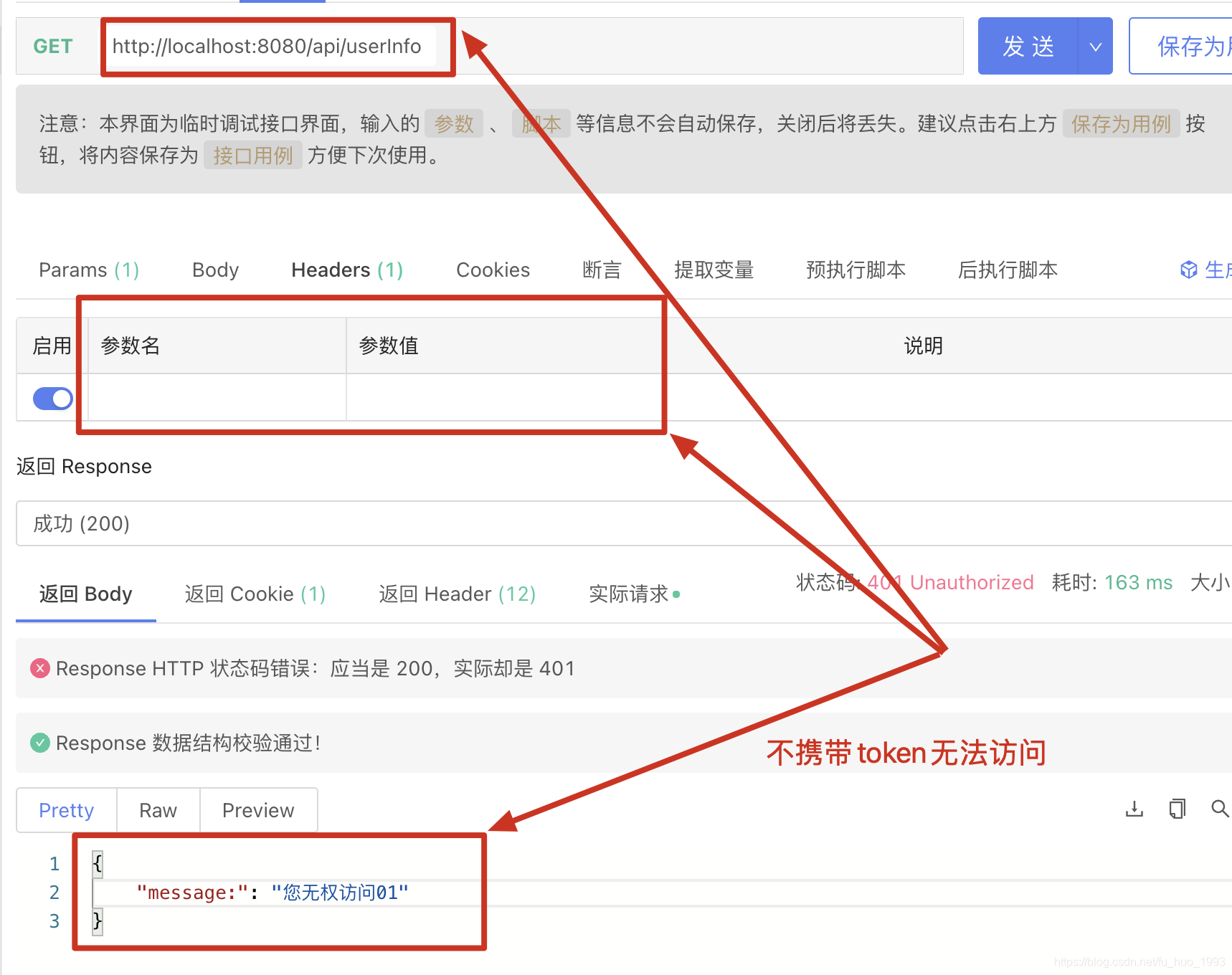
token,只要获取到token的值,就认为认证成功,并赋予ROLE_ADMIN到角色。如果没有权限,则给前端返回JSON对象
{message:"您无权限访问"}访问
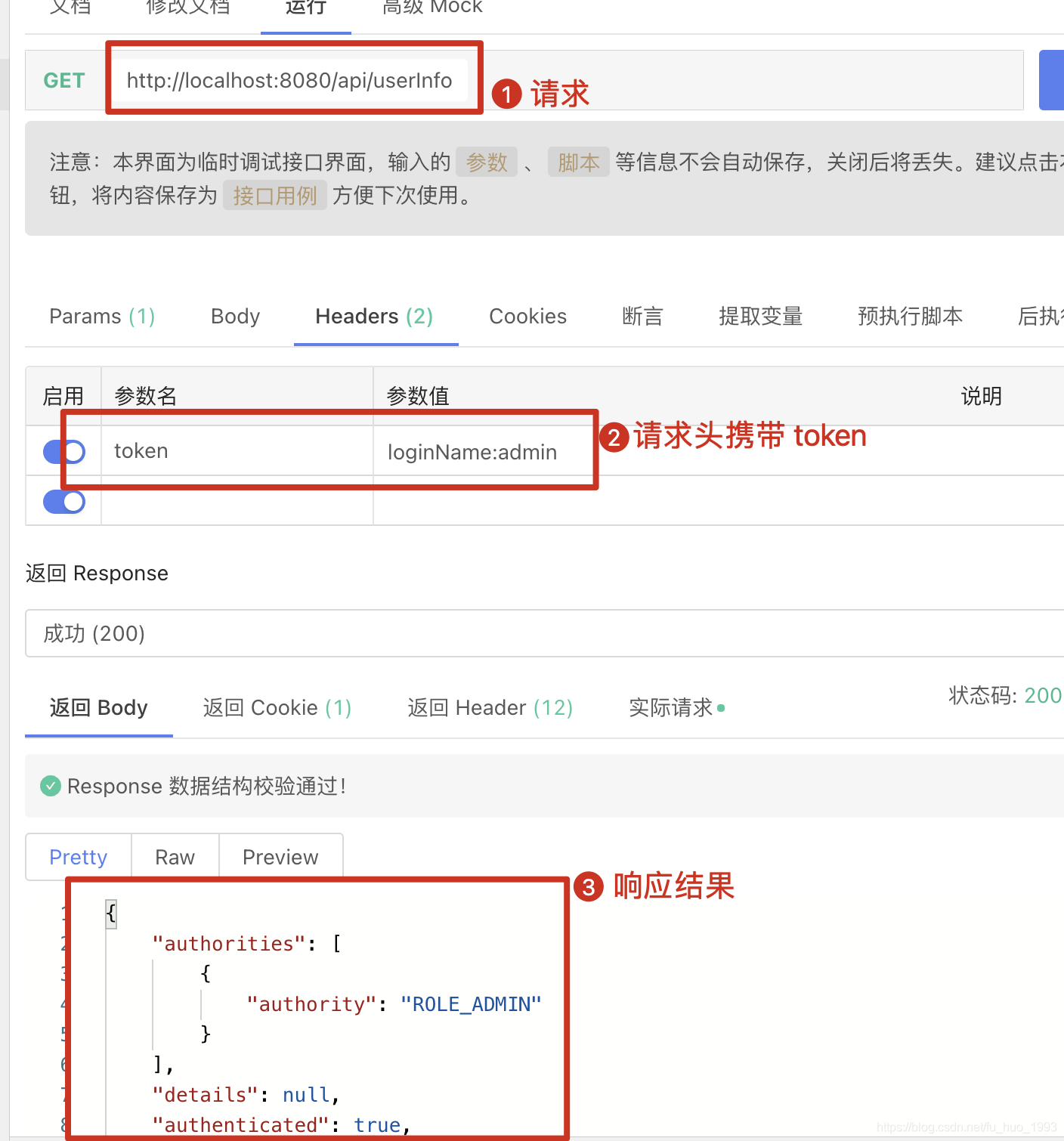
/api/userInfo端点- 请求头携带
token可以访问。 - 请求头不携带
token不可以访问。
- 请求头携带
2、给网站使用的api
- 拦截
所有的请求,但是不处理/api/**开头的请求。 - 所有的请求需要
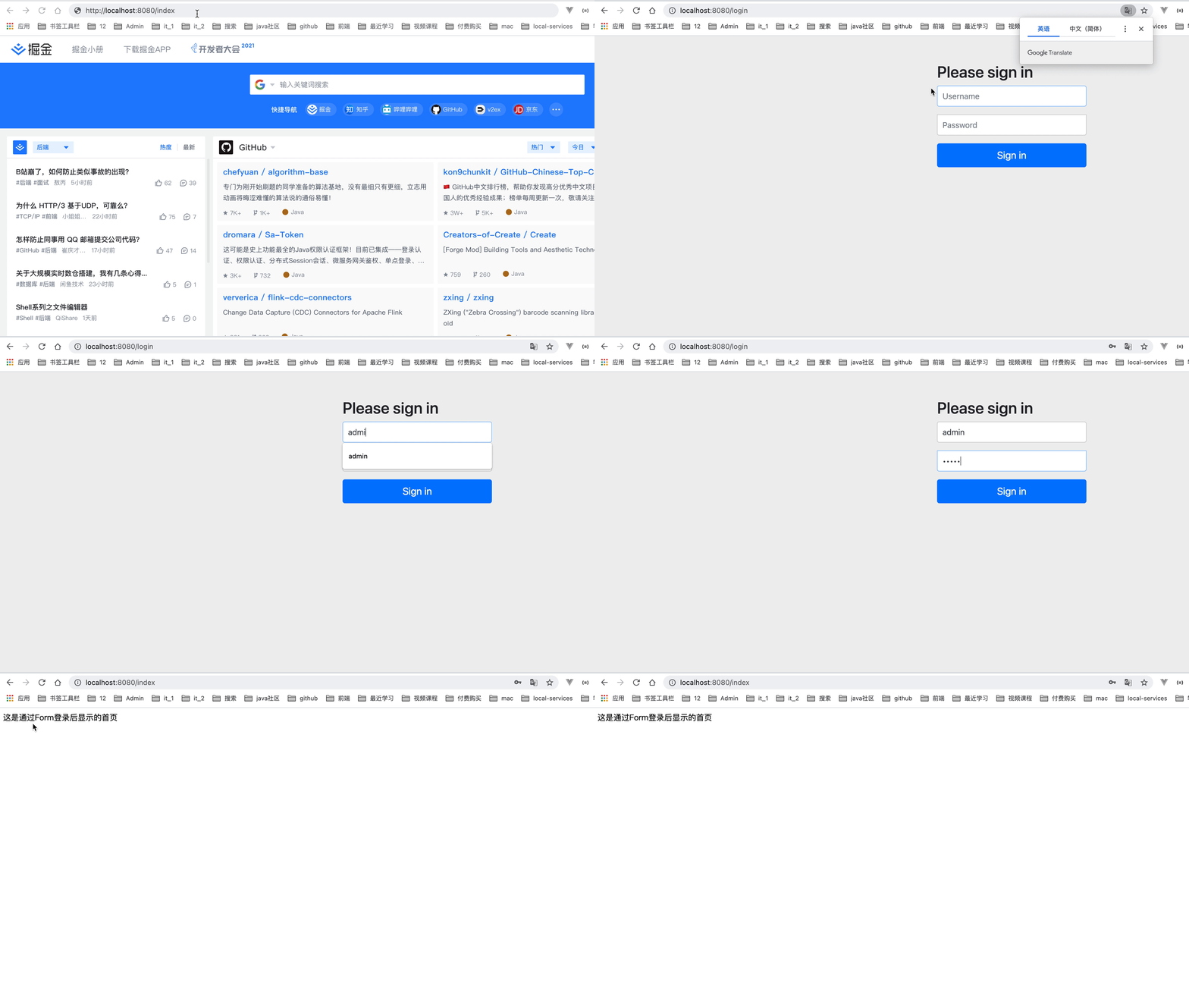
ROLE_ADMIN的权限。 - 没有权限,需要使用表单登录。
- 登录成功后,访问了无权限的请求,直接跳转到百度去。
- 构建2个内建的用户
- 用户一: admin/admin 拥有 ROLE_ADMIN 角色
- 用户二:dev/dev 拥有 ROLE_DEV 角色
- 访问
/index端点admin用户访问,可以访问。dev用户访问,不可以访问,权限不够。
三、实现方案
方案一:
直接拆成多个服务,其中 /api/** 的成为一个服务。非/api/**的拆成另外一个服务。各个服务使用自己的配置,互不影响。
方案二
在同一个服务中编写。不同的请求使用不同的SecurityFilterChain来实现。
经过考虑,此处采用
方案二来实现,因为方案一简单,使用方案二实现,也可以记录下在同一个项目中 通过使用多条过滤器链,因为并不是所有的时候,都是可以分成多个项目的。
扩展:
1、Spring Security SecurityFilterChain 的结构
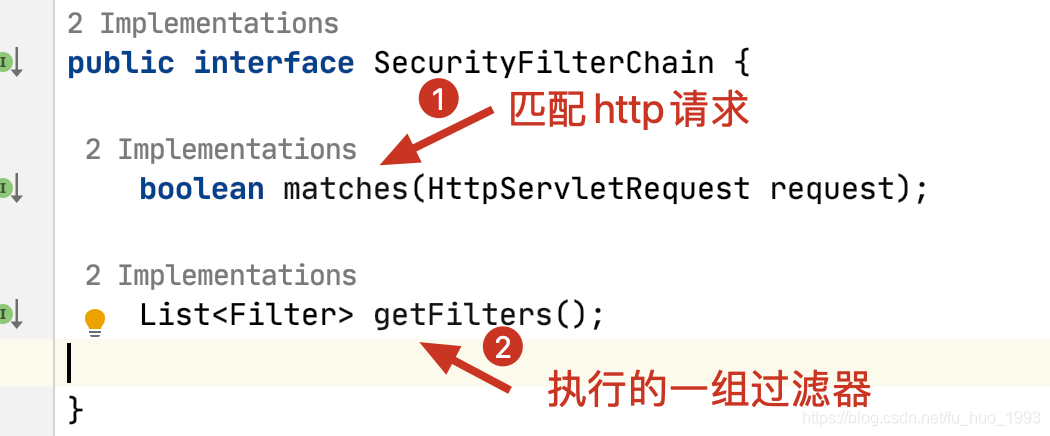
2、控制 SecurityFilterChain 的执行顺序
使用 org.springframework.core.annotation.Order 注解。
3、查看是怎样选择那个 SecurityFilterChain 的
查看 org.springframework.web.filter.DelegatingFilterProxy#doFilter方法
四、实现
1、app 端 Spring Security 的配置
package com.huan.study.security.config;

import org.springframework.context.annotation.Bean;

import org.springframework.context.annotation.Configuration;

import org.springframework.core.annotation.Order;

import org.springframework.http.HttpStatus;

import org.springframework.http.MediaType;

import org.springframework.security.authentication.TestingAuthenticationToken;

import org.springframework.security.config.annotation.web.builders.HttpSecurity;

import org.springframework.security.core.Authentication;

import org.springframework.security.core.authority.AuthorityUtils;

import org.springframework.security.core.context.SecurityContextHolder;

import org.springframework.security.web.SecurityFilterChain;

import org.springframework.security.web.authentication.UsernamePasswordAuthenticationFilter;

import org.springframework.util.StringUtils;

import javax.servlet.http.HttpServletRequest;

import java.nio.charset.StandardCharsets;

/**

 * 给 app 端用的 Security 配置

 *

 * @author huan.fu 2021/7/13 - 下午9:06

 */

@Configuration

public class AppSecurityConfig {

    /**

     * 处理 给 app(前后端分离) 端使用的过滤链

     * 以 json 的数据格式返回给前端

     */

    @Bean

    @Order(1)

    public SecurityFilterChain appSecurityFilterChain(HttpSecurity http) throws Exception {

        // 只处理 /api 开头的请求

        return http.antMatcher("/api/**")

                .authorizeRequests()

                // 所有以 /api 开头的请求都需要 ADMIN 的权限

                    .antMatchers("/api/**")

                    .hasRole("ADMIN")

                    .and()

                // 捕获到异常,直接给前端返回 json 串

                .exceptionHandling()

                    .authenticationEntryPoint((request, response, authException) -> {

                        response.setStatus(HttpStatus.UNAUTHORIZED.value());

                        response.setCharacterEncoding(StandardCharsets.UTF_8.name());

                        response.setContentType(MediaType.APPLICATION_JSON.toString());

                        response.getWriter().write("{\"message:\":\"您无权访问01\"}");

                    })

                    .accessDeniedHandler((request, response, accessDeniedException) -> {

                        response.setStatus(HttpStatus.UNAUTHORIZED.value());

                        response.setCharacterEncoding(StandardCharsets.UTF_8.name());

                        response.setContentType(MediaType.APPLICATION_JSON.toString());

                        response.getWriter().write("{\"message:\":\"您无权访问02\"}");

                    })

                    .and()

                // 用户认证

                .addFilterBefore((request, response, chain) -> {

                    // 此处可以模拟从 token 中解析出用户名、权限等

                    String token = ((HttpServletRequest) request).getHeader("token");

                    if (!StringUtils.hasText(token)) {

                        chain.doFilter(request, response);

                        return;

                    }

                    Authentication authentication = new TestingAuthenticationToken(token, null,

                            AuthorityUtils.createAuthorityList("ROLE_ADMIN"));

                    SecurityContextHolder.getContext().setAuthentication(authentication);

                    chain.doFilter(request, response);

                }, UsernamePasswordAuthenticationFilter.class)

                .build();

    }

}
2、网站端 Spring Secuirty 的配置
package com.huan.study.security.config;

import org.springframework.context.annotation.Bean;

import org.springframework.context.annotation.Configuration;

import org.springframework.core.annotation.Order;

import org.springframework.security.config.annotation.authentication.builders.AuthenticationManagerBuilder;

import org.springframework.security.config.annotation.web.builders.HttpSecurity;

import org.springframework.security.config.annotation.web.configuration.WebSecurityCustomizer;

import org.springframework.security.core.authority.AuthorityUtils;

import org.springframework.security.crypto.bcrypt.BCryptPasswordEncoder;

import org.springframework.security.web.SecurityFilterChain;

/**

 * 给 网站 应用的安全配置

 *

 * @author huan.fu 2021/7/14 - 上午9:09

 */

@Configuration

public class WebSiteSecurityFilterChainConfig {

    /**

     * 处理 给 webSite(非前后端分离) 端使用的过滤链

     * 以 页面 的格式返回给前端

     */

    @Bean

    @Order(2)

    public SecurityFilterChain webSiteSecurityFilterChain(HttpSecurity http) throws Exception {

        AuthenticationManagerBuilder authenticationManagerBuilder = http.getSharedObject(AuthenticationManagerBuilder.class);

        // 创建用户

        authenticationManagerBuilder.inMemoryAuthentication()

                .withUser("admin")

                    .password(new BCryptPasswordEncoder().encode("admin"))

                    .authorities(AuthorityUtils.commaSeparatedStringToAuthorityList("ROLE_ADMIN"))

                    .and()

                .withUser("dev")

                    .password(new BCryptPasswordEncoder().encode("dev"))

                    .authorities(AuthorityUtils.commaSeparatedStringToAuthorityList("ROLE_DEV"))

                    .and()

                .passwordEncoder(new BCryptPasswordEncoder());

        // 只处理 所有 开头的请求

        return http.antMatcher("/**")

                .authorizeRequests()

                // 所有请求都必须要认证才可以访问

                    .anyRequest()

                    .hasRole("ADMIN")

                    .and()

                // 禁用csrf

                .csrf()

                    .disable()

                // 启用表单登录

                .formLogin()

                    .permitAll()

                    .and()

                // 捕获成功认证后无权限访问异常,直接跳转到 百度

                .exceptionHandling()

                    .accessDeniedHandler((request, response, exception) -> {

                        response.sendRedirect("http://www.baidu.com");

                    })

                    .and()

                .build();

    }

    /**

     * 忽略静态资源

     */

    @Bean

    public WebSecurityCustomizer webSecurityCustomizer( ){

        return web -> web.ignoring()

                .antMatchers("/**/js/**")

                .antMatchers("/**/css/**");

    }

}
3、控制器写法
/**

 * 资源控制器

 *

 * @author huan.fu 2021/7/13 - 下午9:33

 */

@Controller

public class ResourceController {

    /**

     * 返回用户信息

     */

    @GetMapping("/api/userInfo")

    @ResponseBody

    public Authentication showUserInfoApi() {

        return SecurityContextHolder.getContext().getAuthentication();

    }

    @GetMapping("/index")

    public String index(Model model){

        model.addAttribute("username","张三");

        return "index";

    }

}
4、引入jar包
<dependency>

  <groupId>org.springframework.boot</groupId>

  <artifactId>spring-boot-starter-security</artifactId>

</dependency>

<dependency>

  <groupId>org.springframework.boot</groupId>

  <artifactId>spring-boot-starter-web</artifactId>

</dependency>

<dependency>

  <groupId>org.springframework.boot</groupId>

  <artifactId>spring-boot-starter-thymeleaf</artifactId>

</dependency>
五、实现效果
1、app 有权限访问 api
2、app 无权限访问 api
3、admin 用户有权限访问 网站 api
4、dev 用户无权限访问 网站 api
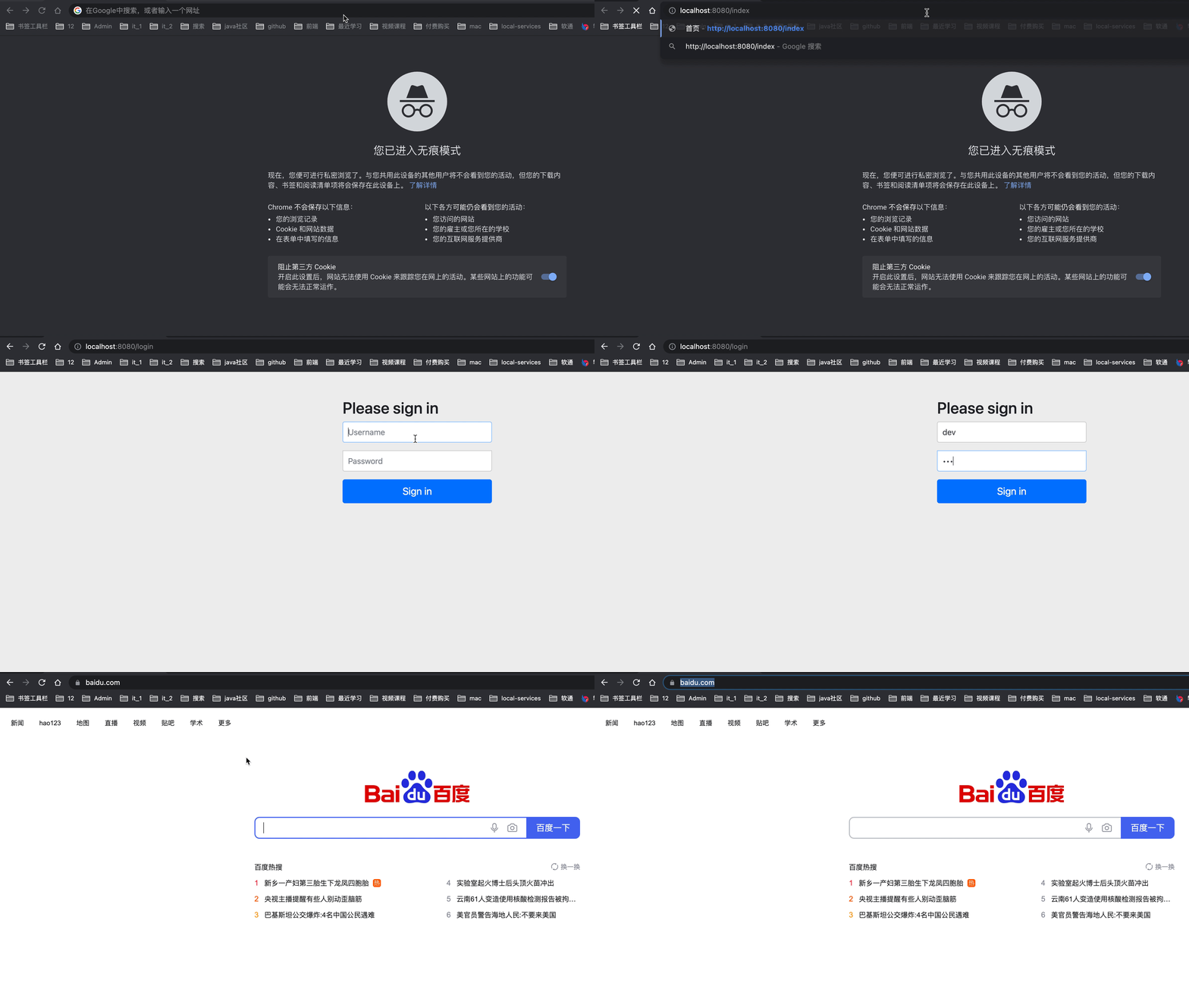
访问无权限的API直接跳转到 百度 首页。
六、完整代码
https://gitee.com/huan1993/Spring-Security/tree/master/multi-security-filter-chain
Spring Security 多过滤链的使用的更多相关文章
- Spring Security(2):过滤器链(filter chain)的介绍
上一节中,主要讲了Spring Security认证和授权的核心组件及核心方法.但是,什么时候调用这些方法呢?答案就是Filter和AOP.Spring Security在我们进行用户认证以及授予权限 ...
- Spring Security 学习总结
Spring Security Spring Security是基于Spring提供声明式安全保护的安全性框架.Spring Security提供了完整的安全性解决方案,能够在Web请求级别和方法调用 ...
- spring security基本知识(一)
spring security基本知识(一) Spring Security是为基于Spring的应用程序提供声明式安全保护的安全 性框架.Spring Security提供了完整的安全性解决方案,它 ...
- springBoot整合spring security+JWT实现单点登录与权限管理--筑基中期
写在前面 在前一篇文章当中,我们介绍了springBoot整合spring security单体应用版,在这篇文章当中,我将介绍springBoot整合spring secury+JWT实现单点登录与 ...
- Spring Security:Servlet 过滤器(三)
3)Servlet 过滤器 Spring Security 过滤器链是一个非常复杂且灵活的引擎.Spring Security 的 Servlet 支持基于 Servlet 过滤器,因此通常首先了解过 ...
- Spring学习日志之Spring Security配置
依赖引入 <dependency> <groupId>org.springframework.security</groupId> <artifactId&g ...
- Spring Security OAuth 2.0
续·前一篇<OAuth 2.0> OAuth 2.0 Provider 实现 在OAuth 2.0中,provider角色事实上是把授权服务和资源服务分开,有时候它们也可能在同一个应用中, ...
- Spring Security OAuth 2开发者指南译
Spring Security OAuth 2开发者指南译 介绍 这是用户指南的支持OAuth 2.0.对于OAuth 1.0,一切都是不同的,所以看到它的用户指南. 本用户指南分为两部分,第一部分为 ...
- Spring Security 快速了解
在Spring Security之前 我曾经使用 Interceptor 实现了一个简单网站Demo的登录拦截和Session处理工作,虽然能够实现相应的功能,但是无疑Spring Security提 ...
随机推荐
- ClientValidationFunction
CustomValidator.ClientValidationFunction 属性 获取或设置用于验证的自定义客户端脚本函数的名称. 命名空间: System.Web.UI.WebContro ...
- Operator 示例:使用 Redis 部署 PHP 留言板应用程序
「Kubernetes 官方示例:使用 Redis 部署 PHP 留言板应用程序」Operator 化. 源码仓库:https://github.com/jxlwqq/guestbook-operat ...
- HCNP Routing&Switching之IS-IS路由渗透和开销
前文我们了解了IS-IS邻居建立过程.LSDB同步.拓扑计算和路由的形成:回顾请参考https://www.cnblogs.com/qiuhom-1874/p/15265698.html:今天我们来聊 ...
- Java数学函数的使用
Java的Math类中提供了一系列关于数学运算的静态方法,常见的运算整理如下[1] 算数运算 Math.sqrt() // 平方根 Math.cbrt() // 立方根 Math.pow(a, b) ...
- opencv官宣
opencv官方文档地址 https://docs.opencv.org/master/ 安装opencv(cv2)官方地址 https://pypi.org/project/opencv-pytho ...
- ASP.NET Core 中间件的使用(三):全局异常处理机制
前言 我们经常听到"秒修复秒上线",觉得很厉害的样子. 其实不然,这只是一个调侃而已,出现问题的方式很多(逻辑漏洞.代码异常.操作方式不正确等). 我们今天来说代码异常问题怎么快速 ...
- Spring技术内幕笔记2--我懒不写了哈哈哈哈。
目录 1.1 关于IOC容器设计的线路区别 1.1.1 BeanFactory 1.1.2 ApplicationContext 2.1 FileSystemXmlApplicationContext ...
- SpringBoot入门报错 Whitelabel Error Page的总结
刚入门SpringBoot,编写helloControl类,去访问本地端口,无缘无故报了这个错误 Whitelabel Error Page 总结了下,目前我碰到的有三种会导致这种情况 1.当你的 S ...
- java8的新特性之lambda表达式和方法引用
1.1. Lambda表达式 通过具体的实例去体会lambda表达式对于我们代码的简化,其实我们不去深究他的底层原理和背景,仅仅从用法上去理解,关注两方面: lambda表达式是Java8的一个语法糖 ...
- Rclone使用教程 - 挂载Onedrive和谷歌网盘
1. 介绍 Rclone 是一个用于多个云平台之间同步文件和目录的命令行工具,其支持多种运营商网盘. 官网网址:https://rclone.org 开源地址:https://github.com/n ...