
vue.js 配置axios 用来ajax请求数据
* 用npm 安装 axios
切换到项目的根目录
npm install --save axios vue-axios
* 在vue的入口文件./src/main.js 中引入axios, 添加2行代码
// axios

import axios from 'axios'

Vue.prototype.$http = axios
* ./src/main.js 入口文件如下:
// The Vue build version to load with the `import` command

// (runtime-only or standalone) has been set in webpack.base.conf with an alias.

import Vue from 'vue'

import App from './App'

import router from './router'

// axios

import axios from 'axios'

Vue.prototype.$http = axios

Vue.config.productionTip = false

/* eslint-disable no-new */

new Vue({

  el: '#app',

  router,

  components: { App },

  template: '<App/>'

})
* 生成数据文件./assets/data/people.json
{"people":[{"id":1,"name":"Jack","age":30,"gender":"Male"},{"id":2,"name":"Bill","age":26,"gender":"Male"},{"id":3,"name":"Tracy","age":22,"gender":"Female"},{"id":4,"name":"Chris","age":36,"gender":"Male"}]}
为什么不能直接在组件中访问 ../assets/data/people.json?
* php生成数据 (需要跨域CORS)
<?php

/**

 * Test axios=> people.json

 */

header('Content-Type:text/json; charset=utf-8');

header('Access-Control-Allow-Origin:*');

header('Access-Control-Allow-Methods:GET');

header('Access-Control-Allow-Headers:x-requested-with,content-type');

$data = new \StdClass();

$data->people = [

    [

        "id" => 1,

        "name" => "Jack",

        "age" => 30,

        "gender" => "Male"

    ],

    [

        "id" => 2,

        "name" => "Bill",

        "age" => 26,

        "gender" => "Male"

    ],

    [

        "id" => 3,

        "name" => "Tracy",

        "age" => 22,

        "gender" => "Female"

    ],

    [

        "id" => 4,

        "name" => "Chris",

        "age" => 36,

        "gender" => "Male"

    ],

    [

        "id" => 5,

        "name" => "guanmengying",

        "age" => 29,

        "gender" => "Female"

    ]

];

echo json_encode($data, true);
* 启动php接口
php -S 0.0.0.0:8081
* 测试这个接口 可以用浏览器访问http://localhost:8081/person.php
或者 命令行 curl http://localhost:8081/people.php
输出:
{"people":[{"id":1,"name":"Jack","age":30,"gender":"Male"},{"id":2,"name":"Bill","age":26,"gender":"Male"},{"id":3,"name":"Tracy","age":22,"gender":"Female"},{"id":4,"name":"Chris","age":36,"gender":"Male"},{"id":5,"name":"guanmengying","age":29,"gender":"Female"}]}
* 路由文件 ./src/router/index.js
根据默认的HelloWorld照葫芦画瓢即可
import Vue from 'vue'

import Router from 'vue-router'

import HelloWorld from '@/components/HelloWorld'

import person from '@/components/person'

Vue.use(Router)

export default new Router({

  routes: [

    {

      path: '/',

      name: 'HelloWorld',

      component: HelloWorld

    },

    {

      path: '/person',

      name: 'person',

      component: person

    }

  ]

})
* 模板文件 ./src/components/person.vue
<template>

<div class="wrapper">

   <fieldset>

                <legend>

                    Create New Person

                </legend>

                <div class="form-group">

                    <label>Name:</label>

                    <input type="text" v-model="newPerson.name"/>

                </div>

                <div class="form-group">

                    <label>Age:</label>

                    <input type="text" v-model="newPerson.age"/>

                </div>

                <div class="form-group">

                    <label>gender:</label>

                    <select v-model="newPerson.gender">

                    <option value="Male">Male</option>

                    <option value="Female">Female</option>

                </select>

                </div>

                <div class="form-group">

                    <label></label>

                    <button @click="createPerson">Create</button>

                </div>

        </fieldset>

        <table>

            <thead>

                <tr>

                    <th>Name</th>

                    <th>Age</th>

                    <th>gender</th>

                    <th>Delete</th>

                </tr>

            </thead>

            <!-- 循环必须指定key -->

            <tbody>

                <tr v-for="(person) in people" :key="person.id">

                    <td>{{ person.name }}</td>

                    <td>{{ person.age }}</td>

                    <td>{{ person.gender }}</td>

                    <td :class="'text-center'">

                       <!-- <button @click="deletePerson($index)">Delete</button> -->

                       <button @click="deletePerson(person.id)">Delete</button>

                    </td>

                </tr>

            </tbody>

        </table>

</div>

</template>

<style>

#app {

  margin-top: 10px;

}

table {

  margin: 20px auto;

}

</style>

<script>

export default {

  name: "person",

  created: function() {

    var v = this;

    v.$http

      .get("http://localhost:8081/people.php")

      .then(function(resp) {

        v.people = resp.data.people;

      })

      .catch(function(error) {

        document.write(error.toString());

      });

  },

  data() {

    return {

      newPerson: {

        name: "",

        age: 0,

        gender: "Male"

      },

      people: []

    };

  },

  methods: {

    createPerson: function() {

      this.people.push(this.newPerson);

      // 添加完newPerson对象后,重置newPerson对象

      this.newPerson = { name: "", age: 0, gender: "Male" };

    },

    deletePerson: function(id) {

      // find index

      var index, person;

      person = this.people.find(function(person, idx) {

        var matchID = person.id === id;

        if (matchID) {

          index = idx;

        }

        return matchID;

      });

      // 删一个数组元素

      this.people.splice(index, 1);

    }

  }

};

</script>
主要的变更:
created: function() {

    var v = this;    // vue instance

    v.$http

      .get("http://localhost:8081/people.php")  // xhr

      .then(function(resp) {

        v.people = resp.data.people;  // bind data

      })

      .catch(function(error) {

        document.write(error.toString());

      });

  },

  data() {

    return {

      // ...

      people: []  // empty array. null can cause template compiling error

    };

  },
* 浏览器访问http://localhost:8080/#/person
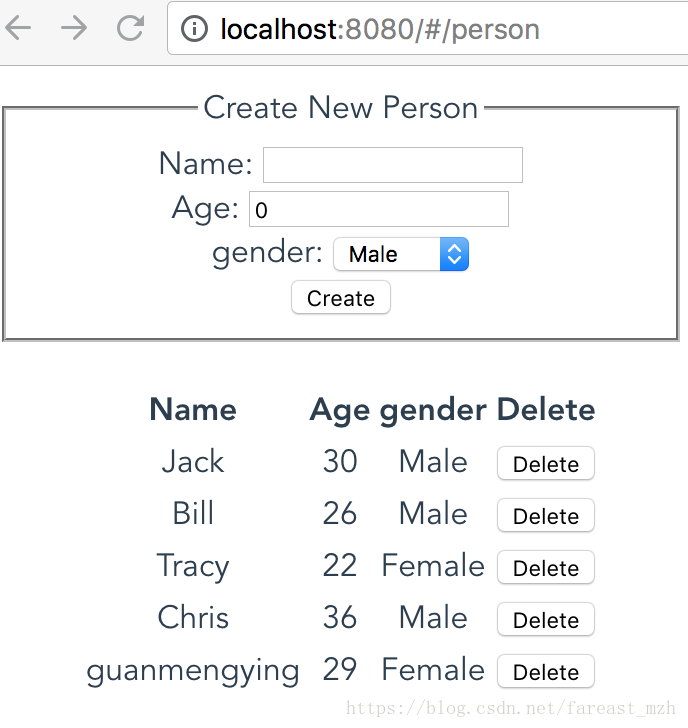
csdn博客中插入 emoji 会导致后面的内容失效,要重新编辑。
https://emojipedia.org/smiling-face-with-sunglasses/ 所以不要用emoji
CSDN 的这个文章丢失了, 转存到这里。
而且在csdn创建的所有标签为vue的文章也都没有了。
vue.js 配置axios 用来ajax请求数据的更多相关文章
- 使用Vue.js和Axios从第三方API获取数据 — SitePoint
更多的往往不是,建立你的JavaScript应用程序时,你会想把数据从远程源或消耗一个[ API ](https:/ /恩.维基百科.org /维基/ application_programming_ ...
- vue使用element Transfer 穿梭框实现ajax请求数据和自定义查询
vue使用element Transfer 穿梭框实现ajax请求数据和自定义查询 基于element Transfer http://element-cn.eleme.io/#/zh-CN/comp ...
- JS 点击元素发ajax请求 打开一个新窗口
JS 点击元素发ajax请求 打开一个新窗口 经常在项目中会碰到这样的需求,点击某个元素后,需要发ajax请求,请求成功以后,开发需要把链接传给前端(或者说请求成功后打开新窗口),前端需要通过新窗口打 ...
- js中使用队列发送ajax请求
最近,项目中需要按照先后顺序发送ajax请求,并且在一次请求结束后才能发起下一次,不然就会导致逻辑错误. 解决办法是定义一个数组,保存ajax请求数据. 以下使用extjs4定义一个类 Ext.def ...
- 使用Python的Flask框架,结合Highchart,动态渲染图表(Ajax 请求数据接口)
参考链接:https://www.highcharts.com.cn/docs/ajax 参考链接中的示例代码是使用php写的,这里改用python写. 需要注意的地方: 1.接口返回的数据格式,这个 ...
- Ajax请求数据的两种方式
ajax 请求数据的两种方法,有需要的朋友可以参考下. 实现ajax 异步访问网络的方法有两个.第一个是原始的方法,第二个是利用jquery包的 原始的方法不用引入jquery包,只需在html中编写 ...
- session失效,使用ajax请求数据被拦截,此时正常的处理逻辑是跳到登录界面,而不是界面没有变化(java推断是否是ajax请求)
在登录过滤器中.推断请求是ajax请求还是超链接或者地址栏变化的请求 if (httpServletReq.getHeader("x-requested-with") != nul ...
- 关于ajax请求数据,并将数据赋值给全局变量的一些解决方法
在使用ajax请求数据是,开始的时候是打算将ajax的数据取出,并赋予给全局变量,但是在实际编码过程中发现并不能将数据赋予给最开始定义的全局变量,出现这个问题的原因是由于ajax异步加载的原因,所以只 ...
- h5-localStorage实现缓存ajax请求数据
使用背景:要实现每次鼠标hover“能力雷达”,则显示能力雷达图(通过ajax请求数据实现雷达图数据显示),所以每次hover都去请求ajax会影响性能,因此这里要用到本地缓存. 实现: 此处是通过传 ...
随机推荐
- S3C2440—3.用点亮LED来熟悉裸机开发的详细流程
文章目录 一.硬件知识 1.LED原理图 2.芯片手册 Ⅰ.找LED原理图 Ⅱ.找对应引脚 Ⅲ.在芯片手册中查找引脚信息 Ⅳ.查看寄存器说明 Ⅴ.配置寄存器 二.S3C2440框架与启动过程 三.要用 ...
- comm tools
RTL:寄存器传输级别 LRM:语言参考手册 FSM:有限状态机 EDIF:电子数据交换格式 LSO:库搜索目录 XCF:XST 约束条件 1. par -ol. high 命令总是 '-'开头,参 ...
- redis知识点及常见面试题
redis知识点及常见面试题 参考: https://zm8.sm-tc.cn/?src=l4uLj4zF0NCIiIjRnJGdk5CYjNGckJLQrIqNiZaJnpOWjIvQno2Llpy ...
- 03.SpringMVC之器
整体结构介绍 在Servlet的继承结构中一共有5个类,GenericServlet和HttpServlet在java中剩下的三个类HttpServletBean.FrameworkServlet和D ...
- PQGrid商业化的表格组件
官网地址https://paramquery.com/pro/grid 右侧导航条有目录哟,看着更方便 快速入门 表格构建 API简单介绍 主要研究功能介绍 快速入门 ParamQuery Grid ...
- 刷题-力扣-剑指 Offer 42. 连续子数组的最大和
剑指 Offer 42. 连续子数组的最大和 题目链接 来源:力扣(LeetCode) 链接:https://leetcode-cn.com/problems/lian-xu-zi-shu-zu-de ...
- Go进阶--httptest
目录 基本使用 扩展使用 接口context使用 模拟调用 测试覆盖率 参考 单元测试的原则,就是你所测试的函数方法,不要受到所依赖环境的影响,比如网络访问等,因为有时候我们运行单元测试的时候,并没有 ...
- rabbitMq镜像集群
rabbitMq延迟投递的方案 1 把消息记录到数据路,通过定时器进行刷新 2 TTL 加上死信队列 :通过路由把过期的消息同步到死信队列,通过死信队列的消费者进行消费 3
- linux centos7 模拟垃圾回收站功能以及 crontab 定时任务的设置
2021-08-04 1. 安装 环境:CentOS Linux release 7.5.1804 (Core) # 将 saferm.sh 拷贝到 /bin 目录下面 git clone git:/ ...
- Android中TextView和EditView常用属性设置
Android中TextView和EditView常用属性设置 点击跳转