
apache kafka & CDH kafka源码编译
Apache kafka编译
前言
github网站kafka项目的README.md有关于kafka源码编译的说明
github地址:https://github.com/apache/kafka
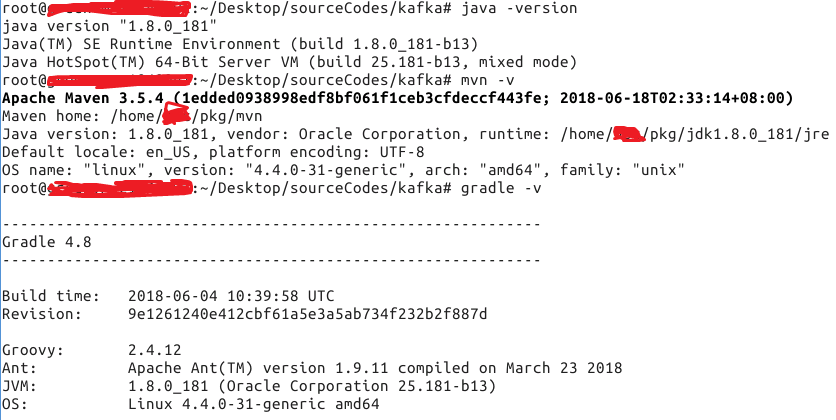
编译环境准备 java maven gradle
编译
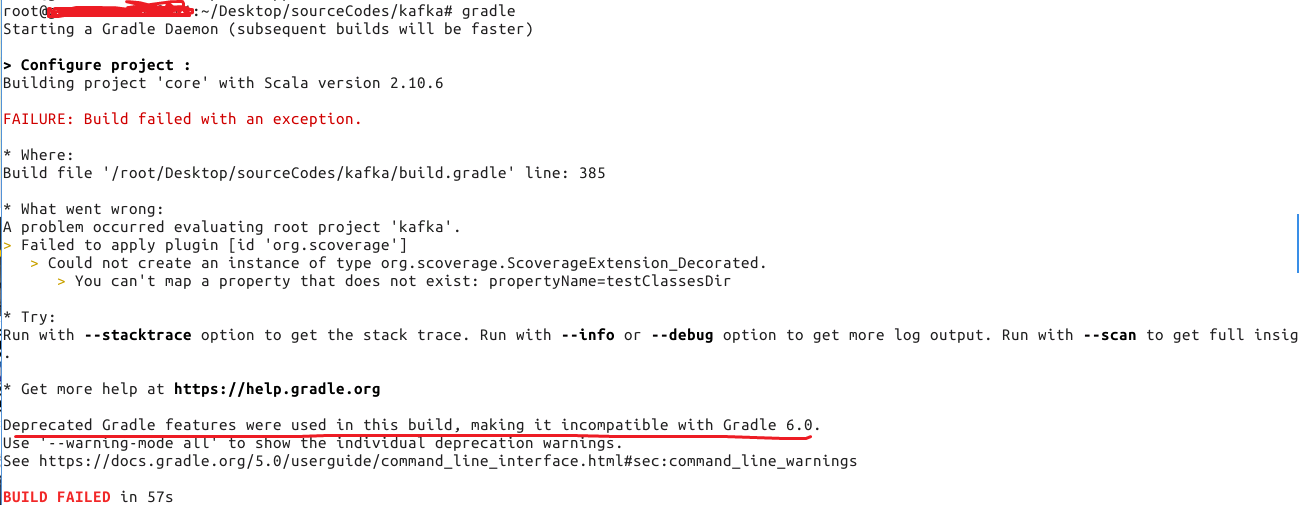
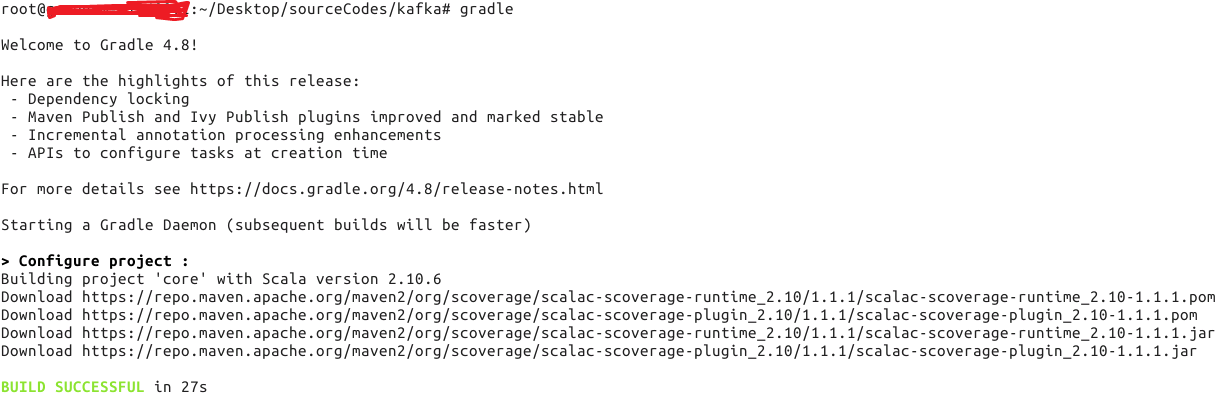
失败原因:gradle版本太高,降低到4.8就ok了
编译(执行如下命令)
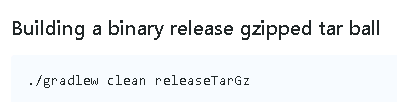
会在kafka/core/build/distributions目录下生成需要的tar包

CDH kafka编译
源码还是从github获取
git clone https://github.com/cloudera/kafka.git
注意:修改gradle.properties中的mavenUrl,因为maven.jenkins.cloudera.com是私有的,需要改成公有的
# Licensed to the Apache Software Foundation (ASF) under one or more

# contributor license agreements.  See the NOTICE file distributed with

# this work for additional information regarding copyright ownership.

# The ASF licenses this file to You under the Apache License, Version 2.0

# (the "License"); you may not use this file except in compliance with

# the License.  You may obtain a copy of the License at

#

#    http://www.apache.org/licenses/LICENSE-2.0

#

# Unless required by applicable law or agreed to in writing, software

# distributed under the License is distributed on an "AS IS" BASIS,

# WITHOUT WARRANTIES OR CONDITIONS OF ANY KIND, either express or implied.

# See the License for the specific language governing permissions and

# limitations under the License.

group=org.apache.kafka

# NOTE: When you change this version number, you should also make sure to update

# the version numbers in tests/kafkatest/__init__.py and kafka-merge-pr.py.

cdhversion=6.1.

version=2.0.-cdh6.1.0

scalaVersion=2.11.

task=build

org.gradle.jvmargs=-Xmx1024m -Xss2m

mavenUrl=https://repository.cloudera.com/artifactory/cloudera-repos

#http://maven.jenkins.cloudera.com:8081/artifactory/cdh-snapshot-local

mavenSnapshotUrl=http://maven.jenkins.cloudera.com:8081/artifactory/cdh-snapshot-local

mavenArtifactoryUrl=http://maven.jenkins.cloudera.com:8081/artifactory/cloudera-mirrors

mavenUsername=

mavenPassword=
之后的编译过程参考apache kafka编译打包命令!
结果:

apache kafka & CDH kafka源码编译的更多相关文章
- centos 6.5源码编译安装subversion 1.8.10
一.简介 CentOS 6.5的yum源可以安装的SVN客户端版本太低了,1.6.11,所以需要升级到1.8.10,而官网有没有找到1.8.10的安装包,只能选择源码编译安装. 二.安装步骤 参考官网 ...
- Maven编译并打包Mahout CDH版源码
目录 1. 问题描述 最近在使用Mahout里的推荐算法进行实验,由于业务需求,需要修改Mahout源码,将原本输出到HDFS上的结果输出到HBase中.由于Mahout发布的源码都是Maven项目, ...
- 1、Spark 2.1 源码编译支持CDH
目前CDH支持的spark版本都是1.x, 如果想要使用spark 2x的版本, 只能编译spark源码生成支持CDH的版本. 一.准备工作 找一台Linux主机, 由于spark源码编译会下载很多的 ...
- Apache Spark源码走读之9 -- Spark源码编译
欢迎转载,转载请注明出处,徽沪一郎. 概要 本来源码编译没有什么可说的,对于java项目来说,只要会点maven或ant的简单命令,依葫芦画瓢,一下子就ok了.但到了Spark上面,事情似乎不这么简单 ...
- 基于cdh5.10.x hadoop版本的apache源码编译安装spark
参考文档:http://spark.apache.org/docs/1.6.0/building-spark.html spark安装需要选择源码编译方式进行安装部署,cdh5.10.0提供默认的二进 ...
- Linux学习日记——源码编译Apache
[本文为笔者在学习Linux 下的软件安装时,尝试使用源码安装Apache 的过程,事后进行一个小小的总结,发现错误望指正.] 一.典型的源码编译安装软件的过程包括以下3步: 1) 运行 config ...
- apache源码编译安装
源码安装apche 下载apache的源码包文件 访问http://mirror.bit.edu.cn/apache/httpd/,复制如下gz文件的链接地址,并使用wget下载到本地 wget -P ...
- 源码编译路径错误导致的Apache 无法重启问题解决方法
问题现象: 第一次源码编译安装Apache设置路径错误,安装到/usr/local/src/ 目录下了. 删掉该目录下的安装文件,重新编译安装到/usr/local/目录下 重启apache服务时报这 ...
- Apache源码编译安装脚本
Apache是开源的的.最流行的Web服务器软件之一,它快速.可靠并且可通过简单的API扩充,将Perl/Python/PHP等解释器编译到服务器中.Apache的模块超多,以及具有运行稳定,强大 ...
随机推荐
- 网络编程之套接字(tcp)
经过几天高强度的学习,对套接字的编程有了初步的认识,今天对这几天所学的知识总结一下:首先简单阐述一下tcp通信: TCP提供的是可靠的,顺序的,以及不会重复的数据传输,处理流控制,由于TCP是可靠的, ...
- js 数据加载loading封装
<!-- 模态框(Modal) --> <div class="modal fade" id="qst_loading" tabindex=& ...
- swoft 源码解读【转】
官网: https://www.swoft.org/ 源码解读: http://naotu.baidu.com/file/814e81c9781b733e04218ac7a0494e2a?toke ...
- 2018 Unite大会——《使用UPA工具优化项目》演讲实录
2018年5月11日至13日,腾讯WeTest与Unity联合打造的移动游戏性能分析工具(Unity Performance Analysis,以下称为UPA)正式亮相2018 Unite大会,为Un ...
- 超实用的JavaScript代码段 Item3 --图片轮播效果
图片轮播效果 图片尺寸 统一设置成:490*170px; 一.页面加载.获取整个容器.所有放数字索引的li及放图片列表的ul.定义放定时器的变量.存放当前索引的变量index 二.添加定时器,每隔2秒 ...
- 解决python2.x用urllib2证书验证错误, _create_unverified_context
解决以下错误: 错误1:AttributeError: 'module' object has no attribute '_create_unverified_context', 错误2:URLEr ...
- 【BZOJ 4652】【NOI 2016】循环之美
题目连接: 传送 题解: 真是一道好题…… 一: 一个分数$\frac{x}{y}$完全循环当其第一次出现时,当且仅当y与k互质,x与y互质,且y不等于1. 整数情况下y一定为1,即也满足以上判断. ...
- 【构造】Bzoj1432[ZJOI2009]Function
Description Input 一行两个整数n; k. Output 一行一个整数,表示n 个函数第k 层最少能由多少段组成. Sample Input 1 1 Sample Output 1 ...
- HTTP VISUAL HTTP请求可视化工具、HTTP快照工具(公测)
先啰嗦几句,最近工作比较忙,再加上自己又开设了一个小站(简单点),没时间写博客,都快憋坏了,趁着周末有时间,抓紧来一篇~ HTTP VISUAL是一款HTTP可视化工具,它可以记录HTTP请求,包括请 ...
- 关于” 记一次logback传输日志到logstash根据自定义设置动态创建ElasticSearch索引” 这篇博客相关的优化采坑记录
之前写过一篇博客是关于记录日志的简单方式的 主要就是 应用->redis->logstash->elasticsearch 整个流程的配置方法和过程的 虽然我们部分线上应用使用 ...