
ssh整合之四单独搭建struts的运行环境
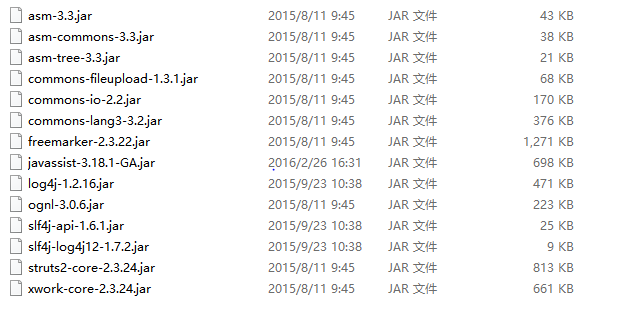
1.导入struts的基本jar包
2.在web.xml中配置我们struts的核心控制器StrutsPrepareAndExecuteFilter
<?xml version="1.0" encoding="UTF-8"?>

  <web-app xmlns:xsi="http://www.w3.org/2001/XMLSchema-instance" xmlns="http://java.sun.com/xml/ns/javaee" xsi:schemaLocation="http://java.sun.com/xml/ns/javaee   http://java.sun.com/xml/ns/javaee/web-app_2_5.xsd" id="WebApp_ID" version="2.5">

    <display-name>ssh_spring</display-name>

    <filter>

      <filter-name>ssh</filter-name>

      <filter-class>org.apache.struts2.dispatcher.ng.filter.StrutsPrepareAndExecuteFilter</filter-class>

    </filter>

    <filter-mapping>

      <filter-name>ssh</filter-name>

      <url-pattern>/*</url-pattern>

    </filter-mapping>

    <welcome-file-list>

      <welcome-file>index.html</welcome-file>

      <welcome-file>index.htm</welcome-file>

      <welcome-file>index.jsp</welcome-file>

      <welcome-file>default.html</welcome-file>

      <welcome-file>default.htm</welcome-file>

      <welcome-file>default.jsp</welcome-file>

    </welcome-file-list>

  </web-app>
3.编写我们的CustomerAction
package com.itheima.action;

import com.itheima.entity.Customer;

import com.opensymphony.xwork2.ActionSupport;

import com.opensymphony.xwork2.ModelDriven;

public class CustomerAction extends ActionSupport implements ModelDriven<Customer> {

    private Customer customer = new Customer();

    public Customer getModel() {

        return customer;

    }

    //进入添加页面

    public String addCustomerUI(){

        return this.SUCCESS;

    }

    //进入列表页面

    public String getAllCustomer(){

        return this.SUCCESS;

    }

}
4.编写我们的struts的核心配置文件struts.xml
<!DOCTYPE struts PUBLIC

"-//Apache Software Foundation//DTD Struts Configuration 2.3//EN"

"http://struts.apache.org/dtds/struts-2.3.dtd">

<struts>

  <package name="customer" extends="struts-default" namespace="/customer">

  <!--

  1.class: 全限定类名

  反射的请示创建动作类对象

  class:需要修改为容器中动作类的bean的唯一标识

  -->

    <action name="addCustomerUI" class="com.itheima.action.CustomerAction" method="addCustomerUI">

      <result name="success">/jsp/customer/add.jsp</result>

    </action>

    <action name="getAllCustomer" class="com.itheima.action.CustomerAction" method="getAllCustomer">

      <result name="success">/jsp/customer/list.jsp</result>

    </action>

  </package>

</struts>
5.导入我们的jsp页面,并对我们的jsp页面中内容进行修改
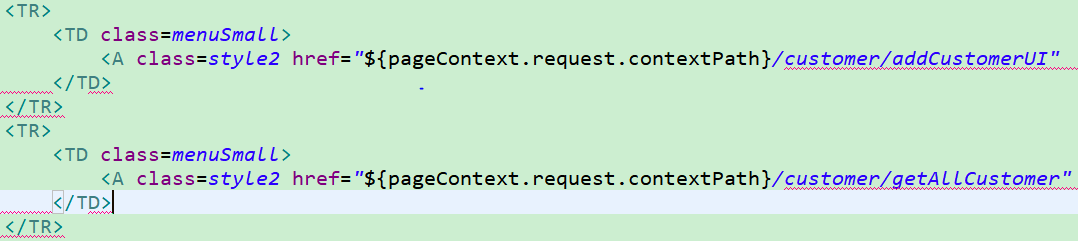
完了我们把我们的项目部署到tomcat上,然后访问地址 http://localhost:8080/ssh_spring/

这样的话,我们的struts的单独运行环境就搭建好了,每天进步一点点!
ssh整合之四单独搭建struts的运行环境的更多相关文章
- windows下9款一键快速搭建PHP本地运行环境的好工具(含php7.0环境)
推荐几款一键快速搭建PHP本地运行环境的好工具(含php7.0及apache,nigix,mysql) 首推phpstudy2016和wampServer3.0.6 理由支持php7.0 目前 ...
- linux(ubuntu) 搭建java程序运行环境
一:简介 ubuntu 系统的和linux差不多,我们需要在系统上搭建java程序运行环境,需要安装jdk,mysql这两个软件,tomcat是绿色版,直接通过taz -zxvf tomcat 就可以 ...
- Docker搭建Java Web运行环境
1. 前提条件 安装了Docker的64位Linux 操作系统 Linux操作系统镜像 Linux版本的JDK压缩包 Linux版本的Tomcat压缩包 2. 启动容器 容器是在镜像的基础上来运行的, ...
- 搭建ASP JSP运行环境
搭建JSP 服务器 Java + HTML 的运行环境 服务端搭建ASP.NET运行环境
- 使用 Docker 搭建 Java Web 运行环境
黄勇的博客 Docker 是 2014 年最为火爆的技术之一,几乎所有的程序员都听说过它.Docker 是一种“轻量级”容器技术,它几乎动摇了传统虚拟化技术的地位,现在国内外已经有越来越多的公司开始逐 ...
- 转:使用 Docker 搭建 Java Web 运行环境
原文来自于:http://www.codeceo.com/article/docker-java-web-runtime.html Docker 是 2014 年最为火爆的技术之一,几乎所有的程序员都 ...
- [scrapy]使用Anaconda来搭建scrapy的运行环境。官方推荐方法。
1.官方文档推荐. 2.一般情况下多数人使用框架的时候使用的是,安装pywin32,和openssl来搭建scrapy的运行环境.但是由于,在这样搭建环境中会遇到各种各样的问题,诸如:下载的版本有问题 ...
- 使用 Docker 搭建 Java Web 运行环境(转)
原文 http://www.importnew.com/21798.html Docker 是 2014 年最为火爆的技术之一,几乎所有的程序员都听说过它.Docker 是一种“轻量级”容器技术,它几 ...
- VSCode搭建Java开发运行环境
用了一段时间VSCode,觉得还可以,想用VSCode整合不同的开发语言,于是研究了一下利用VSCode搭建Java环境.开发Java程序.网上这方面的帖子有不少,但每人的经历不同,把自己的经历记下来 ...
随机推荐
- 快递查询 C#
//电商ID private string EBusinessID = "1257164"; //电商加密私钥,快递鸟提供,注意保管,不要泄漏 private string App ...
- Python3 多线程编程(thread、threading模块)
threading是对thread的封装. 1.开启线程: t=threading.Thread(target=sayhi,args=('hh',)) t.start() 或者先建一个Thread的继 ...
- IE常见的兼容处理
IE常见的兼容处理 1. 禁用IE兼容模式 为了保证IE能够使用最新渲染模式而不是兼容模式,在html文档头部应加入以下代码: <head> <meta charset=" ...
- Greetings
1,Common English Greetings Hey! Hey man! Hey girl! Hi. How's it going? How are you doing? What's up? ...
- Go语言学习1
1.go标示符:非空字母或者数字串,第一个必须是字母,不能为关键字,可以是下划线. 2.go关键字: break,default,func,interface,select, case,defer,g ...
- Bootstrap3 datetimepicker控件的使用
Bootstrap3 日期+时间选择控件 1.支持日期选择,格式设定 2.支持时间选择 3.支持时间段选择控制 4.支持中文 官网地址:http://eonasdan.github.io/bootst ...
- [css 揭秘]:CSS编码技巧
CSS编码技巧 我的github地址:https://github.com/FannieGirl/ifannie 喜欢的给我一个星吧 尽量减少代码重复 尽量减少改动时需要编辑的地方 当某些值相互依赖时 ...
- 深入理解C++ new/delete, new []/delete[]动态内存管理
在C语言中,我们写程序时,总是会有动态开辟内存的需求,每到这个时候我们就会想到用malloc/free 去从堆里面动态申请出来一段内存给我们用.但对这一块申请出来的内存,往往还需要我们对它进行稍许的“ ...
- nginx session 配置失效解决
nginx 反向代理后台web服务器session path导致的session 失效,特此总结下配置方法: 配置如下: location ^~ /2016tyjf_dev/djwechat { pr ...
- C 连接mysql VC的步骤
初学C,看到C 连接mysql的教程不是很多,遇到很多的问题,看过许多盟友的解决方法,有点模糊(对我这个菜鸟来说),下面贴出具体步骤,一起学习: 1.C连接mysql的方法:C ,C ++ ,ODBC ...