
SpringBoot配置activemq消息队列
1.配置pom相关依赖
        <dependency>

            <groupId>org.springframework.boot</groupId>

            <artifactId>spring-boot-starter-activemq</artifactId>
       <version>1.5.4.RELEASE</version>
     </dependency>
2.在application.yml配置文件下配置相关信息
 spring:          #表示该配置直接为Spring容器负责处理
  jms:

    pub-sub-domain: false     #配置消息的类型,如果是true则表示为topic消息,如果为false表示Queue消息

  activemq:

    user: admin     #连接用户名

    password: admin   #连接密码

    broker-url: tcp://0.0.0.0:61616         #消息组件的连接主机信息
3.创建消费者代码
import org.springframework.jms.annotation.JmsListener;

import org.springframework.stereotype.Service;

@Service

public class MessageConsumerService {

    @JmsListener(destination = "mldn.msg.queue")

    public void receiveMessage(String text) {//进行消息接收处理

            System.err.println("接受消息"+text);

    }

}
4.建立生产者代码
生产者接口:
public interface ImessageProducerService {

        public void sendMessage(String msg);

}
生产者实现:
import javax.annotation.Resource;

import javax.jms.Queue;

import org.springframework.jms.core.JmsMessagingTemplate;

import org.springframework.stereotype.Service;

import cn.mldn.microboot.producer.ImessageProducerService;

@Service

public class MessageProducerServiceImpl implements ImessageProducerService {

    @Resource

    private JmsMessagingTemplate jmsMessagingTemplate;

    @Resource

    private Queue queue;

    @Override

    public void sendMessage(String msg) {

        this.jmsMessagingTemplate.convertAndSend(this.queue,msg);;

    }

}
5.建立测试类
import javax.annotation.Resource;

import org.junit.Test;

import org.junit.runner.RunWith;

import org.springframework.boot.test.context.SpringBootTest;

import org.springframework.test.context.junit4.SpringJUnit4ClassRunner;

import org.springframework.test.context.web.WebAppConfiguration;

import cn.mldn.microboot.StartSpringBootMain;

import cn.mldn.microboot.producer.ImessageProducerService;

@SpringBootTest(classes = StartSpringBootMain.class)

@RunWith(SpringJUnit4ClassRunner.class)

@WebAppConfiguration

public class TestActiveMQ {

    @Resource

    private ImessageProducerService messageProducer;

    @Test

    public void testSend() throws Exception{

        for (int i = 0; i < 103; i++) {

            this.messageProducer.sendMessage("mldn-"+i);

        }

    }

}
6.增加消息Queue的配置
import javax.jms.Queue;

import org.apache.activemq.command.ActiveMQQueue;

import org.springframework.context.annotation.Bean;

import org.springframework.context.annotation.Configuration;

import org.springframework.jms.annotation.EnableJms;

@Configuration

@EnableJms

public class ActiveMQConfig {

    @Bean

    public Queue queue() {

        return new ActiveMQQueue("mldn.msg.queue");

    }

}
7.启动activemq的服务,该服务可自行下载,我这里下载了一个Windows版本的,直接启动就好。

8.登录activmq,http://localhost:8161/admin/,用户名密码采用默认的,admin、admin。也可以在activmq的配置文件配置用户
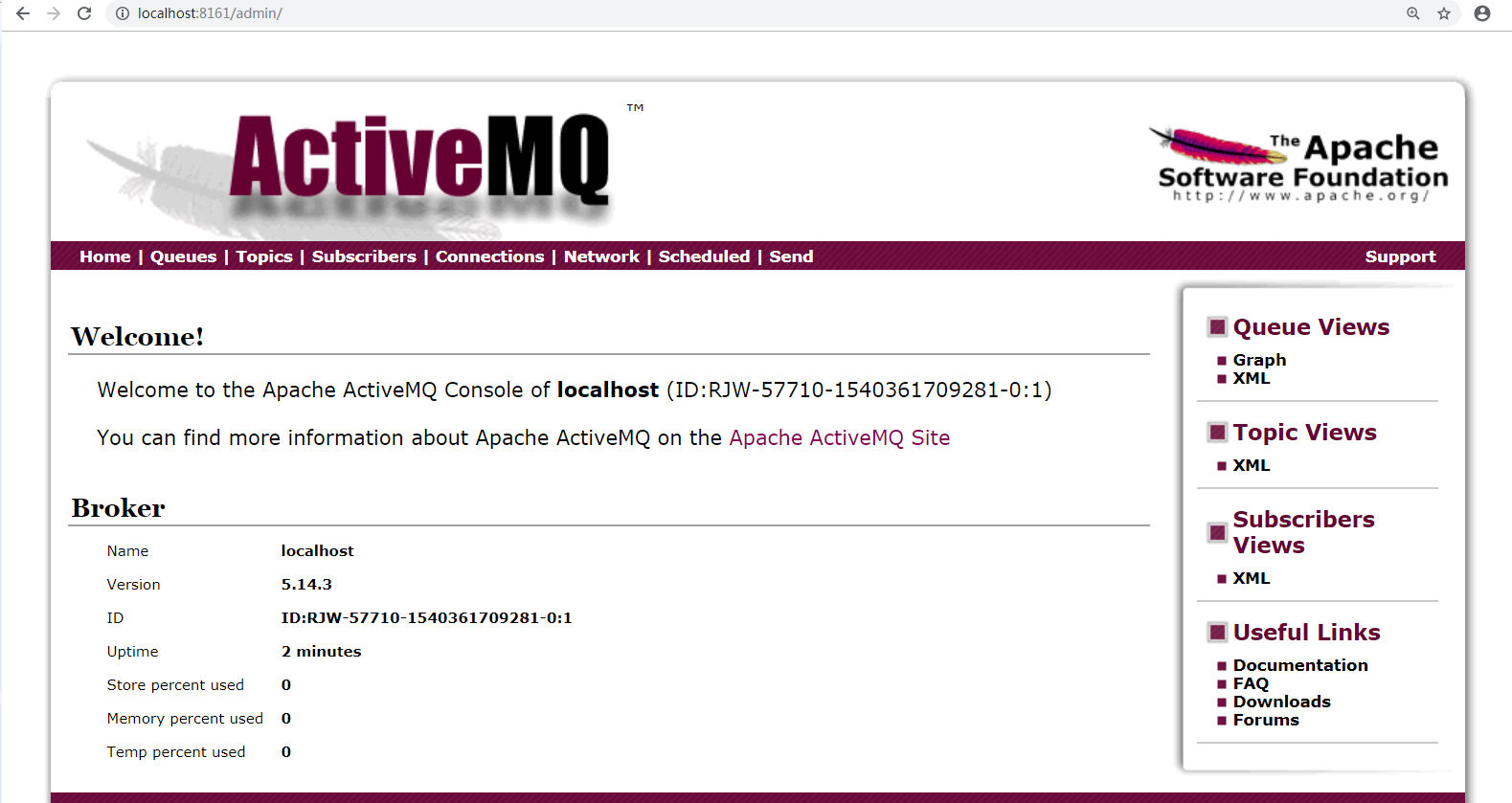
这样我们就成功登录。
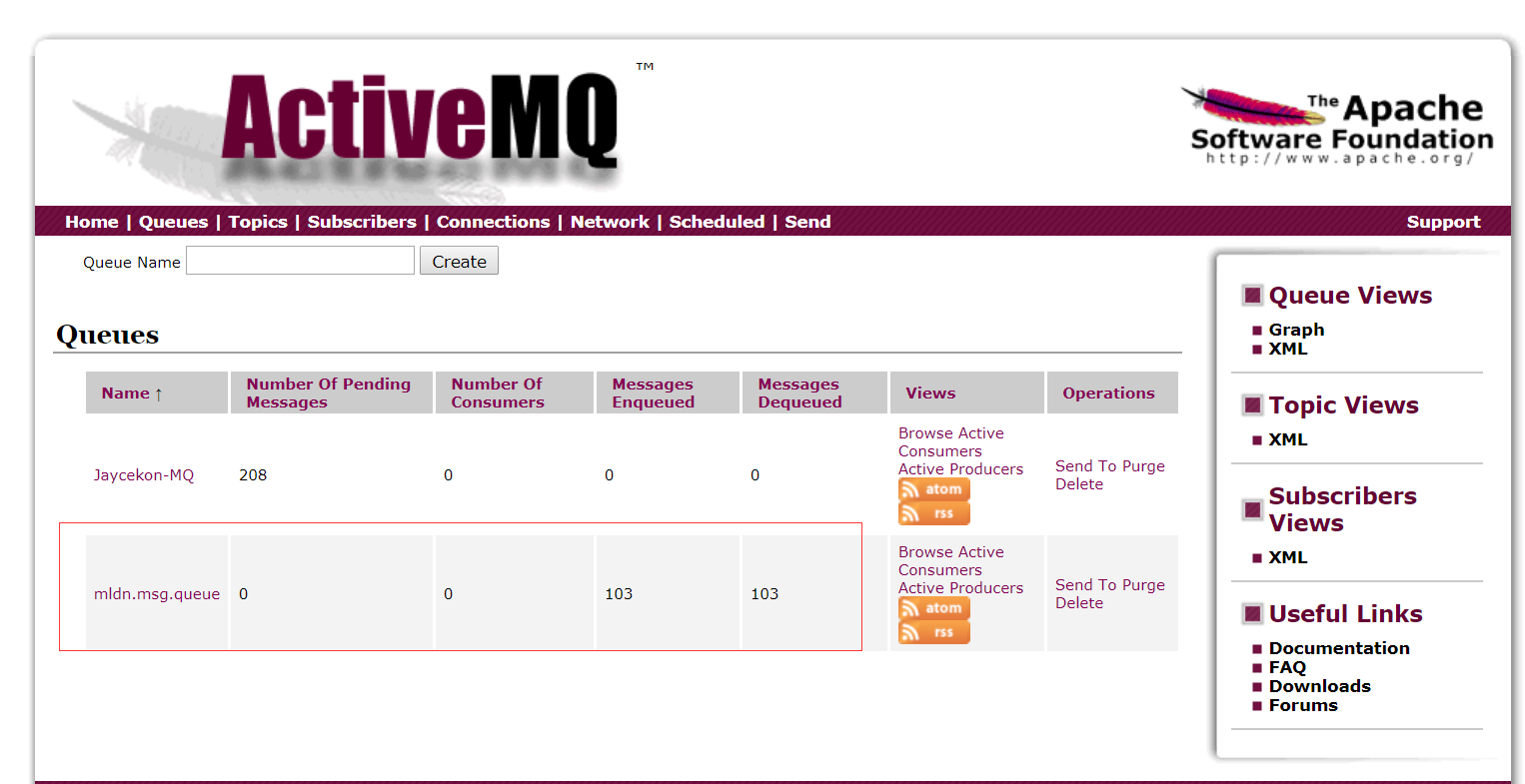
最后进行测试,测试成功,查看activemq的Queues,成功接收消息
SpringBoot配置activemq消息队列的更多相关文章
- SpringBoot集成ActiveMq消息队列实现即时和延迟处理
原文链接:https://blog.csdn.net/My_harbor/article/details/81328727 一.安装ActiveMq 具体安装步骤:自己谷歌去 二.新建springbo ...
- springboot中activeMQ消息队列的引入与使用(发送短信)
1.引入pom依赖 <!--activemq--><dependency> <groupId>org.springframework.boot</groupI ...
- activemq消息队列的使用及应用docker部署常见问题及注意事项
activemq消息队列的使用及应用docker部署常见问题及注意事项 docker用https://hub.docker.com/r/rmohr/activemq/配置在/data/docker/a ...
- JAVA的设计模式之观察者模式----结合ActiveMQ消息队列说明
1----------------------观察者模式------------------------------ 观察者模式:定义对象间一对多的依赖关系,当一个对象的状态发生改变时,所有依赖于它的 ...
- ActiveMQ消息队列从入门到实践(4)—使用Spring JMS收发消息
Java消息服务(Java Message Service ,JMS)是一个Java标准,定义了使用消息代理的通用API .在JMS出现之前,每个消息代理都有私有的API,这就使得不同代理之间的消息代 ...
- ActiveMQ 消息队列服务
1 ActiveMQ简介 1.1 ActiveMQ是什么 ActiveMQ是一个消息队列应用服务器(推送服务器).支持JMS规范. 1.1.1 JMS概述 全称:Java Message Serv ...
- ActiveMQ基础教程(四):.net core集成使用ActiveMQ消息队列
接上一篇:ActiveMQ基础教程(三):C#连接使用ActiveMQ消息队列 这里继续说下.net core集成使用ActiveMQ.因为代码比较多,所以放到gitee上:https://gitee ...
- C#实现ActiveMQ消息队列
本文使用C#实现ActiveMQ消息队列功能. 一.首先需要导入两个包,分别是:Apache.NMS 和 Apache.NMS.ActiveMQ 二.创建Winform程序实现生产者功能. 三.Pro ...
- SpringBoot学习笔记(11)-----SpringBoot中使用rabbitmq,activemq消息队列和rest服务的调用
1. activemq 首先引入依赖 pom.xml文件 <dependency> <groupId>org.springframework.boot</groupId& ...
随机推荐
- SLAM+语音机器人DIY系列:(一)Linux基础——1.Linux简介
摘要 由于机器人SLAM.自动导航.语音交互这一系列算法都在机器人操作系统ROS中有很好的支持,所以后续的章节中都会使用ROS来组织构建代码:而ROS又是安装在Linux发行版ubuntu系统之上的, ...
- RequireJS入门级_RequireJS能给我们带来什么帮助?
前言:其实很早前就已经接触和了解到RequireJS了,当时只是大概明白它能用来控制JS的加载顺序,即:页面一定要先加载这个JS,再加载那个JS,对于RequireJS的好处还没有一个真正的体会和认识 ...
- C# 默认访问权限
声明类.方法.字段.属性时不加访问权限修饰符时的访问权限是什么呢?1. 声明命名空间.类,前面不加限制访问修饰符时,默认访问权限为internal——访问仅限于当前程序集. 2. 声明类成员(域.属性 ...
- VsCode+Node的前端环境搭建及其理解并创建一个前端目录
既然选择了远方,便只顾风雨兼程 __ HANS许 系列:零基础搭建前后端分离项目 系列:零基础搭建前后端分离项目 VsCode VsCode的安装 VSCode中文设置 VsCode 扩展 VsCod ...
- 微信小程序 选择微信自带的地址 用户授权选择了拒绝
// 选择微信自带地址 addAddr:function () { wx.chooseAddress({ success: function (res) { self.setData({ addrIn ...
- 覆盖ng-zorro样式(非style.scss)
之前发现在模板的样式表里写样式不起作用,然后想起vue里有个/deep/,angular会不会也有一个,果然,发现了一个::ng-deep可以在模板的样式表里覆盖ng-zorro的样式.记录一下(●' ...
- Web API 持续集成:PostMan+Newman+Jenkins(图文讲解)
本文由葡萄城技术团队于博客园原创并首发 转载请注明出处:葡萄城官网,葡萄城为开发者提供专业的开发工具.解决方案和服务,赋能开发者. 上篇文章我们已经完成了API测试工具选型,接下来是一系列周期性的开发 ...
- IntentService原理分析
IntentService是一个异步处理请求的服务,通过Context#startService(Intent)可以将请求发送给IntentService,IntentService在工作线程中依次串 ...
- Win10系统下装Ubuntu虚拟机的遇到的问题总结
环境和工具 win10操作系统 VMware Workstation 12 Ubuntu 14.0 64位 教程可参考:VMware Ubuntu安装详细过程(非常靠谱) [因为我的安装过程不是十分顺 ...
- 数据库原理 - 序列5 - 事务是如何实现的? - Undo Log解析
本文节选自作者书籍<软件架构设计:大型网站技术架构与业务架构融合之道>.作者微信公众号:架构之道与术.公众号底部菜单有书友群可以加入,与作者和其他读者进行深入讨论.也可以在京东.天猫上购买 ...