
小白学 Python 爬虫(38):爬虫框架 Scrapy 入门基础(六) Item Pipeline

人生苦短,我用 Python
前文传送门:
小白学 Python 爬虫(2):前置准备(一)基本类库的安装
小白学 Python 爬虫(3):前置准备(二)Linux基础入门
小白学 Python 爬虫(4):前置准备(三)Docker基础入门
小白学 Python 爬虫(6):前置准备(五)爬虫框架的安装
小白学 Python 爬虫(10):Session 和 Cookies
小白学 Python 爬虫(11):urllib 基础使用(一)
小白学 Python 爬虫(12):urllib 基础使用(二)
小白学 Python 爬虫(13):urllib 基础使用(三)
小白学 Python 爬虫(14):urllib 基础使用(四)
小白学 Python 爬虫(15):urllib 基础使用(五)
小白学 Python 爬虫(16):urllib 实战之爬取妹子图
小白学 Python 爬虫(17):Requests 基础使用
小白学 Python 爬虫(18):Requests 进阶操作
小白学 Python 爬虫(21):解析库 Beautiful Soup(上)
小白学 Python 爬虫(22):解析库 Beautiful Soup(下)
小白学 Python 爬虫(23):解析库 pyquery 入门
小白学 Python 爬虫(26):为啥买不起上海二手房你都买不起
小白学 Python 爬虫(27):自动化测试框架 Selenium 从入门到放弃(上)
小白学 Python 爬虫(28):自动化测试框架 Selenium 从入门到放弃(下)
小白学 Python 爬虫(29):Selenium 获取某大型电商网站商品信息
小白学 Python 爬虫(31):自己构建一个简单的代理池
小白学 Python 爬虫(32):异步请求库 AIOHTTP 基础入门
小白学 Python 爬虫(33):爬虫框架 Scrapy 入门基础(一)
小白学 Python 爬虫(34):爬虫框架 Scrapy 入门基础(二)
小白学 Python 爬虫(35):爬虫框架 Scrapy 入门基础(三) Selector 选择器
小白学 Python 爬虫(36):爬虫框架 Scrapy 入门基础(四) Downloader Middleware
小白学 Python 爬虫(37):爬虫框架 Scrapy 入门基础(五) Spider Middleware
引言
Item Pipeline 直译过来是项目管道的意思。
Spider 抓取了一个项目后,将其发送到项目管道,该管道通过依次执行的几个组件对其进行处理。
每个项目管道都是一个实现简单方法的 Python 类。 他们接收到一个项目并对其执行操作,还决定该项目是否应继续通过管道或被删除并不再处理。
Item Pipeline 主要用于以下场景:
- 清理HTML数据
- 验证抓取的数据(检查项目是否包含某些字段)
- 检查重复项(并将其删除)
- 将爬取的结果存储在数据库中
自定义 Item Pipeline
自定义 Item Pipeline 必须要实现一个方法 process_item(self, item, spider) 。
另外还有几个可选的比较有用的方法:
- open_spider(self, spider)
- close_spider(self, spider)
- from_crawler(cls, crawler)
接下来我们介绍详细一点的用法。
process_item(self, item, spider)
参数:
item (item 类型为对象或字典)–抓取的物品
spider (spider 对象)–抓取物品的 spider
这个方法是必须要实现的方法,每个 Item Pipeline 都调用此方法。 process_item() 必须返回带有数据的字典,返回Item(或任何后代类)对象,返回 Twisted Deferred 或引发 DropItem 异常。
open_spider(self, spider)
参数:
spider (spider 对象)–已开启的 spider
这个方法在 Spider 开启的时候被自动调用。
close_spider(self, spider)
参数:
spider (spider 对象)–已关闭的 spider
这个方法在 Spider 关闭的时候被自动调用。
from_crawler(cls, crawler)
from_crawler() 方法是一个类方法,用 @classmethod 标识,是一种依赖注入的方式。它的参数是 crawler ,通过 crawler 对象,我们可以获取到 Scrapy 所有的核心组件。
示例
本次示例还是使用妹子图。
目标是将妹子图首页的数据通过 Item Pipeline 存入 MongoDB 和 Mysql 中。
首先还是新建一个 MziTuSpider ,示例代码如下:
# -*- coding: utf-8 -*-

from scrapy import Spider, Request

from first_scrapy.items import ImageItem

class MziTuSpider(Spider):

    name = 'MziTuSpider'

    allowed_domains = ['www.mzitu.com']

    start_urls = ['https://www.mzitu.com/mm/']

    def start_requests(self):

        headers = {

            'user-agent': 'Mozilla/5.0 (Windows NT 10.0; Win64; x64) AppleWebKit/537.36 (KHTML, like Gecko) Chrome/79.0.3945.117 Safari/537.36',

            'referer': 'https://www.mzitu.com/'

        }

        yield Request('https://www.mzitu.com/mm/', self.parse, headers = headers)

    def parse(self, response):

        imageList = response.css('.postlist ul li')

        for image in imageList:

            item = ImageItem()

            item['id'] = image.css('a::attr("href")').extract_first().split('/')[3]

            item['url'] = image.css('a::attr("href")').extract_first()

            item['title'] = image.css('a img::attr("alt")').extract_first()

            item['thumb'] = image.css('a img::attr("data-original")').extract_first()

            yield item
其次我们再创建一个 Item 用来提取信息,示例代码如下:
import scrapy

class ImageItem(scrapy.Item):

    collection = table = 'image'

    id = scrapy.Field()

    url = scrapy.Field()

    title = scrapy.Field()

    thumb = scrapy.Field()
在前面的示例中我们已经创建了一个 MongoPipeline 用来讲数据保存在 MongoDB 中,本次我们再加一个 MysqlPipeline 将数据保存在 Mysql 中,示例代码如下:
前提需本地正常安装 pymysql 。
import pymysql

class MysqlPipeline():

    def __init__(self, host, database, user, password, port):

        self.host = host

        self.database = database

        self.user = user

        self.password = password

        self.port = port

    @classmethod

    def from_crawler(cls, crawler):

        return cls(

            host=crawler.settings.get('MYSQL_HOST'),

            database=crawler.settings.get('MYSQL_DATABASE'),

            user=crawler.settings.get('MYSQL_USER'),

            password=crawler.settings.get('MYSQL_PASSWORD'),

            port=crawler.settings.get('MYSQL_PORT'),

        )

    def open_spider(self, spider):

        self.db = pymysql.connect(self.host, self.user, self.password, self.database, charset='utf8',

                                  port=self.port)

        self.cursor = self.db.cursor()

    def close_spider(self, spider):

        self.db.close()

    def process_item(self, item, spider):

        print(item['title'])

        data = dict(item)

        keys = ', '.join(data.keys())

        values = ', '.join(['%s'] * len(data))

        sql = 'insert into %s (%s) values (%s)' % (item.table, keys, values)

        self.cursor.execute(sql, tuple(data.values()))

        self.db.commit()

        return item
这里和前面一样,我们需要在 settings 中配置一些有关 Mysql 的内容,如下:
MYSQL_HOST = 'localhost'

MYSQL_DATABASE = 'test'

MYSQL_USER = 'root'

MYSQL_PASSWORD = '123456'

MYSQL_PORT = 3306
还需在 settings 中增加我们的 MysqlPipeline 的相关配置,如下:
ITEM_PIPELINES = {

    'first_scrapy.pipelines.MongoPipeline': 400,

    'first_scrapy.pipelines.MysqlPipeline': 401,

}
这样,我们就创建好了我们的示例程序,现在通过命令行来启动我们的 Spider 。
scrapy crawl MziTuSpider
执行结果:
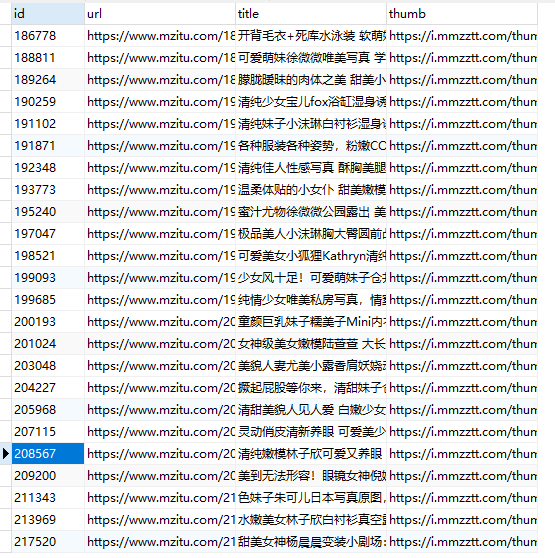
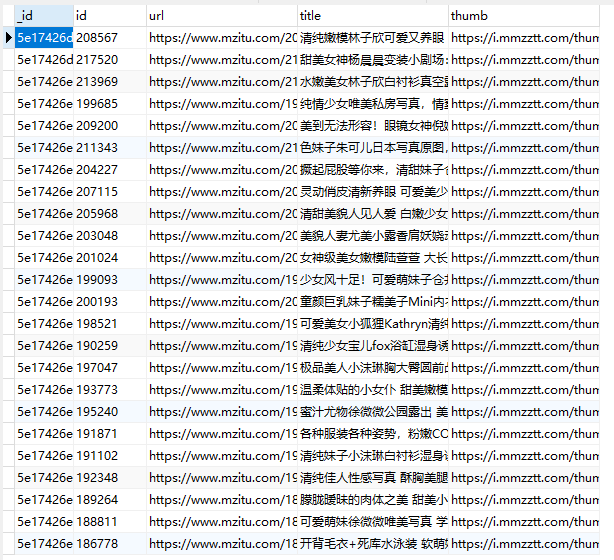
可以看到,我们的 MongoDB 和 Mysql 数据都正常的存入。
示例代码
本系列的所有代码小编都会放在代码管理仓库 Github 和 Gitee 上,方便大家取用。
小白学 Python 爬虫(38):爬虫框架 Scrapy 入门基础(六) Item Pipeline的更多相关文章
- 小白学 Python 爬虫(41):爬虫框架 Scrapy 入门基础(八)对接 Splash 实战
人生苦短,我用 Python 前文传送门: 小白学 Python 爬虫(1):开篇 小白学 Python 爬虫(2):前置准备(一)基本类库的安装 小白学 Python 爬虫(3):前置准备(二)Li ...
- 小白学 Python 爬虫(34):爬虫框架 Scrapy 入门基础(二)
人生苦短,我用 Python 前文传送门: 小白学 Python 爬虫(1):开篇 小白学 Python 爬虫(2):前置准备(一)基本类库的安装 小白学 Python 爬虫(3):前置准备(二)Li ...
- 小白学 Python 爬虫(35):爬虫框架 Scrapy 入门基础(三) Selector 选择器
人生苦短,我用 Python 前文传送门: 小白学 Python 爬虫(1):开篇 小白学 Python 爬虫(2):前置准备(一)基本类库的安装 小白学 Python 爬虫(3):前置准备(二)Li ...
- 小白学 Python 爬虫(36):爬虫框架 Scrapy 入门基础(四) Downloader Middleware
人生苦短,我用 Python 前文传送门: 小白学 Python 爬虫(1):开篇 小白学 Python 爬虫(2):前置准备(一)基本类库的安装 小白学 Python 爬虫(3):前置准备(二)Li ...
- 小白学 Python 爬虫(37):爬虫框架 Scrapy 入门基础(五) Spider Middleware
人生苦短,我用 Python 前文传送门: 小白学 Python 爬虫(1):开篇 小白学 Python 爬虫(2):前置准备(一)基本类库的安装 小白学 Python 爬虫(3):前置准备(二)Li ...
- 小白学 Python 爬虫(40):爬虫框架 Scrapy 入门基础(七)对接 Selenium 实战
人生苦短,我用 Python 前文传送门: 小白学 Python 爬虫(1):开篇 小白学 Python 爬虫(2):前置准备(一)基本类库的安装 小白学 Python 爬虫(3):前置准备(二)Li ...
- 小白学 Python 数据分析(7):Pandas (六)数据导入
人生苦短,我用 Python 前文传送门: 小白学 Python 数据分析(1):数据分析基础 小白学 Python 数据分析(2):Pandas (一)概述 小白学 Python 数据分析(3):P ...
- 小白学 Python 爬虫(33):爬虫框架 Scrapy 入门基础(一)
人生苦短,我用 Python 前文传送门: 小白学 Python 爬虫(1):开篇 小白学 Python 爬虫(2):前置准备(一)基本类库的安装 小白学 Python 爬虫(3):前置准备(二)Li ...
- 小白学 Python 数据分析(1):数据分析基础
各位同学好,小编接下来为大家分享一些有关 Python 数据分析方面的内容,希望大家能够喜欢. 人工植入广告: PS:小编最近两天偷了点懒,好久没有发原创了,最近是在 CSDN 开通了一个付费专栏,用 ...
随机推荐
- 提高github下载速度的方法【100%有效】可达到2MB/s
因为大家都知道的原因,在国内从github上面下载代码的速度峰值通常都是20kB/s.这种速度对于那些小项目还好,而对于大一些的并且带有很多子模块的项目来讲就跟耽误时间.而常见的的方法无非就是修改HO ...
- 在SuperSocket中启用TLS/SSL传输层加密
关键字: TLS, SSL, 传输层加密, 传输层安全, 证书使用, X509Certificate SuperSocket 支持传输层加密(TLS/SSL) SuperSocket 有自动的对TLS ...
- [转]C# 语言历史版本特性(C# 1.0到C# 8.0汇总)
历史版本 C#作为微软2000年以后.NET平台开发的当家语言,发展至今具有17年的历史,语言本身具有丰富的特性,微软对其更新支持也十分支持.微软将C#提交给标准组织ECMA,C# 5.0目前是ECM ...
- html(二)登陆页面
今天开始正常上课学习HTML+CSS+JSP 嗯 前两个没讲直接上手! 老师也是很认同我们的呢~ 这是第一个案例 做一个登陆页面,并利用post提交表单 传值到另一个界面接收值. 1.设置值: &l ...
- dotnet core 添加 SublimeText 编译插件
因为 SublimeText 有很多插件都是使用 Py 写的,而我想使用 dotnet core 给 SublimeText 写一个编译插件,也就是在我使用 Markdown 的时候可以点击编译,将 ...
- UPC 2019年第二阶段我要变强个人训练赛第十六场
传送门: [1]:UPC比赛场 [2]:UPC补题场 F.gu集合(数论) •题目描述 题目描述: Dew有一个长为n的集合S. 有一天,他想选k个不同的元素出来做游戏. 但是Dew只有两只手,所以他 ...
- ESB总线的核心架构
根据近期对开源ESB产品的研究,已经对Oracle和Tibco的ESB总线产品的实施经验积累,对ESB总线的核心产品架构有了进一步的清晰认识,将ESB的核心架构整理为上图,上图中看到的内容也是做为一款 ...
- 用jsonp 解决跨域问题
想自己用 js写一个原生的ajax请求,访问本地文件,json/txt.但是demo,写了一个后,发现 原来是跨域了. js 写的原生ajax 请求代码如下 html代码 将获取的txt 文件 展示出 ...
- centos7 安装R和RstudioServer版
参考: http://www.cnblogs.com/inspursu/p/4275701.html http://blog.csdn.net/u010022051/article/details/5 ...
- 遍历$.map和$.each
<body> <p style="color:red;"><b>Values: </b></p> <form> ...