
SpringBoot安全管理--(三)整合shiro
简介:
Apache Shiro 是一一个开源的轻量级的Java安全框架,它提供身份验证、授权、密码管理以及会话管理等功能。
相对于Spring Security, Shiro框架更加直观、易用,同时也能提供健壮的安全性。在传统的SSM框架中,手动整合Shiro的配置步骤还是比较多的,针对Spring Boot, Shiro 官方提供了shiro-spring-boot-web-starter 用来简化Shiro 在Spring Boot 中的配置。
pom.xml
<dependency>

            <groupId>org.apache.shiro</groupId>

            <artifactId>shiro-spring-boot-web-starter</artifactId>  //已经依赖spring-boot-web-starter

            <version>1.4.0</version>

        </dependency>

        <dependency>

            <groupId>org.springframework.boot</groupId>

            <artifactId>spring-boot-starter-thymeleaf</artifactId>

        </dependency>

        <dependency>

            <groupId>com.github.theborakompanioni</groupId>

            <artifactId>thymeleaf-extras-shiro</artifactId>

            <version>2.0.0</version>

        </dependency>
application.properties
#开启shiro
shiro.enabled=true

#开启shiro web
shiro.web.enabled=true

#登陆地址,默认/login.jsp
shiro.loginUrl=/login

#登陆成功地址
shiro.successUrl=/index

#未获授权跳转地址
shiro.unauthorizedUrl=/unauthorized

#是否允许通过url进行会话跟踪,默认true
shiro.sessionManager.sessionIdUrlRewritingEnabled=true

#是否允许通过Cookie实现会话跟踪
shiro.sessionManager.sessionIdCookieEnabled=true
配置shiro
@Configuration

public class ShiroConfig {

    @Bean

    public Realm realm() {//添加用户

        TextConfigurationRealm realm = new TextConfigurationRealm();

        realm.setUserDefinitions("sang=123,user\n admin=123,admin"); //添加用户名+密码+角色

        realm.setRoleDefinitions("admin=read,write\n user=read");  //添加权限

        return realm;

    }


@Bean  #添加过滤规则
public ShiroFilterChainDefinition shiroFilterChainDefinition() {

        DefaultShiroFilterChainDefinition chainDefinition =

                new DefaultShiroFilterChainDefinition();

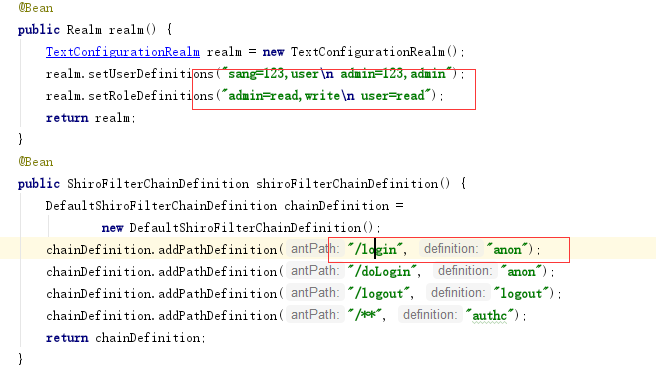
        chainDefinition.addPathDefinition("/login", "anon");    //可以匿名访问

        chainDefinition.addPathDefinition("/doLogin", "anon"); //同上

        chainDefinition.addPathDefinition("/logout", "logout"); //注销登陆

        chainDefinition.addPathDefinition("/**", "authc");      //其余请求都需要认证后擦可以访问

        return chainDefinition;

    }

    @Bean

    public ShiroDialect shiroDialect() {  //可以在Thymeleaf中使用shiro标签

        return new ShiroDialect();

    }

}
controller:
@Controller

public class UserController {
  @GetMapping("/hello")
  public String hello() {
      return "hello shiro!";
  }
    @PostMapping("/doLogin")

    public String doLogin(String username, String password, Model model) {

        UsernamePasswordToken token =

                new UsernamePasswordToken(username, password);

        Subject subject = SecurityUtils.getSubject();

        try {

            subject.login(token);      //登陆

        } catch (AuthenticationException e) {

            model.addAttribute("error", "用户名或密码输入错误!");

            return "login";

        }

        return "redirect:/index";

    }


    @RequiresRoles("admin")    //admin角色

    @GetMapping("/admin")

    public String admin() {

        return "admin";

    }


    @RequiresRoles(value = {"admin","user"},logical = Logical.OR)    //admin或者user任意一个都可以

    @GetMapping("/user")

    public String user() {

        return "user";

    }

}
对于不需要角色就可以访问的页面
@Configuration

public class WebMvcConfig implements WebMvcConfigurer{

    @Override

    public void addViewControllers(ViewControllerRegistry registry) {

        registry.addViewController("/login").setViewName("login");

        registry.addViewController("/index").setViewName("index");

        registry.addViewController("/unauthorized").setViewName("unauthorized");

    }

}
全局异常处理:
@ControllerAdvice

public class ExceptionController {

    @ExceptionHandler(AuthorizationException.class)

    public ModelAndView error(AuthorizationException e) {

        ModelAndView mv = new ModelAndView("unauthorized");

        mv.addObject("error", e.getMessage());

        return mv;

    }

}
新建5个页面:
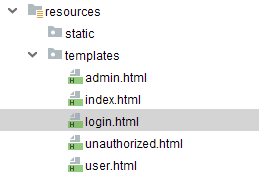
admin.html
<!DOCTYPE html>

<html lang="en">

<head>

    <meta charset="UTF-8">

    <title>Title</title>

</head>

<body>

<h1>管理员页面</h1>

</body>

</html>
index.html
<!DOCTYPE html>

<html lang="en" xmlns:shiro="http://www.pollix.at/thymeleaf/shiro">

<head>

    <meta charset="UTF-8">

    <title>Title</title>

</head>

<body>

<h3>Hello, <shiro:principal/></h3>

<h3><a href="/logout">注销登录</a></h3>

<h3><a shiro:hasRole="admin" href="/admin">管理员页面</a></h3>

<h3><a shiro:hasAnyRoles="admin,user" href="/user">普通用户页面</a></h3>

</body>

</html>
login.html
<!DOCTYPE html>

<html lang="en" xmlns:th="http://www.thymeleaf.org">

<head>

    <meta charset="UTF-8">

    <title>Title</title>

</head>

<body>

<div>

    <form action="/doLogin" method="post">

        <input type="text" name="username"><br>

        <input type="password" name="password"><br>

        <div th:text="${error}"></div>

        <input type="submit" value="登录">

    </form>

</div>

</body>

</html>
unauthorized.html
<!DOCTYPE html>

<html lang="en" xmlns:th="http://www.thymeleaf.org">

<head>

    <meta charset="UTF-8">

    <title>Title</title>

</head>

<body>

<div>

    <h3>未获授权,非法访问</h3>

    <h3 th:text="${error}"></h3>

</div>

</body>

</html>
user.html
<!DOCTYPE html>

<html lang="en">

<head>

    <meta charset="UTF-8">

    <title>Title</title>

</head>

<body>

<h1>普通用户页面</h1>

</body>

</html>
访问http://localhost:8080/login

由于上面的shiro配置,可以匿名访问
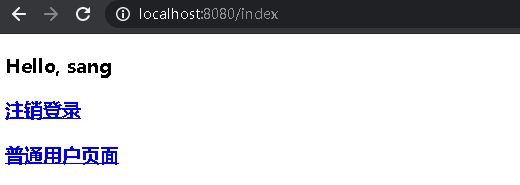
输入我们在shiro配置的2用户
sang/123
admin/123

不同角色,权限不一样,页面也不一样
SpringBoot安全管理--(三)整合shiro的更多相关文章
- SpringBoot 优雅的整合 Shiro
Apache Shiro是一个功能强大且易于使用的Java安全框架,可执行身份验证,授权,加密和会话管理.借助Shiro易于理解的API,您可以快速轻松地保护任何应用程序 - 从最小的移动应用程序到最 ...
- 在 springboot 中如何整合 shiro 应用 ?
Shiro是Apache下的一个开源项目,我们称之为Apache Shiro. 它是一个很易用与Java项目的的安全框架,提供了认证.授权.加密.会话管理,与spring Security 一样都是 ...
- SpringBoot学习:整合shiro(身份认证和权限认证),使用EhCache缓存
项目下载地址:http://download.csdn.NET/detail/aqsunkai/9805821 (一)在pom.xml中添加依赖: <properties> <shi ...
- SpringBoot学习:整合shiro自动登录功能(rememberMe记住我功能)
首先在shiro配置类中注入rememberMe管理器 /** * cookie对象; * rememberMeCookie()方法是设置Cookie的生成模版,比如cookie的name,cooki ...
- SpringBoot学习:整合shiro(rememberMe记住我后自动登录session失效解决办法)
项目下载地址:http://download.csdn.NET/detail/aqsunkai/9805821 定义一个拦截器,判断用户是通过记住我登录时,查询数据库后台自动登录,同时把用户放入ses ...
- SpringBoot学习:整合shiro(验证码功能和登录次数限制功能)
项目下载地址:http://download.csdn.NET/detail/aqsunkai/9805821 (一)验证码 首先login.jsp里增加了获取验证码图片的标签: <body s ...
- SpringBoot学习:整合shiro(rememberMe记住我功能)
项目下载地址:http://download.csdn.NET/detail/aqsunkai/9805821 首先在shiro配置类中注入rememberMe管理器 /** * cookie对象; ...
- SpringBoot整合Shiro (二)
Apache Shiro是一个强大且易用的Java安全框架,执行身份验证.授权.密码学和会话管理.相比较Spring Security,shiro有小巧.简单.易上手等的优点.所以很多框架都在使用sh ...
- SpringBoot整合Shiro 三:整合Mybatis
搭建环境见: SpringBoot整合Shiro 一:搭建环境 shiro配置类见: SpringBoot整合Shiro 二:Shiro配置类 整合Mybatis 添加Maven依赖 mysql.dr ...
随机推荐
- 使用 LinkedBlockingQueue 实现简易版线程池
前一阵子在做联系人的导入功能,使用POI组件解析Excel文件后获取到联系人列表,校验之后批量导入.单从技术层面来说,导入操作通常情况下是一个比较耗时的操作,而且如果联系人达到几万.几十万级别,必须拆 ...
- Drupal SA-CORE-2019-010 .开头文件名(如.htaccess) 文件上传
目录 drupal .开头文件名 文件上传 原生模块分析 第三方模块分析 补丁 参考 drupal .开头文件名 文件上传 通过diff 8.8.1的补丁,很容易发现修复点,位于core\module ...
- vue-DevTools安装使用
方式一:通过谷歌应用商店进行安装 vue devtools 方式二:手动安装 下载https://github.com/vuejs/vue-devtools 安装 方式一:打开谷歌浏览器 点击扩展程 ...
- C语言 获取系统时间与睡眠时间函数
摘要: 以ms为单位,获取系统时间.睡眠或延迟时间函数的使用方法. #include<stdio.h> #include <time.h> #include <sys/t ...
- Nginx配置及负载均衡
转载:http://www.cnblogs.com/jingmoxukong/p/5945200.html nginx简易教程 目录 Nginx 概述 安装与使用 nginx 配置实战 参 ...
- V8垃圾回收?看这篇就够了!
什么是内存管理 内存管理是控制和协调应用程序访问电脑内存的过程.这个过程是复杂的,对于我们来说,可以说相当于一个黑匣子. 当咱们的应用程序运行在某个操作系统中的时候,它访问电脑内存(RAM)来达成下列 ...
- Linux vi & bash使用笔记
f 1.vi入门级命令 打开或新建 vi filename 有三种模式,刚开始进去的是一般模式,在一般模式下按 I 之后进入编辑模式 ,按Esc进入命令模式 在命令模式下按 :wq 保存退出 多个窗口 ...
- 用TreeWalk提高网速及其在vista中的安装方法
本文中所需的软件请到http://download.csdn.net/source/738436下载. 有时候,我们发现可以上的去QQ,上的去飞信,但是却打不开网页,我通过GOOGLE的搜索发 ...
- Centos7桥接设置网络并使用xrdp+tigervnc实现桌面远程访问
最近用到了虚拟机,之前虚拟机的网络配置使用的NAT配置好了,但是无论怎样设置都无法使用局域网内的其它主机访问虚拟机的服务.经过了一天的折腾,远程主机仍然连接不上虚拟机服务,后来找到原因,NAT连接模式 ...
- HDU_4456_二维树状数组
http://acm.hdu.edu.cn/showproblem.php?pid=4456 第一道二维树状数组就这么麻烦,题目要计算的是一个菱形范围内的和,于是可以把原来的坐标系旋转45度,就是求一 ...