
OpenCV函数:提取轮廓相关函数使用方法
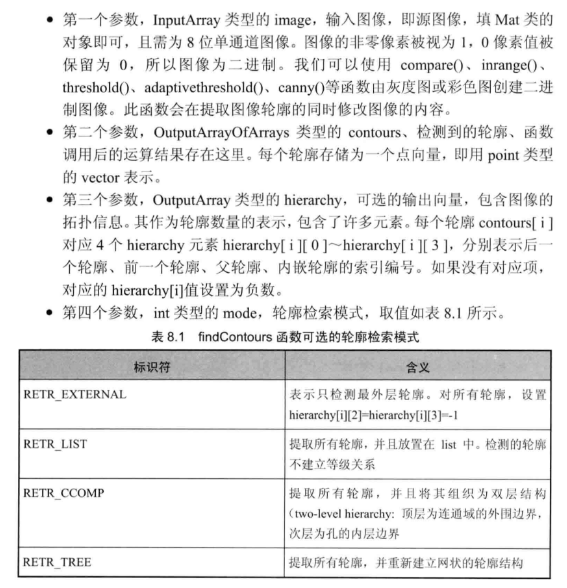
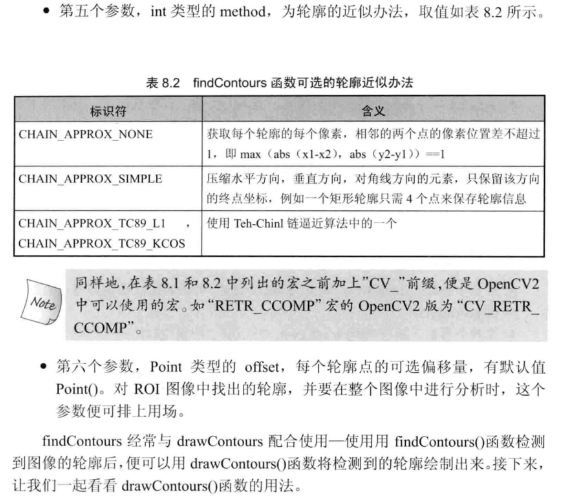
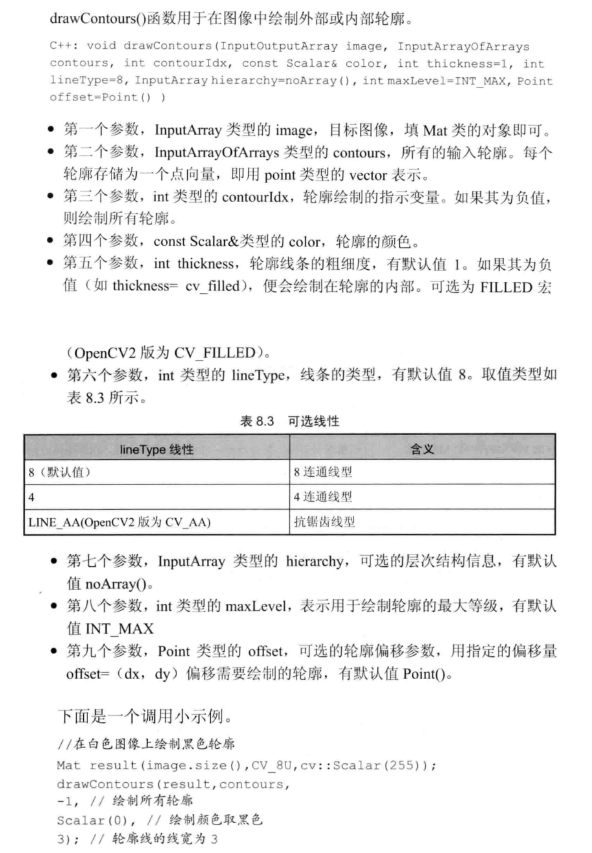
opencv中提供findContours()函数来寻找图像中物体的轮廓,并结合drawContours()函数将找到的轮廓绘制出。首先看一下findContours(),opencv中提供了两种定义形式
官网:https://docs.opencv.org/3.3.1/d3/dc0/group__imgproc__shape.html#ga17ed9f5d79ae97bd4c7cf18403e1689a
void cv::findContours   (   InputOutputArray    image,

                            OutputArrayOfArrays     contours,

                            OutputArray     hierarchy,

                            int     mode,

                            int     method,

                            Point   offset = Point()

                        )
#include "opencv2/highgui/highgui.hpp"

#include "opencv2/imgproc/imgproc.hpp"

#include <iostream>

#include <stdio.h>

#include <stdlib.h>

using namespace cv;

using namespace std;

Mat src; Mat src_gray;

int thresh = 100;

int max_thresh = 255;

RNG rng(12345);

/// Function header

void thresh_callback(int, void*);

/** @function main */

int main(int argc, char** argv)

{

	/// 加载源图像

	src = imread("E:\\VS2015Opencv\\vs2015\\project\\picture\\07.jpg", 1);

	/// 转成灰度并模糊化降噪

	cvtColor(src, src_gray, CV_BGR2GRAY);

	blur(src_gray, src_gray, Size(3, 3));

	/// 创建窗体

	char* source_window = "Source";

	namedWindow(source_window, CV_WINDOW_AUTOSIZE);

	imshow(source_window, src);

	createTrackbar(" Canny thresh:", "Source", &thresh, max_thresh, thresh_callback);

	thresh_callback(0, 0);

	waitKey(0);

	return(0);

}

/** @function thresh_callback */

void thresh_callback(int, void*)

{

	Mat canny_output;

	vector<vector<Point> > contours;

	vector<Vec4i> hierarchy;

	/// 用Canny算子检测边缘

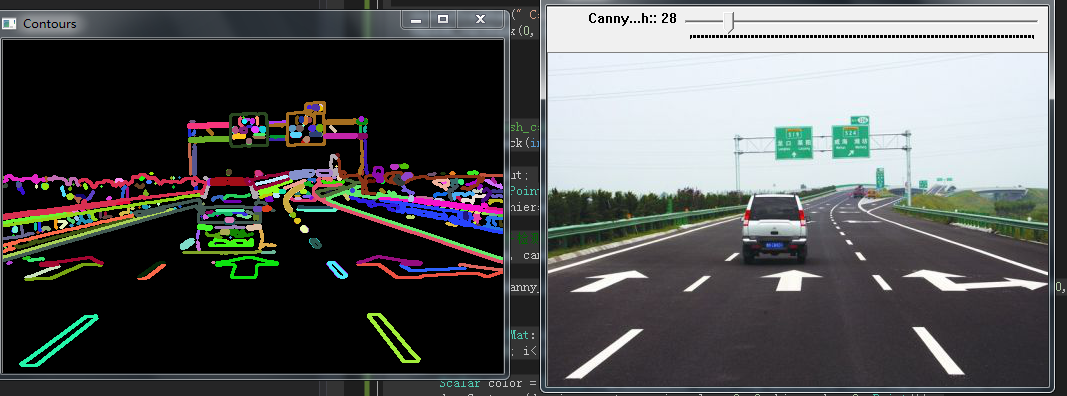
	Canny(src_gray, canny_output, thresh, thresh * 2, 3);

	/// 寻找轮廓

	findContours(canny_output, contours, hierarchy, CV_RETR_TREE, CV_CHAIN_APPROX_SIMPLE, Point(0, 0));

	/// 绘出轮廓

	Mat drawing = Mat::zeros(canny_output.size(), CV_8UC3);

	for (int i = 0; i< contours.size(); i++)

	{

		Scalar color = Scalar(rng.uniform(0, 255), rng.uniform(0, 255), rng.uniform(0, 255));

		drawContours(drawing, contours, i, color, 2, 8, hierarchy, 0, Point());

	}

	/// 在窗体中显示结果

	namedWindow("Contours", CV_WINDOW_AUTOSIZE);

	imshow("Contours", drawing);

}
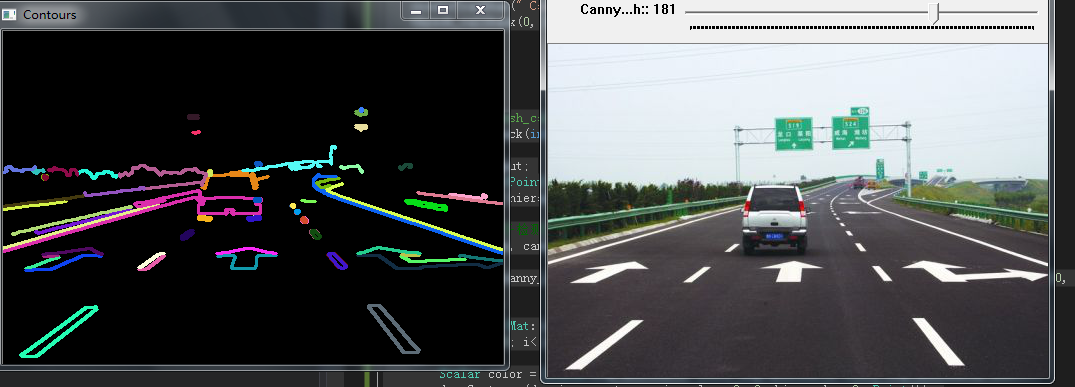
OpenCV提取轮廓之后,还可以进行许多操作:
ArcLength() 计算轮廓长度
ContourArea() 计算轮廓区域的面积
BoundingRect() 轮廓的外包矩形
ConvexHull() 提取轮廓的凸包
IsContourConvex() 测试轮廓的凸性
MinAreaRect() 轮廓的最小外包矩形
MinEnclosingCircle() 轮廓的最小外包圆
fitEllipse() 用椭圆拟合二维点集
approxPolyDP() 逼近多边形曲线
boundingRect函数简介
boundingRect函数是用来计算轮廓的最小外接矩形,通常与findContours函数组合使用,findContours函数用来查找图像的轮廓,boundingRect获取轮廓的最小外接矩形!
Rect boundingRect( InputArray array );
(1) 第一个参数,InputArray array,一般为findContours函数查找的轮廓,包含轮廓的点集或者Mat;
(2) 返回值,Rect,返回值为最小外接矩形的Rect,即左上点与矩形的宽度和高度;
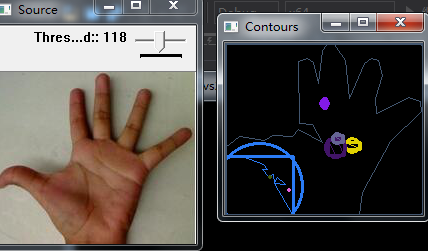
#include "opencv2/highgui/highgui.hpp"

#include "opencv2/imgproc/imgproc.hpp"

#include <iostream>

#include <stdio.h>

#include <stdlib.h>

using namespace cv;

using namespace std;

Mat src; Mat src_gray;

int thresh = 100;

int max_thresh = 255;

RNG rng(12345);

/// 函数声明

void thresh_callback(int, void*);

/** @主函数 */

int main(int argc, char** argv)

{

	/// 载入原图像, 返回3通道图像

	src = imread("E:\\VS2015Opencv\\vs2015\\project\\picture\\1.1.jpg", 1);

	/// 转化成灰度图像并进行平滑

	cvtColor(src, src_gray, CV_BGR2GRAY);

	blur(src_gray, src_gray, Size(3, 3));

	/// 创建窗口

	char* source_window = "Source";

	namedWindow(source_window, CV_WINDOW_AUTOSIZE);

	imshow(source_window, src);

	createTrackbar(" Threshold:", "Source", &thresh, max_thresh, thresh_callback);

	thresh_callback(0, 0);

	waitKey(0);

	return(0);

}

/** @thresh_callback 函数 */

void thresh_callback(int, void*)

{

	Mat threshold_output;

	vector<vector<Point> > contours;

	vector<Vec4i> hierarchy;

	/// 使用Threshold检测边缘

	threshold(src_gray, threshold_output, thresh, 255, THRESH_BINARY);

	/// 找到轮廓

	findContours(threshold_output, contours, hierarchy, CV_RETR_TREE, CV_CHAIN_APPROX_SIMPLE, Point(0, 0));

	/// 多边形逼近轮廓 + 获取矩形和圆形边界框

	vector<vector<Point> > contours_poly(contours.size());

	vector<Rect> boundRect(contours.size());

	vector<Point2f>center(contours.size());

	vector<float>radius(contours.size());

	for (int i = 0; i < contours.size(); i++)

	{

		approxPolyDP(Mat(contours[i]), contours_poly[i], 3, true);

		boundRect[i] = boundingRect(Mat(contours_poly[i]));

		minEnclosingCircle(contours_poly[i], center[i], radius[i]);

	}

	/// 画多边形轮廓 + 包围的矩形框 + 圆形框

	Mat drawing = Mat::zeros(threshold_output.size(), CV_8UC3);

	for (int i = 0; i< contours.size(); i++)

	{

		Scalar color = Scalar(rng.uniform(0, 255), rng.uniform(0, 255), rng.uniform(0, 255));

		drawContours(drawing, contours_poly, i, color, 1, 8, vector<Vec4i>(), 0, Point());

		rectangle(drawing, boundRect[i].tl(), boundRect[i].br(), color, 2, 8, 0);

		circle(drawing, center[i], (int)radius[i], color, 2, 8, 0);

	}

	/// 显示在一个窗口

	namedWindow("Contours", CV_WINDOW_AUTOSIZE);

	imshow("Contours", drawing);

}
minAreaRect()
作用:找到一个能包围输入二维点集的面积最小的任意方向矩形。
形式:minAreaRect(InputArray points);
参数:points:输入二维点集,并用std::vector or Mat存储;
fitEllipse()
作用:寻找一个适合的围绕二维点集的椭圆。
形式:fitEllipse(InputArray points);
参数:points:输入二维点集,并用std::vector or Mat存储;
ellipse()
作用:画一个简单的或明显的椭圆弧,或填充一个椭圆部分。
形式:void ellipse(Mat& img, const RotatedRect& box, const Scalar& color, int thickness=1, int lineType=8);
或void ellipse(Mat& img, Point center, Size axes, double angle, double startAngle, double endAngle, const Scalar& color, int thickness=1, int lineType=8, int shift=0);
参数:
img:输入的图像;
box:通过RotatedRect or CvBox2D选择椭圆代表,也就是在任意方向矩阵中镶嵌一个椭圆;
后边三个参数分别是:颜色、边线粗细、边线的类型;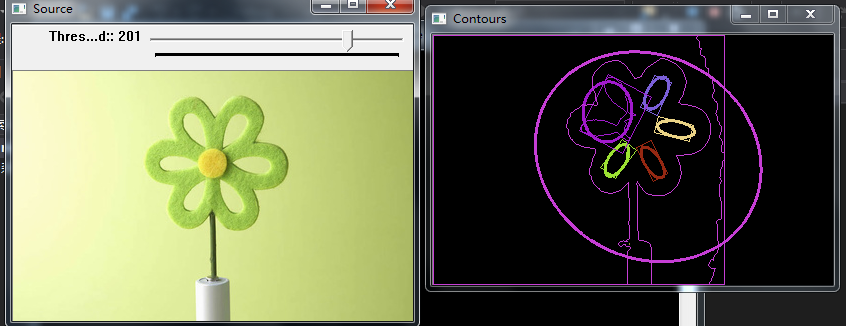
#include "opencv2/highgui/highgui.hpp"

#include "opencv2/imgproc/imgproc.hpp"

#include <iostream>

#include <stdio.h>

#include <stdlib.h>

using namespace cv;

using namespace std;

Mat src; Mat src_gray;

int thresh = ;

int max_thresh = ;

RNG rng();

/// Function header

void thresh_callback(int, void*);

/** @function main */

int main(int argc, char** argv)

{

    /// 加载源图像

    src = imread("E:\\VS2015Opencv\\vs2015\\project\\picture\\01.jpg");

    /// 转为灰度图并模糊化

    cvtColor(src, src_gray, CV_BGR2GRAY);

    blur(src_gray, src_gray, Size(, ));

    /// 创建窗体

    char* source_window = "Source";

    namedWindow(source_window, CV_WINDOW_AUTOSIZE);

    imshow(source_window, src);

    createTrackbar(" Threshold:", "Source", &thresh, max_thresh, thresh_callback);

    thresh_callback(, );

    waitKey();

    return();

}

/** @function thresh_callback */

void thresh_callback(int, void*)

{

    Mat threshold_output;

    vector<vector<Point> > contours;

    vector<Vec4i> hierarchy;

    /// 阈值化检测边界

    threshold(src_gray, threshold_output, thresh, , THRESH_BINARY);

    /// 寻找轮廓

    findContours(threshold_output, contours, hierarchy, CV_RETR_TREE, CV_CHAIN_APPROX_SIMPLE, Point(, ));

    /// 对每个找到的轮廓创建可倾斜的边界框和椭圆

    vector<RotatedRect> minRect(contours.size());

    vector<RotatedRect> minEllipse(contours.size());

    for (int i = ; i < contours.size(); i++)

    {

        minRect[i] = minAreaRect(Mat(contours[i]));

        if (contours[i].size() > )

        {

            minEllipse[i] = fitEllipse(Mat(contours[i]));

        }

    }

    /// 绘出轮廓及其可倾斜的边界框和边界椭圆

    Mat drawing = Mat::zeros(threshold_output.size(), CV_8UC3);

    for (int i = ; i < contours.size(); i++)

    {

        Scalar color = Scalar(rng.uniform(, ), rng.uniform(, ), rng.uniform(, ));

        // contour

        drawContours(drawing, contours, i, color, , , vector<Vec4i>(), , Point());

        // ellipse

        ellipse(drawing, minEllipse[i], color, , );

        // rotated rectangle

        Point2f rect_points[]; minRect[i].points(rect_points);

        for (int j = ; j < ; j++)

            line(drawing, rect_points[j], rect_points[(j + ) % ], color, , );

    }

    /// 结果在窗体中显示

    namedWindow("Contours", CV_WINDOW_AUTOSIZE);

    imshow("Contours", drawing);

}
OpenCV函数:提取轮廓相关函数使用方法的更多相关文章
- 【OpenCV函数】轮廓提取;轮廓绘制;轮廓面积;外接矩形
FindContours 在二值图像中寻找轮廓 int cvFindContours( CvArr* image, CvMemStorage* storage, CvSeq** first_cont ...
- OpenCV示例学习笔记(1)-contours2.cpp-通过findContours 函数实现轮廓提取
这个系列的目的是通过对OpenCV示例,进一步了解OpenCV函数的使用,不涉及具体原理. 示例代码地址:http://docs.opencv.org/3.0.0/examples.html(安装op ...
- [转载]findContours函数参数说明及相关函数
原文地址:findContours函数参数说明及相关函数作者:鸳都学童 findContours函数,这个函数的原型为: void findContours(InputOutputArray imag ...
- OpenCV学习笔记(12)——OpenCV中的轮廓
什么是轮廓 找轮廓.绘制轮廓等 1.什么是轮廓 轮廓可看做将连续的点(连着边界)连在一起的曲线,具有相同的颜色和灰度.轮廓在形态分析和物体的检测和识别中很有用. 为了更加准确,要使用二值化图像.在寻找 ...
- matlab调用opencv函数的配置
环境: VS2010 活动解决方案平台x64 WIN 8.1 Opencv 2.4.3 Matlab 2012a 1. 首先保证vs2010能正确调用opencv函数, 2. Matlab中选择编 ...
- 一些常用的opencv函数
分配图像空间: IplImage* cvCreateImage(CvSize size, int depth, int channels); size: cvSize(width,hei ...
- 常用的OpenCV函数速查
常用的OpenCV函数速查 1.cvLoadImage:将图像文件加载至内存: 2.cvNamedWindow:在屏幕上创建一个窗口: 3.cvShowImage:在一个已创建好的窗口中显示图像: 4 ...
- [转] matlab调用opencv函数的配置
原文地址百度账户 aleasa123 方式1 1. 首先保证vs2010能正确调用opencv函数, 2. Matlab中选择编译器,操作如下: 打开matlab2012,输入mex –setup ...
- django的聚合函数和aggregate、annotate方法使用
支持聚合函数的方法: 提到聚合函数,首先我们要知道的就是这些聚合函数是不能在django中单独使用的,要想在django中使用这些聚合函数,就必须把这些聚合函数放到支持他们的方法内去执行.支持聚合函数 ...
随机推荐
- PHP0001:PHP环境搭建
1,本机域名解析 网站域名访问流程 配置阿帕奇服务器 的 路径 阿帕奇中添加 PHP 支持 一个简单的PHP 代码 检测PHP apache 语法 httpd -t apache 的启动 获取网站 ...
- Certificate Request Processor: Invalid provider specified. 0x80090013 (-2146893805 NTE_BAD_PROVIDER)
通过INF文件创建CSR时遇到Certificate Request Processor: Invalid provider specified. 0x80090013 (-2146893805 NT ...
- musql 单表查询
一 介绍 本节内容: 查询语法 关键字的执行优先级 简单查询 单条件查询:WHERE 分组查询:GROUP BY HAVING 查询排序:ORDER BY 限制查询的记录数:LIMIT 使用聚合函数查 ...
- 前端开发 css、less编写规范
壹 ❀ 引 早在大半年前,我在负责整理定义了前端组JavaScript开发规范与less.css样式开发规范.一直想将两个规范整理成文章,但在整理了JavaScript规范后,我花了较多的时间在学习J ...
- 假期学习【十】首都之窗百姓信件JavaWweb+Echarts图表展示
今天主要对昨天爬取的数据进行处理,处理后用Echart图表展示, 效果如下:
- 深信服SCSA
最近应公司要求报了SCSA课程,老师讲解的可谓是非常的专业以及详细,不止深信服产品及其配置,还有VPN,网络基础的原理介绍等等,产品不用说,工作中会遇到,能学即学.最好的要数网络发包原理,建立连接等底 ...
- 微信小程序之数组操作:push与concat的区别
微信小程序中需要用到数组的操作,push和concat二者功能很相像,但有两点区别. 先看如下例子: var arr = []; arr.push(); arr.push(); arr.push([, ...
- Django 初试水(三)
在前面的一和二中,分别实现了一些基础的操作,数据库和 Django 自带的管理界面,接下来,主要是创建我们自己的界面(视图). 访问一个地址,对应的服务器直接返回一个视图.这是最常见的交互. 就好比访 ...
- 【Python】表白代码
# -*- coding:utf-8 -*- import turtle import time # 画爱心的顶部 def LittleHeart(): for i in range(200): tu ...
- js中变量含(参数、数组)作用域传递问题
js没有块级作用域(你可以自己闭包或其他方法实现),只有函数级作用域和全局作用域,函数外面的变量函数里面可以找到使用,函数里面的变量外面无法访问到. 写这个是因为ES6中的一个例子开始的.首先看下例子 ...