
OpenCV示例学习笔记(1)-contours2.cpp-通过findContours 函数实现轮廓提取
本文记录了对OpenCV示例contours2.cpp的分析。
资料地址:http://docs.opencv.org/3.0.0/d0/d2a/contours2_8cpp-example.html
1.findContours函数轮廓检测函数原型:void findContours(InputOutputArray image, OutputArrayOfArrays contours, OutputArray hierarchy, int mode, int method, Point offset=Point());
CHAIN_APPROX_NONE存储所有的轮廓点,相邻的两个点的像素位置差不超过1,即max(abs(x1-x2),abs(y2-y1))==1
CHAIN_APPROX_SIMPLE压缩水平方向,垂直方向,对角线方向的元素,只保留该方向的终点坐标,例如一个矩形轮廓只需4个点来保存轮廓信息
CHAIN_APPROX_TC89_L1,CV_CHAIN_APPROX_TC89_KCOS使用teh-Chinl chain 近似算法
offset:代表轮廓点的偏移量,可以设置为任意值。对ROI图像中找出的轮廓,并要在整个图像中进行分析时,这个参数还是很有用的。
函数原型:
参数说明:
InputArray curve:输入的点集
OutputArray approxCurve:输出的点集,当前点集是能最小包容指定点集的。draw出来即是一个多边形;
double epsilon:指定的精度,也即是原始曲线与近似曲线之间的最大距离。
bool closed:若为true,则说明近似曲线是闭合的,它的首位都是相连,反之,若为false,则断开。
drawContours(InputOutputArray image, InputArrayOfArrays contours, int contourIdx, const Scalar& color, int thickness=1, int lineType=8, InputArray hierarchy=noArray(), int maxLevel=INT_MAX, Point offset=Point() )
maxLevel=0,绘制与输入轮廓属于同一等级的所有轮廓即输入轮廓和与其相邻的轮廓
maxLevel=1, 绘制与输入轮廓同一等级的所有轮廓与其子节点。
maxLevel=2,绘制与输入轮廓同一等级的所有轮廓与其子节点以及子节点的子节点
PS:findContours()运行的时候,这个图像会被直接涂改,因此如果是将来还有用的图像,应该复制之后再传给findContours()。
以上描述摘至参考资料5
trackbarname:滑动空间的名称;
winname:滑动空间用于依附的图像窗口的名称;
value:初始化阈值;
count:滑动控件的刻度范围;
TrackbarCallback是回调函数。
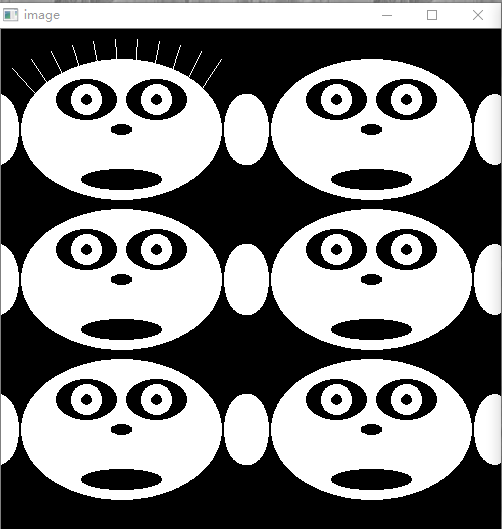

取消approxPolyDP调用

Example分析
1.申明需要使用的变量
for( int i = ; i < ; i++ )

    {

        int dx = (i%)* - ;

        int dy = (i/)*;

        const Scalar white = Scalar();

        const Scalar black = Scalar();


        if( i ==  )

        {

            for( int j = ; j <= ; j++ )

            {

                double angle = (j+)*CV_PI/;

                line(img, Point(cvRound(dx++j*-*cos(angle)),

                    cvRound(dy+-*sin(angle))),

                    Point(cvRound(dx++j*-*cos(angle)),

                    cvRound(dy+-*sin(angle))), white, , , );

            }

        }


        ellipse( img, Point(dx+, dy+), Size(,), , , , white, -, ,  );

        ellipse( img, Point(dx+, dy+), Size(,), , , , black, -, ,  );

        ellipse( img, Point(dx+, dy+), Size(,), , , , black, -, ,  );

        ellipse( img, Point(dx+, dy+), Size(,), , , , white, -, ,  );

        ellipse( img, Point(dx+, dy+), Size(,), , , , white, -, ,  );

        ellipse( img, Point(dx+, dy+), Size(,), , , , black, -, ,  );

        ellipse( img, Point(dx+, dy+), Size(,), , , , black, -, ,  );

        ellipse( img, Point(dx+, dy+), Size(,), , , , black, -, ,  );

        ellipse( img, Point(dx+, dy+), Size(,), , , , black, -, ,  );

        ellipse( img, Point(dx+, dy+), Size(,), , , , white, -, ,  );

        ellipse( img, Point(dx+, dy+), Size(,), , , , white, -, ,  );

    }
2.3.创建显示源图像的窗口
 #include "opencv2/imgproc/imgproc.hpp"

 #include "opencv2/highgui/highgui.hpp"

 #include <math.h>

 #include <iostream>

 using namespace cv;

 using namespace std;

 static void help()

 {

     cout

     << "\nThis program illustrates the use of findContours and drawContours\n"

     << "The original image is put up along with the image of drawn contours\n"

     << "Usage:\n"

     << "./contours2\n"

     << "\nA trackbar is put up which controls the contour level from -3 to 3\n"

     << endl;

 }

 const int w = ;

 int levels = ;

 vector<vector<Point> > contours;

 vector<Vec4i> hierarchy;

 static void on_trackbar(int, void*)

 {

     Mat cnt_img = Mat::zeros(w, w, CV_8UC3);

     int _levels = levels - ;

     drawContours( cnt_img, contours, _levels <=  ?  : -, Scalar(,,),

                   , LINE_AA, hierarchy, std::abs(_levels) );

     imshow("contours", cnt_img);

 }

 int main( int argc, char**)

 {

     Mat img = Mat::zeros(w, w, CV_8UC1);

     if(argc > )

     {

         help();

         return -;

     }

     //Draw 6 faces

     for( int i = ; i < ; i++ )

     {

         int dx = (i%)* - ;

         int dy = (i/)*;

         const Scalar white = Scalar();

         const Scalar black = Scalar();

         if( i ==  )

         {

             for( int j = ; j <= ; j++ )

             {

                 double angle = (j+)*CV_PI/;

                 line(img, Point(cvRound(dx++j*-*cos(angle)),

                     cvRound(dy+-*sin(angle))),

                     Point(cvRound(dx++j*-*cos(angle)),

                     cvRound(dy+-*sin(angle))), white, , , );

             }

         }

         ellipse( img, Point(dx+, dy+), Size(,), , , , white, -, ,  );

         ellipse( img, Point(dx+, dy+), Size(,), , , , black, -, ,  );

         ellipse( img, Point(dx+, dy+), Size(,), , , , black, -, ,  );

         ellipse( img, Point(dx+, dy+), Size(,), , , , white, -, ,  );

         ellipse( img, Point(dx+, dy+), Size(,), , , , white, -, ,  );

         ellipse( img, Point(dx+, dy+), Size(,), , , , black, -, ,  );

         ellipse( img, Point(dx+, dy+), Size(,), , , , black, -, ,  );

         ellipse( img, Point(dx+, dy+), Size(,), , , , black, -, ,  );

         ellipse( img, Point(dx+, dy+), Size(,), , , , black, -, ,  );

         ellipse( img, Point(dx+, dy+), Size(,), , , , white, -, ,  );

         ellipse( img, Point(dx+, dy+), Size(,), , , , white, -, ,  );

     }

     //show the faces

     namedWindow( "image",  );

     imshow( "image", img );

     //Extract the contours so that

     vector<vector<Point> > contours0;

     findContours( img, contours0, hierarchy, RETR_TREE, CHAIN_APPROX_SIMPLE);

     contours.resize(contours0.size());

     for( size_t k = ; k < contours0.size(); k++ )

         approxPolyDP(Mat(contours0[k]), contours[k], , true);

     namedWindow( "contours",  );

     createTrackbar( "levels+3", "contours", &levels, , on_trackbar );

     on_trackbar(,);

     waitKey();

     return ;

 }
OpenCV示例学习笔记(1)-contours2.cpp-通过findContours 函数实现轮廓提取的更多相关文章
- Android NDK开发及OpenCV初步学习笔记
https://www.jianshu.com/p/c29bb20908da Android NDK开发及OpenCV初步学习笔记 Super_圣代 关注 2017.08.19 00:55* 字数 6 ...
- OpenCV入门学习笔记
OpenCV入门学习笔记 参照OpenCV中文论坛相关文档(http://www.opencv.org.cn/) 一.简介 OpenCV(Open Source Computer Vision),开源 ...
- OpenCV图像处理学习笔记-Day1
OpenCV图像处理学习笔记-Day1 目录 OpenCV图像处理学习笔记-Day1 第1课:图像读入.显示和保存 1. 读入图像 2. 显示图像 3. 保存图像 第2课:图像处理入门基础 1. 基本 ...
- OpenCV图像处理学习笔记-Day03
OpenCV图像处理学习笔记-Day03 目录 OpenCV图像处理学习笔记-Day03 第31课:Canny边缘检测原理 第32课:Canny函数及使用 第33课:图像金字塔-理论基础 第34课:p ...
- OpenCV图像处理学习笔记-Day4(完结)
OpenCV图像处理学习笔记-Day4(完结) 第41课:使用OpenCV统计直方图 第42课:绘制OpenCV统计直方图 pass 第43课:使用掩膜的直方图 第44课:掩膜原理及演示 第45课:直 ...
- MYSQL学习笔记三:日期和时间函数
MYSQL学习笔记三:日期和时间函数 1. 获取当前日期的函数和获取当前时间的函数 /*获取当前日期的函数和获取当前时间的函数.将日期以'YYYY-MM-DD'或者'YYYYMMDD'格式返回 */ ...
- 播放一个视频并用滚动条控制进度-OpenCV应用学习笔记二
今天我们来做个有趣的程序实现:利用OpenCV读取本地文件夹的视频文件,并且在窗口中创建拖动控制条来显示并且控制视频文件的读取进度. 此程序调试花费了笔者近一天时间,其实大体程序都已经很快写出,结果执 ...
- C++ Primer学习笔记(三) C++中函数是一种类型!!!
C++中函数是一种类型!C++中函数是一种类型!C++中函数是一种类型! 函数名就是变量!函数名就是变量!函数名就是变量! (---20160618最新消息,函数名不是变量名...囧) (---201 ...
- JavaScript学习笔记(十)——高阶函数之map,reduce,filter,sort
在学习廖雪峰前辈的JavaScript教程中,遇到了一些需要注意的点,因此作为学习笔记列出来,提醒自己注意! 如果大家有需要,欢迎访问前辈的博客https://www.liaoxuefeng.com/ ...
随机推荐
- 经常使用Javascript CDN 对照
[前言] 请参阅某种网上文章: http://c7sky.com/javascript-libraries-cdn.html 本文加入的各个cdn对一些库的更新情况.以及响应时间. [更新] 发表文章 ...
- 推荐两个针对github的chrome插件
作为一只程序猿,在github上找代码.看代码是再正常不过的事情了.这时候有个工具可以方便你翻看代码,想必是极好的. Sourcegraph for GitHub 这个插件允许你像使用IDE那样浏览代 ...
- ssis的script task作业失败(调用外部dll)
原文 ssis的script task作业失败 我的ssis作业包里用了一个script task,会查询一个http的页面接口,获取json数据后解析然后做后续处理,其中解析json引用了本地目录下 ...
- Python装饰器学习
Python装饰器学习(九步入门) 这是在Python学习小组上介绍的内容,现学现卖.多练习是好的学习方式. 第一步:最简单的函数,准备附加额外功能 ? 1 2 3 4 5 6 7 8 # -*- ...
- QTP脚本不能录制怎么办?
QTP是基于VBS脚本语言的,大部分VBS脚本都能在QTP上运行,只是在一些细节上略有不同,比如说VBS上停止用sleep,QTP上用wait.QTP的强大之处在于对程序窗口的操作,有很多针对窗体的属 ...
- ASP.NET MVC之单元测试
ASP.NET MVC之单元测试分分钟的事2014-07-15 13:05 by 书洞里的猫, 550 阅读, 4 评论, 收藏, 编辑 一.为什么要进行单元测试? 大部分开发者都有个习惯(包括本人在 ...
- Love myself...
Sometimes we feel as if our lives rely on that one person. We think 'If I do this, he/she will like ...
- Step one : 熟悉HTML
//H1 1 <html> <head> <title>BeiJing</title> </head> <body> <h ...
- ubuntu-使用终端配置网络
文件说明: IP.网关.掩码的配置文件:/etc/network/interfaces DNS配置文件:/etc/resolv.conf 配置步骤: 1)配置有关IP文件 配置IP.网关.掩码这些信息 ...
- [Usaco2007 Dec]Building Roads 修建道路[最小生成树]
Description Farmer John最近得到了一些新的农场,他想新修一些道路使得他的所有农场可以经过原有的或是新修的道路互达(也就是说,从任一个农场都可以经过一些首尾相连道路到达剩下的所有农 ...