
Nginx安装 默认虚拟主机 Nginx用户认证 Nginx域名重定向
Nginx安装
- cd /usr/local/src
(http://nginx.org/en/download.html)
- wget http://nginx.org/download/nginx-1.13.9.tar.gz
- tar zxf nginx-1.12.1.tar.gz
- ./configure --prefix=/usr/local/nginx
- make && make install
- vim /etc/init.d/nginx //复制如下内容
#!/bin/bash

# chkconfig: -

# description: http service.

# Source Function Library

. /etc/init.d/functions

# Nginx Settings

NGINX_SBIN="/usr/local/nginx/sbin/nginx"

NGINX_CONF="/usr/local/nginx/conf/nginx.conf"

NGINX_PID="/usr/local/nginx/logs/nginx.pid"

RETVAL=

prog="Nginx"

start()

{

echo -n $"Starting $prog: "

mkdir -p /dev/shm/nginx_temp

daemon $NGINX_SBIN -c $NGINX_CONF

RETVAL=$?

echo

return $RETVAL

}

stop()

{

echo -n $"Stopping $prog: "

killproc -p $NGINX_PID $NGINX_SBIN -TERM

rm -rf /dev/shm/nginx_temp

RETVAL=$?

echo

return $RETVAL

}

reload()

{

echo -n $"Reloading $prog: "

killproc -p $NGINX_PID $NGINX_SBIN -HUP

RETVAL=$?

echo

return $RETVAL

}

restart()

{

stop

start

}

configtest()

{

$NGINX_SBIN -c $NGINX_CONF -t

return

}

case "$1" in

start)

start

;;

stop)

stop

;;

reload)

reload

;;

restart)

restart

;;

configtest)

configtest

;;

*)

echo $"Usage: $0 {start|stop|reload|restart|configtest}"

RETVAL=

esac

exit $RETVAL
- chmod 755 /etc/init.d/nginx
- chkconfig --add nginx
- chkconfig nginx on
- cd /usr/local/nginx/conf/; mv nginx.conf nginx.conf.bak
- vim nginx.conf //写入如下内容(参考)
user nobody nobody;

worker_processes ;

error_log /usr/local/nginx/logs/nginx_error.log crit;

pid /usr/local/nginx/logs/nginx.pid;

worker_rlimit_nofile ;

events

{

use epoll;

worker_connections ;

}

http

{

include mime.types;

default_type application/octet-stream;

server_names_hash_bucket_size ;

server_names_hash_max_size ;

log_format combined_realip '$remote_addr $http_x_forwarded_for [$time_local]'

' $host "$request_uri" $status'

' "$http_referer" "$http_user_agent"';

sendfile on;

tcp_nopush on;

keepalive_timeout ;

client_header_timeout 3m;

client_body_timeout 3m;

send_timeout 3m;

connection_pool_size ;

client_header_buffer_size 1k;

large_client_header_buffers  4k;

request_pool_size 4k;

output_buffers  32k;

postpone_output ;

client_max_body_size 10m;

client_body_buffer_size 256k;

client_body_temp_path /usr/local/nginx/client_body_temp;

proxy_temp_path /usr/local/nginx/proxy_temp;

fastcgi_temp_path /usr/local/nginx/fastcgi_temp;

fastcgi_intercept_errors on;

tcp_nodelay on;

gzip on;

gzip_min_length 1k;

gzip_buffers  8k;

gzip_comp_level ;

gzip_http_version 1.1;

gzip_types text/plain application/x-javascript text/css text/htm

application/xml;

server

{

listen ;

server_name localhost;

index index.html index.htm index.php;

root /usr/local/nginx/html;

location ~ \.php$

{

include fastcgi_params;

fastcgi_pass unix:/tmp/php-fcgi.sock;

fastcgi_index index.php;

fastcgi_param SCRIPT_FILENAME /usr/local/nginx/html$fastcgi_script_name;

}

}

}
- /usr/local/nginx/sbin/nginx -t
- /etc/init.d/nginx start
- netstat -lntp |grep 80
- 测试php解析
vi /usr/local/nginx/html/1.php //加入如下内容
<?php
echo "test php scripts.";
?>
curl localhost/1.php

Nginx安装 默认虚拟主机 Nginx用户认证 Nginx域名重定向的更多相关文章
- Nginx安装、默认虚拟主机、Nginx用户认证和域名重定向
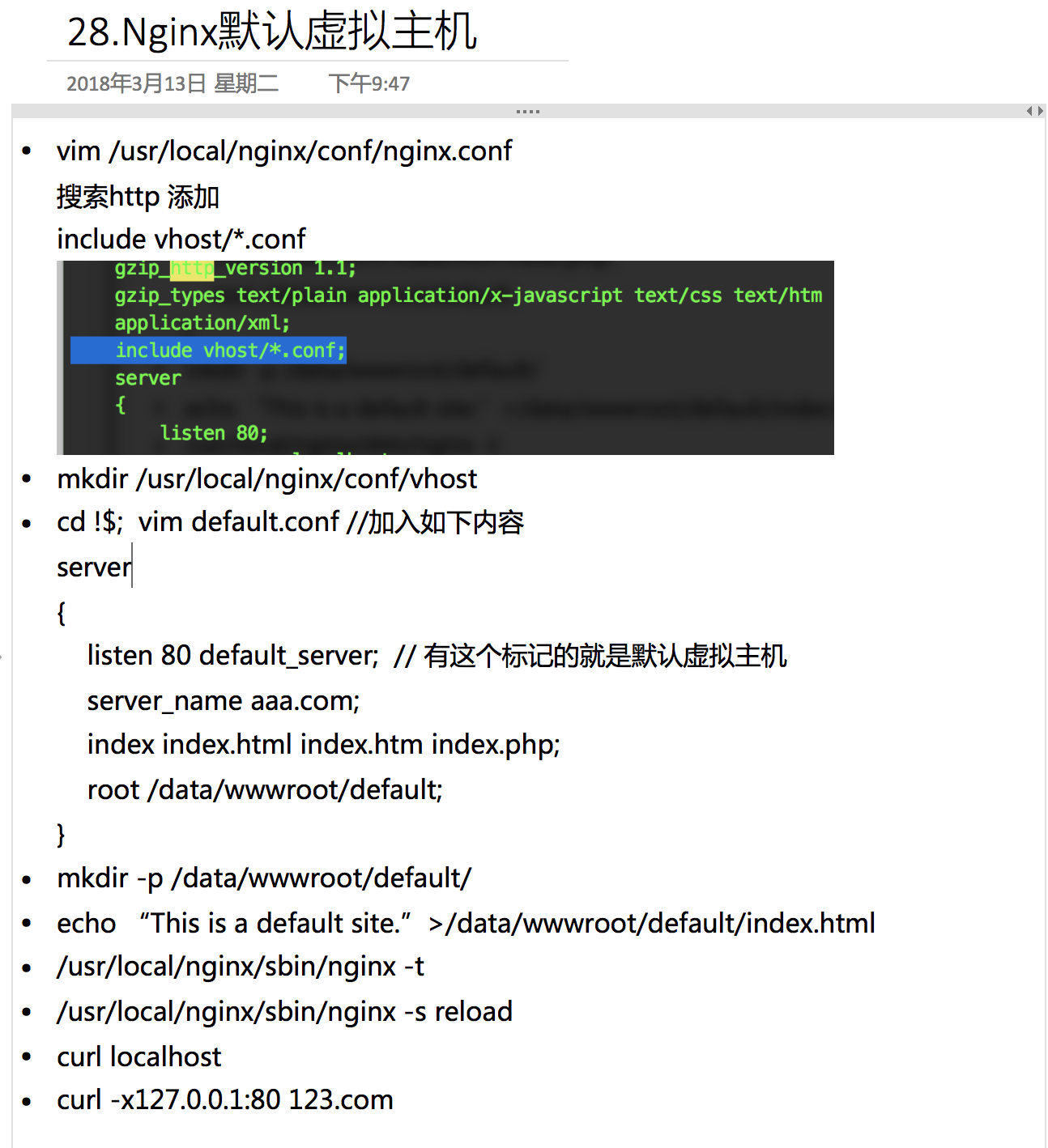
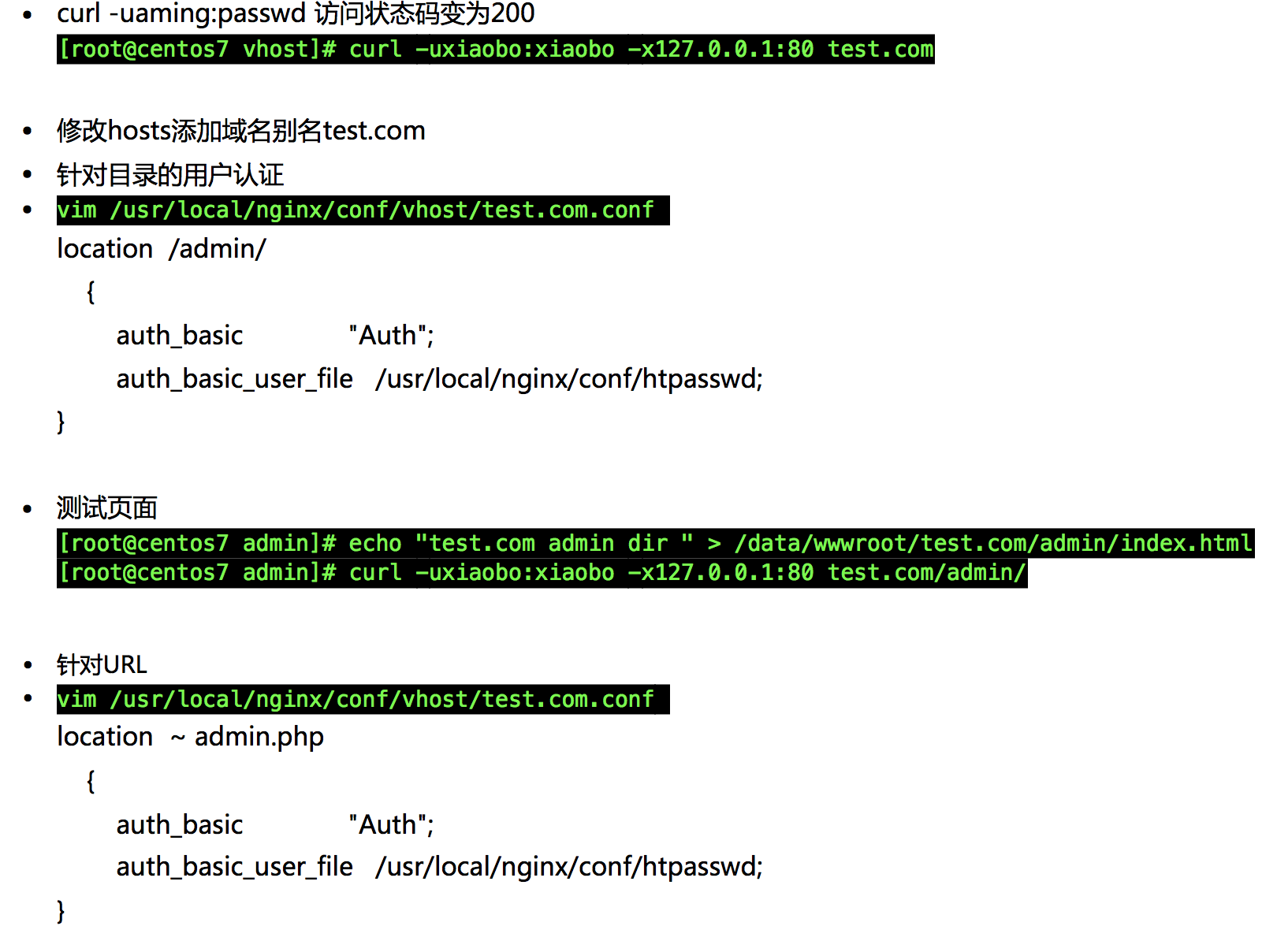
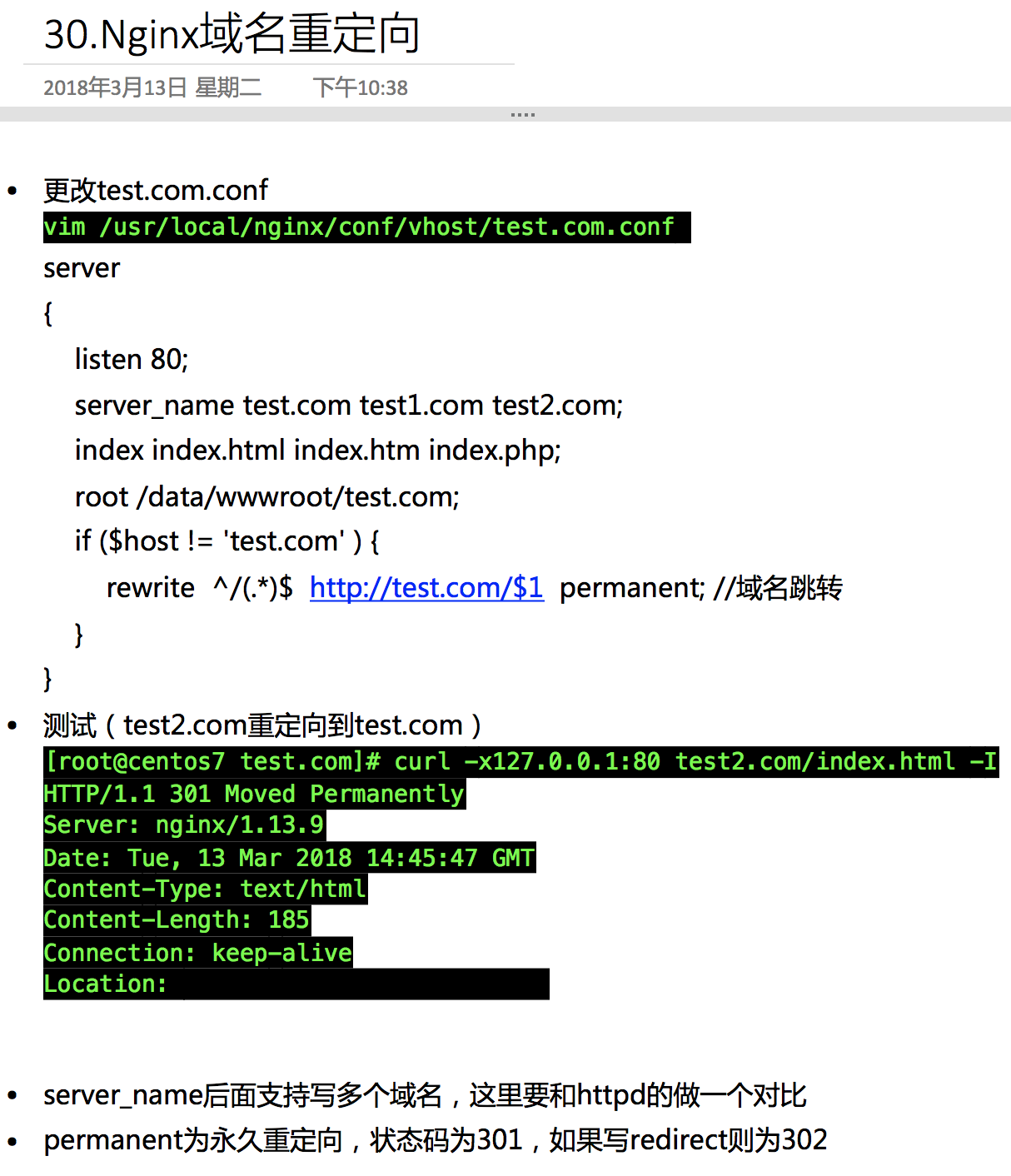
6月7日任务 12.6 Nginx安装12.7 默认虚拟主机12.8 Nginx用户认证12.9 Nginx域名重定向 扩展nginx.conf 配置详解 http://www.ha97.com/51 ...
- nginx创建默认虚拟主机
创建默认虚拟主机配置文件作用:禁止任何人通过ip或未允许的域名访问web服务. 如:vim vhosts/default.conf server { listen 80 default; server ...
- LNMP配置——Nginx配置 —— 默认虚拟主机
一.配置 首先修改配置文件 #vi /usr/local/nginx/conf/nginx.conf 在最后一个结束符号}前加一行配置: include vhost/*.conf; 意思就是/usr/ ...
- Linux centosVMware Nginx安装、 默认虚拟主机、Nginx用户认证、Nginx域名重定向
一. Nginx安装 cd /usr/local/src wget http://nginx.org/download/nginx-1.12.1.tar.gz 版本在http://nginx.org/ ...
- LAMP 1.8默认虚拟主机
默认虚拟主机是为了解决别人域名恶心绑定自己的服务器ip,可导致服务器上的网站排名靠后,即干扰seo优化 我们访问指定的两个网站可以直接访问,ip也可以访问 打开配置文件 vim /usr/local/ ...
- apache禁止默认虚拟主机
禁止默认虚拟主机:作用使除特定域名外,其它的域名/ip无法访问此站点. 在虚拟主机配置文件中 即:/usr/local/apache2/conf/extra/httpd-vhosts.conf 将其中 ...
- nginx的安装 、Nginx默认虚拟主机、nginx用户认证、nginx 域名重定向
1.nginx:官网:www.nginx.org 下载:wget -c http://nginx.org/download/nginx-1.14.0.tar.gz解压:tar -zxvf nginx ...
- [转] linux学习第四十四篇:Nginx安装,Nginx默认虚拟主机,Nginx域名重定向
Nginx安装 进入存放源码包的目录: cd /usr/local/src 下载源码包: wget http://nginx.org/download/nginx-1.12.1.tar.gz 解压: ...
- centos LAMP第二部分apache配置 下载discuz!配置第一个虚拟主机 安装Discuz! 用户认证 配置域名跳转 配置apache的访问日志 配置静态文件缓存 配置防盗链 访问控制 apache rewrite 配置开机启动apache tcpdump 第二十节课
centos LAMP第二部分apache配置 下载discuz!配置第一个虚拟主机 安装Discuz! 用户认证 配置域名跳转 配置apache的访问日志 配置静态文件缓存 配置防盗链 ...
随机推荐
- 设计模式之原型模式(深入理解OC中的NSCopying协议以及浅拷贝、深拷贝)
原型模式:用原型实例指定创建对象的种类,并且通过拷贝这些原型创建新的对象.原型模式其实就是从一个对象再创建另一个可定制的对象,而且不需知道任何创建的细节. 比如说,有一个Person类,有firstN ...
- Android 自动化测试
Python +Android +uiautomator test 在init中定义的方法 uiautomator 该模块是android的一个python包装uiautomator测试框架 ...
- SQL Server 数据库自建表
sysobjects是系统自建的表,里面存储了在数据库内创建的每个对象(约束.默认值.日志.规则.存储过程等). 列名 数据类型 描述 name sysname 对象名 id int 对象标识号 xt ...
- python 下载虾米音乐
#!/usr/bin/env python2 # coding:utf-8 import urllib import re import sys import urllib2 # xml => ...
- 基于jQuery鼠标点击弹出登陆框效果
基于jQuery鼠标点击弹出登陆框效果.这是一款扁平样式风格的jQuery弹出层登陆框特效.效果图如下: 在线预览 源码下载 实现的代码. html代码: <input type=" ...
- app测试初窥
要用到的两个神器:abd&drozer adb介绍 adb的全称为Android Debug Bridge,就是起到调试桥的作用,作为一名开发者倒是常用到这个工具.借助adb工具,我们可以管理 ...
- springboot 使用c3p0数据库连接池
springboot 使用c3p0数据库连接池的方法 本文转自:http://www.cnblogs.com/xiaosiyuan/p/6255292.html 使用springboot开发时,默认 ...
- [RTC]系统时间NTP和RTC同步,Debian的时区配置
转自:http://www.cnblogs.com/jiu0821/p/5999566.html Debian的时区配置 一. 修改时区 1. 查看当前时区 命令 : "date -R&qu ...
- 无线linux应用及配置--wifi配置
linux下应用wifi,AP侧运行程序hostapd,客户端运行wpa_supplicant.官网:http://w1.fi/. 无线网卡应用 无线网卡的应用服务程序为wpa_supplicant, ...
- Android NDK: Application targets deprecated ABI(s): armeabi Open File
Error:(81) Android NDK: Application targets deprecated ABI(s): armeabi Error:(82) Android NDK: Suppo ...