
ROS学习(十二)—— 编写简单的消息发布器和订阅器(C++)
一、创建发布器节点
1 节点功能:
不断的在ROS网络中广播消息
2 创建节点
(1)打开工作空间目录
cd ~/catkin_ws/src/beginner_tutorials
创建一个发布器节点("talker"),它将不断的在ROS网络中广播消息。
-->
(2)创建src文件夹
mkdir -p ~/catkin_ws/src/beginner_tutorials/src
(3)创建talkler.cpp文件,幷附上代码
#include "ros/ros.h"              //      ros/ros.h是一个实用的头文件,它引用了ROS系统中大部分常用的头文件,使用它会使得编程很简便。

#include "std_msgs/String.h"      //      这引用了std_msgs/String 消息, 它存放在std_msgs package里,是由String.msg文件自动生成的头文件。

                                  //  需要更详细的消息定义,参考msg页面.

#include <sstream>

/**

 * This tutorial demonstrates simple sending of messages over the ROS system.

 */

int main(int argc, char **argv)

{

  /**

   * The ros::init() function needs to see argc and argv so that it can perform

   * any ROS arguments and name remapping that were provided at the command line.

   * For programmatic remappings you can use a different version of init() which takes

   * remappings directly, but for most command-line programs, passing argc and argv is

   * the easiest way to do it.  The third argument to init() is the name of the node.

   *

   * You must call one of the versions of ros::init() before using any other

   * part of the ROS system.

   */

  ros::init(argc, argv, "talker");   // 初始化ROS。它允许ROS通过命令行进行名称重映射——目前,这不是重点。

                                     // 同样,我们也在这里指定我们节点的名称——必须唯一。

  /**

   * NodeHandle is the main access point to communications with the ROS system.

   * The first NodeHandle constructed will fully initialize this node, and the last

   * NodeHandle destructed will close down the node.

    为这个进程的节点创建一个句柄。第一个创建的NodeHandle会为节点进行初始化,最后一个销毁的会清理节点使用的所有资源。

   */

  ros::NodeHandle n;

  /**

   * The advertise() function is how you tell ROS that you want to

   * publish on a given topic name. This invokes a call to the ROS

   * master node, which keeps a registry of who is publishing and who

   * is subscribing. After this advertise() call is made, the master

   * node will notify anyone who is trying to subscribe to this topic name,

   * and they will in turn negotiate a peer-to-peer connection with this

   * node.  advertise() returns a Publisher object which allows you to

   * publish messages on that topic through a call to publish().  Once

   * all copies of the returned Publisher object are destroyed, the topic

   * will be automatically unadvertised.

   *

   * The second parameter to advertise() is the size of the message queue

   * used for publishing messages.  If messages are published more quickly

   * than we can send them, the number here specifies how many messages to

   * buffer up before throwing some away.

   */

  /* 1、告诉master我们将要在chatter topic上发布一个std_msgs/String的消息。这样master就会告诉所有订阅了chatter topic的节点,将要有数据发布。

     2、第二个参数是发布序列的大小。在这样的情况下,如果我们发布的消息太快,缓冲区中的消息在大于1000个的时候就会开始丢弃先前发布的消息。

     3、NodeHandle::advertise() 返回一个 ros::Publisher对象,它有两个作用: 1) 它有一个publish()成员函数可以让你在topic上发布消息;

                                                                     2) 如果消息类型不对,它会拒绝发布。

  */

  ros::Publisher chatter_pub = n.advertise<std_msgs::String>("chatter", );

  //ros::Rate对象可以允许你指定自循环的频率。它会追踪记录自上一次调用Rate::sleep()后时间的流逝,并休眠直到一个频率周期的时间。

  ros::Rate loop_rate();

  /**

   * A count of how many messages we have sent. This is used to create

   * a unique string for each message.

   */

  int count = ;

  /* roscpp会默认安装一个SIGINT句柄,它负责处理Ctrl-C键盘操作——使得ros::ok()返回FALSE。

         ros::ok()返回false,如果下列条件之一发生:

              1)SIGINT接收到(Ctrl-C)

              2)被另一同名节点踢出ROS网络

              3)ros::shutdown()被程序的另一部分调用

              4) 所有的ros::NodeHandles都已经被销毁

  */

  while (ros::ok())

  {

    /**

     * This is a message object. You stuff it with data, and then publish it.

     */

    //我们使用一个由msg file文件产生的‘消息自适应’类在ROS网络中广播消息。现在我们使用标准的String消息,它只有一个数据成员"data"。当然你也可以发布更复杂的消息类型。

    std_msgs::String msg;

    std::stringstream ss;

    ss << "hello world " << count;

    msg.data = ss.str();

    ROS_INFO("%s", msg.data.c_str());

    /**

     * The publish() function is how you send messages. The parameter

     * is the message object. The type of this object must agree with the type

     * given as a template parameter to the advertise<>() call, as was done

     * in the constructor above.

     */

    chatter_pub.publish(msg);    //现在我们已经向所有连接到chatter topic的节点发送了消息

    ros::spinOnce();             //在这个例子中并不是一定要调用ros::spinOnce(),因为我们不接受回调。

                                 //然而,如果你想拓展这个程序,却又没有在这调用ros::spinOnce(),你的回调函数就永远也不会被调用。所以,在这里最好还是加上这一语句。

    loop_rate.sleep();           //这条语句是调用ros::Rate对象来休眠一段时间以使得发布频率为10hz。

    ++count;

  }

  return ;

}
二、编写订阅器节点
在src文件中,继续写入listener.cpp文件,幷附上代码
#include "ros/ros.h"

#include "std_msgs/String.h"

/**

 * This tutorial demonstrates simple receipt of messages over the ROS system.

 * 这是一个回调函数,当消息到达chatter topic的时候就会被调用。消息是以 boost shared_ptr指针的形式传输,这就意味着你可以存储它而又不需要复制数据

 */

void chatterCallback(const std_msgs::String::ConstPtr& msg)

{

  ROS_INFO("I heard: [%s]", msg->data.c_str());

}

int main(int argc, char **argv)

{

  /**

   * The ros::init() function needs to see argc and argv so that it can perform

   * any ROS arguments and name remapping that were provided at the command line.

   * For programmatic remappings you can use a different version of init() which takes

   * remappings directly, but for most command-line programs, passing argc and argv is

   * the easiest way to do it.  The third argument to init() is the name of the node.

   *

   * You must call one of the versions of ros::init() before using any other

   * part of the ROS system.

   */

  ros::init(argc, argv, "listener");

  /**

   * NodeHandle is the main access point to communications with the ROS system.

   * The first NodeHandle constructed will fully initialize this node, and the last

   * NodeHandle destructed will close down the node.

   */

  ros::NodeHandle n;

  /**

   * The subscribe() call is how you tell ROS that you want to receive messages

   * on a given topic.  This invokes a call to the ROS

   * master node, which keeps a registry of who is publishing and who

   * is subscribing.  Messages are passed to a callback function, here

   * called chatterCallback.  subscribe() returns a Subscriber object that you

   * must hold on to until you want to unsubscribe.  When all copies of the Subscriber

   * object go out of scope, this callback will automatically be unsubscribed from

   * this topic.

   *

   * The second parameter to the subscribe() function is the size of the message

   * queue.  If messages are arriving faster than they are being processed, this

   * is the number of messages that will be buffered up before beginning to throw

   * away the oldest ones.

   */

   //告诉master我们要订阅chatter topic上的消息。当有消息到达topic时,ROS就会调用chatterCallback()函数。

   //第二个参数是队列大小,以防我们处理消息的速度不够快,在缓存了1000个消息后,再有新的消息到来就将开始丢弃先前接收的消息。

   //NodeHandle::subscribe()返回ros::Subscriber对象,你必须让它处于活动状态直到你不再想订阅该消息。当这个对象销毁时,它将自动退订消息。

   //有各种不同的NodeHandle::subscribe()函数,允许你指定类的成员函数,甚至是Boost.Function对象可以调用的任何数据类型。roscpp overview 提供了更为详尽的信息。

   ros::Subscriber sub = n.subscribe("chatter", , chatterCallback);

  /**

   * ros::spin() will enter a loop, pumping callbacks.  With this version, all

   * callbacks will be called from within this thread (the main one).  ros::spin()

   * will exit when Ctrl-C is pressed, or the node is shutdown by the master.

   */

  //ros::spin()进入自循环,可以尽可能快的调用消息回调函数。如果没有消息到达,它不会占用很多CPU,所以不用担心。

  //一旦ros::ok()返回FALSE,ros::spin()就会立刻跳出自循环。

  //   1)这有可能是ros::shutdown()被调用,

  //   2)或者是用户按下了Ctrl-C,使得master告诉节点要shutdown。也有可能是节点被人为的关闭。

  ros::spin();

  return ;

}
三、编译节点
1、在beginner_tutorials 包中的CMakeLists.txt 的末尾加入
## Build talker and listener

include_directories(include ${catkin_INCLUDE_DIRS})

add_executable(talker src/talker.cpp)

target_link_libraries(talker ${catkin_LIBRARIES})

add_dependencies(talker beginner_tutorials_generate_messages_cpp)

add_executable(listener src/listener.cpp)

target_link_libraries(listener ${catkin_LIBRARIES})

add_dependencies(listener beginner_tutorials_generate_messages_cpp)
这会生成两个可执行文件, talker 和 listener, 默认存储到devel space目录,具体是在~/catkin_ws/devel/lib/<package name>中.
这会生成两个可执行文件, talker 和 listener, 默认存储到devel space目录,具体是在~/catkin_ws/devel/lib/中.
-->
2、编译
# In your catkin workspace

catkin_make
四、测试消息发布器和订阅器
1、运行roscore
2、加入到ROS工作空间中
# In your catkin workspace

cd ~/catkin_ws

source ./devel/setup.bash
3、运行talker节点
rosrun beginner_tutorials talker

rosrun beginner_tutorials listener
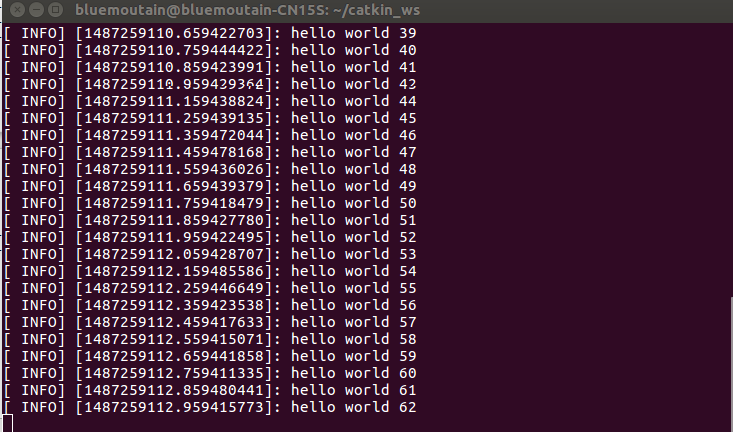

创建一个发布器节点("talker"),它将不断的在ROS网络中广播消息。
-->
ROS学习(十二)—— 编写简单的消息发布器和订阅器(C++)的更多相关文章
- SLAM+语音机器人DIY系列:(二)ROS入门——5.编写简单的消息发布器和订阅器
摘要 ROS机器人操作系统在机器人应用领域很流行,依托代码开源和模块间协作等特性,给机器人开发者带来了很大的方便.我们的机器人“miiboo”中的大部分程序也采用ROS进行开发,所以本文就重点对ROS ...
- ROS教程2 编写简单的消息发布器和订阅器 (C++ catkin)
创建工作环境 创建文件夹,创建包 mkdir -p ~/catkin_arduino_ros/src catkin_create_pkg test1_pub_sub std_msgs rospy ro ...
- (转)SpringMVC学习(十二)——SpringMVC中的拦截器
http://blog.csdn.net/yerenyuan_pku/article/details/72567761 SpringMVC的处理器拦截器类似于Servlet开发中的过滤器Filter, ...
- ROS学习手记 - 8 编写ROS的Publisher and Subscriber
上一节我们完成了 message & srv 文件的创建和加入编译,这次我们要玩简单的Publisher 和 Subscriber 要玩 Publisher 和 Subscriber, 需要具 ...
- Android Studio(十二):打包多个发布渠道的apk文件
Android Studio相关博客: Android Studio(一):介绍.安装.配置 Android Studio(二):快捷键设置.插件安装 Android Studio(三):设置Andr ...
- RabbitMQ学习系列二-C#代码发送消息
RabbitMQ学习系列二:.net 环境下 C#代码使用 RabbitMQ 消息队列 http://www.80iter.com/blog/1437455520862503 上一篇已经讲了Rabbi ...
- ROS学习笔记二:ROS系统架构及概念
本文主要是了解ROS的系统架构.文件夹结构以及工作所需的核心文件. ROS系统架构主要被设计和划分为三部分,每一部分代表一个层级的概念:文件系统级(The filesystem level).计算图级 ...
- ROS学习笔记10-写一个简单的订阅者和发布者(C++版本)
本文档来源于:http://wiki.ros.org/ROS/Tutorials/WritingPublisherSubscriber%28c%2B%2B%29 写发布者节点如前所述,节点是连接到RO ...
- Scala学习十二——高阶函数
一.本章要点 在Scala中函数是”头等公民“(可以作为参数,返回值,赋值给其他); 可以创建匿名函数,通常还会交给其他函数; 函数参数可以给出需要稍后执行的行为; 许多集合方法都接受函数参数,将函数 ...
随机推荐
- Kafka:ZK+Kafka+Spark Streaming集群环境搭建(七)针对hadoop2.9.0启动DataManager失败问题
DataManager启动失败 启动过程中发现一个问题:slave1,slave2,slave3都是只启动了DataNode,而DataManager并没有启动: [spark@slave1 hado ...
- Java-JUC(七):同步锁的几种方式
为什么要使用同步锁? 因为当使用多线程同时访问一个变量或对象时,如果这些线程中即有读又有写操作时,会造成导致变量或对象的状态出现混乱.例如:一个银行账户被A/B两个线程同时操作,A线程.B线程同时开始 ...
- Node.js中 express-session的奇怪问题
var session = require('express-session'); app.use(cookieParser()); 行 登录以后访问的时候有时候会报这样的错误: The la ...
- ExtMail telnet 25端口号 不通
搭建好的Mail服务器在本地端口号25是开的,但是在别的电脑上就连不上. 修改/etc/postfix/main.cf文件,将 inet_interfaces = localhost 注释掉即可.
- 4、Cocos2dx 3.0游戏开发找小三之Hello World 分析
尊重开发人员的劳动成果.转载的时候请务必注明出处:http://blog.csdn.net/haomengzhu/article/details/27186557 Hello World 分析 打开新 ...
- 如何用简单例子讲解 Q - learning 的具体过程?
作者:牛阿链接:https://www.zhihu.com/question/26408259/answer/123230350来源:知乎著作权归作者所有.商业转载请联系作者获得授权,非商业转载请注明 ...
- [Canvas]动态背景
欲查看动态效果请点击下载代码再用Chrome或Firefox打开index.html 图例: 代码: <!DOCTYPE html> <html lang="utf-8&q ...
- Code optimization and organization in Javascript / jQuery
This article is a combined effort of Innofied Javascript developers Puja Deora and Subhajit Ghosh) W ...
- WIN10系统如何隐藏底部搜索框
右击任务栏,搜索,可以切换三种模式,建议还是显示搜索图标,因为这个搜索还是能比较快速定位到系统功能的,只不过显示搜索框的话比较占地方,不方便
- android中RecyclerView控件实现长按弹出PopupMenu菜单功能
之前写过一篇文章:android中实现简单的聊天功能 现在是在之前功能的基础上,添加一个长按聊天记录,删除对应聊天记录的功能 RecyclerView控件,没有对应的长按事件,我们需要自己手工添加,修 ...