
多线程二:线程池(ThreadPool)
一、ThreadPool
ThreadPool是.Net Framework 2.0版本中出现的。
ThreadPool出现的背景:Thread功能繁多,而且对线程数量没有管控,对于线程的开辟和销毁要消耗大量的资源。每次new一个THread都要重新开辟内存。
如果某个线程的创建和销毁的代价比较高,同时这个对象还可以反复使用的,就需要一个池子(容器),保存多个这样的对象,需要用的时候从池子里面获取,用完之后不用销毁,在放到池子里面。这样不但能节省内存资源,提高性能,而且还能管控线程的总数量,防止滥用。这时就需要使用ThreadPool了。
我们来看看ThreadPool中常用的一些方法。
1、QueueUserWorkItem()
QueueUserWorkItem()方法用来启动一个多线程。我们先看看方法的定义:

QueueUserWorkItem()方法有一个WaitCallback类型的参数,在看看WaitCallback的定义:

可以看到WaitCallback就是有一个object类型参数的委托,所以ThreadPool启动多线程使用下面的代码:
using System;

using System.Threading;

namespace ThreadPoolDemo

{

    class Program

    {

        static void Main(string[] args)

        {

            Console.WriteLine($"start ThreadId: {Thread.CurrentThread.ManagedThreadId.ToString("")}");

            // ThreadPoll启动多线程

            ThreadPool.QueueUserWorkItem(p => DoSomethingLong("启动多线程"));

            Console.WriteLine($"end ThreadId: {Thread.CurrentThread.ManagedThreadId.ToString("")}");

            Console.ReadKey();

        }

        static void DoSomethingLong(string para)

        {

            Console.WriteLine($"{para}  ThreadId: {Thread.CurrentThread.ManagedThreadId.ToString("")}");

        }

    }

}
运行结果:

2、GetMaxThreads()
GetMaxThreads()用来获取线程池中最多可以有多少个辅助线程和最多有多少个异步线程。
 ThreadPool.GetMaxThreads(out int workerThreads, out int completionPortThreads);

 Console.WriteLine($"GetMaxThreads workerThreads={workerThreads} completionPortThreads={completionPortThreads}");
程序运行结果:

3、GetMinThreads()
GetMinThreads()用来获取线程池中最少可以有多少个辅助线程和最少有多少个异步线程。
ThreadPool.GetMinThreads(out int minworkerThreads, out int mincompletionPortThreads);

Console.WriteLine($"GetMinThreads workerThreads={minworkerThreads} completionPortThreads={mincompletionPortThreads}");
程序运行结果:

4、SetMaxThreads()和SetMinThreads()
SetMaxThreads()和SetMinThreads()分别用来设置线程池中最多线程数和最少线程数。
using System;

using System.Threading;

namespace ThreadPoolDemo

{

    class Program

    {

        static void Main(string[] args)

        {

            Console.WriteLine($"start ThreadId: {Thread.CurrentThread.ManagedThreadId.ToString("")}");

            // ThreadPoll启动多线程

            ThreadPool.QueueUserWorkItem(p => DoSomethingLong("启动多线程"));

            // 获取最大线程

            ThreadPool.GetMaxThreads(out int workerThreads, out int completionPortThreads);

            Console.WriteLine($"GetMaxThreads workerThreads={workerThreads} completionPortThreads={completionPortThreads}");

            // 获取最小线程

            ThreadPool.GetMinThreads(out int minworkerThreads, out int mincompletionPortThreads);

            Console.WriteLine($"GetMinThreads workerThreads={minworkerThreads} completionPortThreads={mincompletionPortThreads}");

            // 设置线程池线程

            SetThreadPool();

            // 输出设置后的线程池线程个数

            Console.WriteLine("输出修改后的最多线程数和最少线程数");

            ThreadPool.GetMaxThreads(out int maxworkerThreads, out int maxcompletionPortThreads);

            Console.WriteLine($"GetMaxThreads workerThreads={maxworkerThreads} completionPortThreads={maxcompletionPortThreads}");

            ThreadPool.GetMinThreads(out int workerEditThreads, out int completionPortEditThreads);

            Console.WriteLine($"GetMinThreads workerThreads={workerEditThreads} completionPortThreads={completionPortEditThreads}");

            Console.WriteLine($"end ThreadId: {Thread.CurrentThread.ManagedThreadId.ToString("")}");

            Console.ReadKey();

        }

        static void DoSomethingLong(string para)

        {

            Console.WriteLine($"{para}  ThreadId: {Thread.CurrentThread.ManagedThreadId.ToString("")}");

        }

        /// <summary>

        /// 设置线程池线程个数

        /// </summary>

        static void SetThreadPool()

        {

            Console.WriteLine("************设置最多线程数和最少线程数****************");

            // 设置最大线程

            ThreadPool.SetMaxThreads(, );

            // 设置最小线程

            ThreadPool.SetMinThreads(, );

        }

    }

}
程序运行结果:

二、线程等待
先来看下面一个小例子:
ThreadPool.QueueUserWorkItem(p => DoSomethingLong("启动多线程"));

Console.WriteLine("等着QueueUserWorkItem完成后才执行");
我们想让异步多线程执行完以后再输出“等着QueueUserWorkItem完成后才执行” 这句话,上面的代码运行效果如下:

从截图中可以看出,效果并不是我们想要的,Thread中提供了暂停、恢复等API,但是ThreadPool中没有这些API,在ThreadPool中要实现线程等待,需要使用到ManualResetEvent类。
ManualResetEvent类的定义如下:
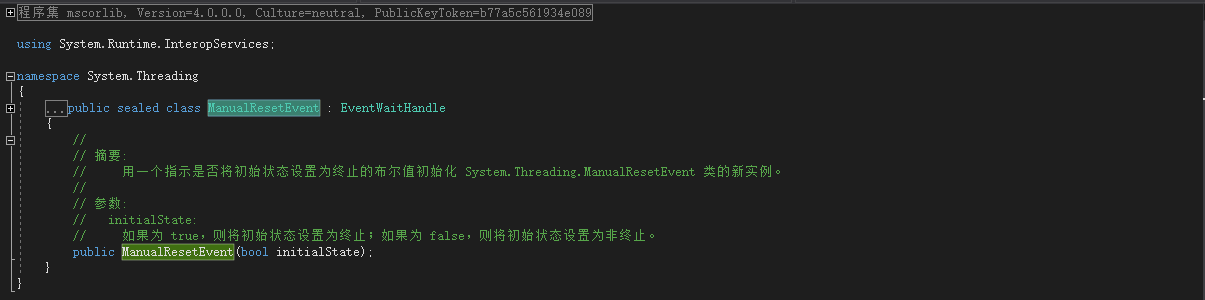
ManualResetEvent需要一个bool类型的参数来表示暂停和停止。上面的代码修改如下:
// 参数设置为false

ManualResetEvent manualResetEvent = new ManualResetEvent(false);

ThreadPool.QueueUserWorkItem(p =>

{

      DoSomethingLong("启动多线程");

      // 设置为true

      manualResetEvent.Set();

});

//

manualResetEvent.WaitOne();

Console.WriteLine("等着QueueUserWorkItem完成后才执行");
结果:

ManualResetEvent类的参数值执行顺序如下:
(1)、false--WaitOne等待--Set--true--WaitOne直接过去
(2)、true--WaitOne直接过去--ReSet--false--WaitOne等待
注意:一般情况下,不要阻塞线程池中的线程,因为这样会导致一些无法预见的错误。来看下面的一个例子:
static void SetWait()

{

            // 设置最大线程

            ThreadPool.SetMaxThreads(, );

            // 设置最小线程

            ThreadPool.SetMinThreads(, );

            ManualResetEvent manualResetEvent = new ManualResetEvent(false);

            for (int i = ; i < ; i++)

            {

                int k = i;

                ThreadPool.QueueUserWorkItem(p =>

                {

                    Console.WriteLine(k);

                    if (k < )

                    {

                        manualResetEvent.WaitOne();

                    }

                    else

                    {

                        // 设为true

                        manualResetEvent.Set();

                    }

                });

            }

            if (manualResetEvent.WaitOne())

            {

                Console.WriteLine("没有死锁、、、");

            }

            else

            {

                Console.WriteLine("发生死锁、、、");

            }

}
启动20个线程,如果k小于18就阻塞当前的线程,结果:

从截图中看出,只执行了16个线程,后面的线程没有执行,这是为什么呢?因为我们在上面设置了线程池中最多可以有16个线程,当16个线程都阻塞的时候,会造成死锁,所以后面的线程不会再执行了。
三、线程重用
ThreadPool可以很好的实现线程的重用,这样就可以减少内存的消耗,看下面的代码:
/// <summary>

/// 测试ThreadPool线程重用

/// </summary>

static void ThreadPoolTest()

{

            // 线程重用

            ThreadPool.QueueUserWorkItem(t =>DoSomethingLong("ThreadPool"));

            ThreadPool.QueueUserWorkItem(t =>DoSomethingLong("ThreadPool"));

            ThreadPool.QueueUserWorkItem(t =>DoSomethingLong("ThreadPool"));

            ThreadPool.QueueUserWorkItem(t =>DoSomethingLong("ThreadPool"));

            ThreadPool.QueueUserWorkItem(t =>DoSomethingLong("ThreadPool"));

            Thread.Sleep( * );

            Console.WriteLine("前面的计算都完成了。。。。。。。。");

            ThreadPool.QueueUserWorkItem(t =>DoSomethingLong("ThreadPool"));

            ThreadPool.QueueUserWorkItem(t =>DoSomethingLong("ThreadPool"));

            ThreadPool.QueueUserWorkItem(t =>DoSomethingLong("ThreadPool"));

            ThreadPool.QueueUserWorkItem(t =>DoSomethingLong("ThreadPool"));

            ThreadPool.QueueUserWorkItem(t =>DoSomethingLong("ThreadPool"));

}
然后在Main方法里面调用该方法,输出结果如下图所示:

我们在代码里面总共创建了10个线程,而结果里面只有4个线程ID,这就说明ThreadPool可以实现线程的重用。下面我们在看看Thread是否可以实现线程的重用,代码如下:
/// <summary>

/// 测试Thread线程重用

/// </summary>

static void ThreadTest()

{

            for (int i = ; i < ; i++)

            {

                new Thread(() => DoSomethingLong("Threads")).Start();

            }

            Thread.Sleep( * );

            Console.WriteLine("前面的计算都完成了。。。。。。。。");

            for (int i = ; i < ; i++)

            {

                new Thread(() => DoSomethingLong("btnThreads")).Start();

            }

}
然后在Main方法里面调用,输入结果如下图所示:

我们同样在代码里面创建了10个线程,结果输出了10个线程的ID,这就说明Thread不能实现线程的重用。同样也说明THread的效率没有ThreadPool高。
程序完整代码:
using System;

using System.Threading;

namespace ThreadPoolDemo

{

    class Program

    {

        static void Main(string[] args)

        {

            Console.WriteLine($"start ThreadId: {Thread.CurrentThread.ManagedThreadId.ToString("")}");

            //// ThreadPoll启动多线程

            //ThreadPool.QueueUserWorkItem(p => DoSomethingLong("启动多线程"));

            //// 获取最大线程

            //ThreadPool.GetMaxThreads(out int workerThreads, out int completionPortThreads);

            //Console.WriteLine($"GetMaxThreads workerThreads={workerThreads} completionPortThreads={completionPortThreads}");

            //// 获取最小线程

            //ThreadPool.GetMinThreads(out int minworkerThreads, out int mincompletionPortThreads);

            //Console.WriteLine($"GetMinThreads workerThreads={minworkerThreads} completionPortThreads={mincompletionPortThreads}");

            //// 设置线程池线程

            //SetThreadPool();

            //// 输出设置后的线程池线程个数

            //Console.WriteLine("输出修改后的最多线程数和最少线程数");

            //ThreadPool.GetMaxThreads(out int maxworkerThreads, out int maxcompletionPortThreads);

            //Console.WriteLine($"GetMaxThreads workerThreads={maxworkerThreads} completionPortThreads={maxcompletionPortThreads}");

            //ThreadPool.GetMinThreads(out int workerEditThreads, out int completionPortEditThreads);

            //Console.WriteLine($"GetMinThreads workerThreads={workerEditThreads} completionPortThreads={completionPortEditThreads}");

            //Console.WriteLine($"end ThreadId: {Thread.CurrentThread.ManagedThreadId.ToString("00")}");

            //// 参数设置为false

            //ManualResetEvent manualResetEvent = new ManualResetEvent(false);

            //ThreadPool.QueueUserWorkItem(p =>

            //{

            //    DoSomethingLong("启动多线程");

            //    // 设置为true

            //    manualResetEvent.Set();

            //});

            ////

            //manualResetEvent.WaitOne();

            //Console.WriteLine("等着QueueUserWorkItem完成后才执行");

            // SetWait();

            // ThreadPool实现线程的重用

            // ThreadPoolTest();

            // Thread

            ThreadTest();

            Console.WriteLine($"end ThreadId: {Thread.CurrentThread.ManagedThreadId.ToString("")}");

            Console.ReadKey();

        }

        static void DoSomethingLong(string para)

        {

            Console.WriteLine($"{para}  ThreadId: {Thread.CurrentThread.ManagedThreadId.ToString("")}");

        }

        /// <summary>

        /// 设置线程池线程个数

        /// </summary>

        static void SetThreadPool()

        {

            Console.WriteLine("************设置最多线程数和最少线程数****************");

            // 设置最大线程

            ThreadPool.SetMaxThreads(, );

            // 设置最小线程

            ThreadPool.SetMinThreads(, );

        }

        static void SetWait()

        {

            // 设置最大线程

            ThreadPool.SetMaxThreads(, );

            // 设置最小线程

            ThreadPool.SetMinThreads(, );

            ManualResetEvent manualResetEvent = new ManualResetEvent(false);

            for (int i = ; i < ; i++)

            {

                int k = i;

                ThreadPool.QueueUserWorkItem(p =>

                {

                    Console.WriteLine(k);

                    if (k < )

                    {

                        manualResetEvent.WaitOne();

                    }

                    else

                    {

                        // 设为true

                        manualResetEvent.Set();

                    }

                });

            }

            if (manualResetEvent.WaitOne())

            {

                Console.WriteLine("没有死锁、、、");

            }

            else

            {

                Console.WriteLine("发生死锁、、、");

            }

        }

        /// <summary>

        /// 测试ThreadPool线程重用

        /// </summary>

        static void ThreadPoolTest()

        {

            // 线程重用

            ThreadPool.QueueUserWorkItem(t => DoSomethingLong("ThreadPool"));

            ThreadPool.QueueUserWorkItem(t => DoSomethingLong("ThreadPool"));

            ThreadPool.QueueUserWorkItem(t => DoSomethingLong("ThreadPool"));

            ThreadPool.QueueUserWorkItem(t => DoSomethingLong("ThreadPool"));

            ThreadPool.QueueUserWorkItem(t => DoSomethingLong("ThreadPool"));

            Thread.Sleep( * );

            Console.WriteLine("前面的计算都完成了。。。。。。。。");

            ThreadPool.QueueUserWorkItem(t => DoSomethingLong("ThreadPool"));

            ThreadPool.QueueUserWorkItem(t => DoSomethingLong("ThreadPool"));

            ThreadPool.QueueUserWorkItem(t => DoSomethingLong("ThreadPool"));

            ThreadPool.QueueUserWorkItem(t => DoSomethingLong("ThreadPool"));

            ThreadPool.QueueUserWorkItem(t => DoSomethingLong("ThreadPool"));

        }

        /// <summary>

        /// 测试Thread线程重用

        /// </summary>

        static void ThreadTest()

        {

            for (int i = ; i < ; i++)

            {

                new Thread(() => DoSomethingLong("Threads")).Start();

            }

            Thread.Sleep( * );

            Console.WriteLine("前面的计算都完成了。。。。。。。。");

            for (int i = ; i < ; i++)

            {

                new Thread(() => DoSomethingLong("btnThreads")).Start();

            }

        }

    }

}
多线程二:线程池(ThreadPool)的更多相关文章
- 多线程系列 线程池ThreadPool
上一篇文章我们总结了多线程最基础的知识点Thread,我们知道了如何开启一个新的异步线程去做一些事情.可是当我们要开启很多线程的时候,如果仍然使用Thread我们需要去管理每一个线程的启动,挂起和终止 ...
- (原创)JAVA多线程二线程池
一,线程池的介绍 线程池包括一下三种: 线程池名称 创建方法 特点 其他 固定大小线程池 ExecutorService threadpool = Executors.newFixedThreadPo ...
- 细说.NET中的多线程 (二 线程池)
上一章我们了解到,由于线程的创建,销毁都是需要耗费大量资源和时间的,开发者应该非常节约的使用线程资源.最好的办法是使用线程池,线程池能够避免当前进行中大量的线程导致操作系统不停的进行线程切换,当线程数 ...
- python中多进程multiprocessing、多线程threading、线程池threadpool
浅显点理解:进程就是一个程序,里面的线程就是用来干活的,,,进程大,线程小 一.多线程threading 简单的单线程和多线程运行:一个参数时,后面要加逗号 步骤:for循环,相当于多个线程——t=t ...
- C#多线程学习 之 线程池[ThreadPool](转)
在多线程的程序中,经常会出现两种情况: 一种情况: 应用程序中,线程把大部分的时间花费在等待状态,等待某个事件发生,然后才能给予响应 这一般使用ThreadPo ...
- C# -- 使用线程池 ThreadPool 执行多线程任务
C# -- 使用线程池 ThreadPool 执行多线程任务 1. 使用线程池 class Program { static void Main(string[] args) { WaitCallba ...
- 多线程Thread,线程池ThreadPool
首先我们先增加一个公用方法DoSomethingLong(string name),这个方法下面的举例中都有可能用到 #region Private Method /// <summary> ...
- 多线程系列(2)线程池ThreadPool
上一篇文章我们总结了多线程最基础的知识点Thread,我们知道了如何开启一个新的异步线程去做一些事情.可是当我们要开启很多线程的时候,如果仍然使用Thread我们需要去管理每一个线程的启动,挂起和终止 ...
- C#多线程学习 之 线程池[ThreadPool]
在多线程的程序中,经常会出现两种情况: 一种情况: 应用程序中,线程把大部分的时间花费在等待状态,等待某个事件发生,然后才能给予响应 这一般使用ThreadPo ...
- [转]C#多线程学习 之 线程池[ThreadPool]
在多线程的程序中,经常会出现两种情况: 一种情况: 应用程序中,线程把大部分的时间花费在等待状态,等待某个事件发生,然后才能给予响应 这一般使用ThreadPo ...
随机推荐
- php实现rar文件的读取和解压
PHP Rar Archiving 模块 (php_rar) 是一个读取和解压rar文件的模块,但不提供RAR压缩(打包)的功能. 1.首先要到PECL的RAR页面下载DLL. 根据自己的情况选择下载 ...
- Navicat for SQL Server(SQLServer数据库管理)
Navicat for SQL Server 是一套专为 Mircosoft SQL Server设计的强大数据库管理及开发工具.它可以用于 SQL Server 2000.2005 及 2008R2 ...
- php分享三十:php版本选择
思考: cgi是怎么运行的?(是多线程?多进程?单线程?单进程?) fastcgi运行原理? apache运行php的原理? (是多进程还是多线程?) nginx是怎么运行php的? 什么是安全模式和 ...
- Hudson基本工作原理
从SVN下载代码到hudson服务器本地 -> 将SVN下载的源代码,利用maven[maven依赖pom.xml]或者ant[ant依赖build.xml]打包(war包),pom.xml ...
- jQuery学习笔记(Ajax)
jQuery对Ajax操作进行了封装,在jQuery中$.ajax方法属于最底层的方法,第2层是$.load().$.get().$.post()方法,第3层是$.getScript()和$.getJ ...
- JS验证邮箱格式是否正确 实例代码
如何用js验证邮箱格式是否正确?分享一个例子.代码: /* *验证邮箱格式是否正确 *参数strEmail,需要验证的邮箱 */ function chkEmail(strEmail) { if (! ...
- lua -- io.pathinfo
io.pathinfo 拆分一个路径字符串,返回组成路径的各个部分. 格式: parts = io.pathinfo(路径) 使用示例: local pathinfo = io.pathinfo(&q ...
- windows 定时任务:schtasks,定时关闭网易云音乐
大部分属于转载和粘贴. 使用命令:schtasks windows 定时任务 使用样例: 每天定时关闭网易云音乐: 每天22:20关闭网易云音乐: schtasks /create /tn &qu ...
- http.ResponseWriter的Flush
func handle(res http.ResponseWriter, req *http.Request) { fmt.Fprintf(res, "sending first line ...
- delphi中Webbrowser疑难问题集锦<转>
1.获得网页中变量值 htm中<script> var currID=123</script> 程序中可以这么调用 id := Form1.WebBrows ...