
(转)spring boot整合redis
一篇写的更清晰的文章,包括redis序列化:http://makaidong.com/ncjava/330749_5285125.html
1.项目目录结构
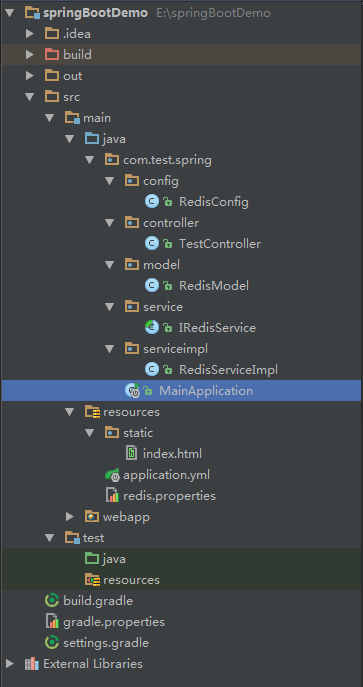
2、引入所需jar包
<!-- Spring Boot 使用 Redis 缓存 -->

        <dependency>

            <groupId>org.springframework.boot</groupId>

            <artifactId>spring-boot-starter-data-redis</artifactId>

        </dependency>
3.配置文件
application.yml
testName:

  applicationName: testRedis

spring:

  redis:

    host: 192.168.200.108

    port: 6379
redis.properties
host=192.168.200.108

port=6379

connectionTimeout=5000

soTimeout=5000

database=0
build.gradle

group 'springBootDemo'

version '1.0-SNAPSHOT'

apply plugin: 'java'

apply plugin: 'war'

sourceCompatibility = 1.8

repositories {

    mavenCentral()

}

dependencies {

    testCompile("junit:junit:$springJunit")

    compile("org.springframework.boot:spring-boot-starter-web:$springBootVersion")

    compile("org.springframework.boot:spring-boot-starter-redis:$springRedisVersion")

    compile("org.springframework.data:spring-data-redis:$springDataRedis")

}
gradle.properties
#spring

springBootVersion=1.3.5.RELEASE

springRedisVersion=1.3.5.RELEASE

springDataRedis=1.7.2.RELEASE

springJunit=1.3.5.RELEASE
4.代码
RedisConfig.java
package com.test.spring.config;

import org.springframework.beans.factory.annotation.Autowired;

import org.springframework.context.annotation.Bean;

import org.springframework.context.annotation.Configuration;

import org.springframework.data.redis.connection.RedisConnectionFactory;

import org.springframework.data.redis.core.*;

import org.springframework.data.redis.serializer.JdkSerializationRedisSerializer;

import org.springframework.data.redis.serializer.StringRedisSerializer;

/**

 * Created by Administrator on 2017/3/1 14:45.

 */

@Configuration

public class RedisConfig {

    /**

     * 注入 RedisConnectionFactory

     */

    @Autowired

    RedisConnectionFactory redisConnectionFactory;

    /**

     * 实例化 RedisTemplate 对象

     *

     * @return

     */

    @Bean

    public RedisTemplate<String, Object> functionDomainRedisTemplate() {

        RedisTemplate<String, Object> redisTemplate = new RedisTemplate<>();

        initDomainRedisTemplate(redisTemplate, redisConnectionFactory);

        return redisTemplate;

    }

    /**

     * 设置数据存入 redis 的序列化方式

     *

     * @param redisTemplate

     * @param factory

     */

    private void initDomainRedisTemplate(RedisTemplate<String, Object> redisTemplate, RedisConnectionFactory factory) {

        redisTemplate.setKeySerializer(new StringRedisSerializer());

        redisTemplate.setHashKeySerializer(new StringRedisSerializer());

        redisTemplate.setHashValueSerializer(new JdkSerializationRedisSerializer());

        redisTemplate.setValueSerializer(new JdkSerializationRedisSerializer());

        redisTemplate.setConnectionFactory(factory);

    }

    /**

     * 实例化 HashOperations 对象,可以使用 Hash 类型操作

     *

     * @param redisTemplate

     * @return

     */

    @Bean

    public HashOperations<String, String, Object> hashOperations(RedisTemplate<String, Object> redisTemplate) {

        return redisTemplate.opsForHash();

    }

    /**

     * 实例化 ValueOperations 对象,可以使用 String 操作

     *

     * @param redisTemplate

     * @return

     */

    @Bean

    public ValueOperations<String, Object> valueOperations(RedisTemplate<String, Object> redisTemplate) {

        return redisTemplate.opsForValue();

    }

    /**

     * 实例化 ListOperations 对象,可以使用 List 操作

     *

     * @param redisTemplate

     * @return

     */

    @Bean

    public ListOperations<String, Object> listOperations(RedisTemplate<String, Object> redisTemplate) {

        return redisTemplate.opsForList();

    }

    /**

     * 实例化 SetOperations 对象,可以使用 Set 操作

     *

     * @param redisTemplate

     * @return

     */

    @Bean

    public SetOperations<String, Object> setOperations(RedisTemplate<String, Object> redisTemplate) {

        return redisTemplate.opsForSet();

    }

    /**

     * 实例化 ZSetOperations 对象,可以使用 ZSet 操作

     *

     * @param redisTemplate

     * @return

     */

    @Bean

    public ZSetOperations<String, Object> zSetOperations(RedisTemplate<String, Object> redisTemplate) {

        return redisTemplate.opsForZSet();

    }

}
RedisModel.java
package com.test.spring.model;

import java.io.Serializable;

/**

 * Created by Administrator on 2017/3/1 14:55.

 */

public class RedisModel implements Serializable {

    private String redisKey;//redis中的key

    private String name;//姓名

    private String tel;//电话

    private String address;//住址

    public String getRedisKey() {

        return redisKey;

    }

    public void setRedisKey(String redisKey) {

        this.redisKey = redisKey;

    }

    public String getName() {

        return name;

    }

    public void setName(String name) {

        this.name = name;

    }

    public String getTel() {

        return tel;

    }

    public void setTel(String tel) {

        this.tel = tel;

    }

    public String getAddress() {

        return address;

    }

    public void setAddress(String address) {

        this.address = address;

    }

}
IRedisService.java
package com.test.spring.service;

import org.springframework.beans.factory.annotation.Autowired;

import org.springframework.data.redis.core.HashOperations;

import org.springframework.data.redis.core.RedisTemplate;

import javax.annotation.Resource;

import java.util.List;

import java.util.Set;

import java.util.concurrent.TimeUnit;

/**

 * Created by Administrator on 2017/3/1 14:57.

 */

public abstract class IRedisService<T> {

    @Autowired

    protected RedisTemplate<String, Object> redisTemplate;

    @Resource

    protected HashOperations<String, String, T> hashOperations;

    /**

     * 存入redis中的key

     *

     * @return

     */

    protected abstract String getRedisKey();

    /**

     * 添加

     *

     * @param key    key

     * @param doamin 对象

     * @param expire 过期时间(单位:秒),传入 -1 时表示不设置过期时间

     */

    public void put(String key, T doamin, long expire) {

        hashOperations.put(getRedisKey(), key, doamin);

        if (expire != -1) {

            redisTemplate.expire(getRedisKey(), expire, TimeUnit.SECONDS);

        }

    }

    /**

     * 删除

     *

     * @param key 传入key的名称

     */

    public void remove(String key) {

        hashOperations.delete(getRedisKey(), key);

    }

    /**

     * 查询

     *

     * @param key 查询的key

     * @return

     */

    public T get(String key) {

        return hashOperations.get(getRedisKey(), key);

    }

    /**

     * 获取当前redis库下所有对象

     *

     * @return

     */

    public List<T> getAll() {

        return hashOperations.values(getRedisKey());

    }

    /**

     * 查询查询当前redis库下所有key

     *

     * @return

     */

    public Set<String> getKeys() {

        return hashOperations.keys(getRedisKey());

    }

    /**

     * 判断key是否存在redis中

     *

     * @param key 传入key的名称

     * @return

     */

    public boolean isKeyExists(String key) {

        return hashOperations.hasKey(getRedisKey(), key);

    }

    /**

     * 查询当前key下缓存数量

     *

     * @return

     */

    public long count() {

        return hashOperations.size(getRedisKey());

    }

    /**

     * 清空redis

     */

    public void empty() {

        Set<String> set = hashOperations.keys(getRedisKey());

        set.stream().forEach(key -> hashOperations.delete(getRedisKey(), key));

    }

}
RedisServiceImpl.java
package com.test.spring.serviceimpl;

import com.test.spring.model.RedisModel;

import com.test.spring.service.IRedisService;

import org.springframework.stereotype.Service;

/**

 * Created by Administrator on 2017/3/1 16:00.

 */

@Service

public class RedisServiceImpl extends IRedisService<RedisModel> {

    private static final String REDIS_KEY = "TEST_REDIS_KEY";

    @Override

    protected String getRedisKey() {

        return this.REDIS_KEY;

    }

}
MainApplication.java
package com.test.spring;

import org.springframework.boot.SpringApplication;

import org.springframework.boot.autoconfigure.EnableAutoConfiguration;

import org.springframework.context.annotation.ComponentScan;

import org.springframework.context.annotation.Configuration;

/**

 * Created by Administrator on 2017/2/28 9:40.

 */

@Configuration

@EnableAutoConfiguration

@ComponentScan

public class MainApplication {

    public static void main(String[] args) {

        System.getProperties().put("projectName", "springApp");

        SpringApplication.run(MainApplication.class, args);

    }

}
TestController.java
package com.test.spring.controller;

import com.test.spring.model.RedisModel;

import com.test.spring.serviceimpl.RedisServiceImpl;

import org.springframework.beans.factory.annotation.Autowired;

import org.springframework.stereotype.Controller;

import org.springframework.web.bind.annotation.RequestMapping;

import org.springframework.web.bind.annotation.RequestMethod;

import org.springframework.web.bind.annotation.ResponseBody;

/**

 * Created by Administrator on 2017/3/1 14:55.

 */

@Controller

public class TestController {

    @Autowired

    private RedisServiceImpl service;

    //添加

    @RequestMapping(value = "/add", method = RequestMethod.GET)

    @ResponseBody

    public void test() {

        System.out.println("start.....");

        RedisModel m = new RedisModel();

        m.setName("张三");

        m.setTel("1111");

        m.setAddress("深圳1");

        m.setRedisKey("zhangsanKey01");

        service.put(m.getRedisKey(), m, -1);

        RedisModel m2 = new RedisModel();

        m2.setName("张三2");

        m2.setTel("2222");

        m2.setAddress("深圳2");

        m2.setRedisKey("zhangsanKey02");

        service.put(m2.getRedisKey(), m2, -1);

        RedisModel m3 = new RedisModel();

        m3.setName("张三3");

        m3.setTel("2222");

        m3.setAddress("深圳2");

        m3.setRedisKey("zhangsanKey03");

        service.put(m3.getRedisKey(), m3, -1);

        System.out.println("add success end...");

    }

    //查询所有对象

    @RequestMapping(value = "/getAll", method = RequestMethod.GET)

    @ResponseBody

    public Object getAll() {

        return service.getAll();

    }

    //查询所有key

    @RequestMapping(value = "/getKeys", method = RequestMethod.GET)

    @ResponseBody

    public Object getKeys() {

        return service.getKeys();

    }

    //根据key查询

    @RequestMapping(value = "/get", method = RequestMethod.GET)

    @ResponseBody

    public Object get() {

        RedisModel m = new RedisModel();

        m.setRedisKey("zhangsanKey02");

        return service.get(m.getRedisKey());

    }

    //删除

    @RequestMapping(value = "/remove", method = RequestMethod.GET)

    @ResponseBody

    public void remove() {

        RedisModel m = new RedisModel();

        m.setRedisKey("zhangsanKey01");

        service.remove(m.getRedisKey());

    }

    //判断key是否存在

    @RequestMapping(value = "/isKeyExists", method = RequestMethod.GET)

    @ResponseBody

    public void isKeyExists() {

        RedisModel m = new RedisModel();

        m.setRedisKey("zhangsanKey01");

        boolean flag = service.isKeyExists(m.getRedisKey());

        System.out.println("zhangsanKey01 是否存在: "+flag);

    }

    //查询当前缓存的数量

    @RequestMapping(value = "/count", method = RequestMethod.GET)

    @ResponseBody

    public Object count() {

        return service.count();

    }

    //清空所有key

    @RequestMapping(value = "/empty", method = RequestMethod.GET)

    @ResponseBody

    public void empty() {

        service.empty();

    }

}
数据存入redis后的截图
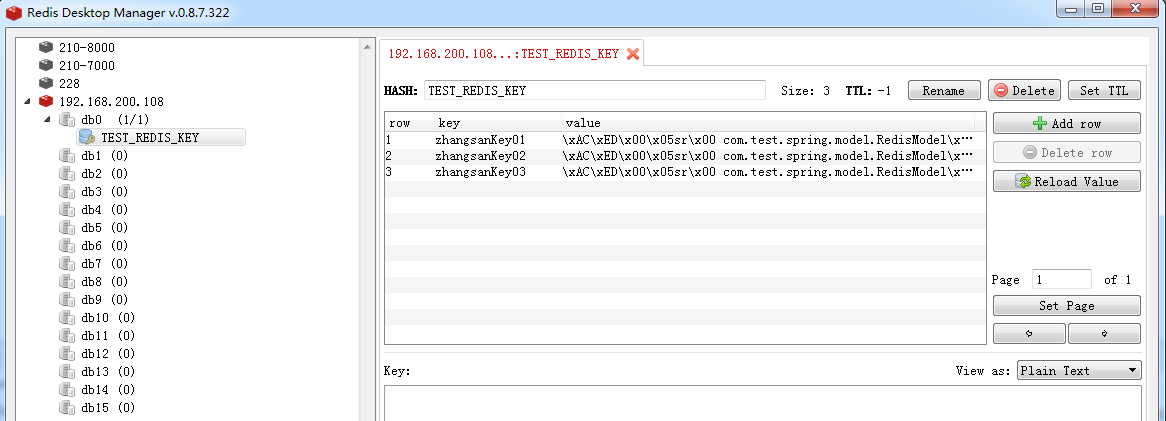
转自:http://www.cnblogs.com/skyessay/p/6485187.html
(转)spring boot整合redis的更多相关文章
- SpringBoot入门系列(七)Spring Boot整合Redis缓存
前面介绍了Spring Boot 中的整合Mybatis并实现增删改查,.不清楚的朋友可以看看之前的文章:https://www.cnblogs.com/zhangweizhong/category/ ...
- Spring Boot 整合 Redis 和 JavaMailSender 实现邮箱注册功能
Spring Boot 整合 Redis 和 JavaMailSender 实现邮箱注册功能 开篇 现在的网站基本都有邮件注册功能,毕竟可以通过邮件定期的给用户发送一些 垃圾邮件 精选推荐
- Spring Boot2 系列教程(二十六)Spring Boot 整合 Redis
在 Redis 出现之前,我们的缓存框架各种各样,有了 Redis ,缓存方案基本上都统一了,关于 Redis,松哥之前有一个系列教程,尚不了解 Redis 的小伙伴可以参考这个教程: Redis 教 ...
- Spring Boot 整合 Redis 实现缓存操作
摘要: 原创出处 www.bysocket.com 「泥瓦匠BYSocket 」欢迎转载,保留摘要,谢谢! 『 产品没有价值,开发团队再优秀也无济于事 – <启示录> 』 本文提纲 ...
- spring boot整合redis,以及设置缓存过期时间
spring-boot 整合 redis 注:redis服务器要先开启 pom文件: <dependency> <groupId>org.springframework.boo ...
- spring boot 2.x 系列 —— spring boot 整合 redis
文章目录 一.说明 1.1 项目结构 1.2 项目主要依赖 二.整合 Redis 2.1 在application.yml 中配置redis数据源 2.2 封装redis基本操作 2.3 redisT ...
- Spring Boot2 系列教程(二十九)Spring Boot 整合 Redis
经过 Spring Boot 的整合封装与自动化配置,在 Spring Boot 中整合Redis 已经变得非常容易了,开发者只需要引入 Spring Data Redis 依赖,然后简单配下 red ...
- Spring Boot 整合Redis 实现缓存
本文提纲 一.缓存的应用场景 二.更新缓存的策略 三.运行 springboot-mybatis-redis 工程案例 四.springboot-mybatis-redis 工程代码配置详解 ...
- spring boot 整合 redis
自己开发环境需要安装 redis 服务,百度一下很多,下面主要说明Springboot 集成 redis 讲解 我的版本 java8 + redis3.0 + springboot 1.5.9. Sp ...
随机推荐
- 【Linux基础】Linux基础命令行学习笔记
绝对路径:cd /home/python相对路径:cd Downloads . 表示:当前那路径..表示:当前路径的上一层../.. 表示:当前路径的上二层 没有...或者以上的 ls: ls 查看当 ...
- 【mac】php7.1 安装swoole 扩展
环境依赖: php- 或更高版本 gcc-4.4 或更高版本 make autoconf 下载源代码包后,在终端进入源码目录,执行下面的命令进行编译和安装 https://github.com/swo ...
- 【Mac】WARNING: REMOTE HOST IDENTIFICATION HAS CHANGED!
使用Mac 自带终端 链接服务器时候,报错如下 处理办法: 第一种: 直接删除: /users/username/.ssh/known_hosts 文件 第二种: ssh-keygen -R ...
- LeetCode——Implement Trie (Prefix Tree)
Description: Implement a trie with insert, search, and startsWith methods. Note:You may assume that ...
- MySQL对数据表进行分组查询(GROUP BY)
MySQL对数据表进行分组查询(GROUP BY) GROUP BY关键字可以将查询结果按照某个字段或多个字段进行分组.字段中值相等的为一组.基本的语法格式如下: GROUP BY 属性名 [HAVI ...
- howdoi 简单分析
对howdoi的一个简单分析. 曾经看到过下面的这样一段js代码: try{ doSth(); } catch (e){ ask_url = "https://stackoverflow.c ...
- 分布式搜索elasticsearch几个概念解析
原文链接:http://blog.csdn.net/july_2/article/details/24367177 介绍下es的几个概念:cluster 代表一个集群,集群中有多个节点,其中有 ...
- 【Win】使用L2TP出现809错误
1.环境:win7/10 2.解决: a.修改注册表(新建一个文本文件,复制以下内容,保存后文件扩展名改为.reg,双击运行文件.) Windows Registry Editor Version 5 ...
- jQuery将时间转化为时间戳或将时间戳转化为时间
下面的这段代码,是可以将时间戳转为时间,或者将时间戳转为时间: <script type="text/javascript"> $.extend({ myTime:{ ...
- 洛谷P2414 阿狸的打字机【AC自动机】【fail树】【dfs序】【树状数组】
居然真的遇上了这种蔡队题.瑟瑟发抖. 题目背景 阿狸喜欢收藏各种稀奇古怪的东西,最近他淘到一台老式的打字机. 题目描述 打字机上只有28个按键,分别印有26个小写英文字母和'B'.'P'两个字母.经阿 ...