
iOS.Animation.Math-behind-CATransform3D
iOS CoreAnimation: Math behind CATransform3D
1. What's CATransform?
Matrix Transform:
"User space = your view (points)
Device space = hardware device native resolution (pixels)
On print or display, Quartz maps user space coordinates to device space coordinates" Ref[2]
CATransform用来控制这个映射过程(User Space => Device Space)。
CATransform3D的定义:
 struct CATransform3D

 {

   CGFloat m11, m12, m13, m14;  // row 1 of matrix

   CGFloat m21, m22, m23, m24;  // row 2 of matrix

   CGFloat m31, m32, m33, m34;  // row 3 of matrix

   CGFloat m41, m42, m43, m44;  // row 4 of matrix

 };
点P(x, y, z, w)经过平移变换(Translate Transform)后:
(x, y, z, ) *

                       = (x+tx, y+ty, z+tz, )

               tx ty tz
点P(x, y, z, w)经过矩阵T进行变换后为点P1(x1, y1, z1, w1):
(x, y, z, ) * m11  m12  m13  m14      m11*x+m21*y+m31*z+m41   // x1

               m21  m22  m23  m24  =   m12*x+m22*y+m32*z+m42   // y1

               m31  m32  m33  m34      m13*x+m23*y+m33*z+m43   // z1

               m41  m42  m43  m44      m14*x+m24*y+m34*z+m44   // w1
2. Using m34
尤其是那个神奇的m34。
(, , , ) *

                 1  0  0

               0  0  1 -/500 = (1, 1, 1, 1*(-1/500)+1) = (1, 1, 1, 499/500) = (500/499, 500/499, 500/499, 1)

               0  0  0  1
通过以上Matrix变换, 点P(1,1,1)的坐标变化为P1(500/499, 500/499, 500/499); 点Q(1,1,-1)的坐标变化为Q1(500/501, 500/501, -500/501, 1)。选取P和Q两个点为例,可见经过设置m34值的Matrix进行变换后呈现3D Perspective(透视)效果。
3. Coordinate Systems
"OpenGL adopts the Right-Hand Coordinate System (RHS). In the RHS, the x-axis is pointing right, y-axis is pointing up,
and z-axis is pointing out of the screen. " Ref[6]
"RHS is counter-clockwise (CCW). The 3D Cartesian Coordinates is a RHS.
Some graphics software (such as Microsoft Direct3D) use Left-hand System (LHS), where the z-axis is inverted.
LHS is clockwise (CW). " Ref[6]
3.1 Core Animation is LHCS or RHCS?
根据Ref[4], Ref[5]中的内容,Core Animation(iOS Platform)使用左手坐标系(Left-Hand Coordinate System/LHCS):
"Core Animation uses a left-handed coordinate system with the Z-axis’ positive space extending from the screen towards the viewer." Ref[5]
"iOS中使用的左手坐标系,其原点在左上角。" Ref[4]
注:目前尚未找到官方文档来说明Core Animation使用LHCS。
3.2 What's LHCS?
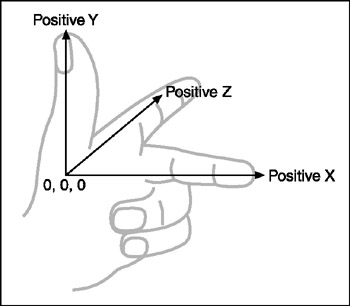
如图Figure-1(图片来源: http://flylib.com/books/en/2.416.1.16/1/)所示,拇指指向Y轴的正方向,食指指向Z轴的正方向,中指指向X轴的正方向。
图Figure-2是右手坐标系示例图(图片来源: http://flylib.com/books/en/2.416.1.16/1/)
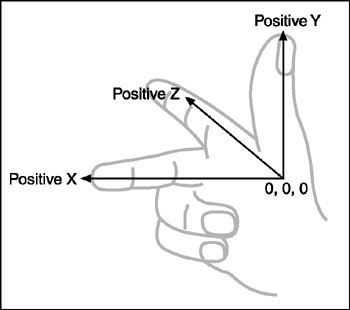
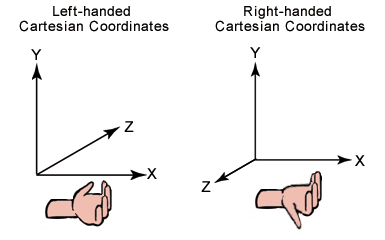
Figure-3:左手笛卡尔坐标系和右手笛卡尔坐标系对比
图片来源: https://sites.google.com/site/craigandera/craigs-stuff/directx-home/managed-direct3d-tutorial/06-coordinate-systems-and-transforms
左手笛卡尔坐标系:左手拇指与手臂垂直,其它手指也与手臂垂直。拇指指向Z轴正方向,手臂指向X轴正方向,其它手指指向Y轴正方向。
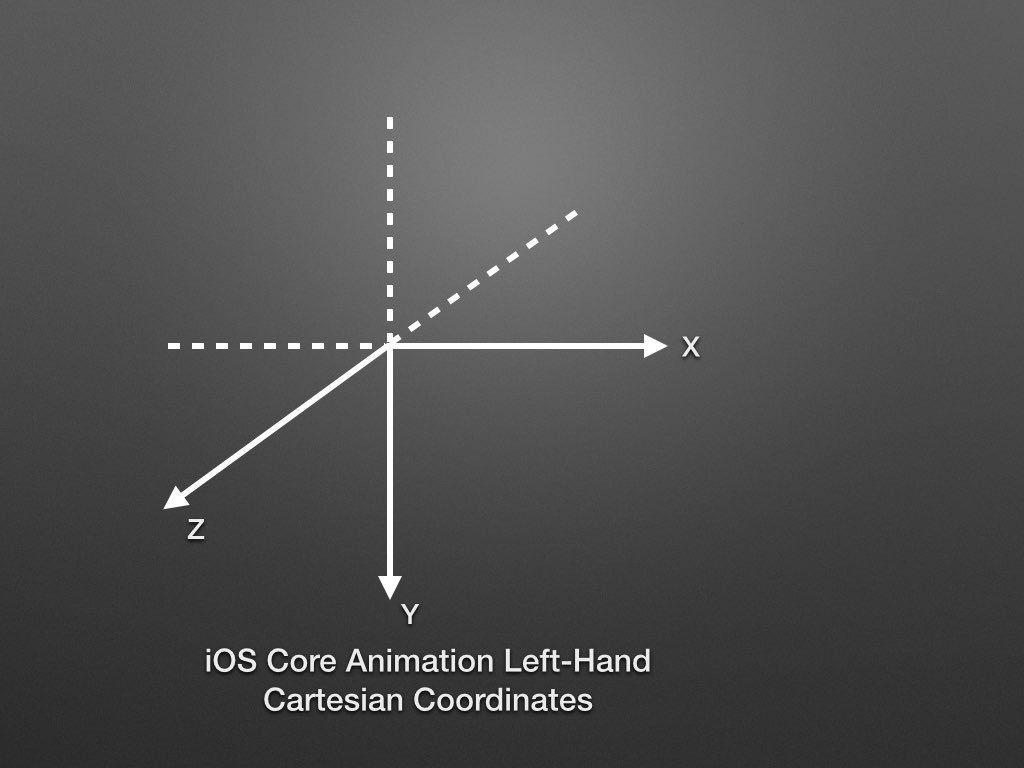
iOS Core Animation Left-Hand Cartesian Coordinates (LHCC)
图Figure-1是标准的LHCS,而iOS平台上Core Animation中CALayer的Y轴正方向是向下的,那么iOS平台上Core Animation的坐标系变为(下图,Figure-4):
3.3 Positive Rotation
Positive Rotation: 正向旋转
"Positive rotation is clockwise about the axis of rotation." Ref[8]
对于LHCC而言,(从旋转轴的正方向看)沿旋转轴的顺时针旋转是正向旋转。例如图Figure-5所示,旋转轴是Z轴,从Z轴正方向往Z轴方向
看去,顺时针的旋转是正向旋转:
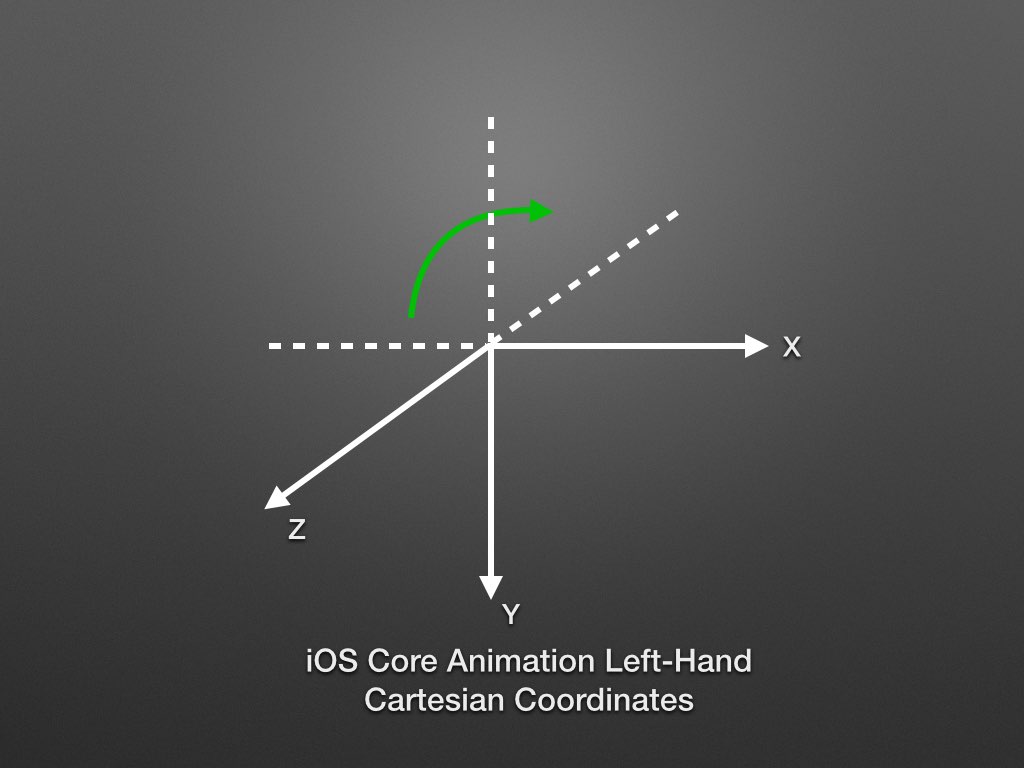
左手握住Z轴,拇指指向Z轴正方向,其它手指指向的方向即LHCC中的Positive Rotation。
3.4 Demo for Rotation
Reference
1. UIView+Fold.m
AnimationDemo 中对m34的使用。
Created by Rachel Bobbins on 1/31/15.
2. Enter the Matrix (AAAA)
http://cocoaconf.com/slides/chicago-2012/matrix.pdf
github.com/mpospese/EnterTheMatrix (TO Debug)
3. iOS.Math-in-CGAffineTransform
Math behind the CGAffineTransform
4. Mac,iOS界面中的三维坐标系
http://geeklu.com/2012/06/3d-coordinate-system/
5. CA's 3D Model
2D planes in a 3D world, simples.
https://milen.me/writings/core-animation-3d-model/
6. 3D Graphics with OpenGL
Basic Theory
https://www.ntu.edu.sg/home/ehchua/programming/opengl/CG_BasicsTheory.html#zz-4.1
7. iOS Core Animation: Advanced Techniques, Part 1: The Layer Beneath (TO Read)
https://gist.github.com/JeOam/94e833bcefd738d805cc
8. Left- vs. Right-handed coordinate systems
https://www.evl.uic.edu/ralph/508S98/coordinates.html
Positive rotation
iOS.Animation.Math-behind-CATransform3D的更多相关文章
- iOS Animation具体解释
iOS Animation具体解释 本篇仅仅要解说iOS中动画的使用. Animtion主要分为两类:UIView动画和CoreAnimation动画. UIView动画有UIView属性动画,UIV ...
- [iOS Animation]-CALayer 图层性能
图层性能 要更快性能,也要做对正确的事情. ——Stephen R. Covey 在第14章『图像IO』讨论如何高效地载入和显示图像,通过视图来避免可能引起动画帧率下降的性能问题.在最后一章,我们将着 ...
- [iOS Animation]CALayer-图层时间
图层时间 时间和空间最大的区别在于,时间不能被复用 -- 弗斯特梅里克 在上面两章中,我们探讨了可以用CAAnimation和它的子类实现的多种图层动画.动画的发生是需要持续一段时间的,所以计时对整个 ...
- [iOS Animation]-CALayer 显示动画
显式动画 如果想让事情变得顺利,只有靠自己 -- 夏尔·纪尧姆 上一章介绍了隐式动画的概念.隐式动画是在iOS平台创建动态用户界面的一种直接方式,也是UIKit动画机制的基础,不过它并不能涵盖所有的动 ...
- [iOS Animation]-CALayer 专用图层
专用图层 复杂的组织都是专门化的 Catharine R. Stimpson 到目前为止,我们已经探讨过CALayer类了,同时我们也了解到了一些非常有用的绘图和动画功能.但是Core Animati ...
- [iOS Animation]-CALayer 变换
变换 很不幸,没人能告诉你母体是什么,你只能自己体会 -- 骇客帝国 在第四章“可视效果”中,我们研究了一些增强图层和它的内容显示效果的一些技术,在这一章中,我们将要研究可以用来对图层旋转,摆放或者扭 ...
- [iOS Animation]-CALayer 图层几何学
图层几何学 不熟悉几何学的人就不要来这里了 --柏拉图学院入口的签名 在第二章里面,我们介绍了图层背后的图片,和一些控制图层坐标和旋转的属性.在这一章中,我们将要看一看图层内部是如何根据父图层和兄弟图 ...
- 谈谈iOS Animation
零.前言 这里没有太多的代码细节,只是探索iOS动画的基本概念,以及其抽象模型,数学基础等.我们学习一个知识的时候一般有两个部分,抽象部分和形象部分,抽象好比语言的语法,是规则,形象好比具体的句子,可 ...
- Swift 实现iOS Animation动画教程
这是一篇翻译文章.原文出处:http://www.raywenderlich.com/95910/uiview-animation-swift-tutorial 动画( animation)是iOS用 ...
随机推荐
- zendstudio快捷键复制行Ctrl+Alt+向下无效的解决方法
今天不断地在百度输入类似"zendstudio快捷键复制行Ctrl+Alt+向下无效"这样的关键字,里面搜索到的内容都是在说系统的显卡驱动Ctrl+Alt+方向键和ZendStud ...
- C语言typedef的用法(转)
http://www.cnblogs.com/afarmer/archive/2011/05/05/2038201.html 一.基本概念剖析 int* (*a[5])(int, char*); ...
- 微服务实战系列--Nginx官网发布(转)
这是Nginx官网写的一个系列,共七篇文章,如下 Introduction to Microservices (this article) Building Microservices: Using ...
- maven构建过程
[转载]原地址:http://www.cnblogs.com/xdp-gacl/p/4051690.html 上一篇只是简单介绍了一下maven入门的一些相关知识,这一篇主要是体验一下Maven高度自 ...
- WCF中常用的binding方式
WCF中常用的binding方式: BasicHttpBinding: 用于把 WCF 服务当作 ASMX Web 服务.用于兼容旧的Web ASMX 服务.WSHttpBinding: 比 Basi ...
- 转: windows下面安装Python和pip终极教程
原文: http://www.cnblogs.com/yuanzm/p/4089856.html 因为如果是初学者在windows环境下安装,简直是折磨人,会遇到各种蛋疼的情况.本文希望提供傻瓜式的教 ...
- 转:xampp-php5.6下安装memcached.exe
1.下载PHP对应版本的php_memcache.dll,我的PHP 5.6.3 所以下载 ,根据phpinfo输出的信息来找出匹配的版本: (1)看 Compiler,的后缀,一般带有vc11的字样 ...
- Google V8编程详解(一)V8的编译安装(Ubuntu)
V8的编译比较简单,需要同时安装git和svn. 下载V8源码: git clone git://github.com/v8/v8.git v8 && cd v8 切换到最新版本: g ...
- SQLserver 查看数据库包含指定数据的表(字段)
找出所有字段 1 select a.name as columnname,object_name(a.id)as tablename into t from syscolumns a, sysobje ...
- iPhone手机安全指南
摘要:iPhone手机安全指南 - 1.iPhone解锁使用指纹:2.启用“查找我的iPhone”功能:3.Apple ID启用两步验证:4.修改SIM卡PIN码.5.iPhone被盗或丢失后,登录i ...