
spring-boot 速成(4) 自定义配置
spring-boot 提供了很多默认的配置项,但是开发过程中,总会有一些业务自己的配置项,下面示例了,如何添加一个自定义的配置:
一、写一个自定义配置的类
package com.example.config;

import lombok.Data;

import org.springframework.boot.context.properties.ConfigurationProperties;

import org.springframework.stereotype.Component;

/**

 * Created by 菩提树下的杨过 on 2017/4/15.

 */

@Data

@Component

@ConfigurationProperties(prefix = "web.config")

public class WebConfig {

    private String webTitle;

    private String authorName;

    private String authorBlogUrl;

}
注意上面的注解@ConfigurationProperties(prefix = "web.config"),这表示这个类将从属性文件中读取web.config开头的属性值
二、在application.yml中配置属性
spring-boot支持properties及yml格式,不过推荐大家使用新的yml格式,看上去更清晰
web:

  config:

    webTitle: "欢迎使用SpringBoot"

    authorName: "菩提树下的杨过"

    authorBlogUrl: "http://yjmyzz.cnblogs.com/"
三、来一发
为了演示效果,可以弄一个最简单的web应用,先来一个controller
package com.example.controllers;

import com.example.config.WebConfig;

import org.springframework.beans.factory.annotation.Autowired;

import org.springframework.stereotype.Controller;

import org.springframework.ui.ModelMap;

import org.springframework.web.bind.annotation.RequestMapping;

@Controller

public class IndexController {

    @Autowired

    WebConfig webConfig;

    @RequestMapping("/")

    String index(ModelMap map) {

        map.addAttribute("title", webConfig.getWebTitle());

        map.addAttribute("name", webConfig.getAuthorName());

        map.addAttribute("blog", webConfig.getAuthorBlogUrl());

        return "index";

    }

}
然后在index.html模板中写点东西(注:本例使用了thymeleaf做为模板引擎)
<!DOCTYPE html>

<html xmlns:th="http://www.thymeleaf.org">

<head>

    <title th:text="${title}"></title>

</head>

<body>

<div>

    <h1 th:text="${name}"/>

    <h1 th:text="${blog}"/>

</div>

</body>

</html>
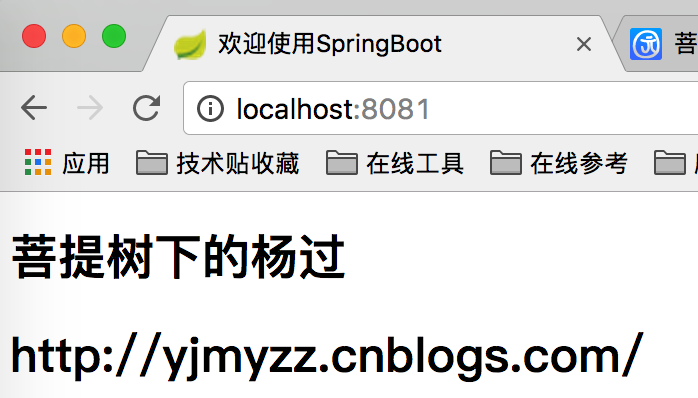
最后跑起来的运行效果如下:
四、配置文件的加载顺序
把所有配置全都打在一个jar包里,显然不是最好的做法,更常见的做法是把配置文件放在jar包外面,可以在需要时,不动java代码的前提下修改配置,spring-boot会按以下顺序加载配置文件application.properties或application.yml:
4.1 先查找jar文件同级目录下的 ./config 子目录 有无配置文件 (外置)
4.2 再查找jar同级目录 有无配置文件(外置)
4.3 再查找config这个package下有无配置文件(内置)
4.4 最后才是查找classpath 下有无配置文件(内置)
附:源代码下载 spring-boot-web-demo.zip
参考文章:
spring-boot 速成(4) 自定义配置的更多相关文章
- Spring Boot 2 使用自定义配置
在application.yml定义配置后,可以使用Environment来读取配置,也可以使用@Value注解让业务代码去读取配置.如果属性较多,可以定义属性映射对象. 开发环境:IntelliJ ...
- spring boot加载自定义配置
1.通过@Value 配置文件中 wechat: ssh: host: 192.0.1.1 port: 22 加载类 @Component @Data public class SftpConfig ...
- spring boot 配置文件提示自定义配置属性
1.引入依赖 <dependency> <groupId>org.springframework.boot</groupId> <artifactId> ...
- Spring Boot之实现自动配置
GITHUB地址:https://github.com/zhangboqing/springboot-learning 一.Spring Boot自动配置原理 自动配置功能是由@SpringBootA ...
- spring boot(5)-properties参数配置
application.properties application.properties是spring boot默认的配置文件,spring boot默认会在以下两个路径搜索并加载这个文件 s ...
- Spring Boot 2.X(十六):应用监控之 Spring Boot Actuator 使用及配置
Actuator 简介 Actuator 是 Spring Boot 提供的对应用系统的自省和监控功能.通过 Actuator,可以使用数据化的指标去度量应用的运行情况,比如查看服务器的磁盘.内存.C ...
- 学记:为spring boot写一个自动配置
spring boot遵循"约定优于配置"的原则,使用annotation对一些常规的配置项做默认配置,减少或不使用xml配置,让你的项目快速运行起来.spring boot的神奇 ...
- Spring Boot 探索系列 - 自动化配置篇
26. Logging Prev Part IV. Spring Boot features Next 26. Logging Spring Boot uses Commons Logging f ...
- spring boot / cloud (四) 自定义线程池以及异步处理@Async
spring boot / cloud (四) 自定义线程池以及异步处理@Async 前言 什么是线程池? 线程池是一种多线程处理形式,处理过程中将任务添加到队列,然后在创建线程后自动启动这些任务.线 ...
- Spring Boot 2.0 教程 | 配置 Undertow 容器
欢迎关注个人微信公众号: 小哈学Java, 文末分享阿里 P8 资深架构师吐血总结的 <Java 核心知识整理&面试.pdf>资源链接!! 文章首发于个人网站 https://ww ...
随机推荐
- Ubuntu14.04搭建Android O编译环境
一.搭建环境 官方参考文档: 1.代号.标签和版本号 2.Factory Images 3.Driver Binaries 4.工具链 软硬件版本: 1.系统平台:I5-8500T+8G+1T,Ub ...
- 安装odbc驱动
1.下载对应的驱动 (32位/64位) http://www.oracle.com/technetwork/database/database-technologies/instant-client/ ...
- imperva 更改agent的注册密码
imperva agent 在注册到网关的时候显示账号密码错误 如下图 这是一个数据库审计的设备由于当初最开始实施的时候并不是我安装的,所以账号密码我也不清楚,客户留的账号密码也不确定.因此导致账号密 ...
- 利用backtrace和ucontex定位segment错误【转】
转自:https://blog.csdn.net/gqtcgq/article/details/53883546 C程序运行时,经常会碰到”segmentfault”错误.这是由于程序中非法访问内存导 ...
- 使用Python编写简单的端口扫描器的实例分享【转】
转自 使用Python编写简单的端口扫描器的实例分享_python_脚本之家 http://www.jb51.net/article/76630.htm -*- coding:utf8 -*- #!/ ...
- git 入门常用命令(转)
Git工作流程:D:\projects\Setup2\Setup2\Setup2\Express\SingleImage\DiskImages\DISK1 git clone工作开始之初,可通过git ...
- 点击超链接打开本地QQ
2014年6月4日 10:20:18 张志斌 这个功能实际上是属于腾讯的推广项目"一键加群"功能: http://qun.qq.com/join.html 用户必须有自己的群,登录 ...
- MVC Autofac依赖注入
通过Dll实现全部类的属性注入,该演示实例主要通过多层架构中单一的对象方式来演示,没有采取接口的方式, 新建AutoFacHelper类,如下代码: public class AutoFacHelpe ...
- python基础类型 —— Sets集合
集合(set)是一个无序不重复元素的序列. 基本功能是进行成员关系测试和删除重复元素. 运行结果如下: sets其他操作: myset.add('x') # 添加一项 myset.update([10 ...
- Algorithm类介绍(core)
参考:http://blog.csdn.net/yang_xian521/article/details/7533922