
JavaScript——HashMap实现
本文版权归博客园和作者吴双本人共同所有,转载和爬虫请注明原文链接博客园蜗牛 cnblogs.com\tdws .
首先提供一种获取hashCode的方法,是一种比较受欢迎的方式,该方法参照了一位园友的文章,链接在尾部给出:
 var djb2Code = function (str) {

        var hash = 5381;

        for (i = 0; i < str.length; i++) {

            char = str.charCodeAt(i);

            hash = ((hash << 5) + hash) + char; /* hash * 33 + c */

        }

        return hash;

   }
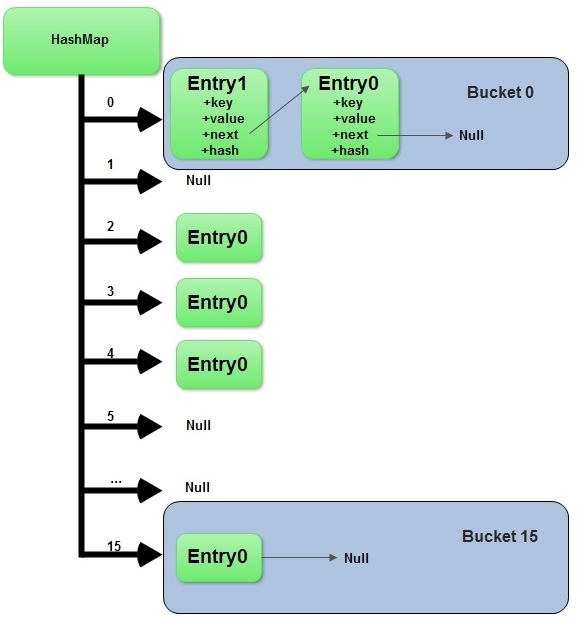
接下来我们用js实现hashmap, hashmap是一种键值对的数据结构。意味着你可以通过key快速找到你所需要查找的值。我使用数组加上LinkedList来实现hashmap,这种方式也被称为解决hashcode冲突的分离链接法。hashmap通常具备以下几种方法:put,get,remove。put是写入和修改数据,在put数据时,首先获取key的hashcode,作为数组的索引。而数组索引对应的值则是一个linkedlist,并且linkedlist所存储的节点值,同时包含着所需存储的key和value。这样以便解决当hashcode重复冲突时,在链表中根据key名称来get查找值。 关于hashmap更多的原理,我推荐这篇文章 http://www.admin10000.com/document/3322.html
下面直接给出实现,其中使用到LinkedList数据结构的源码,在我的这篇分享当中:http://www.cnblogs.com/tdws/p/6033209.html
   var djb2Code = function (str) {

         var hash = 5381;

         for (i = 0; i < str.length; i++) {

             char = str.charCodeAt(i);

             hash = ((hash << 5) + hash) + char; /* hash * 33 + c */

         }

         return hash;

     }

     function HashMap() {

         var map = [];

         var keyValPair = function (key, value) {

             this.key = key;

             this.value = value;

         }

         this.put = function (key, value) {

             var position = djb2Code(key);

             if (map[position] == undefined) {

                 map[position] = new LinkedList();

             }

             map[position].append(new keyValPair(key, value));

         },

         this.get = function (key) {

             var position = djb2Code(key);

             if (map[position] != undefined) {

                 var current = map[position].getHead();

                 while (current.next) {

                     if (current.element.key === key) {  //严格判断

                         return current.element.value;

                     }

                     current = current.next;

                 }

                 if (current.element.key === key) {//如果只有head节点,则不会进while.  还有尾节点,不会进while,这个判断必不可少

                     return current.element.value;

                 }

             }

             return undefined;

         },

         this.remove = function (key) {

             var position = djb2Code(key);

             if (map[position] != undefined) {

                 var current = map[position].getHead();

                 while (current.next) {

                     if (current.element.key === key) {

                         map[position].remove(current.element);

                         if (map[position].isEmpty()) {

                             map[position] == undefined;

                         }

                         return true;

                     }

                     current = current.next;

                 }

                 if (current.element.key === key) {

                     map[position].remove(current.element);

                     if (map[position].isEmpty()) {

                         map[position] == undefined;

                     }

                     return true;

                 }

             }

         }

     }

     //链表

     function LinkedList() {

         var Node = function (element) {        //新元素构造

             this.element = element;

             this.next = null;

         };

         var length = 0;

         var head = null;

         this.append = function (element) {

             var node = new Node(element);        //构造新的元素节点

             var current;

             if (head === null) {             //头节点为空时  当前结点作为头节点

                 head = node;

             } else {

                 current = head;

                 while (current.next) {          //遍历,直到节点的next为null时停止循环,当前节点为尾节点

                     current = current.next;

                 }

                 current.next = node;            //将尾节点指向新的元素,新元素作为尾节点

             }

             length++;                    //更新链表长度

         };

         this.removeAt = function (position) {

             if (position > -1 && position < length) {

                 var current = head;

                 var index = 0;

                 var previous;

                 if (position == 0) {

                     head = current.next;

                 } else {

                     while (index++ < position) {

                         previous = current;

                         current = current.next;

                     }

                     previous.next = current.next;

                 }

                 length--;

                 return current.element;

             } else {

                 return null;

             }

         };

         this.insert = function (position, element) {

             if (position > -1 && position <= length) {        //校验边界

                 var node = new Node(element);

                 current = head;

                 var index = 0;

                 var previous;

                 if (position == 0) {                    //作为头节点,将新节点的next指向原有的头节点。

                     node.next = current;

                     head = node;                        //新节点赋值给头节点

                 } else {

                     while (index++ < position) {

                         previous = current;

                         current = current.next;

                     }                                //遍历结束得到当前position所在的current节点,和上一个节点

                     previous.next = node;                    //上一个节点的next指向新节点  新节点指向当前结点,可以参照上图来看

                     node.next = current;

                 }

                 length++;

                 return true;

             } else {

                 return false;

             }

         };

         this.toString = function () {

             var current = head;

             var string = '';

             while (current) {

                 string += ',' + current.element;

                 current = current.next;

             }

             return string;

         };

         this.indexOf = function (element) {

             var current = head;

             var index = -1;

             while (current) {

                 if (element === current.element) {            //从头节点开始遍历

                     return index;

                 }

                 index++;

                 current = current.next;

             }

             return -1;

         };

         this.getLength = function () {

             return length;

         };

         this.getHead = function () {

             return head;

         };

         this.isEmpty = function () {

             return length == 0;

         }

     }
参考文章:js获取hashcode : http://www.cnblogs.com/pigtail/p/3342977.html
如果我的点滴分享对你有点滴帮助,欢迎点击下方红色按钮,我将长期输出分享。
JavaScript——HashMap实现的更多相关文章
- JavaScript资源大全中文版(Awesome最新版)
Awesome系列的JavaScript资源整理.awesome-javascript是sorrycc发起维护的 JS 资源列表,内容包括:包管理器.加载器.测试框架.运行器.QA.MVC框架和库.模 ...
- 【转】 我的java web登录RSA加密
[转] 我的java web登录RSA加密 之前一直没关注过web应用登录密码加密的问题,这两天用appscan扫描应用,最严重的问题就是这个了,提示我明文发送密码.这个的确很不安全,以前也大概想过, ...
- JavaScript 模拟 HashMap例子
function map(){ var map = {}; // Map map = new HashMap(); var key = "key"; va ...
- JavaScript: 零基础轻松学闭包
本文面向初学者,大神轻喷. 闭包是什么? 初学javascript的人,都会接触到一个东西叫做闭包,听起来感觉很高大上的.网上也有各种五花八门的解释,其实我个人感觉,没必要用太理论化的观念来看待闭包. ...
- 用JavaScript来实现链表LinkedList
本文版权归博客园和作者本人共同所有,转载和爬虫请注明原文地址. 写在前面 好多做web开发的朋友,在学习数据结构和算法时可能比较讨厌C和C++,上学的时候写过的也忘得差不多了,更别提没写过的了.但幸运 ...
- JavaScript资源大全中文版(Awesome最新版--转载自张果老师博客)
JavaScript资源大全中文版(Awesome最新版) 目录 前端MVC 框架和库 包管理器 加载器 打包工具 测试框架 框架 断言 覆盖率 运行器 QA 工具 基于 Node 的 CMS 框 ...
- 【JavaScript】详解JSON
目录结构: // contents structure [-] 什么是JSON JSON和XML的比较 相同点 不同点 JSON语法 如何解析JSON文本 eval()方法 JSON.parse()方 ...
- 重新介绍 JavaScript
简介 为什么需要这个重新介绍呢?因为 JavaScript 已经完全可以被称为世界上被误解最严重的编程语言了.虽然它被当做玩具来用,但是藏在让人迷惑的简单表象下面的,是强大的语言特性.从2005年,一 ...
- 【javascript】:Highcharts实战
PS: Highcharts是一款前端图标设计框架,非常绚. 前端JS: var probabilityStatisticsData; var yearTool; var CoordinateX = ...
随机推荐
- 洛谷P4720 【模板】扩展卢卡斯
P4720 [模板]扩展卢卡斯 题目背景 这是一道模板题. 题目描述 求 C(n,m)%P 其中 C 为组合数. 输入输出格式 输入格式: 一行三个整数 n,m,p ,含义由题所述. 输出格式: 一行 ...
- python--inspect模块
inspect模块主要提供了四种用处: 1.对是否是模块.框架.函数进行类型检查 2.获取源码 3.获取类或者函数的参数信息 4.解析堆栈 一.type and members 1. inspect. ...
- WebService 检测到有潜在危险的 Request.Form 值
在web.config 的 <system.web> <pages validateRequest="false" /> <httpRuntime r ...
- 【题解】 [HNOI2009] 最小圈 (01分数规划,二分答案,负环)
题目背景 如果你能提供题面或者题意简述,请直接在讨论区发帖,感谢你的贡献. 题目描述 对于一张有向图,要你求图中最小圈的平均值最小是多少,即若一个圈经过k个节点,那么一个圈的平均值为圈上k条边权的和除 ...
- c# 16进制byte转成int
]; Ratedata=System.BitConverter.GetBytes(FreResultTBoxValue); 上面这个 FreResultTBoxValue 变量是int,系统中自带in ...
- 界面编程之QT的文件操作20180729
/*******************************************************************************************/ 一.QT文件 ...
- AngularJS学习笔记3——AngularJS的工作原理
个人觉得,要很好的理解AngularJS的运行机制,才能尽可能避免掉到坑里面去.在这篇文章中,我将根据网上的资料和自己的理解对AngularJS的在启动后,每一步都做了些什么,做一个比较清楚详细的解析 ...
- RPC与RMI的区别
分布式项目按照以下发展经历了以下技术: CORBA: RMI:基于远程接口的调用 RMI-RROP:这是RMI与CORBA的结合,用在了EJB技术上,EJB留给世界上是优秀的理论和糟糕的架构. WEB ...
- 自己写的一个Vue
下面这里是我自己写的一个小型的vue,原理就是proxy: //Proxy天生没有prototype,因此要加上,不然extends会报错 Proxy.prototype = Proxy.protot ...
- bzoj千题计划204:bzoj2813: 奇妙的Fibonacci
http://www.lydsy.com/JudgeOnline/problem.php?id=2813 若j能整除i,则f[j]能整除f[i] 题目就变成了求约数个数和.约数的平方和 http:// ...