
RYU 灭龙战 fourth day (1)
RYU 灭龙战 fourth day (1)
前言
对于流量的监控,对于一个网络管理人员来说是非常重要的,可以从可视化的角度,方便检测出哪里的设备出了问题;而在传统网络中,如果是哪里的设备出了问题的话,则需要进行人工的排查,这种排查往往绝大部分依赖于经验上,这也是SDN一个小小的好处吧。这次实验就基于上次实验的基础上,加入流量监控。
实现方案
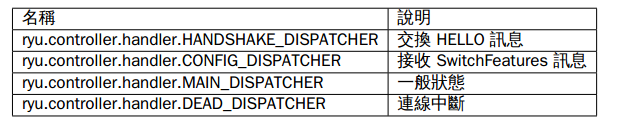
- 交换机状态
# Copyright (C) 2016 Nippon Telegraph and Telephone Corporation.

#

# Licensed under the Apache License, Version 2.0 (the "License");

# you may not use this file except in compliance with the License.

# You may obtain a copy of the License at

#

#    http://www.apache.org/licenses/LICENSE-2.0

#

# Unless required by applicable law or agreed to in writing, software

# distributed under the License is distributed on an "AS IS" BASIS,

# WITHOUT WARRANTIES OR CONDITIONS OF ANY KIND, either express or

# implied.

# See the License for the specific language governing permissions and

# limitations under the License.

from operator import attrgetter

from ryu.app import simple_switch_13

from ryu.controller import ofp_event

from ryu.controller.handler import MAIN_DISPATCHER, DEAD_DISPATCHER

from ryu.controller.handler import set_ev_cls

from ryu.lib import hub

#继承simple_switch_13,OpenFlow1.3 mac学习

class SimpleMonitor13(simple_switch_13.SimpleSwitch13):

    #初始化函数

    def __init__(self, *args, **kwargs):

        super(SimpleMonitor13, self).__init__(*args, **kwargs)

        #数据路径的集合

        self.datapaths = {}

        #每次流表监控的时间戳

        self.monitor_thread = hub.spawn(self._monitor)

    #消息类型StateChange,交换机的状态为一般状态(MAIN_DISPATCHER) 或者连接中断状态(DEAD_DISPATCHER)

    @set_ev_cls(ofp_event.EventOFPStateChange,

                [MAIN_DISPATCHER, DEAD_DISPATCHER])

    def _state_change_handler(self, ev):

        #得到数据路径

        datapath = ev.datapath

        #如果交换机状态为一般连接状态,并且该消息的数据路径id不在数据路径集合中,则把该数据路径id加入数据路径集合中

        if ev.state == MAIN_DISPATCHER:

            if datapath.id not in self.datapaths:

                self.logger.debug('register datapath: %016x', datapath.id)

                self.datapaths[datapath.id] = datapath

        #如果交换机状态为断开链接状态,且该消息的数据路径在数据路径集合中,则把该数据路径id从数据路径集合中去除

        elif ev.state == DEAD_DISPATCHER:

            if datapath.id in self.datapaths:

                self.logger.debug('unregister datapath: %016x', datapath.id)

                del self.datapaths[datapath.id]

    #对于在数据路径集合中的交换机每间隔10s发送请求,来获得交换机的消息

    def _monitor(self):

        while True:

            for dp in self.datapaths.values():

                self._request_stats(dp)

            hub.sleep(10)

    #_request_stats方法用来定期发送,OFPFlowStatsRequest、OFPPortStatsRequest消息给交换机

    def _request_stats(self, datapath):

        self.logger.debug('send stats request: %016x', datapath.id)

        ofproto = datapath.ofproto

        parser = datapath.ofproto_parser

        req = parser.OFPFlowStatsRequest(datapath)

        datapath.send_msg(req)

        req = parser.OFPPortStatsRequest(datapath, 0, ofproto.OFPP_ANY)

        datapath.send_msg(req)

    #用来处理EventOFPFlowStatsReply数据包,在交换机状态为一般链接状态

    @set_ev_cls(ofp_event.EventOFPFlowStatsReply, MAIN_DISPATCHER)

    def _flow_stats_reply_handler(self, ev):

        body = ev.msg.body

        self.logger.info('datapath         '

                         'in-port  eth-dst           '

                         'out-port packets  bytes')

        self.logger.info('---------------- '

                         '-------- ----------------- '

                         '-------- -------- --------')

        #输出消息的数据路径id,入端口,目的mac,出端口,packets数目,以及byte大小,并按入端口,目的mac作为排序

        for stat in sorted([flow for flow in body if flow.priority == 1],

                           key=lambda flow: (flow.match['in_port'],

                                             flow.match['eth_dst'])):

            self.logger.info('%016x %8x %17s %8x %8d %8d',

                             ev.msg.datapath.id,

                             stat.match['in_port'], stat.match['eth_dst'],

                             stat.instructions[0].actions[0].port,

                             stat.packet_count, stat.byte_count)

    # 用来处理EventOFPPortStatsReply数据包,在交换机状态为一般链接状态

    @set_ev_cls(ofp_event.EventOFPPortStatsReply, MAIN_DISPATCHER)

    def _port_stats_reply_handler(self, ev):

        body = ev.msg.body

        self.logger.info('datapath         port     '

                         'rx-pkts  rx-bytes rx-error '

                         'tx-pkts  tx-bytes tx-error')

        self.logger.info('---------------- -------- '

                         '-------- -------- -------- '

                         '-------- -------- --------')

        #打印出对应的数据的数据路径id,以及交换机端口,以及接收数据包数目,接收字节数目,接收数据错误率,以及相应的发送数据包数目,发送字节数目,发送错误数

        for stat in sorted(body, key=attrgetter('port_no')):

            self.logger.info('%016x %8x %8d %8d %8d %8d %8d %8d',

                             ev.msg.datapath.id, stat.port_no,

                             stat.rx_packets, stat.rx_bytes, stat.rx_errors,

                             stat.tx_packets, stat.tx_bytes, stat.tx_errors)
实验过程
- 打开一终端,打开mininet
sudo mn --topo single,3 --mac --switch ovsk,protocols=OpenFlow13 --controller remote
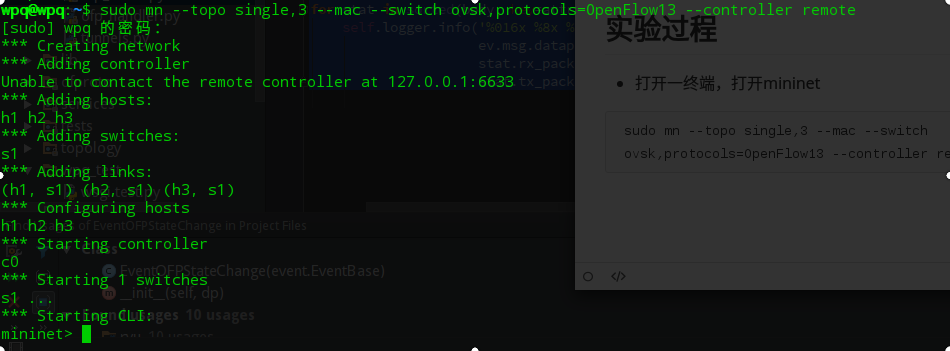
此时还没有执行ryu应用,所以对应的6633端口无应用相应,在wireshark查看可得各种TCP握手失败

- 另一种 执行ryu应用,目录为.../ryu/app
ryu-manager --verbose ./simple_monitor_13.py
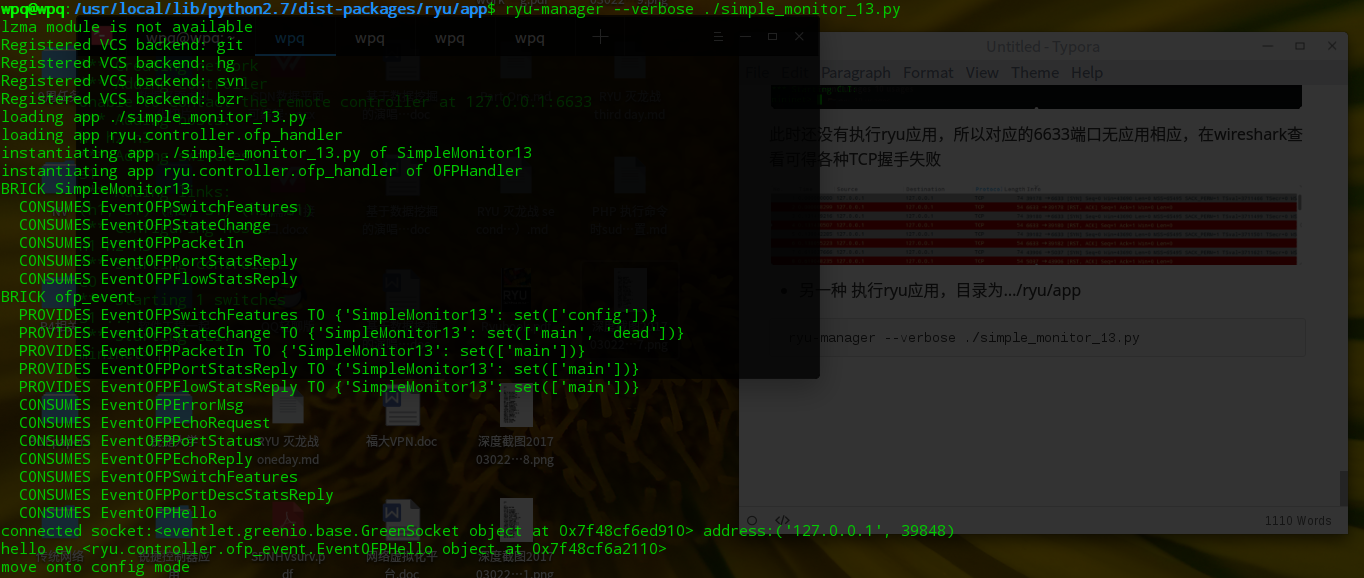

由上次实验可知,此时还没有优先级大于0的流表,所以没有显示出来。此时模仿上次一样h1 ping h2让其下发流表
- mininet端口互ping,触发控制器下发流表
h1 ping h2
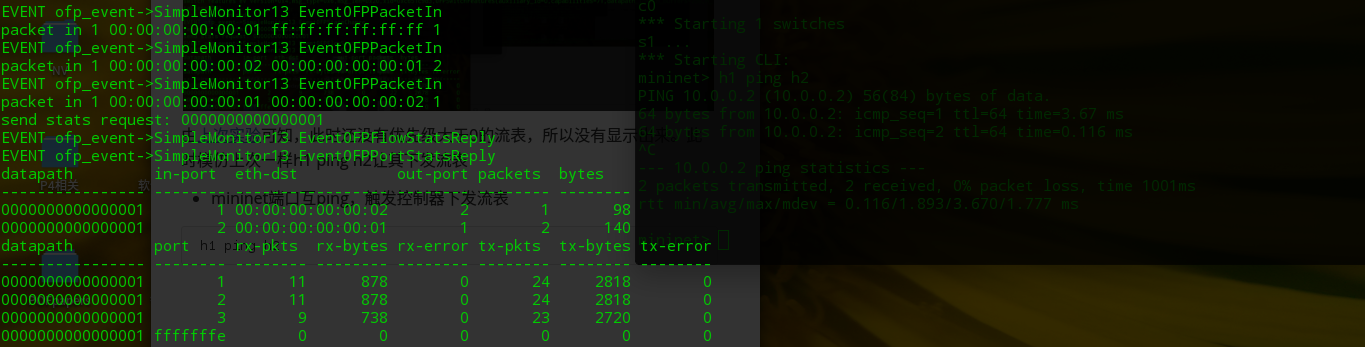
可以看到流表增加了,可看到实时的流量检测
总结
基于上次实验的扩展吧
利用OpenFlow的相应消息可以做的一些特定功能
RYU 灭龙战 fourth day (1)的更多相关文章
- RYU 灭龙战 fourth day (2)
RYU 灭龙战 fourth day (2) 前言 之前试过在ODL调用他们的rest api,一直想自己写一个基于ODL的rest api,结果还是无果而终.这个小目标却在RYU身上实现了.今日说法 ...
- RYU 灭龙战 third day
RYU 灭龙战 third day 前言 传统的交换机有自学习能力.然而你知道在SDN的世界里,脑子空空的OpenFlow交换机是如何学习的吗?今日说法带你领略SDN的mac学习能力. RYUBook ...
- RYU 灭龙战 second day(内容大部分引自网络)
RYU 灭龙战 second day(内容大部分引自网络) 写好的markdown重启忘了保存...再写一次RLG 巨龙的稀有装备-RYU代码结构 RYU控制器代码结构的总结 RYU入门教程 RYU基 ...
- RYU 灭龙战 first day
RYU 灭龙战 first day 前言 由于RYU翻译过来是龙的意思,此次主题就叫灭龙战吧 灵感来源 恶龙的三位真火-问题所在 参照了官方文档的基本操作 笔者以此执行 一个终端里 sudo mn - ...
- mininet和ryu控制器的连接
1.执行ryu应用程式:ryu-manager --verbose ryu.app.simple_switch_13 2.启动mininet,配置如下:创建3个host,1个交换器(open vSwi ...
- Ubuntu下搭建ryu环境
RYU环境搭建总共四步: step1:首先下载相应的python套件,并且更新pip $ sudo apt-get install python-pip python-dev build-essent ...
- Ryu
What's Ryu? Ryu is a component-based software defined networking framework. Ryu provides software co ...
- PIC12F629帮我用C语言写个程序,控制三个LED亮灭
http://power.baidu.com/question/240873584599025684.html?entry=browse_difficult PIC12F629帮我用C语言写个程序,控 ...
- (三)开关检测来控制LED灯的亮灭
开关检测案例一: 具体电路图如下: K1--K4闭合,控制 D1—D4 亮灭 产生的问题: 1.关于 R8 R9 R7 R10 的阻值选择问题,倘若太大的话, 比如10K 不管开关断开还是闭合,好像 ...
随机推荐
- Nodejs学习资源汇总
Node.js v6.3.1 Documentation https://nodejs.org/dist/latest-v6.x/docs/api/ npm官网 https://www.npmjs ...
- cenos6.5 python2.6.6升级至python2.7.3
踩坑无数... 一.参照以下两篇博文把python升级至python2.7.3 https://www.cnblogs.com/senzhe/p/6322214.html http://www.jb5 ...
- Odoo Model内容详解
转载请注明原文地址:https://www.cnblogs.com/cnodoo/p/9390688.html 一:Odoo模型属性 1:_name 模型的唯一标识:如果没有继承其他模型 ...
- java多线程中的死锁情况读书笔记
多线程中的死锁 在前面的分析中,我们知道一个对象可以用Synchronized方法或者其他的加锁形式来防止别的任务在互斥还没有释放的时候就访问这个对象. 试想一下这样的情况:某个任务在等待另一个任务, ...
- C++之内联函数
C++语言新增关键字 inline,用于将一个函数声明为内联函数.在程序编译时,编译器会将内联函数调用处用函数体替换,这一点类似于C语言中的宏扩展. 采用内联函数可以有效避免函数调用的开销,程序执行效 ...
- 面试题之O(n)内旋转字符串
样例: 字符串“abcd1234"左移3位结果为”234abcd1“ K:左移位数 L:字符串长度 方案1:暴力 O(K * L) 可以每次将数组中的元素左移一位,循环K次. abcd123 ...
- C#数组、js数组、json
C#数组 参考地址C#之数组 什么是数组?数组是一种数据结构,包含同一个类型的多个元素.数组的声明:int[] myIntArray; 注:声明数组时,方括号 [] 必须跟在类型后面,而不是变量名后面 ...
- 快速在Ubuntu安装PHP网站
快速安装使用的是tasksel,tasksel是Debian / Ubuntu的工具,安装多个相关软件包作为一个协调的“任务”到你的系统.这个lamp-server^跟taskel这个程序有关.下面是 ...
- 保存网格(mesh)到磁盘上
Unity提供了很方便的工具来保存mesh之类的,下面的代码挂在GameObject上后,按下F键能把mesh(该GameObject必须有mesh组件)保存到磁盘的Assets目录下.在磁盘上是.a ...
- Android APK 签名比对(转)
Android apk签名的过程 1. 生成MANIFEST.MF文件: 程序遍历update.apk包中的所有文件(entry),对非文件夹非签名文件的文件,逐个生成SHA1的数字签名信息,再用Ba ...