
spring boot:接口站增加api版本号后的安全增强(spring boot 2.3.3)
一,接口站增加api版本号后需要做安全保障?
1,如果有接口需要登录后才能访问的,
需要用spring security增加授权
2,接口站需要增加api版本号的检验,必须是系统中定义的版本号才能访问,
避免乱填值刷接口的情况
说明:刘宏缔的架构森林是一个专注架构的博客,地址:https://www.cnblogs.com/architectforest
对应的源码可以访问这里获取: https://github.com/liuhongdi/
说明:作者:刘宏缔 邮箱: 371125307@qq.com
二,演示项目的相关信息
1,项目地址:
https://github.com/liuhongdi/apiversionsecurity
2,功能说明:
演示了接口站增加api版本号后的安全增强
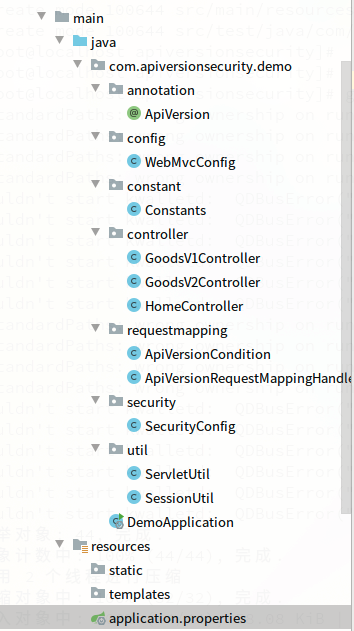
3,项目结构:如图:
三,配置文件说明
1,pom.xml
        <dependency>

            <groupId>org.springframework.boot</groupId>

            <artifactId>spring-boot-starter-web</artifactId>

        </dependency>

        <!-- spring security -->

        <dependency>

            <groupId>org.springframework.boot</groupId>

            <artifactId>spring-boot-starter-security</artifactId>

        </dependency>
2,application.properties
#error

server.error.include-stacktrace=always

#errorlog

logging.level.org.springframework.web=trace
四,java代码说明
1,SecurityConfig.java
@Configuration

@EnableWebSecurity

 public class SecurityConfig extends WebSecurityConfigurerAdapter {

     @Override

     protected void configure(HttpSecurity http) throws Exception {

                  //login和logout

                  http.formLogin()

                        .defaultSuccessUrl("/v2/home/home")

                        .failureUrl("/login-error.html")

                        .permitAll()

                        .and()

                        .logout();

                  //匹配的页面,符合限制才可访问

                  http.authorizeRequests()

                 .antMatchers("/v*/home/**").hasAnyRole("ADMIN","DEV")

                 .antMatchers("/v*/goods/**").hasAnyRole("ADMIN","USER");

                  //剩下的页面,允许访问

                 http.authorizeRequests().anyRequest().permitAll();

     }

     @Autowired

     public  void configureGlobal(AuthenticationManagerBuilder auth) throws Exception {

         //添加两个账号用来做测试

         auth.inMemoryAuthentication().passwordEncoder(new BCryptPasswordEncoder())

                 .withUser("lhdadmin")

                 .password(new BCryptPasswordEncoder().encode("123456"))

                 .roles("ADMIN","USER")

                 .and()

                 .withUser("lhduser")

                 .password(new BCryptPasswordEncoder().encode("123456"))

                 .roles("USER");

     }

 }
2,Constants.java
public class Constants {

    //api version

    public final static List API_VERSION_LIST = Arrays.asList("1","1.0","1.5","1.8","2","2.0");

}
定义了api版本号常量
3,ApiVersionCondition.java
//实现RequestCondition

public class ApiVersionCondition implements RequestCondition<ApiVersionCondition> {

    //api版本号

    private String apiVersion;

    //版本号的格式,如: /v[1-n]/api/test or /v1.5/home/api

    private final static Pattern VERSION_PREFIX_PATTERN = Pattern.compile("/v((\\d+\\.\\d+)|(\\d+))/");

    public ApiVersionCondition(String apiVersion) {

        this.apiVersion = apiVersion;

    }

    //将不同的筛选条件进行合并

    @Override

    public ApiVersionCondition combine(ApiVersionCondition other) {

        // 采用最后定义优先原则,则方法上的定义覆盖类上面的定义

        return new ApiVersionCondition(other.getApiVersion());

    }

    //版本比对,用于排序

    @Override

    public int compareTo(ApiVersionCondition other, HttpServletRequest request) {

        //优先匹配最新版本号

        return compareTo(other.getApiVersion(),this.apiVersion)?1:-1;

    }

    //获得符合匹配条件的ApiVersionCondition

    @Override

    public ApiVersionCondition getMatchingCondition(HttpServletRequest request) {

        Matcher m = VERSION_PREFIX_PATTERN.matcher(request.getRequestURI());

        if (m.find()) {

            String version = m.group(1);

            //如果版本号不是list中则返回

            if (!Constants.API_VERSION_LIST.contains(version)) {

                return null;

            }

            if (compareTo(version,this.apiVersion)){

                return this;

            }

        }

        return null;

    }

    //compare version

    private boolean compareTo(String version1,String version2){

        if (!version1.contains(".")) {

            version1 += ".0";

        }

        if (!version2.contains(".")) {

            version2 += ".0";

        }

        String[] split1 = version1.split("\\.");

        String[] split2 = version2.split("\\.");

        for (int i = 0; i < split1.length; i++) {

            if (Integer.parseInt(split1[i])<Integer.parseInt(split2[i])){

                return false;

            }

        }

        return true;

    }

    public String getApiVersion() {

        return apiVersion;

    }

}
对版本号的解析和处理
4,ApiVersionRequestMappingHandlerMapping.java
//扩展RequestMappingHandlerMapping

public class ApiVersionRequestMappingHandlerMapping extends RequestMappingHandlerMapping {

    //类上有 @ApiVersion注解时生效

    @Override

    protected RequestCondition<?> getCustomTypeCondition(Class<?> handlerType) {

        ApiVersion apiVersion = AnnotationUtils.findAnnotation(handlerType, ApiVersion.class);

        return createRequestCondition(apiVersion);

    }

    //方法上有 @ApiVersion注解时生效

    @Override

    protected RequestCondition<?> getCustomMethodCondition(Method method) {

        ApiVersion apiVersion = AnnotationUtils.findAnnotation(method, ApiVersion.class);

        return createRequestCondition(apiVersion);

    }

    //返回ApiVersionCondition

    private RequestCondition<ApiVersionCondition> createRequestCondition(ApiVersion apiVersion) {

        return apiVersion == null ? null : new ApiVersionCondition(apiVersion.value());

    }

}
定义注解的生效条件
5,WebMvcConfig.java
@Configuration

public class WebMvcConfig extends WebMvcConfigurationSupport {

    //在获取RequestMappingHandlerMapping时

    //返回我们自定义的ApiVersionRequestMappingHandlerMapping

    @Override

    protected RequestMappingHandlerMapping createRequestMappingHandlerMapping() {

        return new ApiVersionRequestMappingHandlerMapping();

    }

}
使自定义的版本号解析生效
6,ApiVersion.java
@Target({ElementType.METHOD, ElementType.TYPE})

@Retention(RetentionPolicy.RUNTIME)

@Documented

public @interface ApiVersion {

    //版本号的值,从1开始

    String value() default "1";

}
自定义版本号的注解
7,HomeController.java
@RestController

@RequestMapping("/{version}/home")

public class HomeController {

    //匹配版本v1的访问

    @ApiVersion("1")

    @GetMapping

    @RequestMapping("/home")

    public String home01(@PathVariable String version) {

        return "home v1 : version:" + version;

    }

    //匹配版本v2的访问

    @ApiVersion("2.0")

    @GetMapping

    @RequestMapping("/home")

    public String home02(@PathVariable String version) {

        String username = SessionUtil.getCurrentUserName();

        String url = ServletUtil.getRequest().getRequestURL().toString();

        return "home v2 version: " + version+":username:"+username+";url:"+url;

    }

    //匹配版本v1.5-2.0的访问

    @ApiVersion("1.5")

    @GetMapping

    @RequestMapping("/home")

    public String home15(@PathVariable String version) {

        return "home v1.5 version: " + version;

    }

}
7,其他非关键代码请访问github
五,测试效果
1,有权限访问的演示:
访问:
http://127.0.0.1:8080/v2/home/home
会跳转到登录页面:
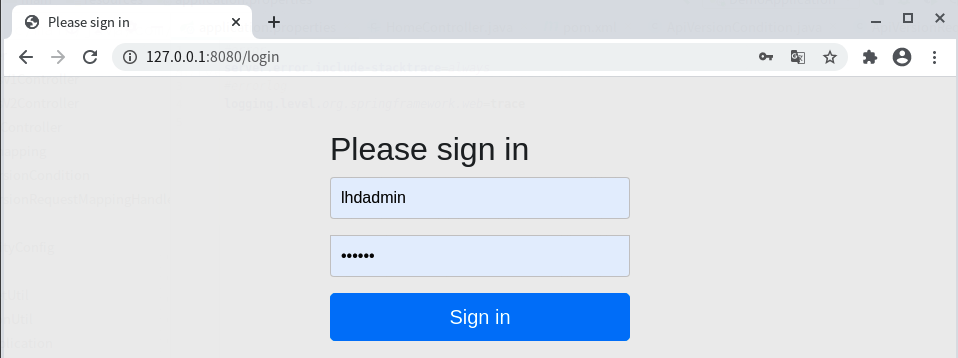
我们用lhdadmin这个账号登录:

可以正常访问
用未定义的版本号访问时会报错,如图:

如果一个版本号在方法没有定义,则会访问到相应的下一个版本:
如图:
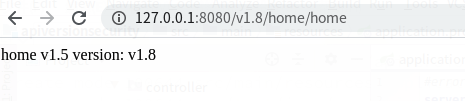
没有方法标注1.8,但有方法上标注了1.5,所以访问到了注解版本号1.5的这个方法
2,演示无权限的访问:
http://127.0.0.1:8080/v1.8/goods/goodsone
会跳转到登录页面
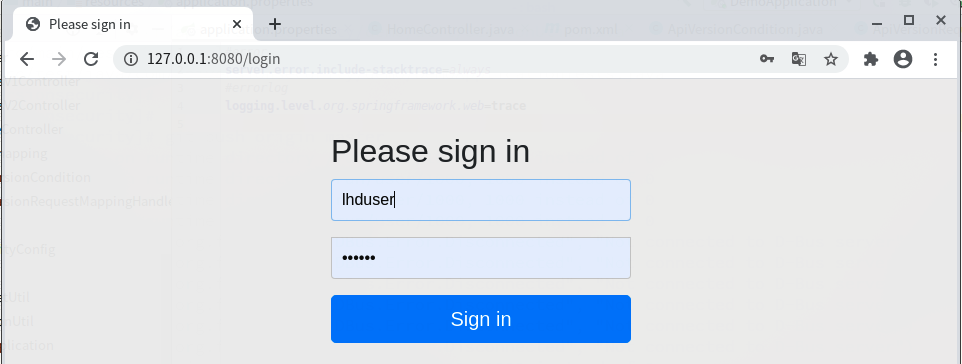
用lhduser这个账号登录

可以访问goods接口
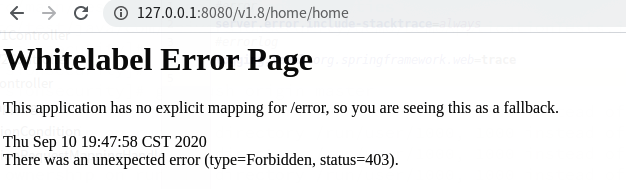
因为没有访问home接口的授权,所以访问时会报错,如图:
六,查看spring boot版本
  .   ____          _            __ _ _

 /\\ / ___'_ __ _ _(_)_ __  __ _ \ \ \ \

( ( )\___ | '_ | '_| | '_ \/ _` | \ \ \ \

 \\/  ___)| |_)| | | | | || (_| |  ) ) ) )

  '  |____| .__|_| |_|_| |_\__, | / / / /

 =========|_|==============|___/=/_/_/_/

 :: Spring Boot ::        (v2.3.3.RELEASE)
spring boot:接口站增加api版本号后的安全增强(spring boot 2.3.3)的更多相关文章
- spring boot: 设计接口站api的版本号,支持次版本号(spring boot 2.3.2)
一,为什么接口站的api要使用版本号? 1,当服务端接口的功能发生改进后, 客户端如果不更新版本, 则服务端返回的功能可能不能使用, 所以在服务端功能升级后, 客户端也要相应的使用 ...
- Spring Boot+Spring Security+JWT 实现 RESTful Api 认证(一)
标题 Spring Boot+Spring Security+JWT 实现 RESTful Api 认证(一) 技术 Spring Boot 2.Spring Security 5.JWT 运行环境 ...
- spring boot使用swagger生成api接口文档
前言 在之前的文章中,使用mybatis-plus生成了对应的包,在此基础上,我们针对项目的api接口,添加swagger配置和注解,生成swagger接口文档 具体可以查看本站spring boot ...
- spring boot 通过feign调用api接口
目的:远程调用服务器api,直接上步骤: 1,添加maven依赖,这是必须的: <dependency> <groupId>org.springframework.cloud& ...
- Spring Boot+Spring Security+JWT 实现 RESTful Api 权限控制
摘要:用spring-boot开发RESTful API非常的方便,在生产环境中,对发布的API增加授权保护是非常必要的.现在我们来看如何利用JWT技术为API增加授权保护,保证只有获得授权的用户才能 ...
- spring boot:spring security给用户登录增加自动登录及图形验证码功能(spring boot 2.3.1)
一,图形验证码的用途? 1,什么是图形验证码? 验证码(CAPTCHA)是"Completely Automated Public Turing test to tell Computers ...
- Spring - BeanPostProcessor接口(后处理器)讲解
概述: BeanPostProcessor接口是众多Spring提供给开发者的bean生命周期内自定义逻辑拓展接口中的一个,其他还有类似InitializingBean,DisposableBean, ...
- Spring Boot实战:Restful API的构建
上一篇文章讲解了通过Spring boot与JdbcTemplate.JPA和MyBatis的集成,实现对数据库的访问.今天主要给大家分享一下如何通过Spring boot向前端返回数据. 在现在的开 ...
- spring boot 接口返回值去掉为null的字段
现在项目都是前后端分离的,返回的数据都是使用json,但有些接口的返回值存在 null或者"",这种字段不仅影响理解,还浪费带宽,需要统一做一下处理,不返回空字段,或者把NULL转 ...
随机推荐
- Django-配置镜像源,虚拟环境详解
0.配源虚拟 全局配源 阿里云镜像站:https://developer.aliyun.com/mirror/ # 在cmd中操作,查找文件 C:\Users\Administrator>pip ...
- Python解答蓝桥杯省赛真题之从入门到真题(二刷题目一直更新)
蓝桥刷题 原文链接: https://github.com/libo-sober/LanQiaoCup Python解答蓝桥杯省赛真题之从入门到真题 不同字串 """ 一 ...
- linux如何把普通用户添加到sudo组
sudo原理:运行命令时,系统检查/etc/sudoers 配置文件,看这个用户是否有执行sudo的权限,如果有权限,系统要求输入用户自己的密码,如果密码输入正确,系统会以root身份运行 passw ...
- 第15课 - make的隐式规则(上)
第15课 - make的隐式规则(上) 1. 问题 如果把同一个目标的命令拆分的写到不同地方,会发生什么? 执行make all 这个实验表明了:如果同一个目标的命令拆分的写到不同地方,那么 make ...
- [程序员代码面试指南]二叉树问题-找到二叉树中的最大搜索二叉树(树形dp)
题意 给定一颗二叉树的头节点,已知所有节点的值都不一样,找到含有节点最多的搜索二叉子树,并返回这个树的头节点. 题解 在后序遍历过程中实现. 求解步骤按树形dp中所列步骤.可能性三种:左子树最大.右子 ...
- Linux宏:__ASSEMBLY__
汇编:assembly 猜测:所以这个宏跟汇编有关?! 引用:某些常量宏会同时被C和asm引用,而C与asm在对立即数符号的处理上是不同的.asm中通过指令来区分其操作数是有符号还是无符号的,而不是通 ...
- Hadoop之MapReduce开发总结
@ 目录 1.输入数据接口:InputFormat 2.逻辑处理接口:Mapper 3.Partitioner分区 4.Comparable排序 5.Combiner合并(可选) 6.Reduce端分 ...
- Docker实战(7):Docker无日志(无*-json.log文件)
出现这种情况基本都是docker 版本太旧,我的处理方案就是将docker 版本升级到最新,然后重新docker run 一遍就会有了.注意:docker 升级后,原来images,容器会出现一些小问 ...
- 将ImageMagic库编译进nginx
1.首先要将ImageMagick库的相应头文件加到环境变量中 export C_INCLUDE_PATH=$C_INCLUDE_PATH:/usr/local/ImageMagick/include ...
- Go 里的函数
1. 关于函数 函数是基于功能或 逻辑进行封装的可复用的代码结构.将一段功能复杂.很长的一段代码封装成多个代码片段(即函数),有助于提高代码可读性和可维护性. 在 Go 语言中,函数可以分为两种: 带 ...