
使用ui-route实现多层嵌套路由
一、预期实现效果:
https://liyuan-meng.github.io/uiRouter-app/index.html
(项目地址:https://github.com/liyuan-meng/uiRouter-app)
二、分析题目要求,给出依赖关系,构建项目
1. service:
(1)根据条件查询people数据checkPeople.service,不给出条件则查询所有。
(2)得到路由信息getStateParams.service。
2. components:
(1)hello模块:点击button按钮更改内容。
(2)peolpleList模块:显示people列表,点击people显示people详情。依赖于checkPeople.service模块。
(3)peopleDetail模块:显示people详情,依赖于checkPeople.service模块和getStateParams.service模块。
3. 构建项目:
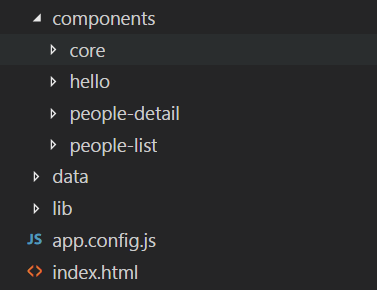
如图所示:component目录用来保存所有服务模块和业务模块,lib目录保存外部引用(我是用的是angular.js1.5.8和ui-route0.2.18),app.config.js文件用来配置路由,index.html则作为入口文件。
三、实现这个例子
1. 首页index.html
<!DOCTYPE html>

<html lang="en">

<head>

    <meta charset="UTF-8">

    <title>Title</title>

    <script src="./lib/angular.js"></script>

    <script src="./lib/angular-ui-route.js"></script>

    <script src="./app.config.js"></script>

    <script src="./components/core/people/checkPeople.service.js"></script>

    <script src="./components/core/people/getStateParams.service.js"></script>

    <script src="./components/hello/hello.component.js"></script>

    <script src="./components/people-list/people-list.component.js"></script>

    <script src="./components/people-detail/people-detail.component.js"></script>

</head>

<body ng-app="helloSolarSystem">

<div>

    <a ui-sref="helloState">Hello</a>

    <a ui-sref="aboutState">About</a>

    <a ui-sref="peopleState">People</a>

</div>

<ui-view></ui-view>

</body>

</html>
(1)导入lib中的文件以及所有用到的service和component服务的文件。
(2)ng-app="helloSolarSystem"指明了从helloSolarSystem模块开始解析。
(3)定义视图<ui-view></ui-view>
2. 配置路由app.config.js
'use strict';

angular.module("helloSolarSystem", ['peopleList', 'peopleDetail', 'hello','ui.router']).

    config(['$stateProvider', function ($stateProvider) {

        $stateProvider.state('helloState', {

            url: '/helloState',

            template:'<hello></hello>'

        }).state('aboutState', {

            url: '/about',

            template: '<h4>Its the UI-Router Hello Solar System app!</h4>'

        }).state('peopleState', {

            url: '/peopleList',

            template:'<people-list></people-list>'

        }).state('peopleState.details', {

            url:'/detail/:id',

            template: '<people-detail></people-detail>'

        })

    }

]);
(1)模块名字:helloSolarSystem;
(2)注入'peopleList', 'peopleDetail', 'hello','ui.router'模块。
(3)配置stateProvider服务的视图控制,例如第一个名为helloState的视图控制器:当ui-sref == "helloState"的时候,路由更新为url的值#/helloState,并且<ui-view></ui-view>中显示的内容为<hello></hello>组件解析出的内容。
(4)嵌套路由的实现:名为peopleState的视图控制器是父路由。名为peopleState.details的视图控制器是子路由。这是一种相对路由方式,父路由将匹配.../index.html#/peopleState/,子路由将匹配.../index.html#/peopleState/detail/x(x是/detail/:id中的id的值)。如果改成绝对路由的形式,只需要写成url:'^/detail/:id',这时子路由将匹配.../index.html#/detail/x(x是/detail/:id中的id的值)。
4. 实现checkPeople.service(根据条件查找people)
checkPeople.sercice.js
'use strict';

//根据条件(参数)查找信息。

angular.module('people.checkPeople', ['ui.router']).

    factory('CheckPeople', ['$http', function ($http) {

        return {

            getData: getData

        };

        function getData(filed) {

            var people;

            var promise =  $http({

                method: 'GET',

                url: './data/people.json'

            }).then(function (response) {

                if (filed) {

                    people = response.data.filter(function (value) {

                        if (Number(value.id) === Number(filed)) {

                            return value;

                        }

                    })

                } else {

                    people = response.data;

                }

                return people;

            });

            return promise;

        }

    }]);
(1)在getData这个函数中,我们想要返回一个保存people信息的数组,但是由于使用$http().then()服务的时候,这是一个异步请求,我们并不知道请求什么时候结束,所以世界返回people数组是有问题的。我们注意到,$http().then()是一个Promise对象,所以我们可以想到直接将这个对象返回,这样在就可以使用"函数的结果.then(function(data))"来得到异步请求拿来的数据data。
3. 实现getStateParams.service(获取路由信息)
getStatePatams.service.js
"use strict";

angular.module("getStateParams", ['ui.router']).

    factory("GetStateParams", ["$location", function ($location) {

        return {

            getParams: getParams

        };

        function getParams() {

            var partUrlArr = $location.url().split("/");

            return partUrlArr[partUrlArr.length-1];

        }

}]);
(1)这里的getParams函数返回的是路由信息的最后一个数据,也就是people的id,这个service有些特殊,不够通用,可能还需要优化一下会更加合理。不过并不影响我们的需求。
4. 实现hello模块
hello.template.html
<div>

    <div ng-hide="hideFirstContent">hello solar sytem!</div>

    <div ng-hide="!hideFirstContent">whats up solar sytem!</div>

    <button ng-click="ctlButton()">click</button>

</div>
hello.component.js
'use strict';

angular.module("hello", [])

    .component('hello', {

        templateUrl: './components/hello/hello.template.html',

        controller: ["$scope",

            function HelloController($scope) {

                $scope.hideFirstContent = false;

                $scope.ctlButton = function () {

                    this.hideFirstContent = !this.hideFirstContent;

                };

            }

        ]

    });
5. 实现peolpeList模块:
peopleList.template.html
<div>

    <ul>

        <a ng-repeat="item in people" ui-sref="peopleState.details({id:item.id})">

            <li>{{item.name}}</li>

        </a>

    </ul>

    <ui-view></ui-view>

</div>
(1)这里的<ui-view></ui-view>用来显示peopleList的子组件pepleDetail
peopleList.component.js
'use strict';

angular.module("peopleList", ['people.checkPeople'])

    .component('peopleList', {

        templateUrl: './components/people-list/people-list.template.html',

        controller: ['CheckPeople','$scope',

            function PeopleListController(CheckPeople, $scope) {

                $scope.people = [];

                CheckPeople.getData().then(function(data){

                    $scope.people = data;

                });

            }

        ]

    });
6. 实现peopleDetail模块
peopleDetail.template.html
<ul ng-repeat="item in peopleDetails track by $index">

    <li>名字: {{item.name}}</li>

    <li>介绍: {{item.intro}}</li>

</ul>
peopleDetail.component.js
'use strict';

angular.module("peopleDetail", ['people.checkPeople', 'getStateParams'])

    .component('peopleDetail', {

        templateUrl: './components/people-detail/people-detail.template.html',

        controller: ['CheckPeople', 'GetStateParams', '$scope',

            function peopleDetailController(CheckPeople, GetStateParams, $scope) {

                $scope.peopleDetails = [];

                CheckPeople.getData(GetStateParams.getParams()).then(function(data){

                    $scope.peopleDetails = data;

                });

            }

        ]

    });
7.源码:
https://github.com/liyuan-meng/uiRouter-app
使用ui-route实现多层嵌套路由的更多相关文章
- angularjs ui-view多视口多层嵌套路由配置
最近研究了一下ui-view多层嵌套,整理了一下 1.最简单的ui-view用法 html部分: <ul class="nav navbar-nav"> <li ...
- angular路由——ui.route
angular路由 使用案例 <!DOCTYPE html> <html lang="en"> <head> <meta charset= ...
- react-router 嵌套路由 内层route找不到
今天在做嵌套路由的时候,没有报错,但是页面显示为空,搜索了一下资料,有两个原因: 1.exact精确匹配 <Route component={xxx} path="/" /& ...
- AngularJS 的嵌套路由 UI-Router
AngularJS 的嵌套路由 UI-Router 本篇文章翻译自:https://scotch.io/tutorials/angular-routing-using-ui-router 演示网站请查 ...
- AngularJS ui-router (嵌套路由)
http://www.oschina.net/translate/angularjs-ui-router-nested-routes AngularJS ui-router (嵌套路由) 英文原文:A ...
- Angularjs中的嵌套路由ui-router
先看看ng-router和ui-router的区别 (1)ng-route的局限性:一个页面无法嵌套多个视图,也就是说一个页面只能有包含一个页面一个控制器的切换. (2)ui-route的改进:在具 ...
- vue嵌套路由总结
嵌套路由就是在一个被路由过来的页面下可以继续使用路由,嵌套也就是路由中的路由的意思. 比如在vue中,我们如果不使用嵌套路由,那么只有一个<router-view>,但是如果使用,那么在一 ...
- VUE router-view 页面布局 (嵌套路由+命名视图)
嵌套路由 实际生活中的应用界面,通常由多层嵌套的组件组合而成.同样地,URL 中各段动态路径也按某种结构对应嵌套的各层组件,例如: /user/foo/profile /user/foo/posts ...
- vue路由-动态路由和嵌套路由
一.动态路由 我们经常需要把某种模式匹配到的所有路由,全都映射到同个组件.例如,我们有一个 User 组件,对于所有 ID 各不相同的用户,都要使用这个组件来渲染.那么,我们可以在 vue-route ...
随机推荐
- Nginx软件部署配置过程
---恢复内容开始--- 注意:博主使用的系统为: [root@web01 ~]# uname -a Linux web01 2.6.32-696.el6.x86_64 #1 SMP Tue Mar ...
- 程序员的自我救赎---3.2:SSO及应用案例
<前言> (一) Winner2.0 框架基础分析 (二)PLSQL报表系统 (三)SSO单点登录 (四) 短信中心与消息中心 (五)钱包系统 (六)GPU支付中心 (七)权限系统 (八) ...
- Java设计模式之职责链设计模式
1.什么是-职责链设计模式 责任链模式是一种对象的行为模式.在责任链模式里,很多对象由每一个对象对其下家的引用而连接起来形成一条链.请求在这个链上传递,直到链上的某一个对象决定处理此请求.发出这个请求 ...
- Java开发小技巧(二):自定义Maven依赖
前言 我们在项目开发中经常会将一些通用的类.方法等内容进行打包,打造成我们自己的开发工具包,作为各个项目的依赖来使用. 一般的做法是将项目导出成Jar包,然后在其它项目中将其导入,看起来很轻松,但是存 ...
- quick-cocos2d-x教程1:在window上创建第一个项目文件夹,并制作helloworld
说明:此教程是针对cocos2dx 2.0系列的,3.0的版本号,如今还没有公布出来. 1)首先从github.com把这个项目下载到本地.然后装到d盘的根文件夹,并设置文件夹路径为d:\quick- ...
- python内置函数(四)
python内部提供了非常多内建函数. 以下让我们从a-z開始学习python的内建函数 1.1 id(object) 返回对象的id(身份),返回的这个是一个整数(integer)是唯一的,在这个对 ...
- HDU 3569 Imaginary Date 简单期望
推一下公式.就会发现是这个.. 由于设结果有x种方案.则每一个数字出现的概率都均等,然后和就是x*m 每种方案的概率是1/x 每一个数出现的概率都是1/n 所以每一个方案的和就是 sum/n *m # ...
- 【Android使用Shape绘制虚线,在4.0以上的手机显示实线】解决方式
问题描写叙述: 用下面代码绘制虚线: <span style="font-family:Comic Sans MS;font-size:18px;"><? xml ...
- 【quickhybrid】架构一个Hybrid框架
前言 虽然说本系列中架构篇是第一章,但实际过程中是在慢慢演化的第二版中才有这个概念, 经过不断的迭代,演化才逐步稳定 明确目标 首先明确需要做成一个什么样的框架? 大致就是: 一套API规范(统一An ...
- 获取spring容器上下文(webApplicationContext)的几种方法
在很多情况,我们需要先获取spring容器上下文,即webApplicationContext,然后通过webApplicationContext来获取其中的bean.典型的情况是,我想在一个并未委托 ...