
[C#]使用控制台获取天气预报
本例子主要是使用由中央气象局网站(http://www.nmc.gov.cn)提供的JSON API,其实现思路如下:
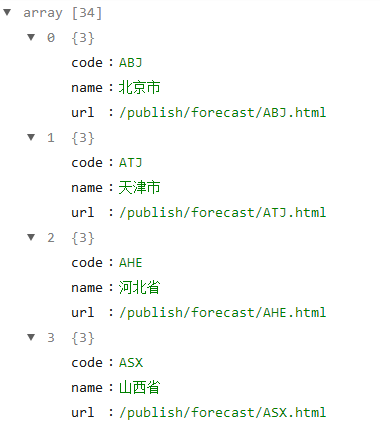
1、访问获取省份(包含直辖市、自治区等,以下简称省份)的网址(http://www.nmc.gov.cn/f/rest/province),返回对应的省份名称(name)、代码(code)等,如下图所示:
2、根据以上返回的代码(code),将代码拼接在网址(http://www.nmc.gov.cn/f/rest/province)的后面,如返回的代码为 AGD (广东省),则拼接后的网址为http://www.nmc.gov.cn/f/rest/province/AGD,以此获得对应的城市名称(city)、代码(code),如下图所示:

3、根据以上返回的代码,将代码拼接在网址(http://www.nmc.gov.cn/f/rest/real/)的后面,如返回的代码为 59287 (广州),则拼接后的网址为http://www.nmc.gov.cn/f/rest/real/59287,以此获得对应的天气信息,如下图所示:

4、本例子使用的技术为 HttpWebRequest类、HttpWebResponse类及Newtonsoft.Json.JsonConvert类的使用,自己有不懂的,请自行进行百度;
5、源代码如下:
using Newtonsoft.Json;

using System;

using System.Collections.Generic;

using System.IO;

using System.Linq;

using System.Net;

namespace Weather

{

    class Program

    {

        static void Main(string[] args)

        {

            HttpWebRequest request = WebRequest.CreateHttp(@"http://www.nmc.gov.cn/f/rest/province");

            try

            {

                HttpWebResponse response = request.GetResponse() as HttpWebResponse;

                Stream stream = response.GetResponseStream();

                StreamReader reader = new StreamReader(stream);

                string content = reader.ReadToEnd();

                List<Province> provinceResult = JsonConvert.DeserializeObject<List<Province>>(content);

                Dictionary<string, string> proviceNamedict = new Dictionary<string, string>();

                Console.WriteLine("省及直辖市:");

                provinceResult.ForEach(x =>

                {

                    proviceNamedict.Add(x.name, x.code);

                    Console.WriteLine(x.name);

                });

                string provice;

                while (true)

                {

                    Console.Write("请输入需要查询的省或直辖市:");

                    provice = Console.ReadLine();

                    if (proviceNamedict.Keys.Contains(provice)) break;

                }

                Console.Clear();

                request = WebRequest.CreateHttp($"http://www.nmc.gov.cn/f/rest/province/{proviceNamedict[provice]}");

                response = request.GetResponse() as HttpWebResponse;

                stream = response.GetResponseStream();

                reader = new StreamReader(stream);

                content = reader.ReadToEnd();

                List<City> cityResult = JsonConvert.DeserializeObject<List<City>>(content);

                Dictionary<string, string> cityNamedict = new Dictionary<string, string>();

                Console.WriteLine("城市:");

                cityResult.ForEach(x =>

                {

                    cityNamedict.Add(x.city, x.code);

                    Console.WriteLine(x.city);

                });

                string city;

                while (true)

                {

                    Console.Write("请输入需要查询的城市:");

                    city = Console.ReadLine();

                    if (cityNamedict.Keys.Contains(city)) break;

                }

                request = WebRequest.CreateHttp($"http://www.nmc.gov.cn/f/rest/real/{cityNamedict[city]}");

                response = request.GetResponse() as HttpWebResponse;

                stream = response.GetResponseStream();

                reader = new StreamReader(stream);

                content = reader.ReadToEnd();

                Detail detailResult = JsonConvert.DeserializeObject<Detail>(content);

                Console.WriteLine(new string('-', ));

                Console.WriteLine("详细情况如下:");

                Console.WriteLine($"{detailResult.station.province},{detailResult.station.city} 发布时间:{detailResult.publish_time}");

                Console.WriteLine($"温度:{detailResult.weather.temperature}℃ 温差:{detailResult.weather.temperatureDiff}℃ 气压:{detailResult.weather.airpressure}hPa 湿度:{detailResult.weather.humidity}% 雨量:{detailResult.weather.rain}mm");

                Console.WriteLine($"天气状况:{detailResult.weather.info}");

                Console.WriteLine($"风向:{detailResult.wind.direct} {detailResult.wind.power} 风速:{detailResult.wind.speed}m/s");

                Console.WriteLine(new string('-', ));

            }

            catch(WebException ex)

            {

                Console.WriteLine(ex.Message);

            }

            Console.WriteLine("按任何键退出...");

            Console.ReadKey();

        }

    }

    class Province

    {

        public string code { set; get; }

        public string name { set; get; }

        public string url { set; get; }

    }

    class City

    {

        public string url { set; get; }

        public string code { set; get; }

        public string city { set; get; }

        public string province { set; get; }

    }

    class Detail

    {

        public City station { set; get; }

        public string publish_time { set; get; }

        public Weather weather { set; get; }

        public Wind wind { set; get; }

        public Warn warn { set; get; }

    }

    class Weather

    {

        public float temperature { set; get; }

        public float temperatureDiff { set; get; }

        public float airpressure { set; get; }

        public float humidity { set; get; }

        public float rain { set; get; }

        public float rcomfort { set; get; }

        public float icomfort { set; get; }

        public string info { set; get; }

        public string img { set; get; }

        public float feelst { set; get; }

    }

    class Wind

    {

        public string direct { set; get; }

        public string power { set; get; }

        public float speed { set; get; }

    }

    class Warn

    {

        public string alert { set; get; }

        public string pic { set; get; }

        public string province { set; get; }

        public string city { set; get; }

        public string url { set; get; }

        public string issuecontent { set; get; }

        public string fmeans { set; get; }

    }

}
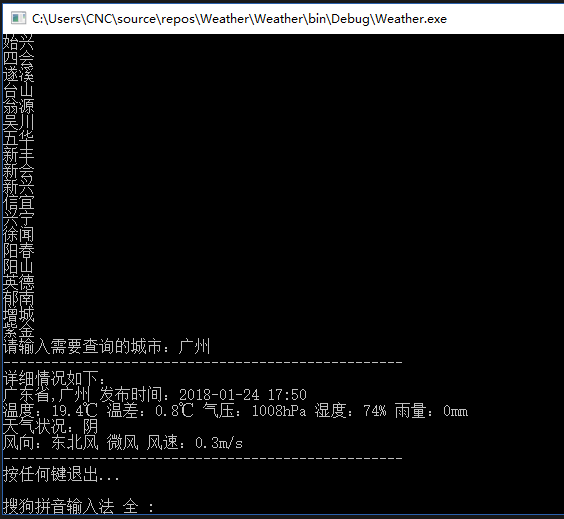
6、运行效果如下:
7、源代码与可执行应用程序如下:
可执行应用程序:https://pan.baidu.com/s/1i6mK8xn
[C#]使用控制台获取天气预报的更多相关文章
- [整]C#获取天气预报信息(baidu api)包括pm2.5
/// <summary> /// 获取天气预报信息 /// </summary> /// <returns></returns> public Bai ...
- java获取天气预报的信息
运行效果: 主要功能: 1,jsp页面输入省份和城市 根据条件获取当地的天气信息 2,java代码 利用第三方的省份和城市的路径地址 本工程主要实现java获取天气预报的信息步骤1,创建工程weath ...
- Android 获取天气预报
界面布局 <?xml version="1.0" encoding="utf-8"?> <LinearLayout xmlns:android ...
- php从气象局获取天气预报并保存到服务器
思路:1.打开网页时读取中国气象网的接口得到每个城市的该日json:2.解析并保存到mysql:3.客户端访问mysql得到数据集. 所包含的技巧: 进度条.flush()问题.mysql.xml.p ...
- springboot 采用HttpClient获取天气预报 异常及原因
采用httpClient调用天气预报地址获取出现异常 2018-10-04 15:18:25.815 ERROR 10868 --- [nio-8080-exec-5] o.a.c.c.C.[.[.[ ...
- Ajax的封装,以及利用jquery的ajax获取天气预报
1.Ajax的封装 function ajax(type,url,param,sync,datetype,callback){//第一个参数是获取数据的类型,第二个参数是传入open的url,第三个是 ...
- 获取天气预报API5_统计最容易生病时间段
sklearn实战-乳腺癌细胞数据挖掘(博客主亲自录制视频教程) https://study.163.com/course/introduction.htm?courseId=1005269003&a ...
- 获取天气预报API
sklearn实战-乳腺癌细胞数据挖掘(博主亲自录制视频) https://study.163.com/course/introduction.htm?courseId=1005269003& ...
- 跨域使用jsonp 获取天气预报
<html xmlns="http://www.w3.org/1999/xhtml"> <head runat="server"> ...
随机推荐
- lesson - 11 正则表达式
正则就是有一定规律的字符串,有几个特殊符号很关键(. * + ? | ),我们平时不仅可以用命令行工具grep/sed/awk去引用正则,而且还可以把正则嵌入在nginx.apache.甚至php.p ...
- lesson - 4 Linux目录文件管理
内容概要:1. 和目录相关的几个命令mkdir 关注-p选项 rmdir 同样也有一个-p选项rm -r -f 两个常用选项cp -r 针对目录, 有时我们使用/bin/cpmv 重命名或者移动, 有 ...
- Linux(CentOS6.5)下Nginx注册系统服务(启动、停止、重启、重载等)&设置开机自启
本文地址http://comexchan.cnblogs.com/ ,作者Comex Chan,尊重知识产权,转载请注明出处,谢谢! 完成了Nginx的编译安装后,仅仅是能支持Nginx最基本的功能, ...
- shiro中 UnknownAccountException
一 shiro的session.request和response与服务端容器自身的这三个对象的关系 在web.xml中配置了一个Filter,拦截/*,所有的uri.在拦截器中还会调用ShiroFil ...
- Effective Java 第三版——14.考虑实现Comparable接口
Tips <Effective Java, Third Edition>一书英文版已经出版,这本书的第二版想必很多人都读过,号称Java四大名著之一,不过第二版2009年出版,到现在已经将 ...
- Linux 下Beanstalk安装
1.安装 # wget https://github.com/kr/beanstalkd/archive/v1.10.tar.gz # tar xzvf v1.10 # cd beanstalkd-1 ...
- Asp.net 不安全端口 解决chrome浏览器访问时提示:ERR_UNSAFE_PORT
https://blog.bbzhh.com/index.php/archives/136.html 想在vps做个测试,看看是否25端口屏蔽是否生效,于是起了一个小web服务在25端口做测试,但是使 ...
- 15个超强悍的CSS3圆盘时钟动画赏析
在网页上,特别是个人博客中经常会用到时钟插件,一款个性化的时钟插件不仅可以让页面显得美观,而且可以让访客看到当前的日期和时间.今天我们给大家收集了15个超强悍的圆盘时钟动画,很多都是基于CSS3,也有 ...
- Kotlin——最详细的操作符与操作符重载详解(上)
本篇文章为大家详细的介绍Koltin特有的操作符重载.或许对于有编程经验的朋友来说,操作符这个词绝对不陌生,就算没有任何编辑基础的朋友,数学中的算数运算符也绝不陌生.例如(+.-.*./.>.& ...
- golang 队列
You have to perform NN operations on the queue. The operations are of following type: E xE x : Enque ...