
使用 VS2017 和 js 进行桌面程序开发 - electron 之 Hello Word
现在基于 js 和 web浏览器核心构建的 C/S 程序越来越多,比如微信桌面版(基于 duilib 和 cef)、VS CODE(基于electron)等,出于了解的目的,最近学习了 electron。electron具体是什么,可以做什么,这里不做过多的介绍,网上很多相关的介绍,这里主要介绍在VS2017下怎么进行 electron 应用程序的开发。
一、环境搭建
- 安装 node.js 及 npm。
- 安装 vs2017 ,必须安装 node.js web开发包。
二、创建空白 Node.js 控制台应用程序项目

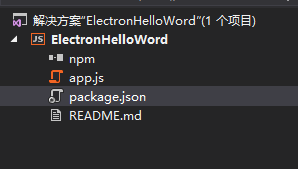
创建好的项目结构入下:
三、编写 electron Hello Word
参照 https://github.com/electron/electron/blob/master/docs/tutorial/quick-start.md:
1、打开 package.json 加入:
"dependencies": {

        "electron": "^1.6.6"

    }
最后内容如下:
{

    "name": "electron-hello-word",

    "version": "0.0.0",

    "description": "ElectronHelloWord",

    "main": "app.js",

    "author": {

        "name": "Starts_2000"

    },

    "dependencies": {

        "electron": "^1.6.6"

    }

}
2、打开 app.js,输入以下内容:
'use strict';

const { app, BrowserWindow } = require('electron')

const path = require('path')

const url = require('url')

// Keep a global reference of the window object, if you don't, the window will

// be closed automatically when the JavaScript object is garbage collected.

let win

function createWindow() {

    // Create the browser window.

    win = new BrowserWindow({ width: 800, height: 600 })

    // and load the index.html of the app.

    win.loadURL(url.format({

        pathname: path.join(__dirname, 'index.html'),

        protocol: 'file:',

        slashes: true

    }))

    // Open the DevTools.

    win.webContents.openDevTools()

    // Emitted when the window is closed.

    win.on('closed', () => {

        // Dereference the window object, usually you would store windows

        // in an array if your app supports multi windows, this is the time

        // when you should delete the corresponding element.

        win = null

    })

}

// This method will be called when Electron has finished

// initialization and is ready to create browser windows.

// Some APIs can only be used after this event occurs.

app.on('ready', createWindow)

// Quit when all windows are closed.

app.on('window-all-closed', () => {

    // On macOS it is common for applications and their menu bar

    // to stay active until the user quits explicitly with Cmd + Q

    if (process.platform !== 'darwin') {

        app.quit()

    }

})

app.on('activate', () => {

    // On macOS it's common to re-create a window in the app when the

    // dock icon is clicked and there are no other windows open.

    if (win === null) {

        createWindow()

    }

})

// In this file you can include the rest of your app's specific main process

// code. You can also put them in separate files and require them here.
3、新建 index.html 文件
<!DOCTYPE html>

<html>

<head>

    <meta charset="UTF-8">

    <title>Hello World!</title>

</head>

<body>

    <h1>Hello World!</h1>

    We are using node

    <script>document.write(process.versions.node)</script>,

    Chrome

    <script>document.write(process.versions.chrome)</script>,

    and Electron

    <script>document.write(process.versions.electron)</script>.

</body>

</html>
四、设置和运行
1、NPM 安装 electron 包
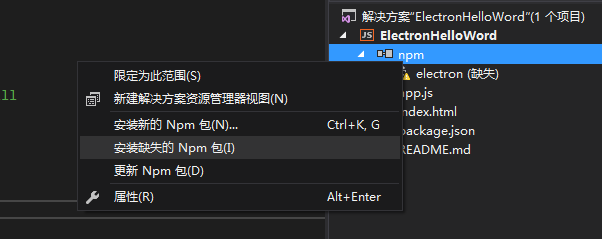
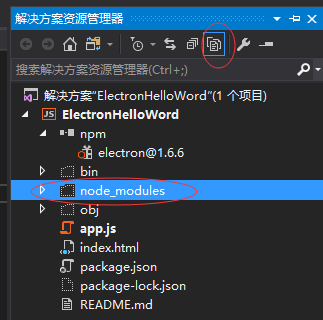
安装成功后可看到,点击解决方案上方的显示所有文件,可以看到
2、设置项目 Node.exe路径为:
.\node_modules\electron\dist\electron.exe
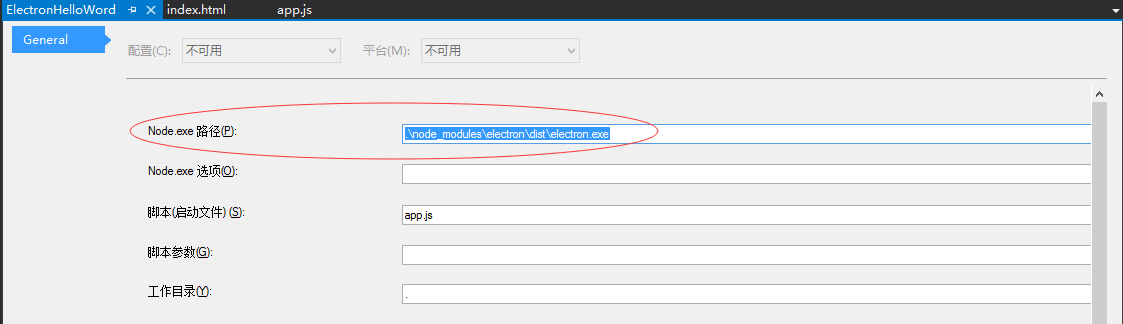
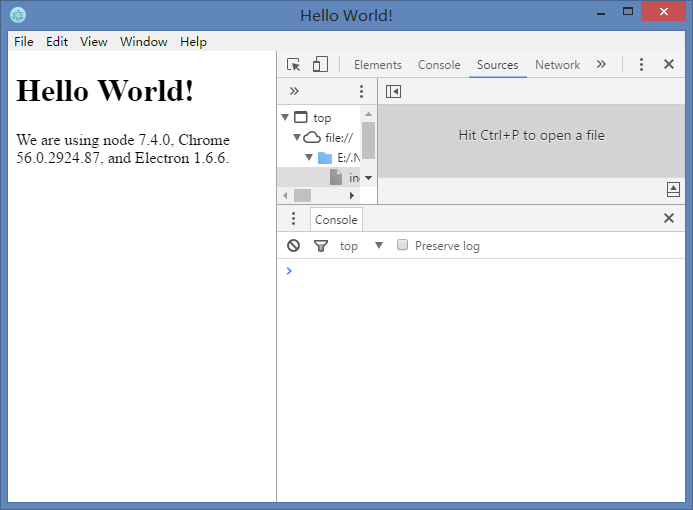
运行解决方案,就可以看到electron 的 Hello Word示例了:
使用 VS2017 和 js 进行桌面程序开发 - electron 之 Hello Word的更多相关文章
- 用python进行桌面程序开发
Python是一种面向对象.直译式计算机程序设计语言,也是一种功能强大而完善的通用型语言,已经具有十多年的发展历史,成熟且稳定.这种语言具有非常简捷而清晰的语法特点,适合完成各种高层任务,几乎可以在所 ...
- Node.js 命令行程序开发资料
Node.js 命令行程序开发教程http://www.ruanyifeng.com/blog/2015/05/command-line-with-node.html用Node.js创建命令行工具ht ...
- 用node-webkit(NW.js)创建桌面程序
以往写windows桌面程序需要用MFC.C#之类的技术,那么如果你只会web开发技术呢?或者说你有一个网站,但是你想把你的网站打包成一个桌面应用程序,该如何做呢? 答案就是用node-webkit这 ...
- [Flutter] Windows桌面程序开发
在今年5月的谷歌I/O 2019大会时, 谷歌就宣布了flutter已经支持全平台开发, 包括 android, ios, mac, linux, windows, web 等 . Flutter桌面 ...
- Python3的桌面程序开发利器:Eric6的环境搭建、使用
本文旨在通过一个简单的demo,介绍基于Python3.PyQT5的环境下开发桌面应用程序的一种方案,当然开发Python的桌面应用程序不止是PyQT 这一种方案,还可以使用Python自带的Tkin ...
- 如何选择合适的Linux系统进行桌面程序开发?
32 or 64 ? 众所周知,64位的Windows系统可以近乎完美地运行32位的应用程序,微软出于商业考虑做了这样一个兼容层.而Linux系统则划分的很清楚,默认情况下64位的Linux系统无法运 ...
- Node.js 命令行程序开发教程
nodejs开发命令行程序非常方便,具体操作方式查看下面几篇文章 http://www.ruanyifeng.com/blog/2015/05/command-line-with-node.html ...
- Node.js 命令行程序开发教程 ---------http://www.ruanyifeng.com/blog/2015/05/command-line-with-node.html
五.yargs 模块 shelljs 只解决了如何调用 shell 命令,而 yargs 模块能够解决如何处理命令行参数.它也需要安装. $ npm install --save yargs yarg ...
- 关于JS及应用程序开发的一些体会
代码通常从 一,生命周期 二,业务流程 这几方面来看. JS Client可以和Server端分离. JS端的生命周期. Server端就是 JS能处理的只是HTTP协议.
随机推荐
- Identity Service - 解析微软微服务架构eShopOnContainers(二)
接上一篇,众所周知一个网站的用户登录是非常重要,一站式的登录(SSO)也成了大家讨论的热点.微软在这个Demo中,把登录单独拉了出来,形成了一个Service,用户的注册.登录.找回密码等都在其中进行 ...
- CSS3用法理解
这里只概括了我对CSS3各属性的用法理解.具体每个属性的值,以及例子,看这里 (竟然每篇文章不能低于200字,不能低于200字不能低于200字不能低于200字不能低于200字....请无视)
- java基础(一章)
java基础(一章) 1. java是一种面向对象的高级编程语言. 2. java包括: javase(java基础) ...
- Web前端性能优化全攻略
网页制作poluoluo文章简介:Web 前端性能优化是个大话题,是个值得运维人员持续跟踪的话题,是被很多网站无情忽视的技术. Web 前端性能优化是个大话题,是个值得运维人员持续跟踪的话题,是被很多 ...
- re 学习随便
. 任意一个字符 \转义字符 * 字符重复0--多次 + 字符重复1-多次 ? 字符重复0-1次 ^行首匹配 或者在一个字符集中表示取反 \$ 匹配字符串末尾 \b 匹配\w 与\w 之间的 \B ...
- CSS 简单了解(二)
我们第一天说了简单的HTML,第二天说了简单的CSS.那么今天.咱们就来说一说他们的结合如何使用吧! 首先说引用方式,和使用方法吧! 1.内部样式表.(放入<head>中) <hea ...
- 新增article注意事项
默认情况下在日志复制中如果新增加Article那么需要产生一个包含所有Article的Snapshot.由于产生Snapshot会加锁,同时会产生IO操作,所以对于大的数据库性能影响是很大的. 可以通 ...
- Bash提示符
Bash有四种提示符 1.基本提示符(PS1):即$符号,是默认的基本提示符,当Shell运行在交互模式下时,该提示符会出现在屏幕上,可以设置为其它符号. 显示PS1设置[cb@cb:16:36:23 ...
- spring4 之 helloworld
1.从官网下载相关JAR包 spring-framework-4.2.1.RELEASE-dist(下载地址:http://maven.springframework.org/release/org/ ...
- php中常用的处理字符串的函数
1.将字符串转换为数组的函数:str_split() array str_split ( string $string [, int $split_length = 1 ] ) string:输入字符 ...