
Openshift初步学习问题集
1.设置资源限额
详细参考
https://docs.openshift.com/enterprise/3.2/admin_guide/quota.html#sample-resource-quota-definitions
先切换成system
ricdeMacBook-Pro:minishift ericnie$ oc login -u system:admin

Logged into "https://192.168.99.100:8443" as "system:admin" using existing credentials.
添加一个compute-resource.yaml
ericdeMacBook-Pro:minishift ericnie$ cat compute-resource.yaml

apiVersion: v1

kind: ResourceQuota

metadata:

  name: compute-resources

spec:

  hard:

    pods: ""

    requests.cpu: ""

    requests.memory: 1Gi

    limits.cpu: ""

    limits.memory: 2Gi
针对nodejs-examples项目建立资源限额
ericdeMacBook-Pro:minishift ericnie$ oc create -f compute-resource.yaml -n nodejs-examples

resourcequota "compute-resources" created
在界面中查看

2.oc和kubectl的区别
可以参考文档
https://docs.openshift.com/container-platform/3.10/cli_reference/differences_oc_kubectl.html
详细的增强包括
Full support for OpenShift resources

Resources such as DeploymentConfigs, BuildConfigs, Routes, ImageStreams, and ImageStreamTags are specific to OpenShift distributions, and not available in standard Kubernetes.

Authentication

The oc binary offers a built-in login command which allows authentication. See developer authentication and configuring authentication for more information.

Additional commands

For example, the additional command new-app makes it easier to get new applications started using existing source code or pre-built images.
3.Openshift和kubernetes的概念区别
摘了一张图,黄色的是openshift组件,紫色的是Kubernetes的组件。
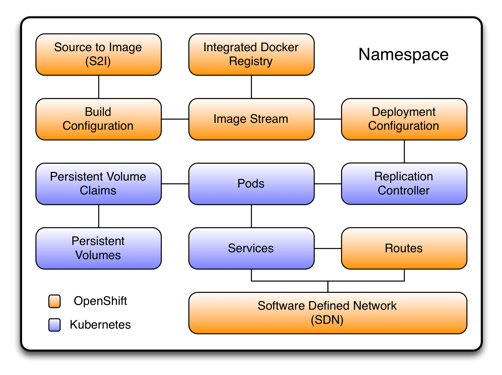
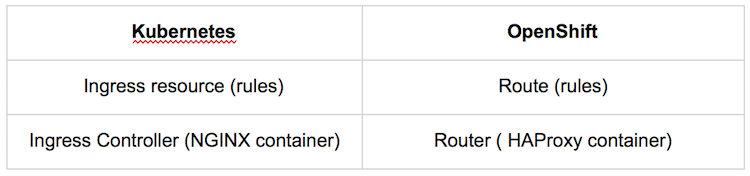
首先的区别在于Route和Router的概念,openshift暴露内部服务是通过Route的模式,也是通过一个域名,外部的调用可以通过域名来访问到服务,在Openshift中,Router是通过HAProxy容器实现,提供反向代理的功能。和Kubernetes的概念映射的如下
第二个主要的概念是Project

在kubernetes里面,namspaces是没有权限控制的,任何集群里的节点都可以看到不同的命名空间以及内部的资源,project是封装了namespace的概念,同时加入了权限控制,通过用户,组,认证和授权模块可以控制不同的项目之间的允许的访问。
4.Openshift启动参数
启动openshift start时,可以指定--public-master,如果没有指定,则采用openshift-web-console命名空间的webconsole-config的configmap中的masterPublicURL
ericdeMacBook-Pro:templates ericnie$ oc get configmap --all-namespaces

NAMESPACE                  NAME                                    DATA      AGE

kube-system                extension-apiserver-authentication               5d

kube-system                kube-controller-manager                          5d

kube-system                kube-scheduler                                   5d

kube-system                openshift-master-controllers                     5d

openshift-core-operators   openshift-web-console-operator-config            5d

openshift-core-operators   openshift-web-console-operator-lock              5d

openshift-web-console      webconsole-config                                5d
ericdeMacBook-Pro:templates ericnie$ oc get configmap webconsole-config -n openshift-web-console -o yaml

apiVersion: v1

data:

  webconsole-config.yaml: |

    {"kind":"WebConsoleConfiguration","apiVersion":"webconsole.config.openshift.io/v1","servingInfo":{"bindAddress":"0.0.0.0:8443","bindNetwork":"tcp4","certFile":"/var/serving-cert/tls.crt","keyFile":"/var/serving-cert/tls.key","clientCA":"","namedCertificates":null,"maxRequestsInFlight":,"requestTimeoutSeconds":},"clusterInfo":{"consolePublicURL":"https://192.168.99.100:8443/console/","masterPublicURL":"https://192.168.99.100:8443","loggingPublicURL":"","metricsPublicURL":"","logoutPublicURL":""},"features":{"inactivityTimeoutMinutes":,"clusterResourceOverridesEnabled":false},"extensions":{"scriptURLs":[],"stylesheetURLs":[],"properties":null}}

kind: ConfigMap

metadata:

  creationTimestamp: --17T23::09Z

  name: webconsole-config

  namespace: openshift-web-console

  resourceVersion: ""

  selfLink: /api/v1/namespaces/openshift-web-console/configmaps/webconsole-config

  uid: 50a5db2f-bad2-11e8-b431-0800276bcf3b
5.推送镜像到minishift/CDK Registry
设置环境变量链接到CDK的Docker Daemon
eval $(minishift docker-env)
login到镜像仓库
ericdeMacBook-Pro:template ericnie$ docker login -u `whoami` --password  `oc whoami -t` 172.30.1.1:

WARNING! Using --password via the CLI is insecure. Use --password-stdin.

Login Succeeded
运行构建
ricdeMacBook-Pro:nginx ericnie$ docker build -t 172.30.1.1:/s2i-tomcat/nginx:1.14 .

Sending build context to Docker daemon  .34kB

Step / : FROM docker.io/nginx:1.14

Trying to pull repository docker.io/library/nginx ...

sha256:2fa968a4b4013c2521115f6dde277958cf03229b95f13a0c8df831d3eca1aa61: Pulling from docker.io/library/nginx

802b00ed6f79: Pull complete

ed418bf9bf60: Pull complete

94fedb7de3b4: Pull complete

Digest: sha256:2fa968a4b4013c2521115f6dde277958cf03229b95f13a0c8df831d3eca1aa61

Status: Downloaded newer image for docker.io/nginx:1.14

 ---> 86898218889a

Step / : LABEL io.openshift.expose-services "8080:http"

 ---> Running in 73734282ca2a

 ---> eec013f84ad9

Removing intermediate container 73734282ca2a

Step / : COPY ./default.conf /etc/nginx/conf.d/default.conf

 ---> 4551d15551a0

Removing intermediate container 38608031666f

Step / : RUN chmod -R  /var/log/nginx /var/cache/nginx /var/run     && chgrp -R  /etc/nginx     && chmod -R g=u /etc/nginx

 ---> Running in 4116c4e42749

 ---> 33c661ad8f2c

Removing intermediate container 4116c4e42749

Step / : EXPOSE

 ---> Running in e53201093cc2

 ---> a755a18084c7

Removing intermediate container e53201093cc2

Successfully built a755a18084c7
因为只是形成在本地所以需要push到镜像仓库
ericdeMacBook-Pro:nginx ericnie$ docker push 172.30.1.1:/s2i-tomcat/nginx:1.14

The push refers to a repository [172.30.1.1:/s2i-tomcat/nginx]

c80e750e02fe: Pushed

efab8e612298: Pushed

935e451e5168: Pushed

4be6f9c212cc: Pushed

8b15606a9e3e: Pushed

1.14: digest: sha256:b6609de5c201305fd6b1061f8165bf6b9ff981714423ace6799217c11643f01b size:
列出镜像
ericdeMacBook-Pro:nginx ericnie$ oc get is -n s2i-tomcat

NAME        DOCKER REPO                            TAGS      UPDATED

myapp       172.30.1.1:/s2i-tomcat/myapp       latest

nginx       172.30.1.1:/s2i-tomcat/nginx       1.14       minutes ago

s2itomcat   172.30.1.1:/s2i-tomcat/s2itomcat   latest     hours ago
6.minishift 启动报错
minishift启动如果报错,信息为
-- Registering machine using subscription-manager

   Registration in progress .......................................................... FAIL [4m16.1s]

Error to register VM: ssh command error:

command : sudo -E subscription-manager register --auto-attach --username eric.nie@.com --password ********

err     : exit status

output  : Registering to: subscription.rhsm.redhat.com:/subscription

The system has been registered with ID: 0db491ae-a8fd-4e7d-b4c7-e97653f9a5db

The registered system name is: minishift

System certificates corrupted. Please reregister.
解决方法,启动加入参数
minishift start --vm-driver=virtualbox --memory= --skip-registration
7.mac上minishift或CDK无法上网情况
CDK启动报错,虚拟机无法访问外网,折腾两晚 :(
-- Checking if external host is reachable from the Minishift VM ...

   Pinging 8.8.8.8 ... fail
先检查terminal自己是否能够上网
nc -w  -z www.baidu.com

nc -w  -z 8.8.8.8
再检查dns设置/etc/reslov.conf,结果发现reslov.conf已经修改成路由器的ip了。
在mac界面中手工把设置成外部dns
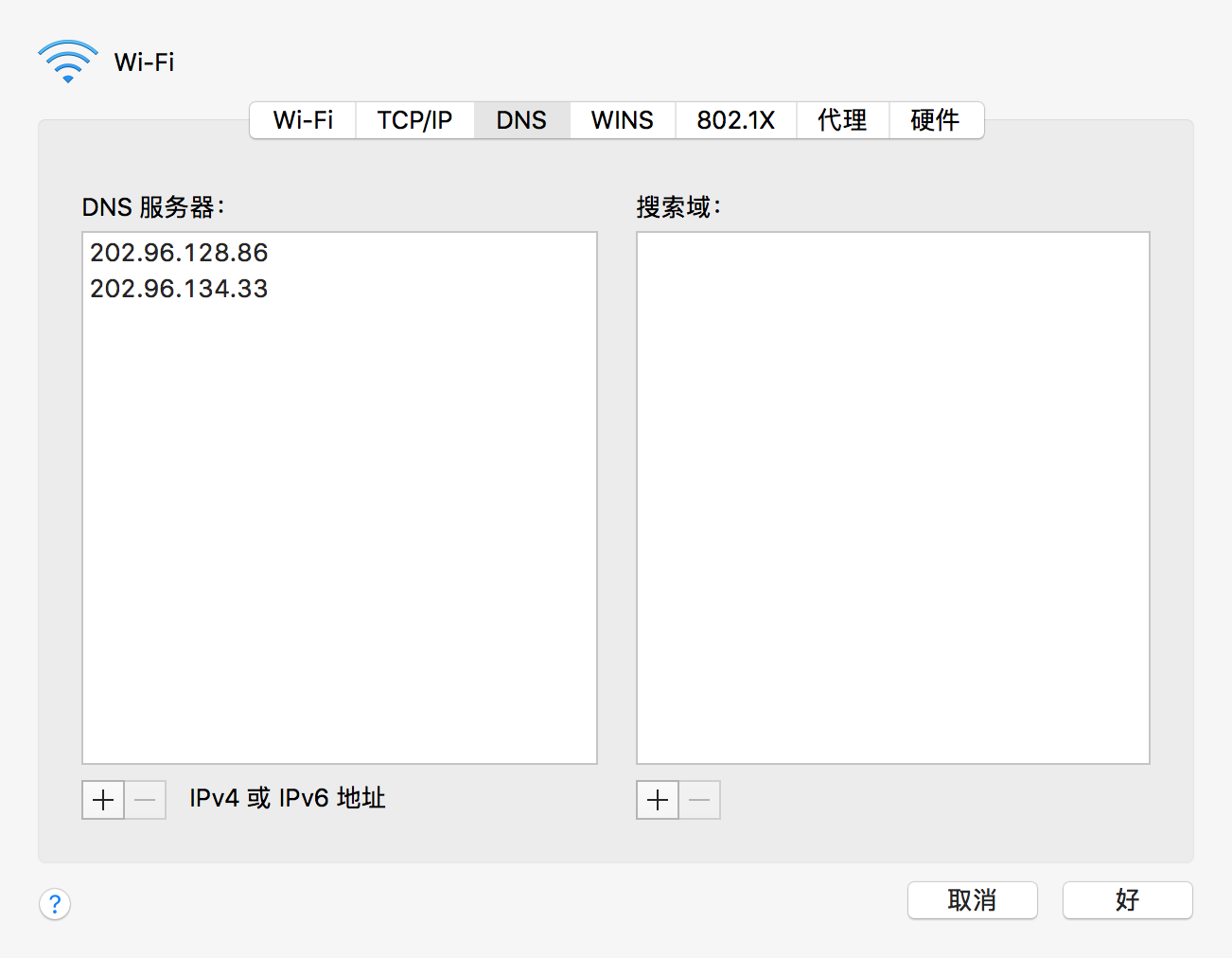
再次启动
minishift start --vm-driver virtualbox --skip-registration
8.minishift启动指定ip问题
多次构建中可能minishift启动得到不同的ip,这会导致启动认证失败,错误如下:
- Starting OpenShift container ...

   Starting OpenShift using container 'origin'

   Waiting for API server to start listening

FAIL

   Error: cannot access master readiness URL https://192.168.99.100:8443/healthz/ready

   Details:

     Last  lines of "origin" container log:

     I1011 ::05.043763     cache.go:] Waiting for caches to sync for APIServiceRegistrationController controller

     I1011 ::05.084713     logs.go:] http: TLS handshake error from 192.168.99.100:: EOF

     I1011 ::05.088441     logs.go:] http: TLS handshake error from 192.168.99.100:: EOF

     I1011 ::05.095914     logs.go:] http: TLS handshake error from 192.168.99.100:: EOF

     I1011 ::05.099899     logs.go:] http: TLS handshake error from 192.168.99.100:: EOF

     I1011 ::05.103700     logs.go:] http: TLS handshake error from 192.168.99.100:: EOF

     I1011 ::05.103750     autoregister_controller.go:] Starting autoregister controller

     I1011 ::05.103759     cache.go:] Waiting for caches to sync for autoregister controller

     I1011 ::05.103791     customresource_discovery_controller.go:] Starting DiscoveryController

     I1011 ::05.103814     naming_controller.go:] Starting NamingConditionController

   Caused By:

     Error: Get https://192.168.99.100:8443/healthz/ready: x509: certificate is valid for 10.0.2.15, 127.0.0.1, 172.17.0.1, 172.30.0.1, 192.168.99.104, not 192.168.99.100
第一次成功启动是获取的192.168.99.104,而第二次启动系统自动获取了192.168.99.100的地址,导致环境变量minishift_kubeconfig中配置的地址和证书错误,通过下面命令把主机地址重新设置104.
minishift start --vm-driver virtualbox --public-hostname=192.168.99.104 --routing-suffix 192.168.99.104.nip.io
9.添加用户
在master节点上运行
htpasswd /etc/origin/master/htpasswd ericnie
然后就可以登录和建立项目了.
Openshift初步学习问题集的更多相关文章
- Git的初步学习
前言 感谢! 承蒙关照~ Git的初步学习 为什么要用Git和Github呢?它们的出现是为了用于提交项目和存储项目的,是一种很方便的项目管理软件和网址地址. 接下来看看,一家公司的基本流程图: 集中 ...
- json2.js的初步学习与了解
json2.js的初步学习与了解,想要学习json的朋友可以参考下. json2.js的初步学习与了解 1.)该js的下载地址是:http://www.json.org/json2.js 2.)在页面 ...
- 老周的ABP框架系列教程 -》 一、框架理论初步学习
老周的ABP框架系列教程 -- 一.框架理论初步学习 1. ABP框架的来源与作用简介 1.1 简介 1.1.1 ABP框架全称为"ASP.NET Boilerplate ...
- 初步学习nodejs,业余用node写个一个自动创建目录和文件的小脚本,希望对需要的人有所帮助
初步学习nodejs,业余用node写个一个自动创建目录和文件的小脚本,希望对需要的人有所帮助,如果有bug或者更好的优化方案,也请批评与指正,谢谢,代码如下: var fs = require('f ...
- EF Codefirst 初步学习(二)—— 程序管理命令 更新数据库
前提:搭建成功codefirst相关代码,参见EF Codefirst 初步学习(一)--设置codefirst开发模式 具体需要注意点如下: 1.确保实体类库程序生成成功 2.确保实体表类库不缺少 ...
- 初步学习python
自计算机诞生以来,也伴随着计算机语言的诞生,现在,全世界的编程语言有600多种,但流行的编程语言也就20多种. Java和C一直占据着前两名.但是近年来伴随着人工智能的发展,Python发展迅猛,以其 ...
- 语法分析器初步学习——LISP语法分析
语法分析器初步学习——LISP语法分析 本文参考自vczh的<如何手写语法分析器>. LISP的表达式是按照前缀的形式写的,比如(1+2)*(3+4)在LISP中会写成(*(+ 1 2)( ...
- 状态保持以及AJAX的初步学习
嘿嘿,今天学习的有点迷茫哦,主要学习把验证码使用在登录页面时间的一些逻辑,学习这个时间并没有那么的迷惑哦,可是自己写程序时间倒是有点反应迟钝,不过还好总是在最后搞清楚啦,另外就是一步一步的学习是接近项 ...
- LinQ的初步学习与总结
嘿嘿,说起来ORM和LinQ,就感觉离我好遥远的,在学校是没有学习的,所以总感觉学习了LinQ就是大神,现在嘛,终于也体会一点,感觉LinQ只是初步学习,没有太难,当然以后使用在项目中就没有这样的简单 ...
随机推荐
- The content of element type "resultMap" must match "(constructor?,id*,result*,association*,collectio
The content of element type "resultMap" must match "(constructor?,id*,result*,associa ...
- 《逐梦旅程 WINDOWS游戏编程之从零开始》笔记6——四大变换&光照与材质
第13章 四大变换 在Direct3D中,如果为进行任何空间坐标变换而直接绘图的话,图形将始终处于应用程序窗口的中心位置,默认这个位置就成为世界坐标系的原点(0,0,0).而且我们也不能改变观察图形的 ...
- 《java并发编程实战》读书笔记11--构建自定义的同步工具,条件队列,Condition,AQS
第14章 构建自定义的同步工具 本章将介绍实现状态依赖性的各种选择,以及在使用平台提供的状态依赖机制时需要遵守的各项规则. 14.1 状态依赖性的管理 对于并发对象上依赖状态的方法,虽然有时候在前提条 ...
- Django-form組件補充
自定义验证规则 方法一: 1 2 3 4 5 6 7 8 9 10 from django.forms import Form from django.forms import widgets f ...
- WordPress主循环(The Loop)函数have_posts(),the_post()详解
WordPress中调用文章标题是the_title();调用文章内容时用到the_content();调用文章的作者时用到the_author();等等这些函数,都需要在主循环中使用,下面就介绍一下 ...
- Java 类、属性、方法修饰符 public、private、protected、default
Java 中修饰类修饰符:public .default (默认) Java 中修饰类中属性.方法修饰符:public.private.protected.default (默认) 通过 IDEA 创 ...
- 微软企业库5.0 学习之路——第四步、使用缓存提高网站的性能(EntLib Caching)
首先先补习下企业库的Caching Application Block的相关知识: 1.四大缓存方式,在Caching Application Block中,主要提供以下四种保存缓存数据的途径,分别是 ...
- 编译python可以调用的dll
如果经过stdcall声明的方法,如果不是用def文件声明的导出函数或者extern “C” 声明的话,编译器会对函数名进行修改;在编译加上extern C:这样就OK了:另外可以在PYTHON代码里 ...
- C# 推送到极光
https://docs.jiguang.cn/jpush/resources/ 下载后有完整的例子 引用 Jiguang.JPush.dll using System; using Jiguang. ...
- 链式前向星实现的堆优化dij求最短路模板
#include<cstdio> #include<string> #include<cstdlib> #include<cmath> #include ...