
【Python项目】使用Face++的人脸识别detect API进行本地图片情绪识别并存入excel
准备工作
首先,需要在Face++的主页注册一个账号,在控制台去获取API Key和API Secret。
然后在本地文件夹准备好要进行情绪识别的图片/相片。
代码
介绍下所使用的第三方库
——urllib2是使用各种协议完成打开url的一个库
——time是对时间进行处理的一个库,以下代码中其实就使用了sleep()和localtime()两个函数,sleep()是用来让程序暂停几秒的,localtime()是格式化时间戳为本地的时间
——xlwt是对excel进行写入操作的一个库
——os是操作系统的相关功能的一个库,例如用来处理文件和目录之类的
——json (Emmmmmm……我也不知道该怎么解释这个)
——PIL是Python图像处理库
 # -*- coding: utf-8 -*-
 # version:python2.7.13
 # author:Ivy Wong

 # 导入相关模块
 import urllib2
 import time, xlwt, os,json
 from PIL import Image

 # 使用face++的api识别情绪
 def useapi(img):
     http_url = 'https://api-cn.faceplusplus.com/facepp/v3/detect'
     boundary = '----------%s' % hex(int(time.time() * 1000))
     data = []
     data.append('--%s' % boundary)
     data.append('Content-Disposition: form-data; name="%s"\r\n' % 'api_key')
     data.append(key)
     data.append('--%s' % boundary)
     data.append('Content-Disposition: form-data; name="%s"\r\n' % 'api_secret')
     data.append(secret)
     data.append('--%s' % boundary)
     fr = open(img, 'rb')
     data.append('Content-Disposition: form-data; name="%s"; filename=" "' % 'image_file')
     data.append('Content-Type: %s\r\n' % 'application/octet-stream')
     data.append(fr.read())
     fr.close()
     data.append(')
     data.append('--%s' % boundary)
     data.append('Content-Disposition: form-data; name="%s"\r\n' % 'return_attributes')
     data.append("gender,age,emotion,ethnicity")# 这里可以还可以返回其他参数,具体可以参看face++的api文档
     data.append('--%s--\r\n' % boundary)

     http_body = '\r\n'.join(data)
     # build http request
     req = urllib2.Request(http_url)
     # header
     req.add_header('Content-Type', 'multipart/form-data; boundary=%s' % boundary)
     req.add_data(http_body)
     try:
         resp = urllib2.urlopen(req,timeout=5)
         qrcont = json.load(resp)
     except urllib2.HTTPError as e:
         print e.read()
     return qrcont

 # 将json字典写入excel
 # 变量用来循环时控制写入单元格,感觉这种方式有点傻,但暂时想不到优化方法
 def writeexcel(img, worksheet, row, files_name):
     parsed = useapi(img)
     if not parsed['faces']:
         print 'This picture do not have any face'
     else:
         if len(parsed['faces'])<=5: # 由于免费API限制,只能返回5张人脸信息
             for list_item in parsed['faces']:
                 # 写入文件名
                 filename, extension = os.path.splitext(files_name)
                 worksheet.write(row, 0, filename)

                 # 写入时间戳
                 daystamp, timestamp, hourstamp = gettimestamp(img)
                 worksheet.write(row, 1, label=daystamp)
                 worksheet.write(row, 2, label=timestamp)
                 worksheet.write(row, 3, hourstamp)

                 # 写入api返回的数据
                 emotion = []
                 for key1, value1 in list_item.items():
                     if key1 == 'attributes':
                         for key2, value2 in value1.items():
                             if key2 == 'age':
                                 worksheet.write(row, 5, value2['value'])
                             elif key2 == 'emotion':
                                 for key3, value3 in value2.items():
                                     if key3 == 'sadness':
                                         worksheet.write(row, 8, value3)
                                         emotion.append(value3)
                                     elif key3 == 'neutral':
                                         worksheet.write(row, 9, value3)
                                         emotion.append(value3)
                                     elif key3 == 'disgust':
                                         worksheet.write(row, 10, value3)
                                         emotion.append(value3)
                                     elif key3 == 'anger':
                                         worksheet.write(row, 11, value3)
                                         emotion.append(value3)
                                     elif key3 == 'surprise':
                                         worksheet.write(row, 12, value3)
                                         emotion.append(value3)
                                     elif key3 == 'fear':
                                         worksheet.write(row, 13, value3)
                                         emotion.append(value3)
                                     else:
                                         worksheet.write(row, 14, value3)
                                         emotion.append(value3)
                             elif key2 == 'gender':
                                 worksheet.write(row, 6, value2['value'])
                             elif key2 == 'ethnicity':
                                 worksheet.write(row, 7, value2['value'])
                             else:
                                 pass
                     elif key1 == 'face_token':
                         worksheet.write(row, 4, value1)
                     else:
                         pass
                 worksheet.write(row, 15, emotion.index(max(emotion)))

                 # 写入概率最大的情绪,0-neutral,1-sadness,2-disgust,3-anger,4-surprise,5-fear,6-happiness
                 row += 1
         else:
             for list_item in parsed['faces'][0:5]:
                 # 写入文件名
                 filename, extension = os.path.splitext(files_name)
                 worksheet.write(row, 0, filename)

                 # 写入时间戳
                 daystamp, timestamp, hourstamp = gettimestamp(img)
                 worksheet.write(row, 1, label=daystamp)
                 worksheet.write(row, 2, label=timestamp)
                 worksheet.write(row, 3, hourstamp)

                 # 写入api返回的数据
                 emotion = []
                 for key1, value1 in list_item.items():
                     if key1 == 'attributes':
                         for key2, value2 in value1.items():
                             if key2 == 'age':
                                 worksheet.write(row, 5, value2['value'])
                             elif key2 == 'emotion':
                                 for key3, value3 in value2.items():
                                     if key3 == 'sadness':
                                         worksheet.write(row, 8, value3)
                                         emotion.append(value3)
                                         '
                                     elif key3 == 'neutral':
                                         worksheet.write(row, 9, value3)
                                         emotion.append(value3)
                                         '
                                     elif key3 == 'disgust':
                                         worksheet.write(row, 10, value3)
                                         emotion.append(value3)
                                         '
                                     elif key3 == 'anger':
                                         worksheet.write(row, 11, value3)
                                         emotion.append(value3)
                                         '
                                     elif key3 == 'surprise':
                                         worksheet.write(row, 12, value3)
                                         emotion.append(value3)
                                         '
                                     elif key3 == 'fear':
                                         worksheet.write(row, 13, value3)
                                         emotion.append(value3)
                                         '
                                     else:
                                         worksheet.write(row, 14, value3)
                                         emotion.append(value3)
                                         '
                             elif key2 == 'gender':
                                 worksheet.write(row, 6, value2['value'])
                             elif key2 == 'ethnicity':
                                 worksheet.write(row, 7, value2['value'])
                             else:
                                 pass
                     elif key1 == 'face_token':
                         worksheet.write(row, 4, value1)
                     else:
                         pass
                 worksheet.write(row, 15, emotion.index(max(emotion)))
                 # 写入概率最大的情绪,0-neutral,1-sadness,2-disgust,3-anger,4-surprise,5-fear,6-happiness
                 row += 1
                 print 'Success! The pic ' + str(files_name) + ' was detected!'

     return row, worksheet

 # 获取图片大小
 def imagesize(img):
     Img = Image.open(img)
     w, h = Img.size
     return w,h

 # 获取时间戳
 def gettimestamp(path):
     statinfo = os.stat(path)
     timeinfo = time.localtime(statinfo.st_ctime)
     daystamp = str(timeinfo.tm_year) + '-' + str(timeinfo.tm_mon) + '-' + str(timeinfo.tm_mday)
     timestamp = str(timeinfo.tm_hour) + ':' + str(timeinfo.tm_min) + ':' + str(timeinfo.tm_sec)
     hourstamp = timeinfo.tm_hour + timeinfo.tm_min / 60.0 + timeinfo.tm_sec / 3600.0
     return daystamp, timestamp, hourstamp

 key = "your_key"
 secret = "your_secret"
 path = r"图片文件夹路径"
 # 注意:由于我是对同一文件夹下的多个文件夹中的图片进行识别,所以这个path是图片所在文件夹的上一级文件夹。文件夹名尽量使用英文与数字,不然可能因为编码问题报错

 # 创建excel
 workbook = xlwt.Workbook(encoding='utf-8')

 for root, dirs, files in os.walk(path, topdown=False):
     for folder in dirs:
         print 'Let us start dealing with folder ' + folder

         # 创建一个新的sheet
         worksheet = workbook.add_sheet(folder)
         # 设置表头
         title = ['PhotoID', 'daystamp', 'timestamp', 'hourstamp','faceID', 'age', 'gender', 'ethnicity', 'sadness',
                  'neutral','disgust', 'anger', 'surprise', 'fear', 'happiness', 'emotion']
         for col in range(len(title)):
             worksheet.write(0, col, title[col])

         # 遍历每个folder里的图片
         row = 1
         for root2, dirs2, files2 in os.walk(path + '\\' + folder):
             for files_name in files2:
                 img = path + '\\' + folder + '\\' + files_name
                 try:
                     print 'Now, the program is going to deal with ' + folder + ' pic' + str(files_name)
                     w,h=imagesize(img)
                     if w<48 or h<48 or w>4096 or h>4096:#API对图片大小的限制
                         print 'invalid image size'
                     else:
                         row, worksheet = writeexcel(img, worksheet, row, files_name)

                 except:
                     print '超过了并发数!等一下!'
                     time.sleep(3)
                     print 'The program is going to work'
                     print 'Now, the program is going to deal with ' + folder + ' pic' + str(files_name)
                     row, worksheet = writeexcel(img, worksheet, row, files_name)

         workbook.save('detactface_facepp_flickr.xls')
         print 'The current folder is done.'

 # 保存文件
 workbook.save('detectface.xls')
 print 'All done!'
成果
最后生成的excel大概是这个样子。
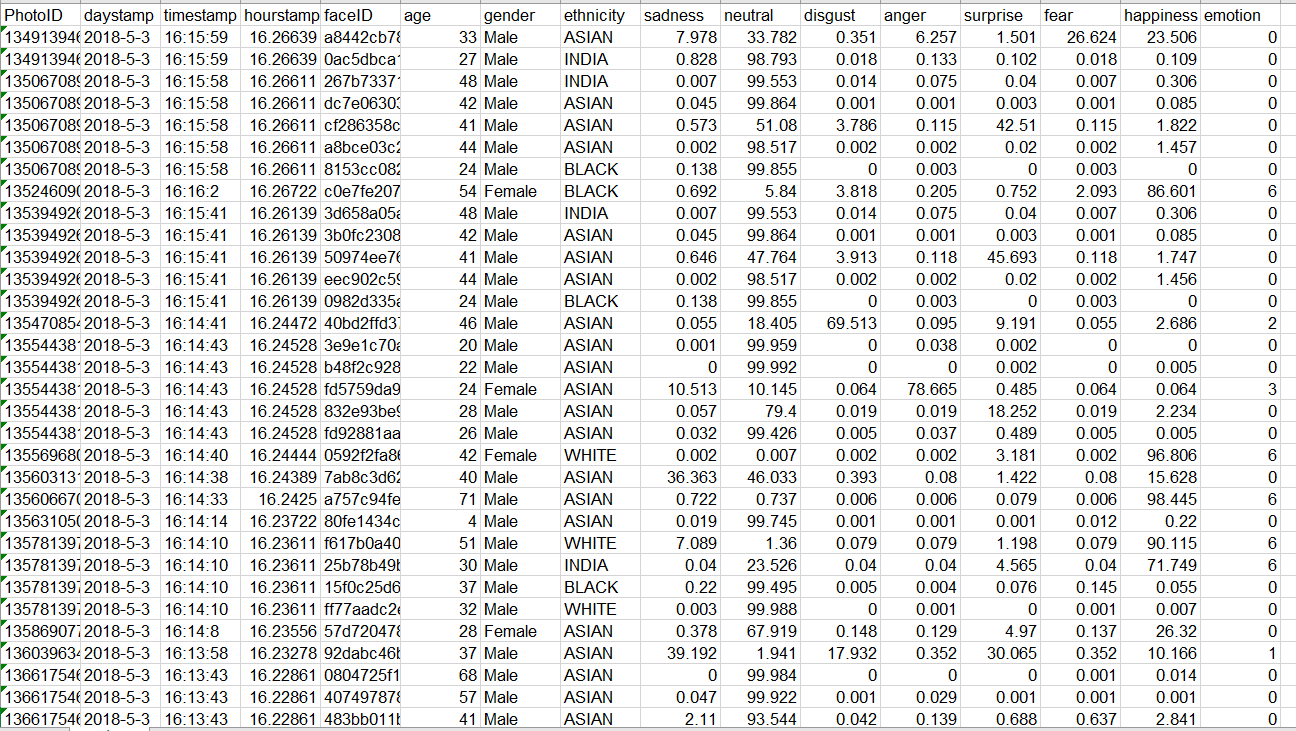
其中emotion就是概率最大的情绪,0-neutral,1-sadness,2-disgust,3-anger,4-surprise,5-fear,6-happiness。
探讨
在我自己运行过程中发现了一个问题,由于使用的是免费API,有并发限制,多次超过并发数,urlopen就会返回403。于是try失败,运行except,return时无定义的qrcont而报错。
     try:
         resp = urllib2.urlopen(req,timeout=5)
         qrcont = json.load(resp)
     except urllib2.HTTPError as e:
         print e.read()
     return qrcont
这就非常尴尬了,所以目前基本上都是大晚上在用这个代码跑……不知看到的各位有何高见?
【Python项目】使用Face++的人脸识别detect API进行本地图片情绪识别并存入excel的更多相关文章
- Tesseract-OCR-v5.0中文识别,训练自定义字库,提高图片的识别效果
1,下载安装Tesseract-OCR 安装,链接地址https://digi.bib.uni-mannheim.de/tesseract/ 2,安装成功 tesseract -v 注意:安装后, ...
- pytesseract在识别只有一个数字的图片时识别不出来
大家好,近期在做自动化测试时,遇到了一个问题需要通过识别图片来实现,遂用到了pytesseract模块和tesseract-ocr这个工具.在使用过程中发现,识别带有数字的图片时,如果这个图片上仅有一 ...
- 第二十三节:scrapy爬虫识别验证码(二)图片验证码识别
图片验证码基本上是有数字和字母或者数字或者字母组成的字符串,然后通过一些干扰线的绘制而形成图片验证码. 例如:知网的注册就有图片验证码 首先我们需要获取验证码图片,通过开发者工具我们可以得到验证码ur ...
- vue-cli3项目中全局引入less sass文件 以及使用本地图片在不同地方规则
第一种直接在main.js中引入,需要声明loader demo: import '!style-loader!css-loader!less-loader!./assets/css/common.l ...
- C#使用OneNote的图片文字识别功能(OCR)
http://www.cnblogs.com/Charltsing/p/OneNoteOCR.html 有需要技术咨询的,联系QQ564955427 前段时间有人问我能不能通过OneNote扫描图片, ...
- 基于Python的face_recognition库实现人脸识别
一.face_recognition库简介 face_recognition是Python的一个开源人脸识别库,支持Python 3.3+和Python 2.7.引用官网介绍: Recognize a ...
- 人脸搜索项目开源了:人脸识别(M:N)-Java版
一.人脸检测相关概念 人脸检测(Face Detection)是检测出图像中人脸所在位置的一项技术,是人脸智能分析应用的核心组成部分,也是最基础的部分.人脸检测方法现在多种多样,常用的技术或工具大 ...
- 转:基于开源项目OpenCV的人脸识别Demo版整理(不仅可以识别人脸,还可以识别眼睛鼻子嘴等)【模式识别中的翘楚】
文章来自于:http://blog.renren.com/share/246648717/8171467499 基于开源项目OpenCV的人脸识别Demo版整理(不仅可以识别人脸,还可以识别眼睛鼻子嘴 ...
- python中使用Opencv进行人脸识别
上一节讲到人脸检测,现在讲一下人脸识别.具体是通过程序采集图像并进行训练,并且基于这些训练的图像对人脸进行动态识别. 人脸识别前所需要的人脸库可以通过两种方式获得:1.自己从视频获取图像 2.从人 ...
随机推荐
- dedecms添加新模型
dedecms虽然预设了一些常见网页的功能模型,但是如果需要新的功能则需要自己创建,dedecms也提供了创建新模型的功能,如下: 1.打开后台首页=>核心=>内容模型管理 2.添加新模型 ...
- 【Maven】Snapshot和Release版本的区别
Snapshot版本代表不稳定.尚处于开发中的版本,快照版本. Release版本则代表稳定的版本,发行版本. 什么时候用Snapshot版本? 依赖库中的jar正处于开发的阶段,会被经常被更新,这种 ...
- KMP算法字符串查找子串
题目: 经典的KMP算法 分析: 和KMP算法对应的是BF算法,其中BF算法时间复杂度,最坏情况下可以达到O(n*m),而KMP算法的时间复杂度是O(n + m),所以,KMP算法效率高很多. 但是K ...
- init只创建一次 只有父类的init创建servletContext的对象
init只创建一次 只有父类的init创建servletContext的对象 如果重写父类的方法 但不显示调用父类的init 是不会创建servletContext对象的
- 【bzoj1634】[Usaco2007 Jan]Protecting the Flowers 护花 贪心
题目描述 Farmer John went to cut some wood and left N (2 <= N <= 100,000) cows eating the grass, a ...
- hdu 2722 Here We Go(relians) Again (最短路径)
Here We Go(relians) Again Time Limit: 2000/1000 MS (Java/Others) Memory Limit: 32768/32768 K (Jav ...
- 弱校的ACM奋斗史
这是一篇老文章,不过由于无法找到最初的发文地址,这里就不能粘贴原文网址了.本站转载此文与ACMer们共勉.感谢acmerfight供稿. 题解:还记得2年前的一个晚上,我和一个女孩一起写完了这篇文章. ...
- mysql 主从同步 M-S 搭建
主机: [root@ygy130 ~]# mysql -usystem -p123456 mysql> create database HA; mysql> use HA; mysql&g ...
- ACE线程管理机制-并发控制
ACE有若干可用于并发控制的类.这些类可划分为以下范畴: ACE Lock类属 ACE Guard类属 ACE Condition类属 ACE Synchronization类 由于篇幅较长,我分别写 ...
- The Shortest Path in Nya Graph HDU - 4725
Problem Description This is a very easy problem, your task is just calculate el camino mas corto en ...