
OC - 31.通过封装的自定义布局快速实现商品展示
概述
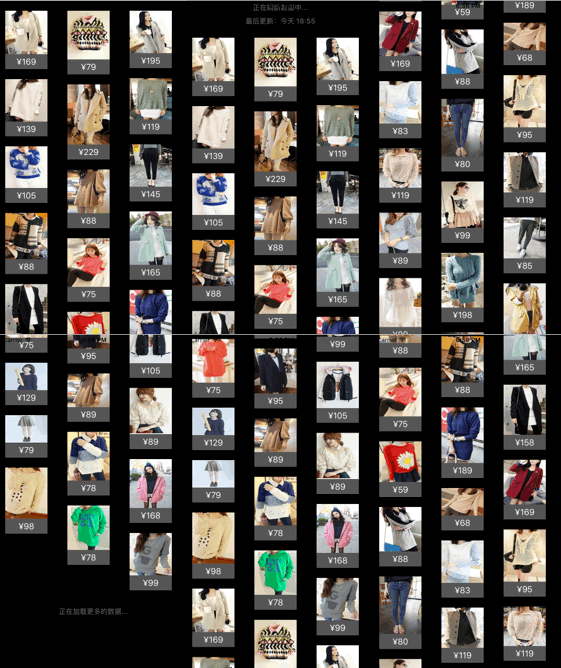
实现效果

设计思路
- 采用MVC架构,即模型—视图-控制器架构
- 使用MJExtension框架实现字典转模型
使用MJRefresh框架实现上拉和下拉刷新
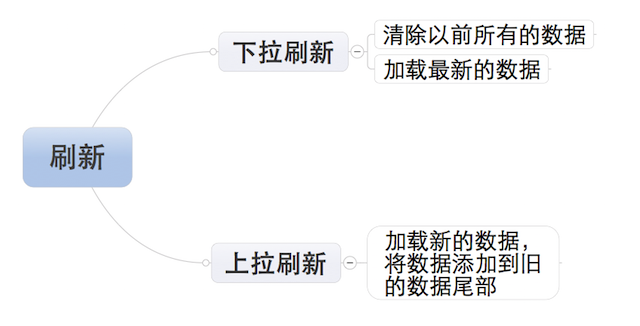
- 上拉刷新,加载新的数据
- 下拉刷新,加载更多的数据
使用SDWebImage框架加载图片
模型
商品模型需要包含以下属性
/**商品控件宽度*/

@property (nonatomic, assign) CGFloat w;

/**商品控件高度*/

@property (nonatomic, assign) CGFloat h;

/**商品图片*/

@property (nonatomic, copy) NSString *img;

/**商品价格*/

@property (nonatomic, copy) NSString *price;
视图
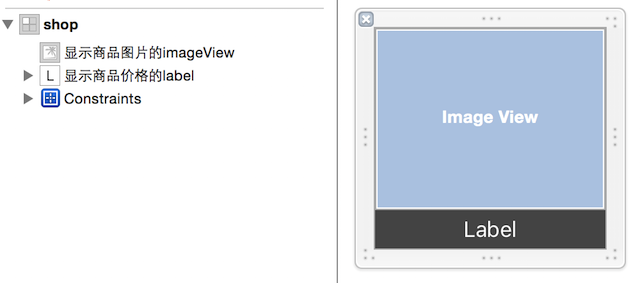
通过xib来实现自定义cell(继承自UICollectionViewCell),xib的结构如图
视图的代码实现
包含商品模型属性
/**商品模型*/

@property (nonatomic, strong) LYPShop *shop;
引用xib中的控件
//展示商品图片

@property (weak, nonatomic) IBOutlet UIImageView *imageView;

//显示商品价格

@property (weak, nonatomic) IBOutlet UILabel *priceLabel;
重写商品模型的setter,使xib中的控件显示乡音的内容
- (void)setShop:(LYPShop *)shop

{

    _shop = shop;

    //使用SDWebImage设置商品图片

    [self.imageView sd_setImageWithURL:[NSURL URLWithString:shop.img] placeholderImage:[UIImage imageNamed:@"loading"]];

    //设置商品价格

    self.priceLabel.text = shop.price;

}
控制器
创建展示商品的容器,即UICollectionView对象,并初始化
- (void)setupCollectionView

{

    //通过封装的自定义布局,创建布局

    LYPWaterFlowLayout *layout = [[LYPWaterFlowLayout alloc] init];

    //设置layout的代理

    layout.delegate = self;

    //创建collectionView

    UICollectionView *collectionView = [[UICollectionView alloc] initWithFrame:self.view.bounds collectionViewLayout:layout];

    self.collectionView = collectionView;

    //设置数据源

    collectionView.dataSource = self;

    //将collectionView添加到控制器的view中

    [self.view addSubview:collectionView];

}
注册通过xib自定义的cell
/**设置cell的重用标示*/

static NSString *const LYPShopID = @"shop";

- (void)registerCell

{

    //注册cell

    [self.collectionView registerNib:[UINib nibWithNibName:NSStringFromClass([LYPShopCell class]) bundle:nil] forCellWithReuseIdentifier:LYPShopID];

}
设置商品模型数组
添加成员属性
/**所有的商品模型数组*/

@property (nonatomic, strong) NSMutableArray *shops;
通过懒加载的方式,初始化模型数组
- (NSMutableArray *)shops

{

    if (_shops == nil)

    {

        _shops = [NSMutableArray array];

    }

    return _shops;

}
实现刷新功能
刷新的业务逻辑,如图
设置上拉刷新和下拉刷新控件
- (void)setupRefresh

{

	//下拉刷新控件

    self.collectionView.header = [MJRefreshNormalHeader headerWithRefreshingTarget:self refreshingAction:@selector(loadNewShops)];

    //view加载完毕,开始下拉刷新

    [self.collectionView.header beginRefreshing];

    //上拉刷新控件

    self.collectionView.footer = [MJRefreshAutoNormalFooter footerWithRefreshingTarget:self refreshingAction:@selector(loadMoreShops)];

    //一开始隐藏footer

    self.collectionView.footer.hidden = YES;

}
实现加载数据功能
/**下拉刷新*/

- (void)loadNewShops

{

    //通过该函数模拟网络延迟

    dispatch_after(dispatch_time(DISPATCH_TIME_NOW, (int64_t)(1.0 * NSEC_PER_SEC)), dispatch_get_main_queue(), ^{

        //将字典转成模型

        NSArray *shops = [LYPShop objectArrayWithFilename:@"1.plist"];

        //清空之前所有的商品模型信息

        [self.shops removeAllObjects];

        //将最新的商品模型信息添加到模型数组中

        [self.shops addObjectsFromArray:shops];

        //刷新数据

        [self.collectionView reloadData];

        //结束刷新

        [self.collectionView.header endRefreshing];

    });

}

/**上拉刷新*/

- (void)loadMoreShops

{

    //通过该函数模拟网络延迟

    dispatch_after(dispatch_time(DISPATCH_TIME_NOW, (int64_t)(1.0 * NSEC_PER_SEC)), dispatch_get_main_queue(), ^{

        //通过该函数模拟网络延迟

        NSArray *shops = [LYPShop objectArrayWithFilename:@"1.plist"];

        //将新加载的商品模型信息添加到模型数组中

        [self.shops addObjectsFromArray:shops];

        //刷新数据

        [self.collectionView reloadData];

        //结束刷新

        [self.collectionView.footer endRefreshing];

    });

}
设置collectionView的数据源
- 遵守协议UICollectionViewDataSource
设置cell的个数
- (NSInteger)collectionView:(nonnull UICollectionView *)collectionView numberOfItemsInSection:(NSInteger)section

{

    //设置上拉刷新控件的状态,无商品时不显示

    self.collectionView.footer.hidden = self.shops.count == 0;

    //返回cell的个数

    return self.shops.count;

}
创建indexPath位置的cell
- (UICollectionViewCell *)collectionView:(nonnull UICollectionView *)collectionView cellForItemAtIndexPath:(nonnull NSIndexPath *)indexPath

{

    //通过重用标示从缓存池中取,若取不到,则自动创建

    LYPShopCell *cell = [collectionView dequeueReusableCellWithReuseIdentifier:LYPShopID forIndexPath:indexPath];

    //给视图cell的模型赋值,使其设置cell中控件的显示内容

    cell.shop = self.shops[indexPath.item];

    return cell;

}
实现layout的代理方法,定制布局
设置每个cell的高度
- (CGFloat)waterFlowLayout:(LYPWaterFlowLayout *)waterFlowLayout heightForItemAtIndex:(NSInteger)index itemWith:(CGFloat)itemWith

{

    LYPShop *shop = self.shops[index];

    //通过比例计算cell的高度

    return itemWith * shop.h / shop.w;

}
设置列数
- (NSInteger)columnCountInWaterFlowLayout:(LYPWaterFlowLayout *)waterFlowLayout

{

    return 2;

}
设置行间距
- (CGFloat)rowMarginInWaterFlowLayout:(LYPWaterFlowLayout *)waterFlowLayout

{

    return 20;

}
设置列间距
- (CGFloat)columnMarginInWaterFlowLayout:(LYPWaterFlowLayout *)waterFlowLayout

{

    return 40;

}
设置内边距
- (UIEdgeInsets)edgeInsetsInWaterFlowLayout:(LYPWaterFlowLayout *)waterFlowLayout

{

    return UIEdgeInsetsMake(20, 10, 10, 30);

}
改变布局
可以简单地通过改变返回列数的代理方法,来改变布局
- (NSInteger)columnCountInWaterFlowLayout:(LYPWaterFlowLayout *)waterFlowLayout

{

	//返回3列

    return 3;

}
效果如图
OC - 31.通过封装的自定义布局快速实现商品展示的更多相关文章
- OC - 30.如何封装自定义布局
概述 对于经常使用的控件或类,通常将其分装为一个单独的类来供外界使用,以此达到事半功倍的效果 由于分装的类不依赖于其他的类,所以若要使用该类,可直接将该类拖进项目文件即可 在进行分装的时候,通常需要用 ...
- OC - 29.自定义布局实现瀑布流
概述 瀑布流是电商应用展示商品通常采用的一种方式,如图示例 瀑布流的实现方式,通常有以下几种 通过UITableView实现(不常用) 通过UIScrollView实现(工作量较大) 通过UIColl ...
- Swift - 使用网格(UICollectionView)的自定义布局实现复杂页面
网格UICollectionView除了使用流布局,还可以使用自定义布局.实现自定义布局需要继承UICollectionViewLayout,同时还要重载下面的三个方法: 1 2 3 4 5 6 7 ...
- Collection View 自定义布局(custom flow layout)
Collection view自定义布局 一般我们自定义布局都会新建一个类,继承自UICollectionViewFlowLayout,然后重写几个方法: prepareLayout():当准备开始布 ...
- 使用Style自定义ListView快速滑动图标
一.显示ListView快速滑动块图标 设想这样一个场景,当ListView的内容有大于100页的情况下,如果想滑动到第80页,用手指滑动到指定位置,无疑是一件很费时的事情,如果想快速滑动到指定的位置 ...
- AcitonBar 自定义布局
Android系统中ActionBar默认的布局不美观且难于控制,通过为ActionBar自定义布局的方式可以灵活控制ActionBar. 自定义Activity主题和ActionBar样式 在新建的 ...
- Xamarin自定义布局系列——瀑布流布局
Xamarin.Forms以Xamarin.Android和Xamarin.iOS等为基础,自己实现了一整套比较完整的UI框架,包含了绝大多数常用的控件,如下图 虽然XF(Xamarin.Forms简 ...
- Android 自定义支持快速搜索筛选的选择控件(一)
Android 自定义支持快速搜索筛选的选择控件 项目中遇到选择控件选项过多,需要快速查找匹配的情况. 做了简单的Demo,效果图如下: 源码地址:https://github.com/whieenz ...
- Centos安装自定义布局才能自己划分各个区的大小ctrl+z ,fg ,route -n ,cat !$ ,!cat ,XShell 设置, ifconfig CentOS远程连接 Linux中的输入流 第一节课
Centos安装自定义布局才能自己划分各个区的大小ctrl+z ,fg ,route -n ,cat !$ ,!cat ,XShell 设置, ifconfig CentOS远程连接 Linux中 ...
随机推荐
- 标量子查询优化(用group by 代替distinct)
标量子查询优化 当使用另外一个SELECT 语句来产生结果中的一列的值的时候,这个查询必须只能返回一行一列的值.这种类型的子查询被称为标量子查询 在某些情况下可以进行优化以减少标量子查询的重复执行,但 ...
- 游戏开发设计模式之对象池模式(unity3d 示例实现)
前篇:游戏开发设计模式之命令模式(unity3d 示例实现) 博主才学尚浅,难免会有错误,尤其是设计模式这种极富禅意且需要大量经验的东西,如果哪里书写错误或有遗漏,还请各位前辈指正. 原理:从一个固定 ...
- 关于Marsedit和我的163博客
其实我一开始选择的并不是163的博客,感觉没什么新意,勾不起我的兴趣. 第一个我想写的是CSDN的博客,代码嘛,总要找个专业的网站来写,但是我发现了一个及其让我不爽的事情,我竟然在网页上无法新建一篇日 ...
- PHP函数:PHP_SELF
php_self是php的内置变量,记作$php_self,其作用是实现“页内跳转”.这里的页内跳转不同等于html的书签之类的跳转,而是php程序通过URL的尾参数的改变在同一个程序里提供不同的We ...
- 《A First Course in Probability》-chaper7-期望的性质-相关系数
之前我们介绍过,协方差能够一定程度上描述两个变量之间的相关性,但是有时候它并没有那么准确,例如下面这个例子: 本质一样的两个随机变量,独立性是不变的,但是通过这个等式我看到,如果在随机变量的前面添加了 ...
- Very simple problem - SGU 111(大数开方)
分析:使用的是构造新数字法进行不断构造,然后逼近每一位数字,然后使用c++徒手敲了240多行代码,竟然过了........................很有成就感. 代码如下: ========== ...
- IOS性能调优系列:使用Instruments动态分析内存泄漏
硬广:<IOS性能调优系列>第二篇,持续更新,欢迎关注. 第一篇介绍了Analyze对App做静态分析,可以发现应用中的内存泄漏问题,对于有些内存泄漏情况通过静态分析无法解决的,可以通过动 ...
- java实现url转码、解码
URL由来: 一般来说,URL只能使用英文字母.阿拉伯数字和某些标点符号,不能使用其他文字和符号.比如,世界上有英文字母的网址 “http://www.abc.com”,但是没有希腊字母的网址“htt ...
- 在ASP.NET中,IE与Firefox下载文件带汉字名时乱码的解决方法
解决办法: HttpContext.Current.Response.Clear(); HttpContext.Current.Response.Buffer = true; HttpContext. ...
- JAVA 内存泄露的理解
1 什么是内存泄露? 内存泄露是指没用的对象持续占有内存空间,造成内存空间浪费.所以说JAVA是有内存泄露的. 2 内存泄露的原因是什么? 较长生命周期对象持有短生命周期对象的引用,导致短生命周期对象 ...