
Solr4.8.0源码分析(20)之SolrCloud的Recovery策略(一)
Solr4.8.0源码分析(20)之SolrCloud的Recovery策略(一)
题记:
我们在使用SolrCloud中会经常发现会有备份的shard出现状态Recoverying,这就表明SolrCloud的数据存在着不一致性,需要进行Recovery,这个时候的SolrCloud建索引是不会写入索引文件中的(每个shard接受到update后写入自己的ulog中)。关于Recovery的内容包含三篇,本文是第一篇介绍Recovery的原因以及总体流程。
1. Recovery的起因
Recovery一般发生在以下三个时候:
- SolrCloud启动的时候,主要由于在建索引的时候发生意外关闭,导致一些shard的数据与leader不一致,那么在启动的时候刚起的shard就会从leader那里同步数据。
- SolrCloud在进行leader选举中出现错误,一般出现在leader宕机引起replica进行选举成leader过程中。
- SolrCloud在进行update时候,由于某种原因leader转发update至replica没有成功,会迫使replica进行recoverying进行数据同步。
前面两种情况暂时不介绍,本文先介绍下第三种情况。大致原理如下图所示:
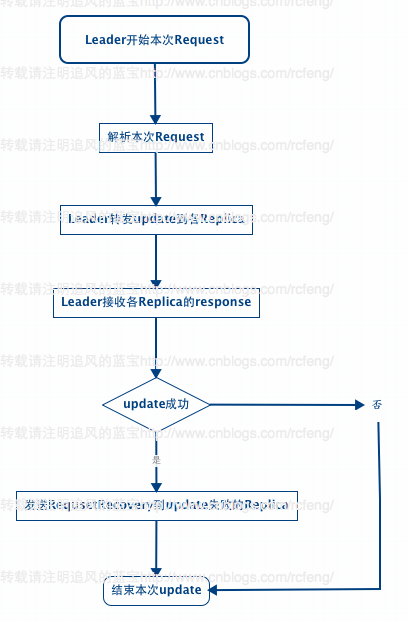
之前在<Solr4.8.0源码分析(15) 之 SolrCloud索引深入(2)>中讲到,不管update请求发送到哪个shard 分片中,最后在solrcloud里面进行分发的顺序都是从Leader发往Replica。Leader接受到update请求后先将document放入自己的索引文件以及update写入ulog中,然后将update同时转发给各个Replica分片。这就流程在就是之前讲到的add的索引链过程。
那么在索引链的add过程完毕后,SolrCloud会再依次调用finish()函数用来接受每一个Replica的响应,检查Replica的update操作是否成功。如果一旦有一个Replica没有成功,就会向update失败的Replica发送RequestRecovering命令强迫该分片进行Recoverying。
 private void doFinish() {

     // TODO: if not a forward and replication req is not specified, we could

     // send in a background thread

     cmdDistrib.finish();

     List<Error> errors = cmdDistrib.getErrors();

     // TODO - we may need to tell about more than one error...

     // if its a forward, any fail is a problem -

     // otherwise we assume things are fine if we got it locally

     // until we start allowing min replication param

     if (errors.size() > 0) {

       // if one node is a RetryNode, this was a forward request

       if (errors.get(0).req.node instanceof RetryNode) {

         rsp.setException(errors.get(0).e);

       } else {

         if (log.isWarnEnabled()) {

           for (Error error : errors) {

             log.warn("Error sending update", error.e);

           }

         }

       }

       // else

       // for now we don't error - we assume if it was added locally, we

       // succeeded

     }

     // if it is not a forward request, for each fail, try to tell them to

     // recover - the doc was already added locally, so it should have been

     // legit

     for (final SolrCmdDistributor.Error error : errors) {

       if (error.req.node instanceof RetryNode) {

         // we don't try to force a leader to recover

         // when we cannot forward to it

         continue;

       }

       // TODO: we should force their state to recovering ??

       // TODO: do retries??

       // TODO: what if its is already recovering? Right now recoveries queue up -

       // should they?

       final String recoveryUrl = error.req.node.getBaseUrl();

       Thread thread = new Thread() {

         {

           setDaemon(true);

         }

         @Override

         public void run() {

           log.info("try and ask " + recoveryUrl + " to recover");

           HttpSolrServer server = new HttpSolrServer(recoveryUrl);

           try {

             server.setSoTimeout(60000);

             server.setConnectionTimeout(15000);

             RequestRecovery recoverRequestCmd = new RequestRecovery();

             recoverRequestCmd.setAction(CoreAdminAction.REQUESTRECOVERY);

             recoverRequestCmd.setCoreName(error.req.node.getCoreName());

             try {

               server.request(recoverRequestCmd);

             } catch (Throwable t) {

               SolrException.log(log, recoveryUrl

                   + ": Could not tell a replica to recover", t);

             }

           } finally {

             server.shutdown();

           }

         }

       };

       ExecutorService executor = req.getCore().getCoreDescriptor().getCoreContainer().getUpdateShardHandler().getUpdateExecutor();

       executor.execute(thread);

     }

   }
2. Recovery的总体流程
Replica接收到来自Leader的RequestRecovery命令后就会开始进行RecoveryStrategy线程,然后进行Recovery。总体流程如下图索引:
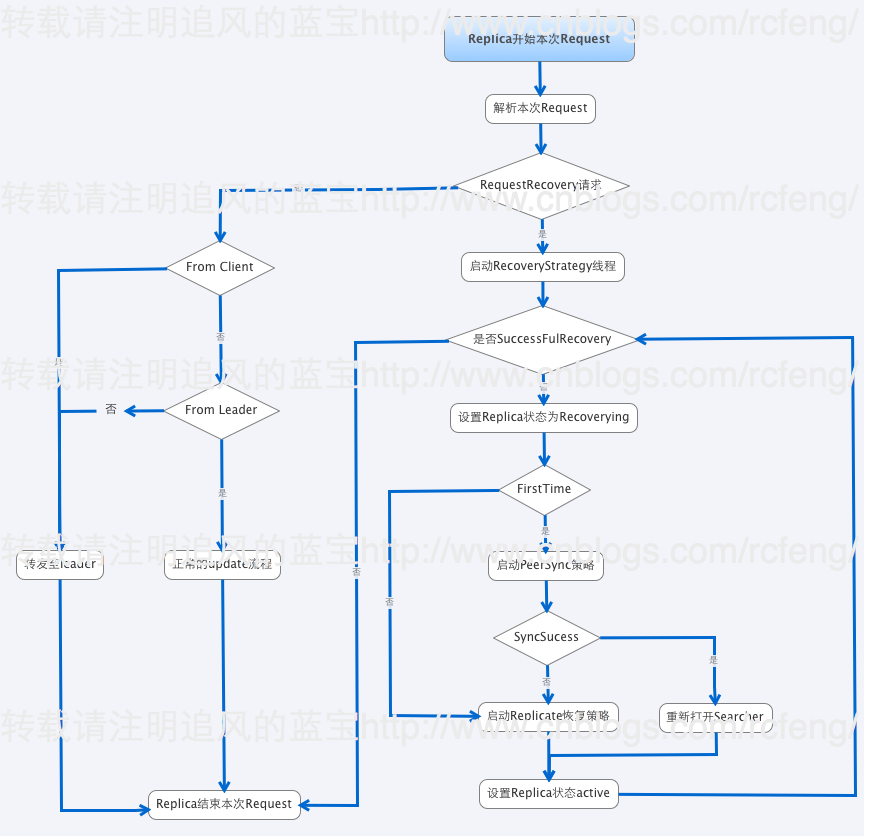
- 在RequestRecovery请求判断中,我例举了一部分(不是全部)请求命令,这是正常的索引链过程。
- 如果接受到的是RequestRecovery命令,那么本分片就会启动RecoveryStrategy线程来进行Recovery。
       // if true, we are recovering after startup and shouldn't have (or be receiving) additional updates (except for local tlog recovery)

       boolean recoveringAfterStartup = recoveryStrat == null;

       recoveryStrat = new RecoveryStrategy(cc, cd, this);

       recoveryStrat.setRecoveringAfterStartup(recoveringAfterStartup);

       recoveryStrat.start();

       recoveryRunning = true;
- 分片会设置分片的状态recoverying。需要指出的是如果一旦检测到本分片成为了leader,那么Recovery过程就会退出。因为Recovery是从leader中同步数据的。
zkController.publish(core.getCoreDescriptor(), ZkStateReader.RECOVERING);
- 这里要判断下firsttime是否为true(在重启分片的时候会检查之前是否进行replication且没做完就被关闭了),firsttime是控制是否先进入PeerSync Recovery策略的,如果为false则跳过PeerSync进入Replicate。
     if (recoveringAfterStartup) {

       // if we're recovering after startup (i.e. we have been down), then we need to know what the last versions were

       // when we went down.  We may have received updates since then.

       recentVersions = startingVersions;

       try {

         if ((ulog.getStartingOperation() & UpdateLog.FLAG_GAP) != 0) {

           // last operation at the time of startup had the GAP flag set...

           // this means we were previously doing a full index replication

           // that probably didn't complete and buffering updates in the

           // meantime.

           log.info("Looks like a previous replication recovery did not complete - skipping peer sync. core="

               + coreName);

           firstTime = false; // skip peersync

         }

       } catch (Exception e) {

         SolrException.log(log, "Error trying to get ulog starting operation. core="

             + coreName, e);

         firstTime = false; // skip peersync

       }

     }
- 最后进行选择进入是PeerSync策略和Replicate策略,在<Solr In Action 笔记(4) 之 SolrCloud分布式索引基础>中简单提到过两者的区别。关于具体的不同将在后面两节详细介绍。
- Peer sync, 如果中断的时间较短,recovering node只是丢失少量update请求,那么它可以从leader的update log中获取。这个临界值是100个update请求,如果大于100,就会从leader进行完整的索引快照恢复。
- Replication, 如果节点下线太久以至于不能从leader那进行同步,它就会使用solr的基于http进行索引的快照恢复。
- 最后设置分片的状态为active。并判断是否是sucessfulrrecovery,如果否则会多出尝试Recovery。
总结:
本文主要介绍了Recovery的起因以及Recovery过程,由于是简述所以内容较简单,主要提到了两种不同的Recovery策略,后续两文种将分别详细介绍。
Solr4.8.0源码分析(20)之SolrCloud的Recovery策略(一)的更多相关文章
- Solr4.8.0源码分析(21)之SolrCloud的Recovery策略(二)
Solr4.8.0源码分析(21)之SolrCloud的Recovery策略(二) 题记: 前文<Solr4.8.0源码分析(20)之SolrCloud的Recovery策略(一)>中提 ...
- Solr4.8.0源码分析(24)之SolrCloud的Recovery策略(五)
Solr4.8.0源码分析(24)之SolrCloud的Recovery策略(五) 题记:关于SolrCloud的Recovery策略已经写了四篇了,这篇应该是系统介绍Recovery策略的最后一篇了 ...
- Solr4.8.0源码分析(23)之SolrCloud的Recovery策略(四)
Solr4.8.0源码分析(23)之SolrCloud的Recovery策略(四) 题记:本来计划的SolrCloud的Recovery策略的文章是3篇的,但是没想到Recovery的内容蛮多的,前面 ...
- Solr4.8.0源码分析(22)之SolrCloud的Recovery策略(三)
Solr4.8.0源码分析(22)之SolrCloud的Recovery策略(三) 本文是SolrCloud的Recovery策略系列的第三篇文章,前面两篇主要介绍了Recovery的总体流程,以及P ...
- Solr4.8.0源码分析(25)之SolrCloud的Split流程
Solr4.8.0源码分析(25)之SolrCloud的Split流程(一) 题记:昨天有位网友问我SolrCloud的split的机制是如何的,这个还真不知道,所以今天抽空去看了Split的原理,大 ...
- Solr4.8.0源码分析(14)之SolrCloud索引深入(1)
Solr4.8.0源码分析(14) 之 SolrCloud索引深入(1) 上一章节<Solr In Action 笔记(4) 之 SolrCloud分布式索引基础>简要学习了SolrClo ...
- Solr4.8.0源码分析(15) 之 SolrCloud索引深入(2)
Solr4.8.0源码分析(15) 之 SolrCloud索引深入(2) 上一节主要介绍了SolrCloud分布式索引的整体流程图以及索引链的实现,那么本节开始将分别介绍三个索引过程即LogUpdat ...
- Solr4.8.0源码分析(17)之SolrCloud索引深入(4)
Solr4.8.0源码分析(17)之SolrCloud索引深入(4) 前面几节以add为例已经介绍了solrcloud索引链建索引的三步过程,delete以及deletebyquery跟add过程大同 ...
- Solr4.8.0源码分析(16)之SolrCloud索引深入(3)
Solr4.8.0源码分析(16)之SolrCloud索引深入(3) 前面两节学习了SolrCloud索引过程以及索引链的前两步,LogUpdateProcessorFactory和Distribut ...
随机推荐
- appium api
AppiumDriver getAppStrings() 默认系统语言对应的Strings.xml文件内的数据.iOS driver.getAppStrings(Stringlanguage ...
- 如何正确并完全安装Visual Studio 2015企业版本[转]
http://blog.csdn.net/code_godfather/article/details/47381631 [注意事项]1> 本文描述的是: Visual Studio 2015企 ...
- 打开WEBBROWSER的选中文件路径
uses CommCtrl, httpApp, ShellApi; { GetWebPath(WebBrowser1); } function GetWebPath(web: TWebBrows ...
- hibernate批量删除和更新数据
转载自:http://blog.csdn.net/yuhua3272004/article/details/2909538 Hibernate3.0 採用新的基于ANTLR的HQL/SQL查询翻译器, ...
- 一、Bitmap的recycle问题
尽管Android有自己的垃圾回收机制,对于是不是要我们自己调用recycle,还的看情况而定.假设仅仅是使用少量的几张图片,回收与否关系不大.但是若有大量bitmap须要垃圾回收处理,那必定垃圾回收 ...
- iscsi介绍及iscsi target配置
iSCSI 主要是透过 TCP/IP 的技术,将储存设备端透过 iSCSI target (iSCSI 目标) 功能,做成可以提供磁盘的服务器端,再透过 iSCSI initiator (iSCSI ...
- python re
>>> url="http://apk.gfan.com/Product/App45021.html" >>> result=html.cont ...
- ArrayBlockingQueue 源码阅读 问题(一)
今天阅读java.util.concurrent 中 ArrayBlockingQueue 的源码,发现其中有很多下面这行代码 final ReentrantLock lock = this.lock ...
- 一次优化web项目的经历记录(一)
一次优化web项目的经历记录 这段时间以来的总结与反思 前言:最近很长一段时间没有更新博客了,忙于一堆子项目的开发,严重拖慢了学习与思考的进程.开水倒满了需要提早放下杯子,晚了就会烫手,这段时间以来, ...
- Linux写配置HDF5的python包h5py
闲言碎语不讲,直接进入正题.Python在科学计算的应用越来越丰度,而hdf(5)数据的应用也非常广泛.python提供了h5py包供开发者处理数据(http://www.h5py.org/).在wi ...