
[PWA] Enable Push Notification in your web app
1. Clone the project:
git clone https://github.com/GoogleChrome/push-notifications.git
2. install the web server:

3. Open the web server, set app folder as current folder, toggle the switch button to restart the server.
Go localhost:8887 you will see the push noticifiation app.
4. Register the service worker: app/js/main.js
if ('serviceWorker' in navigator) {

  console.log('Service Worker is supported');

  navigator.serviceWorker.register('sw.js').then(function() {

    return navigator.serviceWorker.ready;

  }).then(function(reg) {

    console.log('Service Worker is ready :^)', reg);

      // TODO

  }).catch(function(error) {

    console.log('Service Worker error :^(', error);

  });

}
The sw.js is located in app folder.
5. Add code to sw.js
console.log('Started', self);

self.addEventListener('install', function(event) {

  self.skipWaiting();

  console.log('Installed', event);

});

self.addEventListener('activate', function(event) {

  console.log('Activated', event);

});

self.addEventListener('push', function(event) {

  console.log('Push message received', event);

  // TODO

});
There there is a service worker activate. the new servie worker will wait unit the old service worker removed from the browser(hard refersh / close the current tab and open a new one).
In 'Install' event, we tell
self.skipWaiting()
So once anything changed in the code, refresh the browser, new servie worker will replace the old one and start work.
6. Make a project on the Google developer console
For now, if you want to have push notifications on Chrome, you need to create a project on developer console. FireFox doesn't need to do that. And in the future, you won't need to do that, it will support by default.
Push notifications from a web app need a backend service to handle messaging. Chrome currently uses Google Cloud Messaging (GCM) for this, though the eventual goal is for Chrome and GCM to support the Web Push Protocol. Other browsers are free to use other services.

- From the Google APIs list, select Google Cloud Messaging. And Enable it.

- Enter the key name
- Click create. get your key
- Go to IAM & Admin, get the project number

7. Add a mainfest
A manifest is a JSON file that provides information about your web app, including Push Notifications configuration.
app/manifest.json:
{

  "name": "Push Notifications codelab",

  "gcm_sender_id": "593836075156"

}
"gcm_sender_id" is what you got "project number" before.
Link in index.html to mainfest.json:
<!DOCTYPE html>

<html>

<head>

  <title>Push Notification codelab</title>

  <link rel="manifest" href="manifest.json">

</head>

<body>

  <h1>Push Notification codelab</h1>

  <script src="js/main.js"></script>

</body>

</html>
8. Subscribe to Push Notifications
Modify the js/main.js:
'use strict';

if ('serviceWorker' in navigator) {

    console.log('Service Worker is supported');

    navigator.serviceWorker.register('sw.js').then(function() {

        return navigator.serviceWorker.ready;

    }).then(function(reg) {

        console.log('Service Worker is ready :^)', reg);

        reg.pushManager.subscribe({userVisibleOnly: true}).then(function(sub) {

            console.log('endpoint:', sub.endpoint);

        });

    }).catch(function(error) {

        console.log('Service Worker error :^(', error);

    });

}
This code uses the ServiceWorkerRegistration object's pushManager to subscribe to messages for the gcm_sender_id you added to the manifest previously.
You must pass a {userVisibleOnly: true} argument to the subscribe() method. This tells the browser that a notification will always be shown when a push message is received. Currently it's mandatory to show a notification.
9. Refresh your browser and you will see:

And you can find you "endPoint" in you console.
10. Send a request from the command line for GCM to push a message.
To get GCM to push a notification to your web client, you need to send GCM a request that includes the following:
- The public API key that you created, which looks like this:
AIzaSyAc2e8MeZHA5NfhPANea01wnyeQD7uVY0c
GCM will match this with the Project Number you got from the Google Developer Console to use as the
gcm_sender_idvalue in the manifest. - An appropriate Content-Type header, such as
application/json. - An array of subscription IDs, each of which corresponds to an individual client app. That's the last part of the subscription endpoint URL, and looks like this:
APA91bHMaA-R0eZrPisZCGfwwd7z1EzL7P7Q7cyocVkxBU3nXWed1cQYCYvFglMHIJ40kn-jZENQ62UFgg5QnEcqwB5dFZ-AmNZjATO8QObGp0p1S6Rq2tcCuUibjnyaS0UF1gIM1mPeM25MdZdNVLG3dM6ZSfxV8itpihroEN5ANj9A26RU2Uw
Put together: (You need to get your own key, this would NOT work for you)E
curl --header "Authorization: key=AIzaSyAVOc3rC1jBZQ5AHg0_0mZjJ6GzgZiiZD" --header "Content-Type: application/json" https://android.googleapis.com/gcm/send -d "{\"to\":\"cHOJzWtzgqQ:APA91bG6n-paaecj4CmGygeKrr2u7XX_0iOMM4kPNZz9YiZhpXyAMuy0dhtw_shqNtNyeU9HN5v2eGtrfW6nyCBEDm7ZdoOPi2k6q3LhCilw3JCrhmBpa8PIlcPQZmHFQF68dvR41tWN\"}"
install cURL and try the command.
You will send the notificaiton in your browser.
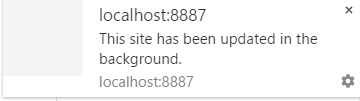
But really, this is not useful, we want the custom message
10. Show the message:
in sw.js:
console.log('Started', self);

self.addEventListener('install', function(event) {

    self.skipWaiting();

    console.log('Installed', event);

});

self.addEventListener('activate', function(event) {

    console.log('Activated', event);

});

self.addEventListener('push', function(event) {

    console.log('Push message', event);

    var title = 'Push message';

    event.waitUntil(

        self.registration.showNotification(title, {

            body: 'The Message',

            icon: 'images/icon.png',

            tag: 'my-tag'

        }));

});
Try again, you will see:
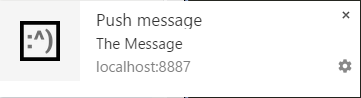
Better, icon, title and message body.
11. Handle notification clicks
In this step you will add code to enable an action (such as navigating to a web page) when a user clicks a notification.
self.addEventListener('notificationclick', function(event) {

  console.log('Notification click: tag', event.notification.tag);

  // Android doesn't close the notification when you click it

  // See http://crbug.com/463146

  event.notification.close();

  var url = 'https://youtu.be/gYMkEMCHtJ4';

  // Check if there's already a tab open with this URL.

  // If yes: focus on the tab.

  // If no: open a tab with the URL.

  event.waitUntil(

    clients.matchAll({

      type: 'window'

    })

    .then(function(windowClients) {

      console.log('WindowClients', windowClients);

      for (var i = 0; i < windowClients.length; i++) {

        var client = windowClients[i];

        console.log('WindowClient', client);

        if (client.url === url && 'focus' in client) {

          return client.focus();

        }

      }

      if (clients.openWindow) {

        return clients.openWindow(url);

      }

    })

  );

});
This code listens for a notification click, then opens a web page — in this example, a YouTube video.
This code checks all window clients for this Service Worker; if the requested URL is already open in a tab, focus on it — otherwise open a new tab for it.
12. Unsubscribe from notifications
a client unsubscribes from notifications by calling the unsubscribe() method of the PushSubscriptionobject.
Modify the index.html add
<!DOCTYPE html>

<html>

<head>

  <title>Push Notification codelab</title>

  <link rel="manifest" href="manifest.json">

</head>

<body>

<h1>Push Notification codelab</h1>

<p>This page must be accessed using HTTPS or via localhost.</p>

<button disabled>Subscribe</button>

<script src="js/main.js"></script>

</body>

</html>
Add a Subscribe/Unsubscribe button to your app.
Modify the main.js:
var reg;

var sub;

var isSubscribed = false;

var subscribeButton = document.querySelector('button');

if ('serviceWorker' in navigator) {

    console.log('Service Worker is supported');

    navigator.serviceWorker.register('sw.js').then(function() {

        return navigator.serviceWorker.ready;

    }).then(function(serviceWorkerRegistration) {

        reg = serviceWorkerRegistration;

        subscribeButton.disabled = false;

        console.log('Service Worker is ready :^)', reg);

    }).catch(function(error) {

        console.log('Service Worker Error :^(', error);

    });

}

subscribeButton.addEventListener('click', function() {

    if (isSubscribed) {

        unsubscribe();

    } else {

        subscribe();

    }

});

function subscribe() {

    reg.pushManager.subscribe({userVisibleOnly: true}).

    then(function(pushSubscription){

        sub = pushSubscription;

        console.log('Subscribed! Endpoint:', sub.endpoint);

        subscribeButton.textContent = 'Unsubscribe';

        isSubscribed = true;

    });

}

function unsubscribe() {

    sub.unsubscribe().then(function(event) {

        subscribeButton.textContent = 'Subscribe';

        console.log('Unsubscribed!', event);

        isSubscribed = false;

    }).catch(function(error) {

        console.log('Error unsubscribing', error);

        subscribeButton.textContent = 'Subscribe';

    });

}
In this code, you set the value of the ServiceWorkerRegistration object reg when the Service Worker installs, which is then used in the subscribe() function to subscribe to push messaging.
Everytime you subscribe and unsubscribe, the endpoint will change, so you need to reconfig it.
The subscribe() function creates the PushSubscription object sub which can be used by theunsubscribe() function.
Remember, the client gets a new registration ID every time it re-subscribes, so you will need to adjust requests to GCM accordingly.
13. Add Actions Button to the notification:
//sw.js

self.addEventListener('push', function(event) {

    console.log('Push message', event);

    var title = 'Push message';

    event.waitUntil(

        self.registration.showNotification(title, {

            body: 'The Message',

            icon: 'images/icon.png',

            tag: 'my-tag',

            actions: [

                {action: 'like', title: 'Like', icon: 'images/like.png'},

                {action: 'setting', title: 'Setting', icon: 'images/setting.png'}

            ]

        }));

});

14. Handle action click:
According to different action type you can do different stuff, here just open different youtube video.
self.addEventListener('notificationclick', function(event) {

    console.log('Notification click: tag', event.notification.tag);

    event.notification.close();

    if(event.action === "like"){

        var url = "https://www.youtube.com/watch?v=DC8FsIdVi9Y";

    }else if(event.action === "setting"){

        var url = "https://www.youtube.com/watch?v=K9QY8faD6sY";

    }else{

        // Click the notification body

        var url = 'https://youtu.be/gYMkEMCHtJ4';

    }

    openWindow(event, url);

});

function openWindow(event, url){

    event.waitUntil(

        clients.matchAll({

            type: 'window'

        })

            .then(function(windowClients) {

                console.log('WindowClients', windowClients);

                for (var i = 0; i < windowClients.length; i++) {

                    var client = windowClients[i];

                    console.log('WindowClient', client);

                    if (client.url === url && 'focus' in client) {

                        return client.focus();

                    }

                }

                if (clients.openWindow) {

                    return clients.openWindow(url);

                }

            })

    );

}

15. Dismiss the notification:
If user click the close button, then it means user might not want to be distrubed. Then you might need to tell the server, not be send this user notification again.
self.addEventListener('notificationclose', function(event) {

    var data = event.notification.data;

    console.log('Notification Close', data);

    event.waitUntil(

        // Tell server not to send me notification again.

      //  fetch('/api/close-notif?id='+data.id)

    )

});
[PWA] Enable Push Notification in your web app的更多相关文章
- 说说 PWA 和微信小程序--Progressive Web App
作者:云图图链接:https://zhuanlan.zhihu.com/p/22578965来源:知乎著作权归作者所有.商业转载请联系作者获得授权,非商业转载请注明出处. 利益相关:微信小用户,谷歌小 ...
- ItunesConnect:"Missing Push Notification Entitlement"警告-----以及解决方法
最近开发的cordova应用,要做ios的适配,并且发布版本,但是有一次在发测试版本的时候,突然收到一封邮件警告,原文如下: Missing Push Notification Entitlement ...
- PWA(Progressive Web App)入门系列:(一)PWA简单介绍
前言 PWA做为一门Google推出的WEB端的新技术,长处不言而喻.但眼下对于相关方面的知识不是非常丰富.这里我推出一下这方面的新手教程系列.提供PWA方面学习. 什么是PWA PWA全称Progr ...
- 推送消息 web push notification
参考 : https://developers.google.com/web/fundamentals/engage-and-retain/push-notifications/ ( step b ...
- (转)PWA(Progressive Web App)渐进式Web应用程序
PWA 编辑 讨论 PWA(Progressive Web App)是一种理念,使用多种技术来增强web app的功能,可以让网站的体验变得更好,能够模拟一些原生功能,比如通知推送.在移动端利用标准化 ...
- tms web core pwa让你的WEB APP离线可用
tms web core pwa让你的WEB APP离线可用 tms web core允许创建渐进式Web应用程序(PWA).渐进式Web应用程序是为适应在线/离线情况,各种设备类型,最重要的是,让自 ...
- 什么是渐进式Web App(PWA)?为什么值得关注?
转载自:https://blog.csdn.net/mogoweb/article/details/79029651 在开始PWA这个话题之前,我们先来看看Internet现状. 截至2017年1月, ...
- [io PWA] keynote: Launching a Progressive Web App on Google.com
Mainly about Material design (effects / colors / flashy stuff) Components (web components / polymer) ...
- (转)Apple Push Notification Services in iOS 6 Tutorial: Part 2/2
转自:http://www.raywenderlich.com/32963/apple-push-notification-services-in-ios-6-tutorial-part-2 Upda ...
随机推荐
- maya 写UI 用到的工具
import os cmds.window() scrollLayout = cmds.scrollLayout(w=150) cmds.gridLayout( numberOfColumns=30, ...
- VMware内安装Ubuntu后安装vmtools
今天处于好奇安装了Ubuntu,可是虚拟机运行的时候发现界面很小,于是百度发现要安装一个工具,看了很多方法,就这个比较实用,和大家分享: 第一步:进入系统后,点击虚拟机上的安装vmware tools ...
- 全连接的BP神经网络
<全连接的BP神经网络> 本文主要描述全连接的BP神经网络的前向传播和误差反向传播,所有的符号都用Ng的Machine learning的习惯.下图给出了某个全连接的神经网络图. 1前向传 ...
- 打log
如果项目上过线的话,那你一定知道Log是多么重要. 为什么说Log重要呢?因为上线项目不允许你调试,你只能通过Log来分析问题.这时打一手好Log的重要性绝不亚于写一手好代码.项目出问题时,你要能拿出 ...
- 写个自动下载安装Ant的shell脚本【一】
#!/bin/bash ###################################################### # file name: install_ant.sh # # f ...
- golang入门--一个简单的http client
看完<Go Web 编程>的前两章就可以开始写代码了. import ( "fmt" "io/ioutil" "log" &qu ...
- Choose the best route
hdu 2680:http://acm.hdu.edu.cn/showproblem.php?pid=2680 这道题值得一提的两点:在图论中注意重边问题是必须的,有向无向也是同等重要的,如这道题 f ...
- Android 模拟HTTP协议的编码问题 Android默认编码UTF-8
Android通过GET和POST方法请求服务器和浏览器请求的过程是不一样的. 浏览器请求服务器的时候会先将中文进行UTF-8编码,然后再发送到服务器端. Android编程下我们需要通过URLEnc ...
- 【UVA1379】Pitcher Rotation (贪心+DP)
题意: 你经营者一直棒球队.在接下来的g+10天中有g(3<=g<=200)场比赛,其中每天最多一场比赛.你已经分析出你的n(5<=n<=100)个投手中每个人对阵所有m个对手 ...
- 【POJ2773】Happy 2006 欧几里德
题目描述: 分析: 根据欧几里德,我们有gcd(b×t+a,b)=gcd(a,b) 则如果a与b互质,则b×t+a与b也一定互质,如果a与b不互质,则b×t+a与b也一定不互质. 所以与m互质的数对m ...