
GridView导出Excel的超好样例
事实上网上有非常多关于Excel的样例,可是不是非常好,他们的代码没有非常全,读的起来还非常晦涩。经过这几天的摸索,最终能够完毕我想要导出报表Excel的效果了。以下是我的效果图。
一.前台的页面图
GridView的第一页的内容
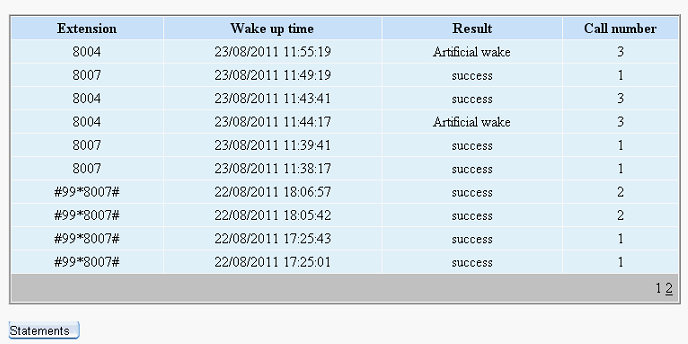
GridView第二页的内容:

大家可能遇到这样的情况,就是这个时候导出Excel的时候,打开Excel的时候发现GridView的第二页的内容却没有导出到Excel表里面。事实上解决这样的情况,非常easy,仅仅要在导出之前,把Gridview的设置分页设置为Flase即可了。
以下是我导出Gridview里面的所有内容,打开Excel表例如以下:
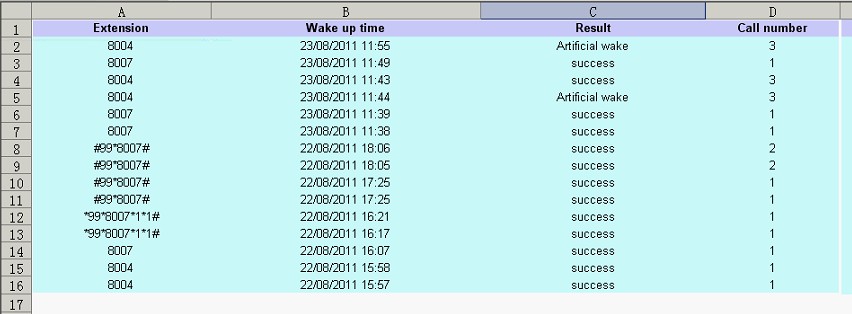
这就能够导出所有的GridView里面的内容了,包含了GridView的第一页和第二页的内容。
二、实现的代码
1.前台的代码:
<div style=" margin:20px;">
<asp:GridView ID="gvRecord" runat="server" AllowPaging="True" CellPadding="3"
AutoGenerateColumns="False" BorderColor="White"
BorderStyle="Ridge" BorderWidth="2px" BackColor="White" CellSpacing="1"
GridLines="None" onprerender="gvRecord_PreRender"
onpageindexchanged="gvRecord_PageIndexChanged"
onpageindexchanging="gvRecord_PageIndexChanging" >
<PagerSettings FirstPageText="Home Page" LastPageText="Last Page"
NextPageText="Next" PreviousPageText="Previous" />
<RowStyle ForeColor="Black" BackColor="#E5F1FF" HorizontalAlign="Center" />
<Columns>
<asp:TemplateField HeaderText="Extension">
<ItemTemplate>
<asp:Label ID="Label1" runat="server" Text='<%# Bind("Extn") %>'></asp:Label>
</ItemTemplate>
<ItemStyle Width="200px" />
</asp:TemplateField>
<asp:TemplateField HeaderText="Wake up time">
<ItemTemplate>
<asp:Label ID="Label2" runat="server" Text='<%# Bind("CallTime") %>'></asp:Label>
</ItemTemplate>
<ItemStyle Width="300px" />
</asp:TemplateField>
<asp:TemplateField HeaderText="Status">
<ItemTemplate>
<asp:Label ID="Label3" runat="server" Text='<%# getResult(Eval("Status").ToString()) %>'></asp:Label>
</ItemTemplate>
<ItemStyle Width="250px" />
</asp:TemplateField>
<asp:TemplateField HeaderText="Call number">
<ItemTemplate>
<asp:Label ID="Label4" runat="server" Text='<%# Bind("callcount") %>'></asp:Label>
</ItemTemplate>
<ItemStyle Width="150px" />
</asp:TemplateField>
</Columns>
<FooterStyle BackColor="#C6C3C6" ForeColor="Black" />
<PagerStyle BackColor="#C6C3C6" ForeColor="Black" HorizontalAlign="Right" />
<SelectedRowStyle BackColor="#9471DE" Font-Bold="True" ForeColor="White" />
<HeaderStyle BackColor="#C9E2FF" Font-Bold="True" ForeColor="#000000" />
</asp:GridView>
<p>
<asp:Button ID="btnExcel" CssClass="button" runat="server" Text="Statements
"
onclick="btnExcel_Click" /></p>
</div>
2.后台代码例如以下:
using System;
using System.Collections;
using System.Configuration;
using System.Data;
using System.Linq;
using System.Web;
using System.Web.Security;
using System.Web.UI;
using System.Web.UI.HtmlControls;
using System.Web.UI.WebControls;
using System.Web.UI.WebControls.WebParts;
using System.Xml.Linq;
using Model;
using DAL;
using System.Collections.Generic;
using System.IO;
public partial class _3C_CallManager_CallRecord : System.Web.UI.Page
{
int selectFlag = 0;
protected void Page_Load(object sender, EventArgs e)
{
if (!IsPostBack)
{
bind();
}
}
public string getResult(string str)
{
if (str == "0")
return "Haven't called";
if (str == "1")
return "check-out";
if (str == "2")
return "success";
if (str == "3")
return "fail";
if (str == "4")
return "dealing";
if (str == "5")
return "Artificial wake";
else
return "unkown";
}
public void bind() {
selectFlag = 0;
gvRecord.DataSource = VgCallService.GetInfo();
gvRecord.DataBind();
}
protected void btnExcel_Click(object sender, EventArgs e)
{
DateTime dt = System.DateTime.Now;
string str = dt.ToString("yyyyMMddhhmmss");
str = str + ".xls";
gvRecord.AllowPaging = false;
if (selectFlag == 0)
bind();
if (selectFlag == 1)
selectBind();
GridViewToExcel(gvRecord, "application/ms-excel", str);
// Export(gvRecord, "application/ms-excel", str);
}
/// <summary>
/// 将网格数据导出到Excel
/// </summary>
/// <param name="ctrl">网格名称(如GridView1)</param>
/// <param name="FileType">要导出的文件类型(Excel:application/ms-excel)</param>
/// <param name="FileName">要保存的文件名称</param>
public static void GridViewToExcel(Control ctrl, string FileType, string FileName)
{
HttpContext.Current.Response.Charset = "GB2312";
HttpContext.Current.Response.ContentEncoding = System.Text.Encoding.UTF8;//注意编码
HttpContext.Current.Response.AppendHeader("Content-Disposition",
"attachment;filename=" + HttpUtility.UrlEncode(FileName, System.Text.Encoding.UTF8).ToString());
HttpContext.Current.Response.ContentType = FileType;//image/JPEG;text/HTML;image/GIF;vnd.ms-excel/msword
ctrl.Page.EnableViewState = false;
StringWriter tw = new StringWriter();
HtmlTextWriter hw = new HtmlTextWriter(tw);
ctrl.RenderControl(hw);
HttpContext.Current.Response.Write(tw.ToString());
HttpContext.Current.Response.End();
}
/// <summary>
/// ReLoad this VerifyRenderingInServerForm is neccessary
/// </summary>
/// <param name="control"></param>
public override void VerifyRenderingInServerForm(Control control)
{
}
protected void gvRecord_PreRender(object sender, EventArgs e)
{
if(selectFlag==0)
bind();
}
protected void gvRecord_PageIndexChanged(object sender, EventArgs e)
{
}
protected void gvRecord_PageIndexChanging(object sender, GridViewPageEventArgs e)
{
this.gvRecord.PageIndex = e.NewPageIndex;
bind();
}
}
注意问题说明:
1)前台页面<%@ Page Language="C#" EnableEventValidation="false" AutoEventWireup="true" CodeFile="CallRecord.aspx.cs" Inherits="_3C_CallManager_CallRecord" %>注意加入EnableEventValidation="false",要不然会报错的。
2)GridView的绑定数据库的代码
gvRecord.DataSource = VgCallService.GetInfo();//VgCallService.GetInfo()是获取数据库的集合,我是封装好的,依据你们的获取的集合做不同的调整。
gvRecord.DataBind();
3)点击GridView下一页的关键代码,在PageIndexChanging事件里面
this.gvRecord.PageIndex = e.NewPageIndex; //注意这个不能少。
bind();
4)在导出Excel的button事件里面记得先gvRecord.AllowPaging = false;把GridView的分页取消之后,再调用GridViewToExcel方法。
5)以下的不可少。
public override void VerifyRenderingInServerForm(Control control)
{
}
GridView导出Excel的超好样例的更多相关文章
- Asp.net Gridview导出Excel
前台页面放一个GridView什么的就不说了,要注意的是在 <%@ Page Language="C#" AutoEventWireup="true" C ...
- C#实现GridView导出Excel
using System.Data;using System.Web;using System.Web.UI;using System.Web.UI.WebControls;using System. ...
- ASP.NET gridview导出excel,防止繁体产生有乱码的方式
//1.先引用比如 : using System; using System.Collections.Generic; using System.Linq; using System.Web; usi ...
- GridView导出excel格式问题
在导出的点击事件中,代码如下: //指定导出对应单元格为文本样式 string style = @"<style> .test { vnd.ms-excel.numberform ...
- C# GridView 导出Excel表
出错1:类型“GridView”的控件“GridView1”必须放在具有 runat=server 的窗体标记内解决方案:在后台文件中重载VerifyRenderingInServerForm方法,如 ...
- GridView导出Excel(中文乱码)
public void OUTEXCEL(string items,string where) { DataSet ds = new StudentBLL().GetTable(items,where ...
- GridView导出Excel
public void OUTEXCEL() { DataSet ds = new GW_T_DemandDAL().GetWzH(GetPersonInfoData(UserInfo), Reque ...
- GridView 导出Excel
protected void btnExcel_Click(object sender, EventArgs e) { ) { ExportGridViewForUTF8(GridView1, Dat ...
- NPOI 导出excel数据超65535自动分表
工作上遇到的问题,网上找了一些资料 整理了一个比较可行的解决方案. NPOI 大数据量分多个sheet导出 代码段 /// <summary> /// DataTable转换成Excel文 ...
随机推荐
- ARM 的Thumb状态测试
作为一个使用ARM的学习者,有必要全面了解你的处理器内核.尽管有些内容可能在实际应用中用不到,但是“了解”还是很必要的.Thumb状态,是ARM的一个特色,但是你知道Thumb状态与ARM状态最大的区 ...
- C++笔记1: 单例模式。(一个简单的设计模式在C++中复杂出翔。。)
C++ 如果用指针new一个单例,内存不容易释放,所以Java和C#等语言中的单例模式在C++不适用... C++中,new申请的内存必须由delete释放,例如: Point p1; Point * ...
- iOS oc 中的闭包
//闭包 NSString* s =@"123"; void (^block)() = ^() { NSLog(@"%@",s); }; block();// ...
- CSS禅意
标题取自<css禅意花园>一书,还记得当年读此书时的情景,真的是内容和书名一样的优秀,就以此标题作为自己在该文的一种追求吧,尽管我的水平和见解都和Dave Shea相去甚远.该文算是对前两 ...
- 关于Action中ValidateXXX方法校验一次失败后\导致以后一直返回input视图的情况
问题: 使用struts2的validateXXX()进行验证,出错后自动返回之前的画面,但是Form中的数据全部丢失了,如何才能保存出错前的Form是要解决的问题. 调查: 调查后发 ...
- hairline!ios实现边框0.5px
在2014WWDC上,Ted O’Connor提出了“retina hairlines”的解决方案,即在ratina屏幕上可以显示0.5px宽度的边框.他的方案是这样的: 1 Standard bor ...
- Linq 筛选出一条数据
InBoxInfo boxInfo = boxList.Find(p => p.GoodsID == goods.GoodsID.ToString().Trim() && p.S ...
- 视频硬解api介绍
在一个gpu如此强大的时代,视频解码怎么能少了gpu厂商的参加.为了用硬件加速视频解码,厂商定义了一些api. 好吧,一旦和硬件打交道,就会有os的参加,有了硬件与os参加,api肯定会变成很凌乱,看 ...
- Https协议:SSL建立过程分析(也比较清楚,而且有OpenSSL的代码)
web访问的两种方式: http协议,我们一般情况下是通过它访问web,因为它不要求太多的安全机制,使用起来也简单,很多web站点也只支持这种方式下的访问. https协议(Hypertext Tra ...
- SharePoint用户控件编写的简单介绍
转:http://www.it165.net/design/html/201204/1131.html 我们开发中,通常需要写各种各样的部件来实现我们的展示或者功能,下面就介绍下刚刚接触的QuickP ...