
canvas——画板
注意部分:
canvas的height和width不能再css中设定,应该在html中设定,否则会影响页面的分辨率。
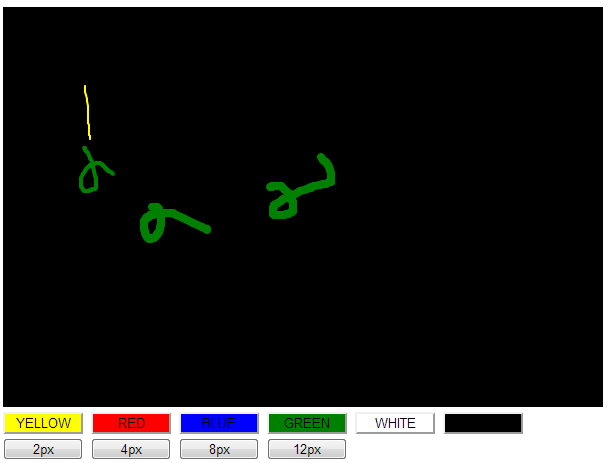
效果图:
图1:
代码
css:
#canvas{

    cursor: crosshair;

}

button{

    width: 80px;

}

.yellowBtn{

    background-color: yellow;

}

.redBtn{

    background-color: red;

}

.blueBtn{

    background-color: blue;

}

.greenBtn{

    background-color: green;

}

.whiteBtn{

    background-color: white;

}

.blackBtn{

    background-color:black;

}
页面:
    <canvas id="canvas" width="900" height="400">浏览器不支持html5</canvas>

    <br>

    <button id="yellow" class="yellowBtn" onclick="lineColor='yellow';">YELLOW</button>

    <button id="red" class="redBtn" onclick="lineColor='red';">RED</button>

    <button id="blue" class="blueBtn" onclick="lineColor='blue';">BLUE</button>

    <button id="green" class="greenBtn" onclick="lineColor='green';">GREEN</button>

    <button id="white" class="whiteBtn" onclick="lineColor='white';">WHITE</button>

    <button id="black" class="blackBtn" onclick="lineColor='black';">BLACK</button>

    <br>

    <button class="lineWeight4" class="whiteBtn" onclick="lineWeight=2;">2px</button>

    <button class="lineWeight4" class="whiteBtn" onclick="lineWeight=4;">4px</button>

    <button class="lineWeight8" class="whiteBtn" onclick="lineWeight=8;">8px</button>

    <button class="lineWeight12" class="whiteBtn" onclick="lineWeight=12;">12px</button>
js:
   <script type="text/javascript">

    var canvas = document.getElementById("canvas");

    //判断是否支持canvas

    if(!canvas || !canvas.getContext){

        return false;

    }

    //获得context对象,目前只支持2d

    var ctx = canvas.getContext("2d");

    //画出画板背景,此处为矩形

    ctx.fillStyle = "black";

    ctx.fillRect(0, 0, 900, 400);

    //初始化鼠标是否按下和坐标点位置, true为按下

    var mouseState = false,

        oldX = -10,

        oldY = -10,

        lineColor = "white",

        lineWeight = 2;

    //canvas添加鼠标事件, 鼠标移动、鼠标按下和鼠标弹起

    if(window.addEventListener){

        canvas.addEventListener("mousemove", draw, true);

        canvas.addEventListener("mousedown", down, false);

        canvas.addEventListener("mouseup", up, false);

    }else{

        canvas.attachEvent("onmousemove", draw);

        canvas.attachEvent("onmousedown", down);

        canvas.attachEvent("onmouseup", up);

    }

    //鼠标按下,拖动画图

    function draw(event){

        if(mouseState === true){

            var newX = event.clientX - 10;

            var newY = event.clientY - 10;

            ctx.beginPath();

            ctx.moveTo(oldX, oldY);

            ctx.lineTo(newX, newY);

            ctx.strokeStyle = lineColor;

            ctx.lineWidth = lineWeight;

            ctx.lineCap = "round";

            ctx.stroke();

            oldX = newX;

            oldY = newY;

        }

    }

    function down(event){

        mouseState = true;

        oldX = event.clientX - 10;

        oldY = event.clientY - 10;

    }

    function up(){

        mouseState = false;

    }

    </script>
增加导出功能:
使用 canvas.toDataURL("image/png");保存图片,eg:
    function exportImage(event){

        var imgSrc = canvas.toDataURL("image/png");

        document.getElementById("image").src = imgsrc;

    }
canvas——画板的更多相关文章
- QML学习笔记(二)-纯qml画图实现canvas画板-鼠标画图
作者: 狐狸家的鱼 Github: 八至 版权声明:如需转载请获取授权和联系作者 用纯qml实现canvas画板功能,用鼠标进行画图,可以画直线,画圆,画矩形,画弧线. 由于canvas画图会有延迟和 ...
- 简易的canvas画板
没事仿照windows画板工具用canvas实现了一个简易版的画板. html: <!doctype html> <html> <head> <meta ch ...
- canvas 画板
<!DOCTYPE html> <html> <head> <meta charset="utf-8" /> <title&g ...
- html5 canvas画板
点击查看演示地址 <!DOCTYPE HTML> <html> <title>HTML5-CanvasDrawDemo</title> <meta ...
- html5 canvas 画板
<!doctype html> <head> <meta http-equiv="Content-Type" content="text/h ...
- JS canvas 画板 撤销
<!DOCTYPE html> <html> <head> <meta http-equiv="Content-Type" content ...
- Canvas画板
aaarticlea/png;base64,iVBORw0KGgoAAAANSUhEUgAAA6QAAAGgCAIAAAAy0z21AAAgAElEQVR4nO3dfYwkZ30n8JqZfcNex8
- canvas画板基础应用的学习
canvas是html5中的绘图容器,我们可以通过javascript的控制来进行图形的绘制,绘制对象可以是路径.盒.圆.字符等,同时,你也可以通过js给画布添加图像,下面来介绍canvas的各种基本 ...
- canvas实践小实例一 —— 画板工具
前面讲了一部分的canvasAPI的基础知识,光看API的介绍确实是很无趣乏味,需要一点可以激发内心的激情的东西来激励自己来学习,于是就了伴随canvasAPI学习的小实例,这样通过API的知识,结合 ...
随机推荐
- js获取元素transform参数得出的个人理解
之前写页面的时候有试过想用js获取某些元素的translate的数值什么的,但是translate又是transform的子样式(勉强说说),理所当然就是先获取transform样式,再读里面的值. ...
- DataDictionaryTool 一款生成数据库字典工具支持mysql和oracle
因为常常查看mysql数据结构,频繁操作.很不爽,于是想把数据表制作成数据字典,于是网上搜的一款工具 DataDictionaryTool ,最终制作成功,分享给大家! 1,此工具需要安装jre ,简 ...
- xml--小结③DTD的基本语法(看懂即可)
四.DTD的基本语法(看懂即可)1.DTD:Document Type Definition2.作用:约束XML的书写规范.3.DTD文件保存到磁盘时,必须使用UTF-8编码 4.如何引入外部的DTD ...
- Lucida Grande字体无法正常显示冒号的解决方案
曾经贪图Mac OSX的UI漂亮,后来查到它用的是Lucida Grande字体,所以索性将win7也改成了那种字体,结果浏览器中的中文冒号全都显示为一个奇怪的符号.后来即使将字体设置回去也无法还原. ...
- 在C#中实现Socket端口复用
转载:http://www.csharpwin.com/csharpspace/68.shtml 一.什么是端口复用: 因为在winsock的实现中,对于服务器的绑定是可以多重绑定的,在 ...
- 对 JDBC 做一个轻量封装,待完善。。。
对 JDBC 做一个轻量地封装,顺便复习,熟悉sql,io,util,lang.Reflect等包的使用,泛型的使用,待完善... package com.webproj.utils; import ...
- 1.RABBITMQ 入门 - WINDOWS - 获取,安装,配置
一. 背景: 公司项目有所改动,要求微信(移动端调用的接口),日志接口换位log4net,全部改成以rabbitMQ作为服务支持, 二.本地环境: windows 10 enterpr ...
- 【STL】string 常用函数
string类的构造函数: string(const char *s); //用c字符串s初始化 string(int n,char c); //用n个字符c初始化 此外,string类还支持默认构造 ...
- 在调用Qt库来实现功能过程中的一些总结
1.对于QTabWidget中tab名字的变化.当其中只有一个&时,Qt Assistant中给出的解释是:If the tab's label contains an ampersand, ...
- mysql 刘道成视频教程 第3课
第3课: 1.mysql中条件使用关键字where: 2.查 select name,content from msg ; select name,content 控制列 where id>2 ...