
Photon Server 服务端编程
Photon Server 和 Unity3D 数据交互:
一:Photon Server的下载安装:
https://www.photonengine.com/zh-CN/sdks#server-sdkserverserver
点击下载 Download SDK(需注册登陆下载)
二:Photon Server的服务端编程:
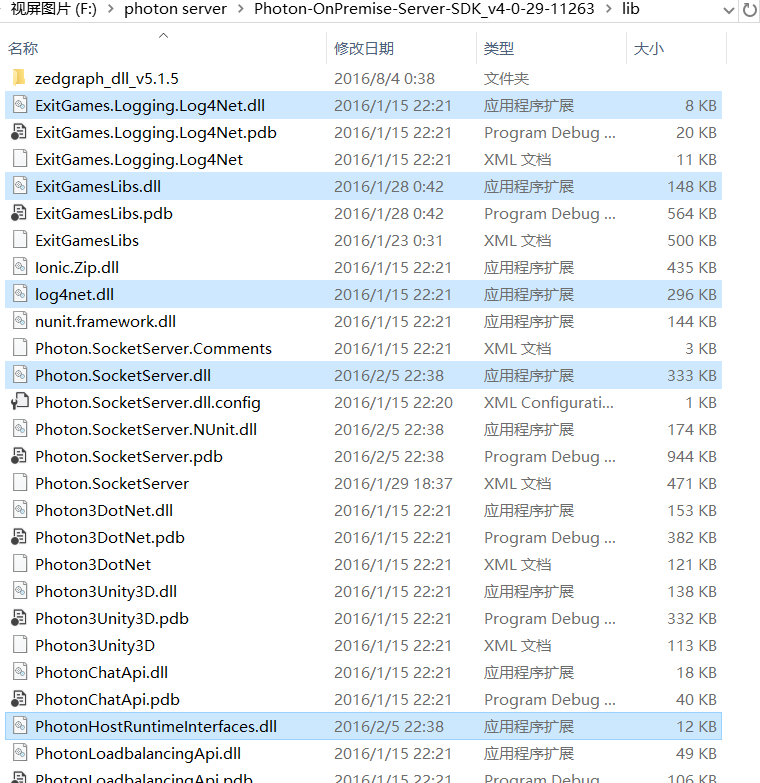
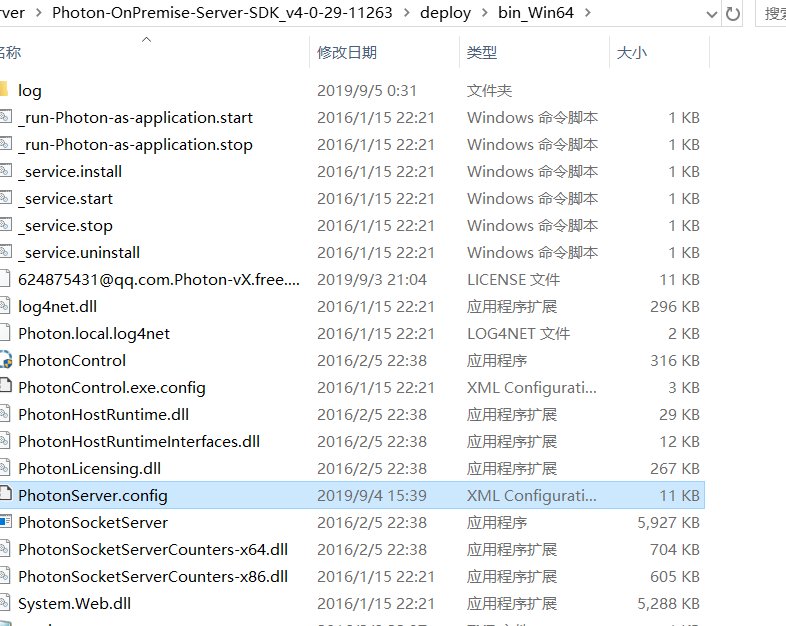
1、新建项目MyGameServer,引用外部库(5个)并设置PhotonServer.config文件。
设置PhotonServer.config文件
 1 <MMoInstance  <!--这个Photon instances的名称-->

 2         MaxMessageSize="512000"

 3         MaxQueuedDataPerPeer="512000"

 4         PerPeerMaxReliableDataInTransit="51200"

 5         PerPeerTransmitRateLimitKBSec="256"

 6         PerPeerTransmitRatePeriodMilliseconds="200"

 7         MinimumTimeout="5000"

 8         MaximumTimeout="30000"

 9         DisplayName="MyGame"  <!--显示在Photon instances的名称-->

10         >

11

12         <!-- 0.0.0.0 opens listeners on all available IPs. Machines with multiple IPs should define the correct one here. -->

13         <!-- Port 5055 is Photon's default for UDP connections. -->

14         <UDPListeners>

15             <UDPListener

16                 IPAddress="0.0.0.0"

17                 Port="5055"

18                 OverrideApplication="MyGame1">"<!--指明这个端口号是给哪个Application使用的-->

19             </UDPListener>

20         </UDPListeners>

21

22         <!-- 0.0.0.0 opens listeners on all available IPs. Machines with multiple IPs should define the correct one here. -->

23         <!-- Port 4530 is Photon's default for TCP connecttions. -->

24         <!-- A Policy application is defined in case that policy requests are sent to this listener (known bug of some some flash clients) -->

25         <TCPListeners>

26             <TCPListener

27                 IPAddress="0.0.0.0"

28                 Port="4530"

29                 PolicyFile="Policy\assets\socket-policy.xml"

30                 InactivityTimeout="10000"

31                 OverrideApplication="MyGame1"

32                 >

33             </TCPListener>

34         </TCPListeners>

35

36         <!-- Policy request listener for Unity and Flash (port 843) and Silverlight (port 943)  -->

37         <PolicyFileListeners>

38           <!-- multiple Listeners allowed for different ports -->

39           <PolicyFileListener

40             IPAddress="0.0.0.0"

41             Port="843"

42             PolicyFile="Policy\assets\socket-policy.xml"

43             InactivityTimeout="10000">

44           </PolicyFileListener>

45           <PolicyFileListener

46             IPAddress="0.0.0.0"

47             Port="943"

48             PolicyFile="Policy\assets\socket-policy-silverlight.xml"

49             InactivityTimeout="10000">

50           </PolicyFileListener>

51         </PolicyFileListeners>

52

53         <!-- WebSocket (and Flash-Fallback) compatible listener -->

54         <WebSocketListeners>

55             <WebSocketListener

56                 IPAddress="0.0.0.0"

57                 Port="9090"

58                 DisableNagle="true"

59                 InactivityTimeout="10000"

60                 OverrideApplication="MyGame1">

61             </WebSocketListener>

62         </WebSocketListeners>

63

64         <!-- Defines the Photon Runtime Assembly to use. -->

65         <Runtime

66             Assembly="PhotonHostRuntime, Culture=neutral"

67             Type="PhotonHostRuntime.PhotonDomainManager"

68             UnhandledExceptionPolicy="Ignore">

69         </Runtime>

70

71

72         <!-- Defines which applications are loaded on start and which of them is used by default. Make sure the default application is defined. -->

73         <!-- Application-folders must be located in the same folder as the bin_win32 folders. The BaseDirectory must include a "bin" folder. -->

74         <Applications Default="MyGame1"><!--客户端连接服务器未指定Application时连接默认的Application-->

75

76             <!-- MMO Demo Application -->

77             <Application

78                 Name="MyGame1"<!--应用名称-->

79                 BaseDirectory="MyGameServer"<!--\deploy下这个服务器应用的文件名称-->

80                 Assembly="MyGameServer"<!-—程序集名称-->

81                 Type="MyGameServer.MyGames"<!--主类名称-->

82                 ForceAutoRestart="true"<!--是否自动重启-->

83                 WatchFiles="dll;config"

84                 ExcludeFiles="log4net.config">

85             </Application>

86

87         </Applications>

88     </MMoInstance>
2、新建MyGames类继承ApplicationBase作为服务器启动类,并实现其抽象方法。
 1 using System.Linq;

 2 using System.Text;

 3 using System.Threading.Tasks;

 4 using ExitGames.Logging;

 5 using Photon.SocketServer;

 6 using log4net.Config;

 7 using ExitGames.Logging.Log4Net;

 8

 9 namespace MyGameServer

10 {

11     public class MyGames : ApplicationBase

12     {

13         /// <summary>

14         /// 获得日志对象   引用ExitGames.Logging命名空间

15         /// </summary>

16         public static readonly ILogger Log = LogManager.GetCurrentClassLogger();

17

18         /// <summary>

19         /// 客户端连接请求时执行

20         /// </summary>

21         /// <param name="initRequest">客户端信息</param>

22         /// <returns></returns>

23         protected override PeerBase CreatePeer(InitRequest initRequest)

24         {

25             Log.Info("客户端连接成功!。。。。。");

26             return new ClientPeers(initRequest);

27         }

28

29         /// <summary>

30         /// 初始化

31         /// </summary>

32         protected override void Setup()

33         {

34             log4net.GlobalContext.Properties["Photon:ApplicationLogPath"] =Path.Combine(Path.Combine(this.ApplicationRootPath, "bin_Win64"),"log");

35             //引用System.IO命名空间  日志设置

36             FileInfo configInfo = new FileInfo(Path.Combine(this.BinaryPath, "log4net.config"));

37             if (configInfo.Exists)

38             {

39                 //引用ExitGames.Logging.Log4Net命名空间

40                 LogManager.SetLoggerFactory(Log4NetLoggerFactory.Instance); //设置使用log4net插件

41                 //引用log4net.Config命名空间

42                 XmlConfigurator.ConfigureAndWatch(configInfo);//读取日志文件

43             }

44             Log.Info("初始化成功!。。。。。");

45         }

46         /// <summary>

47         /// 关闭时

48         /// </summary>

49         protected override void TearDown()

50         {

51             Log.Info("服务器成功关闭!。。。。。");

52         }

53     }

54 }
3、客户端连接类ClientPeers继承ClientPeer类并实现其抽象方法。
 1 using System;

 2 using System.Collections.Generic;

 3 using System.Linq;

 4 using System.Text;

 5 using System.Threading.Tasks;

 6 using Photon.SocketServer;

 7 using PhotonHostRuntimeInterfaces;

 8

 9 namespace MyGameServer

10 {

11     public class ClientPeers :ClientPeer

12     {

13         public ClientPeers(InitRequest initRequest):base(initRequest)

14         {

15         }

16

17         protected override void OnDisconnect(DisconnectReason reasonCode, string reasonDetail)

18         {

19             MyGames.Log.Info("客户端断开连接!.....");

20         }

21

22         protected override void OnOperationRequest(OperationRequest operationRequest, SendParameters sendParameters)

23         {

24             //根据客户端请求类型分类

25             switch(operationRequest.OperationCode)

26             {

27                 case 1:

28                     //客户端数据获得

29                     object i, j;

30                     Dictionary<byte, object> date = operationRequest.Parameters;

31                     date.TryGetValue(1,out i);

32                     date.TryGetValue(2,out j);

33                     //日志输出

34                     MyGames.Log.Info(String.Format("收到一个请求!。。。。。{0},{1}",i,j));

35                     //返回客户端信息

36                     OperationResponse op = new OperationResponse(1);

37                     op.Parameters = date;

38                     //SendOperationResponse只适用于双向交互时(即已由客户端发出请求,再有服务端返回),由服务端到客户端。

39                     SendOperationResponse(op, sendParameters);

40                     //单方面由服务端向客户端发送消息

41                     EventData eventData = new EventData(1);

42                     eventData.Parameters = date;

43                     SendEvent(eventData, sendParameters);

44                     break;

45                 case 2:

46                     break;

47                 default:

48                     break;

49             }

50         }

51     }

52 }
4、引入日志配置文件log4net.config
 1 <?xml version="1.0" encoding="utf-8" ?>

 2 <log4net debug="false" update="Overwrite">

 3

 4   <appender name="RollingFileAppender" type="log4net.Appender.RollingFileAppender">

 5     <file type="log4net.Util.PatternString" value="%property{Photon:ApplicationLogPath}\\MyGame.Server.log" />

 6     <!--MyGame.Server修改为自己想要的日志文件名称-->

 7     <appendToFile value="true" />

 8     <maximumFileSize value="5000KB" />

 9     <maxSizeRollBackups value="2" />

10     <layout type="log4net.Layout.PatternLayout">

11       <conversionPattern value="%d [%t] %-5p %c - %m%n" />

12     </layout>

13   </appender>

14

15   <appender name="ConsoleAppender" type="log4net.Appender.ConsoleAppender">

16     <layout type="log4net.Layout.PatternLayout">

17       <param name="ConversionPattern" value="%d [%t] %-5p %c - %m%n" />

18     </layout>

19     <filter type="log4net.Filter.LevelRangeFilter">

20       <levelMin value="DEBUG" />

21       <levelMax value="FATAL" />

22     </filter>

23   </appender>

24

25   <!-- logger -->

26   <root>

27     <level value="INFO" />

28     <!--<appender-ref ref="ConsoleAppender" />-->

29     <appender-ref ref="RollingFileAppender" />

30   </root>

31

32   <logger name="OperationData">

33     <level value="INFO" />

34   </logger>

35

36 </log4net>
下载地址:https://gitee.com/today6/unity
Photon Server 服务端编程的更多相关文章
- 《Linux多线程服务端编程》笔记——多线程服务器的适用场合
如果要在一台多核机器上提供一种服务或执行一个任务,可用的模式有 运行一个单线程的进程 运行一个多线程的进程 运行多个单线程的进程 运行多个多线程的进程 这些模式之间的比较已经是老生常谈,简单地总结 模 ...
- QT server服务端如何判断客户端断开连接
在QT编程中有时会用到server服务端与客户端进行TCP网络通信,服务端部分代码如下: 1.创建server用于监听客户端套接字 this->server = new QTcpServer(t ...
- Linux多线程服务端编程一些总结
能接触这本书是因为上一个项目是用c++开发基于Linux的消息服务器,公司没有使用第三方的网络库,卷起袖子就开撸了.个人因为从业经验较短,主 要负责的是业务方面的编码.本着兴趣自己找了这本书.拿到书就 ...
- 《Linux 多线程服务端编程:使用 muduo C++ 网络库》电子版上市
<Linux 多线程服务端编程:使用 muduo C++ 网络库> 电子版已在京东和亚马逊上市销售. 京东购买地址:http://e.jd.com/30149978.html 亚马逊Kin ...
- 《Linux多线程服务端编程:使用muduo C++网络库》上市半年重印两次,总印数达到了9000册
<Linux多线程服务端编程:使用muduo C++网络库>这本书自今年一月上市以来,半年之内已经重印两次(加上首印,一共是三次印刷),总印数达到了9000册,这在技术书里已经算是相当不错 ...
- SVN--下载、安装VisualSVN server 服务端和 TortoiseSVN客户端
前言: 在http://www.cnblogs.com/xiaobaihome/archive/2012/03/20/2407610.html的博客中已经很详细地介绍了SVN的服务器--VisualS ...
- 《Linux多线程服务端编程》笔记——线程同步精要
并发编程基本模型 message passing和shared memory. 线程同步的四项原则 尽量最低限度地共享对象,减少需要同步的场合.如果确实需要,优先考虑共享 immutable 对象. ...
- 全网最详细的PLSQL Developer + Oracle client的客户端 或者 PLSQL Developer + Oracle server服务端的下载与安装过程(图文详解)
不多说,直接上干货! 环境说明: 本地没有安装Oracle服务端,oracle服务端64位,是远程连接,因此本地配置PLSQL Developer64位. Oracle database使用在本机部署 ...
- ACE服务端编程3:ACE跨平台之分配堆内存
ACE服务端编程系列的第三篇,探究ACE解决不同编译器之间分配堆内存的差异. 在ACE的官方示例中会看到大量的ACE_NEW_RETURN,ACE_NEW这样的宏,这是ACE为了消除不同编译器编译的代 ...
随机推荐
- 设置Myeclipse的jvm内存参数
Myeclipse经常会遇到内存溢出和Gc开销过大的情况,这时候就需要修改Myeclipse的Jvm内存参数 修改如下:(使用Extjs做公司大项目时候,不要让项目Builders的Javascrip ...
- c#小灶——输出语句
前面我我们学习了如何在控制台输出一句话,今天我们学习一下更详细的输出方式. Console.WriteLine();和Console.Write(); 我们来看一下下面几行代码, using Syst ...
- ElasticSearch6.x版本聚合分析整理
ElasticSearch6.x版本聚合分析整理 ES将聚合分析主要分为如下4类 Bucket,分桶类型,类似SQL中的GROUP BY语法 Metric,指标分析类型,如计算最大值 , 最小值,平均 ...
- xml的四种解析方式(转载)
众所周知,现在解析XML的方法越来越多,但主流的方法也就四种,即:DOM.SAX.JDOM和DOM4J 下面首先给出这四种方法的jar包下载地址 DOM:在现在的Java JDK里都自带了,在xml- ...
- 把Jar包加入windows系统服务
之前在服务器上不一个Java服务时候,总是开着一堆黑框框,非常不雅,重点是极其容易误关,所以把可执行Jar文件加入Windows系统服务,看起来是个非常不错的选择!(实际上也确实是非常不错的选择) ! ...
- 值得花费一周研究的算法 -- KMP算法(indexOf)
KMP算法是由三个科学家(kmp分别是他们名字的首字母)创造出来的一种字符串匹配算法. 所解决的问题: 求文本字符串text内寻找第一次出现字符串s的下标,若未出现返回-1. 例如 text : &q ...
- vs 中本地 git 的基本使用
用 svn 有个毛病就是只有在改好了之后,才能提交.当周期比较长的时候,连自己都不知道自己改了什么东西,或者意外断电的时候,vs 中已保持的项目都有可能被 vs 去掉. 这个时候,使用 git 创建 ...
- 偏差和方差以及偏差方差权衡(Bias Variance Trade off)
当我们在机器学习领域进行模型训练时,出现的误差是如何分类的? 我们首先来看一下,什么叫偏差(Bias),什么叫方差(Variance): 这是一张常见的靶心图 可以看左下角的这一张图,如果我们的目标是 ...
- linux系统磁盘满了,怎么解决?
1.使用命令:df -lk 或 df -hl 发现果然有个磁盘已满 2.使用命令:du --max-depth=1 -h 查找大文件,发现/home文件夹下有17G的东西,因为我的apache是装在 ...
- Linux配置部署_新手向(一)——CentOS系统安装
目录 前言 VMware 开始安装 系统安装 小结 @ 前言 最近忙过一件人生大事之后,终于稍微有点时间鼓捣东西,之前net core相关的基础已经鼓捣的差不多了,既然net core跨平台,那就来体 ...