
Spring Boot Actuator 整合 Prometheus
简介
Spring Boot 自带监控功能 Actuator,可以帮助实现对程序内部运行情况监控,比如监控状况、Bean加载情况、环境变量、日志信息、线程信息等。这一节结合 Prometheus 、Grafana 来更加直观的展示这些信息。
实验
说明
| 服务名 | 地址 | 端口 |
|---|---|---|
| Prometheus | 172.16.2.101 | 9090 |
| Grafana | 172.16.2.101 | 3000 |
| Spring Boot Demo | 172.16.2.204 | 8080 |
创建项目
创建用于测试的 Spring Boot 项目,主要代码如下。
pom.xml
<dependency>

    <groupId>org.springframework.boot</groupId>

    <artifactId>spring-boot-starter-actuator</artifactId>

</dependency>

<dependency>

    <groupId>org.springframework.boot</groupId>

    <artifactId>spring-boot-starter-web</artifactId>

</dependency>

<dependency>

    <groupId>io.micrometer</groupId>

    <artifactId>micrometer-registry-prometheus</artifactId>

</dependency>

<dependency>

    <groupId>org.springframework.boot</groupId>

    <artifactId>spring-boot-starter-test</artifactId>

    <scope>test</scope>

</dependency>
application.yml
management:

  endpoints:

    web:

      exposure:

        include: '*'

  endpoint:

    health:

      show-details: always

  metrics:

    tags:

      application: actuator-demo
- management.endpoints.web.exposure.include:大多数actuator的端口都不会通过http公开,* 代表公开所有这些端点。对于生产环境,应该仔细选择要公开的端点。
- management.metrics.tags.application:为应用设置 tag ,方便区分不同的应用。
启动类
@SpringBootApplication

@RestController

public class SpringbootActuatorPrometheusDemoApplication {

    public static void main(String[] args) {

        SpringApplication.run(SpringbootActuatorPrometheusDemoApplication.class, args);

    }

    @RequestMapping(value = "/hello")

    public String  sayHello() {

        for (int i = 1 ; i <= 10 ; i++) {

            Thread t = new Thread(() -> {

                try {

                    Thread.sleep(5000);

                } catch (InterruptedException e) {

                    e.printStackTrace();

                }

            } , "HelloThread - " + i);

            t.start();

        }

        return "ok";

    }

    /**

    @Bean

    MeterRegistryCustomizer<MeterRegistry> metricsCommonTags() {

        return registry -> registry.config().commonTags("application", "springboot-actuator-prometheus-demo");

    }

    */

}
配置 Prometheus 和 Grafana
在 prometheus.yml 中添加针对该 Spring Boot 应用 的监控 job
- job_name: 'actuator-demo'

    metrics_path: '/prometheus'

    static_configs:

    - targets: ['172.16.2.204:8080']
运行 Prometheus 和 Grafana:
docker start prometheus grafana
访问 Prometheus UI http://172.16.2.101:9090 ,查看 targets ,可以看到 job 处于 UP 状态,说明配置成功了。

Grafana UI http://172.16.2.101:3000,通过Grafana的 + 图标导入(Import) JVM (Micrometer) dashboard:
- grafana id = 4701
- 注意选中prometheus数据源
查看JVM (Micormeter) dashboard:
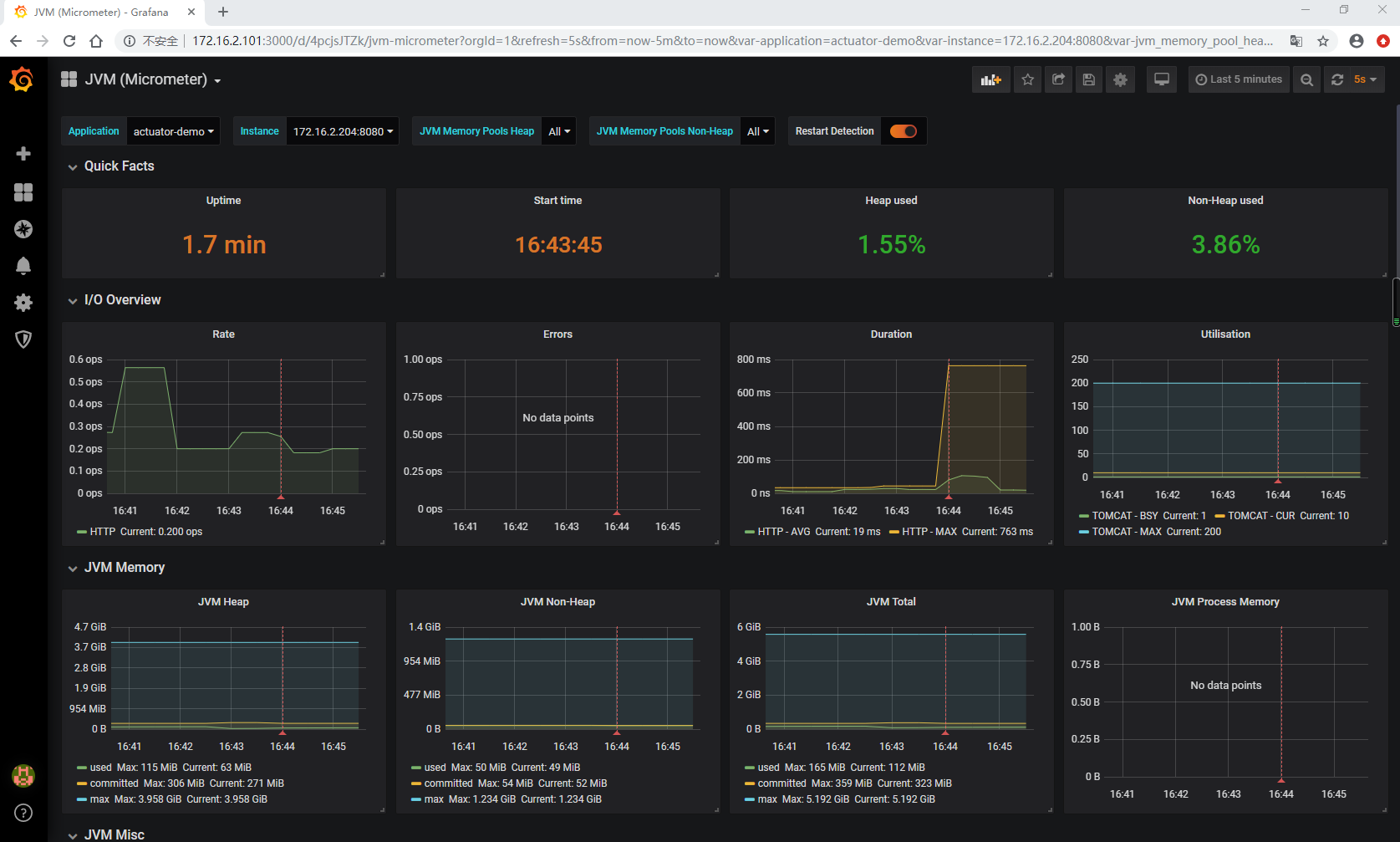
可以看到应用的 JVM 的 堆栈、 线程、 IO 等等信息。
源码
https://github.com/gf-huanchupk/SpringBootLearning/tree/master/springboot-actuator-prometheus
参考
https://micrometer.io/docs/registry/prometheus
https://prometheus.io/docs/prometheus
往期内容
欢迎扫码或微信搜索公众号《程序员果果》关注我,关注有惊喜~

Spring Boot Actuator 整合 Prometheus的更多相关文章
- 使用Spring Boot Actuator将指标导出到InfluxDB和Prometheus
使用Spring Boot Actuator将指标导出到InfluxDB和Prometheus Spring Boot Actuator是Spring Boot 2发布后修改最多的项目之一.它经过 ...
- 使用Spring Boot Actuator、Jolokia和Grafana实现准实时监控
由于最近在做监控方面的工作,因此也读了不少相关的经验分享.其中有这样一篇文章总结了一些基于Spring Boot的监控方案,因此翻译了一下,希望可以对大家有所帮助. 原文:Near real-time ...
- 朱晔和你聊Spring系列S1E7:简单好用的Spring Boot Actuator
阅读PDF版本 本文会来看一下Spring Boot Actuator提供给我们的监控端点Endpoint.健康检查Health和打点指标Metrics等所谓的Production-ready(生产环 ...
- 使用Spring Boot Actuator、Jolokia和Grafana实现准实时监控--转
原文地址:http://mp.weixin.qq.com/s?__biz=MzAxODcyNjEzNQ==&mid=2247483789&idx=1&sn=ae11f04780 ...
- Spring Boot Actuator:健康检查、审计、统计和监控(转)
Spring Boot Actuator可以帮助你监控和管理Spring Boot应用,比如健康检查.审计.统计和HTTP追踪等.所有的这些特性可以通过JMX或者HTTP endpoints来获得. ...
- Spring Boot Actuator:健康检查、审计、统计和监控
Spring Boot Actuator可以帮助你监控和管理Spring Boot应用,比如健康检查.审计.统计和HTTP追踪等.所有的这些特性可以通过JMX或者HTTP endpoints来获得. ...
- spring boot actuator专题
spring-boot-starter-actuator模块的实现对于实施微服务的中小团队来说,可以有效地减少监控系统在采集应用指标时的开发量.当然,它也并不是万能的,有时候我们也需要对其做一些简单的 ...
- Spring Boot (九): 微服务应用监控 Spring Boot Actuator 详解
1. 引言 在当前的微服务架构方式下,我们会有很多的服务部署在不同的机器上,相互是通过服务调用的方式进行交互,一个完整的业务流程中间会经过很多个微服务的处理和传递,那么,如何能知道每个服务的健康状况就 ...
- Spring Boot 2.X(十六):应用监控之 Spring Boot Actuator 使用及配置
Actuator 简介 Actuator 是 Spring Boot 提供的对应用系统的自省和监控功能.通过 Actuator,可以使用数据化的指标去度量应用的运行情况,比如查看服务器的磁盘.内存.C ...
随机推荐
- MySQL Explain学习笔记
目录 一.执行计划概念 二.Explain用法 三.Explain属性介绍 3.1 id属性 3.2 select_type属性 3.3 table属性 3.4 type属性 3.5 possible ...
- centos 7 ifconfig无法找到命令的方法
场景:新安装centos 没有安装. centos7.2的mini版没有安装这个东东,所以我们就直接安装就好了,在终端里面输入: yum -y install net-tools
- apache ignite系列(四):持久化
ignite持久化与固化内存 1.持久化的机制 ignite持久化的关键点如下: ignite持久化可防止内存溢出导致数据丢失的情况: 持久化可以定制化配置,按需持久化; 持久化能解决在大量缓存数据情 ...
- hbase shell命令及Java接口介绍
一. shell命令 1. 进入hbase命令行 ./hbase shell 2. 显示hbase中的表 list3. 创建user表,包含info.data两个列族create 'user', ...
- springmvc request foward 和 redirect
---恢复内容开始--- 最近在实现那个学生信息录入的时候,先是在添加学生的页面添加完,然后想直接调用Conroller层遍历学生的方法,我的意思就是在contoller一个方法怎么直接调用另外一个方 ...
- Elastic Stack 笔记(十)Elasticsearch5.6 For Hadoop
博客地址:http://www.moonxy.com 一.前言 ES-Hadoop 是连接快速查询和大数据分析的桥梁,它能够无间隙的在 Hadoop 和 ElasticSearch 上移动数据.ES ...
- Angular4+Koa2+MongoDB开发个人博客
**文章原创于公众号:程序猿周先森.本平台不定时更新,喜欢我的文章,欢迎关注我的微信公众号.** * 数据库常见sql语句
1:增加INSERT INTO t_student (name, age) VALUES ('liwx', 18);2:删除DELETE FROM t_student WHERE name = 'li ...
- SpringCloud微服务笔记-Nginx实现网关反向代理
背景 当前在SpringCloud微服务架构下,网关作为服务的入口尤为重要,一旦网关发生单点故障会导致整个服务集群瘫痪,为了保证网关的高可用可以通过Nginx的反向代理功能实现网关的高可用. 项目源码 ...
- elastic集群单节点停机维护
为了elastic时时提供服务,需要elastic至少状态维持在yellow状态.所有,维护时需要依次对elastic单个节点进行维护. 操作步骤如下: 1.停止elastic的自动分配功能 curl ...