
利用window10的Linux子系统实现docker的安装使用
先参照 此博客 点这里
我在执行 apt installdocker.io 命令时,不能正确的安装 docker client
所以我找了下面的命令,然后执行 docker version 成功了
辅助参照
https://www.jianshu.com/p/d1b2b4240256
https://blog.csdn.net/hookttg/article/details/80625168
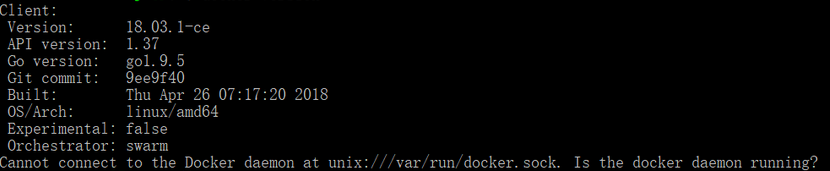
执行命令 sudo curl -sSL https://get.docker.com/ | sh
实际的脚本是下面的
#!/bin/sh

set -e

# This script is meant for quick & easy install via:

#   $ curl -fsSL get.docker.com -o get-docker.sh

#   $ sh get-docker.sh

#

# For test builds (ie. release candidates):

#   $ curl -fsSL test.docker.com -o test-docker.sh

#   $ sh test-docker.sh

#

# NOTE: Make sure to verify the contents of the script

#       you downloaded matches the contents of install.sh

#       located at https://github.com/docker/docker-install

#       before executing.

#

# Git commit from https://github.com/docker/docker-install when

# the script was uploaded (Should only be modified by upload job):

SCRIPT_COMMIT_SHA=36b78b2

# This value will automatically get changed for:

#   * edge

#   * test

#   * experimental

DEFAULT_CHANNEL_VALUE="edge"

if [ -z "$CHANNEL" ]; then

    CHANNEL=$DEFAULT_CHANNEL_VALUE

fi

DEFAULT_DOWNLOAD_URL="https://download.docker.com"

if [ -z "$DOWNLOAD_URL" ]; then

    DOWNLOAD_URL=$DEFAULT_DOWNLOAD_URL

fi

DEFAULT_REPO_FILE="docker-ce.repo"

if [ -z "$REPO_FILE" ]; then

    REPO_FILE="$DEFAULT_REPO_FILE"

fi

SUPPORT_MAP="

x86_64-centos-

x86_64-fedora-

x86_64-fedora-

x86_64-fedora-

x86_64-debian-wheezy

x86_64-debian-jessie

x86_64-debian-stretch

x86_64-debian-buster

x86_64-ubuntu-trusty

x86_64-ubuntu-xenial

x86_64-ubuntu-bionic

x86_64-ubuntu-artful

s390x-ubuntu-xenial

s390x-ubuntu-bionic

s390x-ubuntu-artful

ppc64le-ubuntu-xenial

ppc64le-ubuntu-bionic

ppc64le-ubuntu-artful

aarch64-ubuntu-xenial

aarch64-ubuntu-bionic

aarch64-debian-jessie

aarch64-debian-stretch

aarch64-debian-buster

aarch64-fedora-

aarch64-fedora-

aarch64-fedora-

aarch64-centos-

armv6l-raspbian-jessie

armv7l-raspbian-jessie

armv6l-raspbian-stretch

armv7l-raspbian-stretch

armv7l-debian-jessie

armv7l-debian-stretch

armv7l-debian-buster

armv7l-ubuntu-trusty

armv7l-ubuntu-xenial

armv7l-ubuntu-bionic

armv7l-ubuntu-artful

"

mirror=''

DRY_RUN=${DRY_RUN:-}

while [ $# -gt  ]; do

    case "$1" in

        --mirror)

            mirror="$2"

            shift

            ;;

        --dry-run)

            DRY_RUN=

            ;;

        --*)

            echo "Illegal option $1"

            ;;

    esac

    shift $(( $# >  ?  :  ))

done

case "$mirror" in

    Aliyun)

        DOWNLOAD_URL="https://mirrors.aliyun.com/docker-ce"

        ;;

    AzureChinaCloud)

        DOWNLOAD_URL="https://mirror.azure.cn/docker-ce"

        ;;

esac

command_exists() {

    command -v "$@" > /dev/null >&

}

is_dry_run() {

    if [ -z "$DRY_RUN" ]; then

        return

    else

        return

    fi

}

deprecation_notice() {

    distro=$

    date=$

    echo

    echo "DEPRECATION WARNING:"

    echo "    The distribution, $distro, will no longer be supported in this script as of $date."

    echo "    If you feel this is a mistake please submit an issue at https://github.com/docker/docker-install/issues/new"

    echo

    sleep

}

get_distribution() {

    lsb_dist=""

    # Every system that we officially support has /etc/os-release

    if [ -r /etc/os-release ]; then

        lsb_dist="$(. /etc/os-release && echo "$ID")"

    fi

    # Returning an empty string here should be alright since the

    # case statements don't act unless you provide an actual value

    echo "$lsb_dist"

}

add_debian_backport_repo() {

    debian_version="$1"

    backports="deb http://ftp.debian.org/debian $debian_version-backports main"

    if ! grep -Fxq "$backports" /etc/apt/sources.list; then

        (set -x; $sh_c "echo \"$backports\" >> /etc/apt/sources.list")

    fi

}

echo_docker_as_nonroot() {

    if is_dry_run; then

        return

    fi

    if command_exists docker && [ -e /var/run/docker.sock ]; then

        (

            set -x

            $sh_c 'docker version'

        ) || true

    fi

    your_user=your-user

    [ "$user" != 'root' ] && your_user="$user"

    # intentionally mixed spaces and tabs here -- tabs are stripped by "<<-EOF", spaces are kept in the output

    echo "If you would like to use Docker as a non-root user, you should now consider"

    echo "adding your user to the \"docker\" group with something like:"

    echo

    echo "  sudo usermod -aG docker $your_user"

    echo

    echo "Remember that you will have to log out and back in for this to take effect!"

    echo

    echo "WARNING: Adding a user to the \"docker\" group will grant the ability to run"

    echo "         containers which can be used to obtain root privileges on the"

    echo "         docker host."

    echo "         Refer to https://docs.docker.com/engine/security/security/#docker-daemon-attack-surface"

    echo "         for more information."

}

# Check if this is a forked Linux distro

check_forked() {

    # Check for lsb_release command existence, it usually exists in forked distros

    if command_exists lsb_release; then

        # Check if the `-u` option is supported

        set +e

        lsb_release -a -u > /dev/null >&

        lsb_release_exit_code=$?

        set -e

        # Check if the command has exited successfully, it means we're in a forked distro

        if [ "$lsb_release_exit_code" = "" ]; then

            # Print info about current distro

            cat <<-EOF

            You're using '$lsb_dist' version '$dist_version'.

            EOF

            # Get the upstream release info

            lsb_dist=$(lsb_release -a -u >& | tr '[:upper:]' '[:lower:]' | grep -E 'id' | cut -d ':' -f  | tr -d '[:space:]')

            dist_version=$(lsb_release -a -u >& | tr '[:upper:]' '[:lower:]' | grep -E 'codename' | cut -d ':' -f  | tr -d '[:space:]')

            # Print info about upstream distro

            cat <<-EOF

            Upstream release is '$lsb_dist' version '$dist_version'.

            EOF

        else

            if [ -r /etc/debian_version ] && [ "$lsb_dist" != "ubuntu" ] && [ "$lsb_dist" != "raspbian" ]; then

                if [ "$lsb_dist" = "osmc" ]; then

                    # OSMC runs Raspbian

                    lsb_dist=raspbian

                else

                    # We're Debian and don't even know it!

                    lsb_dist=debian

                fi

                dist_version="$(sed 's/\/.*//' /etc/debian_version | sed 's/\..*//')"

                case "$dist_version" in

                    )

                        dist_version="stretch"

                    ;;

                    |'Kali Linux 2')

                        dist_version="jessie"

                    ;;

                    )

                        dist_version="wheezy"

                    ;;

                esac

            fi

        fi

    fi

}

semverParse() {

    major="${1%%.*}"

    minor="${1#$major.}"

    minor="${minor%%.*}"

    patch="${1#$major.$minor.}"

    patch="${patch%%[-.]*}"

}

ee_notice() {

    echo

    echo

    echo "  WARNING: $1 is now only supported by Docker EE"

    echo "           Check https://store.docker.com for information on Docker EE"

    echo

    echo

}

do_install() {

    echo "# Executing docker install script, commit: $SCRIPT_COMMIT_SHA"

    if command_exists docker; then

        docker_version="$(docker -v | cut -d ' ' -f3 | cut -d ',' -f1)"

        MAJOR_W=

        MINOR_W=

        semverParse "$docker_version"

        shouldWarn=

        if [ "$major" -lt "$MAJOR_W" ]; then

            shouldWarn=

        fi

        if [ "$major" -le "$MAJOR_W" ] && [ "$minor" -lt "$MINOR_W" ]; then

            shouldWarn=

        fi

        cat >& <<-'EOF'

            Warning: the "docker" command appears to already exist on this system.

            If you already have Docker installed, this script can cause trouble, which is

            why we're displaying this warning and provide the opportunity to cancel the

            installation.

            If you installed the current Docker package using this script and are using it

        EOF

        if [ $shouldWarn -eq  ]; then

            cat >& <<-'EOF'

            again to update Docker, we urge you to migrate your image store before upgrading

            to v1.+.

            You can find instructions for this here:

            https://github.com/docker/docker/wiki/Engine-v1.10.0-content-addressability-migration

            EOF

        else

            cat >& <<-'EOF'

            again to update Docker, you can safely ignore this message.

            EOF

        fi

        cat >& <<-'EOF'

            You may press Ctrl+C now to abort this script.

        EOF

        ( set -x; sleep  )

    fi

    user="$(id -un 2>/dev/null || true)"

    sh_c='sh -c'

    if [ "$user" != 'root' ]; then

        if command_exists sudo; then

            sh_c='sudo -E sh -c'

        elif command_exists su; then

            sh_c='su -c'

        else

            cat >& <<-'EOF'

            Error: this installer needs the ability to run commands as root.

            We are unable to find either "sudo" or "su" available to make this happen.

            EOF

            exit

        fi

    fi

    if is_dry_run; then

        sh_c="echo"

    fi

    # perform some very rudimentary platform detection

    lsb_dist=$( get_distribution )

    lsb_dist="$(echo "$lsb_dist" | tr '[:upper:]' '[:lower:]')"

    case "$lsb_dist" in

        ubuntu)

            if command_exists lsb_release; then

                dist_version="$(lsb_release --codename | cut -f2)"

            fi

            if [ -z "$dist_version" ] && [ -r /etc/lsb-release ]; then

                dist_version="$(. /etc/lsb-release && echo "$DISTRIB_CODENAME")"

            fi

        ;;

        debian|raspbian)

            dist_version="$(sed 's/\/.*//' /etc/debian_version | sed 's/\..*//')"

            case "$dist_version" in

                )

                    dist_version="stretch"

                ;;

                )

                    dist_version="jessie"

                ;;

                )

                    dist_version="wheezy"

                ;;

            esac

        ;;

        centos)

            if [ -z "$dist_version" ] && [ -r /etc/os-release ]; then

                dist_version="$(. /etc/os-release && echo "$VERSION_ID")"

            fi

        ;;

        rhel|ol|sles)

            ee_notice "$lsb_dist"

            exit

            ;;

        *)

            if command_exists lsb_release; then

                dist_version="$(lsb_release --release | cut -f2)"

            fi

            if [ -z "$dist_version" ] && [ -r /etc/os-release ]; then

                dist_version="$(. /etc/os-release && echo "$VERSION_ID")"

            fi

        ;;

    esac

    # Check if this is a forked Linux distro

    check_forked

    # Check if we actually support this configuration

    if ! echo "$SUPPORT_MAP" | grep "$(uname -m)-$lsb_dist-$dist_version" >/dev/null; then

        cat >& <<-'EOF'

        Either your platform is not easily detectable or is not supported by this

        installer script.

        Please visit the following URL for more detailed installation instructions:

        https://docs.docker.com/engine/installation/

        EOF

        exit

    fi

    # Run setup for each distro accordingly

    case "$lsb_dist" in

        ubuntu|debian|raspbian)

            pre_reqs="apt-transport-https ca-certificates curl"

            if [ "$lsb_dist" = "debian" ]; then

                if [ "$dist_version" = "wheezy" ]; then

                    add_debian_backport_repo "$dist_version"

                fi

                # libseccomp2 does not exist for debian jessie main repos for aarch64

                if [ "$(uname -m)" = "aarch64" ] && [ "$dist_version" = "jessie" ]; then

                    add_debian_backport_repo "$dist_version"

                fi

            fi

            # TODO: August ,  delete from here,

            if [ "$lsb_dist" =  "ubuntu" ] && [ "$dist_version" = "artful" ]; then

                deprecation_notice "$lsb_dist $dist_version" "August 31, 2018"

            fi

            # TODO: August ,  delete to here,

            if ! command -v gpg > /dev/null; then

                pre_reqs="$pre_reqs gnupg"

            fi

            apt_repo="deb [arch=$(dpkg --print-architecture)] $DOWNLOAD_URL/linux/$lsb_dist $dist_version $CHANNEL"

            (

                if ! is_dry_run; then

                    set -x

                fi

                $sh_c 'apt-get update -qq >/dev/null'

                $sh_c "apt-get install -y -qq $pre_reqs >/dev/null"

                $sh_c "curl -fsSL \"$DOWNLOAD_URL/linux/$lsb_dist/gpg\" | apt-key add -qq - >/dev/null"

                $sh_c "echo \"$apt_repo\" > /etc/apt/sources.list.d/docker.list"

                if [ "$lsb_dist" = "debian" ] && [ "$dist_version" = "wheezy" ]; then

                    $sh_c 'sed -i "/deb-src.*download\.docker/d" /etc/apt/sources.list.d/docker.list'

                fi

                $sh_c 'apt-get update -qq >/dev/null'

            )

            pkg_version=""

            if [ ! -z "$VERSION" ]; then

                if is_dry_run; then

                    echo "# WARNING: VERSION pinning is not supported in DRY_RUN"

                else

                    # Will work for incomplete versions IE (17.12), but may not actually grab the "latest" if in the test channel

                    pkg_pattern="$(echo "$VERSION" | sed "s/-ce-/~ce~.*/g" | sed "s/-/.*/g").*-0~$lsb_dist"

                    search_command="apt-cache madison 'docker-ce' | grep '$pkg_pattern' | head -1 | cut -d' ' -f 4"

                    pkg_version="$($sh_c "$search_command")"

                    echo "INFO: Searching repository for VERSION '$VERSION'"

                    echo "INFO: $search_command"

                    if [ -z "$pkg_version" ]; then

                        echo

                        echo "ERROR: '$VERSION' not found amongst apt-cache madison results"

                        echo

                        exit

                    fi

                    pkg_version="=$pkg_version"

                fi

            fi

            (

                if ! is_dry_run; then

                    set -x

                fi

                $sh_c "apt-get install -y -qq --no-install-recommends docker-ce$pkg_version >/dev/null"

            )

            echo_docker_as_nonroot

            exit

            ;;

        centos|fedora)

            yum_repo="$DOWNLOAD_URL/linux/$lsb_dist/$REPO_FILE"

            if ! curl -Ifs "$yum_repo" > /dev/null; then

                echo "Error: Unable to curl repository file $yum_repo, is it valid?"

                exit

            fi

            if [ "$lsb_dist" = "fedora" ]; then

                if [ "$dist_version" -lt "" ]; then

                    echo "Error: Only Fedora >=26 are supported"

                    exit

                fi

                pkg_manager="dnf"

                config_manager="dnf config-manager"

                enable_channel_flag="--set-enabled"

                pre_reqs="dnf-plugins-core"

                pkg_suffix="fc$dist_version"

            else

                pkg_manager="yum"

                config_manager="yum-config-manager"

                enable_channel_flag="--enable"

                pre_reqs="yum-utils"

                pkg_suffix="el"

            fi

            (

                if ! is_dry_run; then

                    set -x

                fi

                $sh_c "$pkg_manager install -y -q $pre_reqs"

                $sh_c "$config_manager --add-repo $yum_repo"

                if [ "$CHANNEL" != "stable" ]; then

                    $sh_c "$config_manager $enable_channel_flag docker-ce-$CHANNEL"

                fi

                $sh_c "$pkg_manager makecache"

            )

            pkg_version=""

            if [ ! -z "$VERSION" ]; then

                if is_dry_run; then

                    echo "# WARNING: VERSION pinning is not supported in DRY_RUN"

                else

                    pkg_pattern="$(echo "$VERSION" | sed "s/-ce-/\\\\.ce.*/g" | sed "s/-/.*/g").*$pkg_suffix"

                    search_command="$pkg_manager list --showduplicates 'docker-ce' | grep '$pkg_pattern' | tail -1 | awk '{print \$2}'"

                    pkg_version="$($sh_c "$search_command")"

                    echo "INFO: Searching repository for VERSION '$VERSION'"

                    echo "INFO: $search_command"

                    if [ -z "$pkg_version" ]; then

                        echo

                        echo "ERROR: '$VERSION' not found amongst $pkg_manager list results"

                        echo

                        exit

                    fi

                    # Cut out the epoch and prefix with a '-'

                    pkg_version="-$(echo "$pkg_version" | cut -d':' -f 2)"

                fi

            fi

            (

                if ! is_dry_run; then

                    set -x

                fi

                $sh_c "$pkg_manager install -y -q docker-ce$pkg_version"

            )

            echo_docker_as_nonroot

            exit

            ;;

    esac

    exit

}

# wrapped up in a function so that we have some protection against only getting

# half the file during "curl | sh"

do_install
利用window10的Linux子系统实现docker的安装使用的更多相关文章
- Windows(WSL2) Linux子系统搭建Docker环境
摘要:本文主要介绍了如何再Windows(WSL2)中启用Linux系统中,并搭建Docker环境. WSL是适用于 Linux 的 Windows 子系统可让开发人员按原样运行 GNU/Linux ...
- Linux上通过docker方式安装mysql
centos版本信息: docker版本信息 mysql版本:5.7 1.docker方式安装 首先拉取mysql镜像:docker pull mysql:5.7 查看本地的mysql镜像 执 ...
- Linux ubuntu下docker容器安装和基础命令
Docker介绍: 云计算就好比大货轮,docker就是集装箱虚拟机虽然可以隔离出很多"子电脑",但占用空间更大,启动更慢,虚拟机软件可能还要花钱(例如VMWare). 而容器技术 ...
- Windows10系统的Linux子系统中安装MySQL数据库心得
后端开发童鞋们, 自己开发机用的是Windows系统电脑(台式机或笔记本), 而开发的程序和使用的数据库等要运行在Linux服务器上, 这种情况有木有? 提前声明: 本文并不讨论操作系统的比较, 以及 ...
- Windows linux子系统 使用说明
1.安装 linux 子系统 2.应用商店安装ubuntu 3.为了方便可以配置成默认登陆root账户 Ubuntu config –default-user root 4. 安装完毕 5.安 ...
- win10中搭建Linux子系统
win10自带的Linux子系统,简称WSL(Windows Subsystem for Linux).优点是打通了Linux系统和windows系统,改变了传统虚拟机/双系统造成的两个系统相互隔绝的 ...
- Windows下的Linux子系统安装,WSL 2下配置docker
Windows下的Linux子系统安装,WSL 2下配置docker 前提条件: 安装WSL 2需要Windows 10版本是Build 18917或更高,首先先确认系统版本已升级. 在“启用或关闭W ...
- Window10 Linux子系统挂载磁盘
默认情况下, Linux子系统将当前winodws磁盘的盘全部挂载到/mnt/<disk_label>, 但一些新增的盘就需要手动做下了.. 官方参考文档 挂载磁盘 -- DrvFs 挂载 ...
- .NET Core多平台开发体验[3]: Linux (Windows Linux子系统)
如果想体验Linux环境下开发和运行.NET Core应用,我们有多种选择.一种就是在一台物理机上安装原生的Linux,我们可以根据自身的喜好选择某种Linux Distribution,目前来说像R ...
随机推荐
- Linux 笔记 - 第十章 Shell 基础知识
博客地址:http://www.moonxy.com 一.前言 Shell 是系统的用户界面,提供了用户与内核进行交互操作的一种接口,它接收用户输入的命令并把它送入内核去执行.实际上 Shell 是一 ...
- 控制执行流程之switch语句
switch语句,同时也是一种选择性语句,其根据整数表达式的值(整数选择因子)选择一段代码去执行.整数选择因子为int类型或者char类型.
- SpringBoot启动zipkin-server报错Error creating bean with name ‘armeriaServer’
目前,GitHub 上最新 release 版本是 Zipkin 2.12.9,从 2.12.6 版本开始有个较大的更新,迁移使用 Armeria HTTP 引擎. 从此版本开始,若直接添加依赖的 S ...
- [MySQL] 02- Optimisation solutions
前言 一.资源 MySQL 对于千万级的大表要怎么优化? - MySQL - 知乎[方法论] MySQL大表优化方案[一些优化的细节操作] MySQL大表优化方案[一些优化的细节操作] 分布式数据库下 ...
- CSS从大图中抠图然后显示其中的一部分
相信大家在使用css时会遇到一个情况吧 就是一张大图片里面什么都有 各种图标都有 然而自己就是不太会使用其中的小图标 这是我最近的一次学习 首先上图 这么大一张图片 那么这么使其只显示一部分 并且为我 ...
- vscode中如何自动保存
是的,vscode是个不错的编辑器,它的扩展功能能支持很多的语言,然后在实践过程中,我们发现每写好一次就得手动按CTRL+S,未免有点手酸,这时候我们就可以开启我们的自动保存功能,方式也很简单,在 文 ...
- 机器学习之SVM调参实例
一.任务 这次我们将了解在机器学习中支持向量机的使用方法以及一些参数的调整.支持向量机的基本原理就是将低维不可分问题转换为高维可分问题,在前面的博客具体介绍过了,这里就不再介绍了. 首先导入相关标准库 ...
- Scrapy项目 - 实现豆瓣 Top250 电影信息爬取的爬虫设计
通过使Scrapy框架,掌握如何使用Twisted异步网络框架来处理网络通讯的问题,进行数据挖掘和对web站点页面提取结构化数据,可以加快我们的下载速度,也可深入接触各种中间件接口,灵活的完成各种需求 ...
- C/C++中变量的作用域和存储类型简介
写在开头 对于很多C/C++的初学者来说,很容易理不清变量的作用域和存储类型这一块的一些概念,也容易将其中的一些概念搞混淆.作为一个C/C++的初学者,笔者希望在这里能够尝试着去理一理这些较为繁杂的概 ...
- You can't specify target table 'sys_user_function' for update in FROM clause
mysql数据库在执行同时查询本表数据并删除本表数据时候,报错! 报错原因: DELETE from sys_user_function where User_Id = 19 and Function ...