
SpringBoot——Web开发(静态资源映射)
静态资源映射
SpringBoot对于SpringMVC的自动化配置都在WebMVCAutoConfiguration类中。
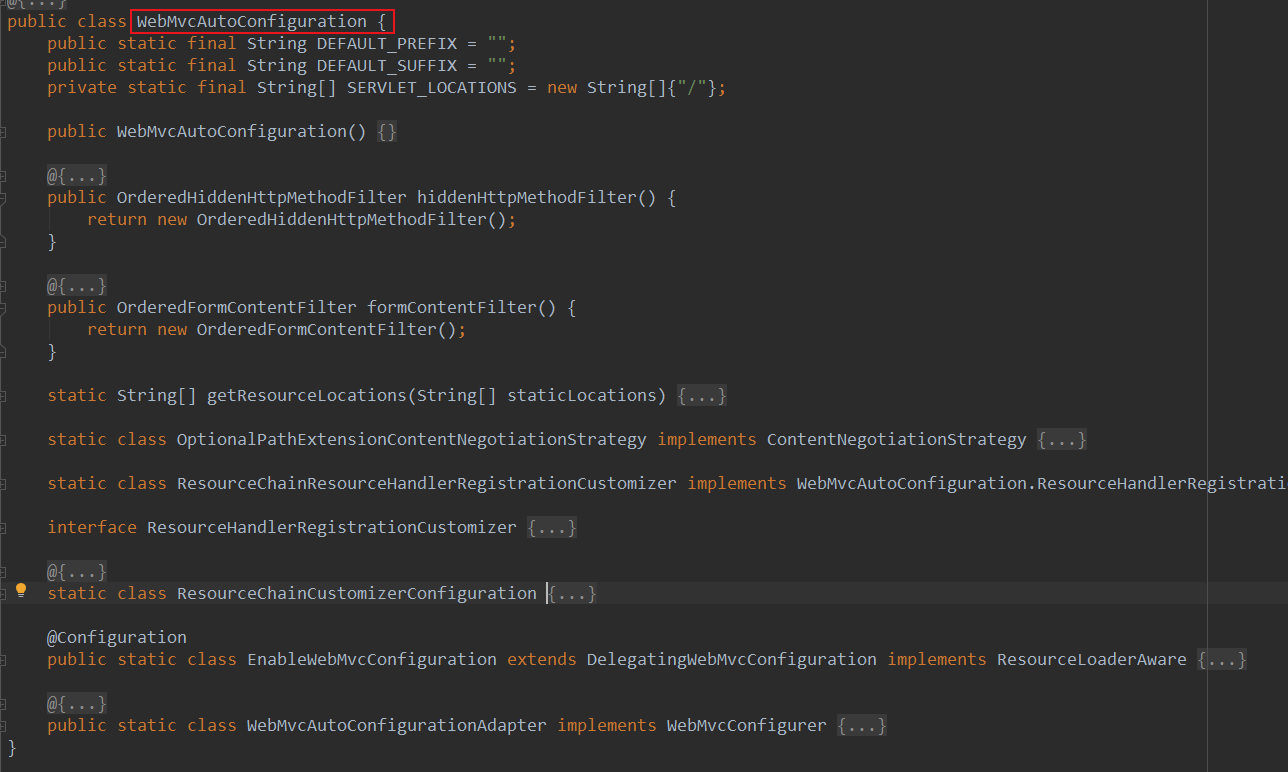
其中一个静态内部类WebMvcAutoConfigurationAdapter实现了WebMvcConfigurer接口。(361)
WebMvcConfigurer接口中定义了addResourceHandlers处理静态资源的默认映射关系.(500)

addResourceHandlers在WebMvcAutoConfigurationAdapter类中实现
public void addResourceHandlers(ResourceHandlerRegistry registry) {

            if (!this.resourceProperties.isAddMappings()) {

                logger.debug("Default resource handling disabled");

            } else {

                Duration cachePeriod = this.resourceProperties.getCache().getPeriod();

                CacheControl cacheControl = this.resourceProperties.getCache().getCachecontrol().toHttpCacheControl();

                if (!registry.hasMappingForPattern("/webjars/**")) {

                    this.customizeResourceHandlerRegistration(registry.addResourceHandler(new String[]{"/webjars/**"}).addResourceLocations(new String[]{"classpath:/META-INF/resources/webjars/"}).setCachePeriod(this.getSeconds(cachePeriod)).setCacheControl(cacheControl));

                }

                String staticPathPattern = this.mvcProperties.getStaticPathPattern();

                if (!registry.hasMappingForPattern(staticPathPattern)) {

                    this.customizeResourceHandlerRegistration(registry.addResourceHandler(new String[]{staticPathPattern}).addResourceLocations(WebMvcAutoConfiguration.getResourceLocations(this.resourceProperties.getStaticLocations())).setCachePeriod(this.getSeconds(cachePeriod)).setCacheControl(cacheControl));

                }

            }

        }
其中
this.resourceProperties.getStaticLocations()
返回静态资源的默认映射关系,

getStaticLocations()方法在ResourceProperties中定义
其中,
private static final String[] CLASSPATH_RESOURCE_LOCATIONS = new String[]{"classpath:/META-INF/resources/", "classpath:/resources/", "classpath:/static/", "classpath:/public/"};
classpath:/META-INF/resources/
classpath:/resources/
classpath:/static/
classpath:/public/
第五个默认的资源映射:在静态方法getResourceLocations中定义
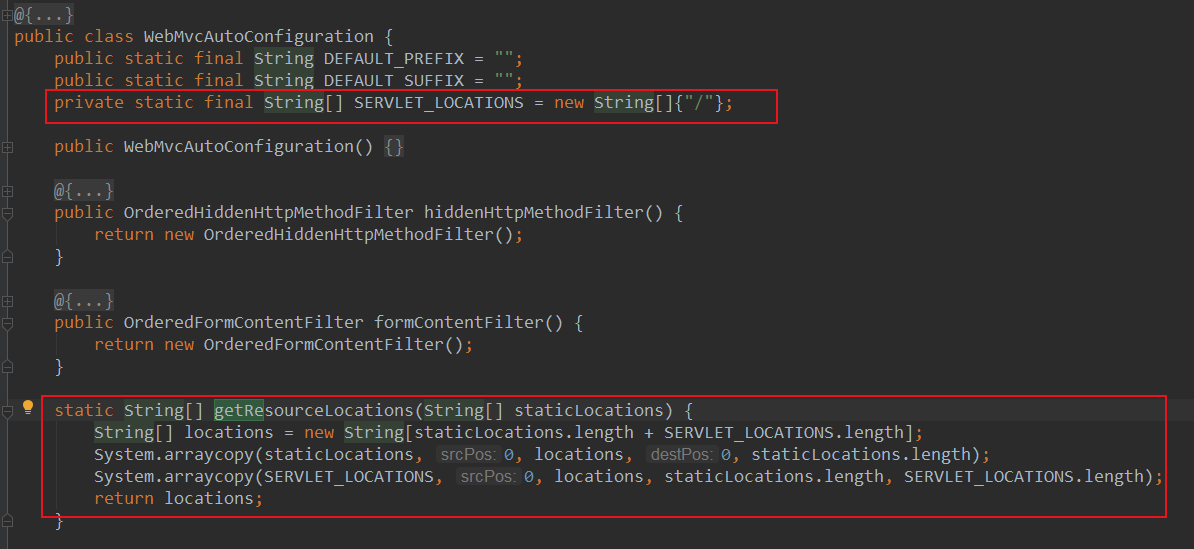
/
小结:
默认情况下,可以在以下五个位置放置静态资源
classpath:/META-INF/resources/

classpath:/resources/

classpath:/static/

classpath:/public/

/
【静态资源一般放在classpath:/static/目录下】
自定义favicon,自定义index.html
favicon.ico是浏览器左上角的图标,可以放在静态资源路径下或者类路径下,静态资源路径优先级高。
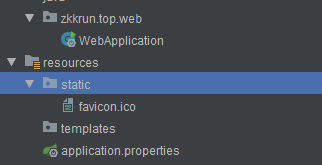

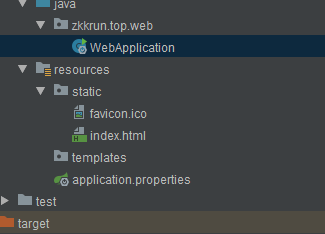
SpringBoot启动后默认在静态资源目录下寻找index.html,如果没有找到;就会去resource/templates目录下寻找index.html(使用Thymeleaf模板)

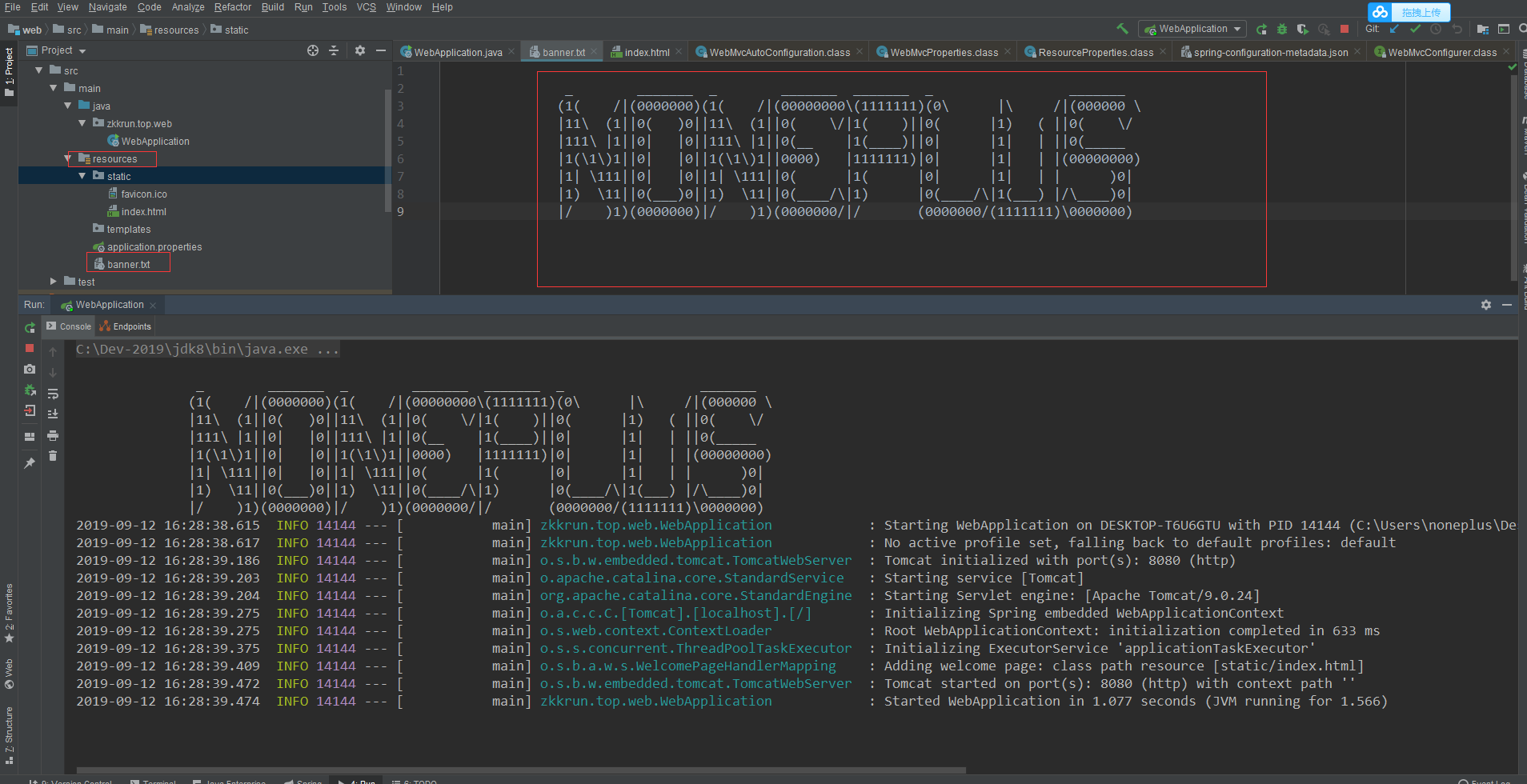
定制banner
http://www.network-science.de/ascii/
创建banner.txt文件置于resource目录下
SpringBoot热部署
<!-- https://mvnrepository.com/artifact/org.springframework.boot/spring-boot-devtools -->

        <dependency>

            <groupId>org.springframework.boot</groupId>

            <artifactId>spring-boot-devtools</artifactId>

            <optional>true</optional>

        </dependency>
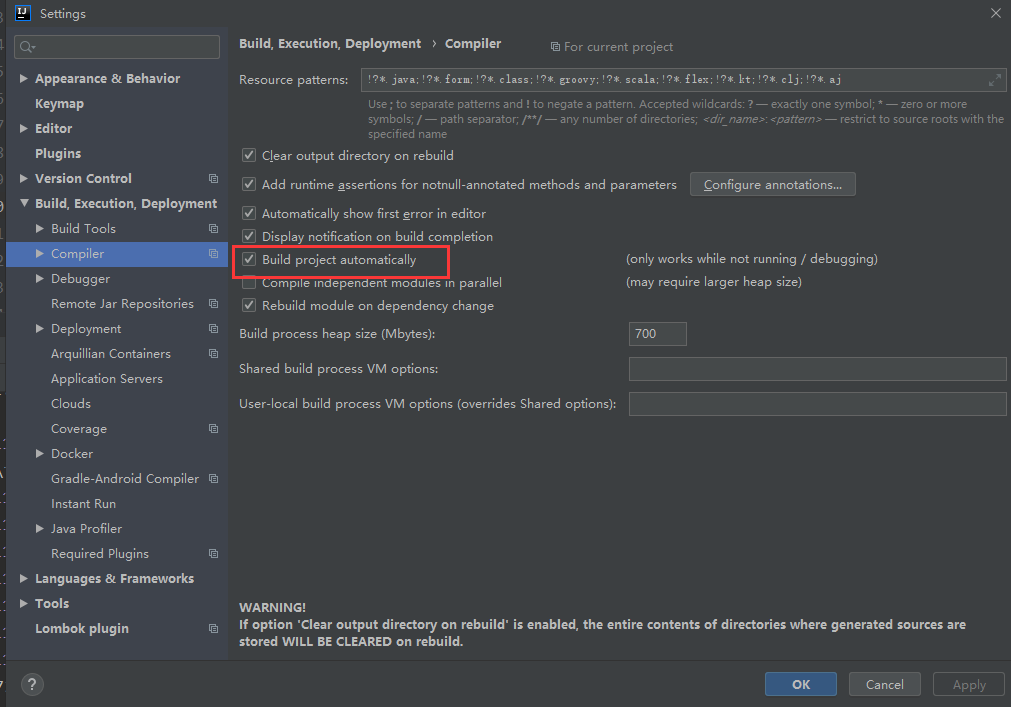
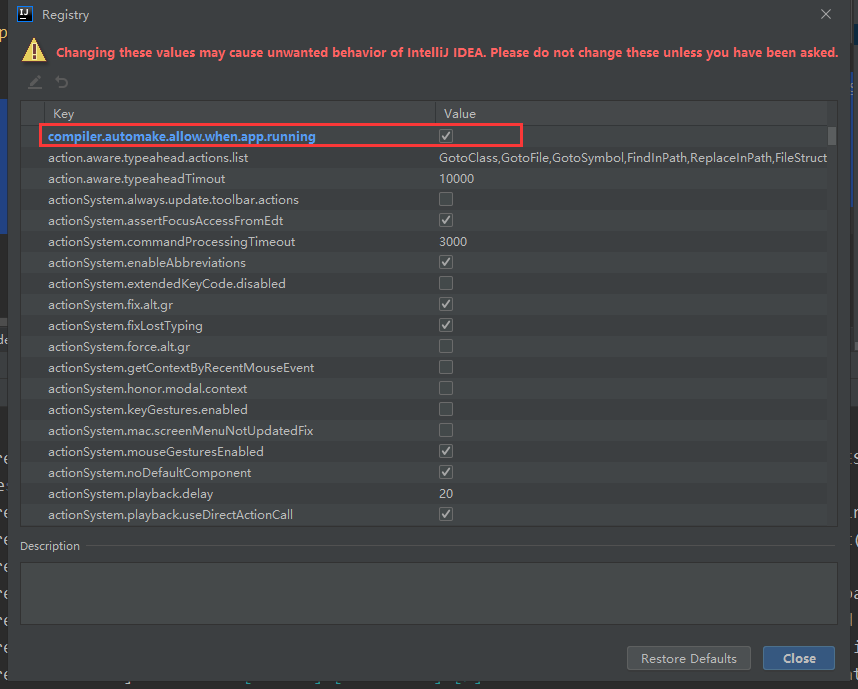
CTRL + ALT + Shift + /

SpringBoot——Web开发(静态资源映射)的更多相关文章
- (4)Spring Boot Web开发---静态资源
文章目录 对静态资源的映射规则 模板引擎 Thymeleaf 使用 & 语法 使用之前将的快速创建项目的方法,勾选我们需要的场景,这里我需要 web --> web.sql --> ...
- Springboot学习02-webjars和静态资源映射规则
Springboot学习01-webjars和静态资源映射规则 前言 1-以前我们在IDEA中创建一个项目,添加web依赖包,我们现在是一个web应用,应该在man目录下面有一个webapp文件夹,将 ...
- SpringBoot:静态资源映射、定制404、配置icon
目录 静态资源映射规则 定制首页 定制错误页面 配置 icon 静态资源映射规则.定制首页.定制404页面.配置网站的图标 静态资源映射规则 SpringBoot中对于静态资源(css,js,img. ...
- spring-boot配置静态资源映射的坑:properties文件不能添加注释
如此博文所述,Spring Boot 对静态资源映射提供了默认配置 默认将 /** 所有访问映射到以下目录:classpath:/staticclasspath:/publicclasspath:/r ...
- SpringBoot 配置静态资源映射
SpringBoot 配置静态资源映射 (嵌入式servlet容器)先决知识 request.getSession().getServletContext().getRealPath("/& ...
- springboot静态资源映射
springboot静态资源映射 WebMvcAutoConfiguration @Override public void addResourceHandlers(ResourceHandlerRe ...
- springboot静态资源映射规则
一.所有/webjars/**的请求,都会去classpath:/META-INF/resources/webjars/下的目录去找资源. 二.访问/**,即访问任何资源,如果没有controller ...
- SpringBoot Web开发(5) 开发页面国际化+登录拦截
SpringBoot Web开发(5) 开发页面国际化+登录拦截 一.页面国际化 页面国际化目的:根据浏览器语言设置的信息对页面信息进行切换,或者用户点击链接自行对页面语言信息进行切换. **效果演示 ...
- Spring Boot 静态资源映射与上传文件路由配置
默认静态资源映射目录 默认映射路径 在平常的 web 开发中,避免不了需要访问静态资源,如常规的样式,JS,图片,上传文件等;Spring Boot 默认配置对静态资源映射提供了如下路径的映射 /st ...
随机推荐
- Go组件学习——database/sql数据库连接池你用对了吗
1.案例 case1: maxOpenConns > 1 func fewConns() { db, _ := db.Open("mysql", "root:roo ...
- java中Long类型和long类型的大小比较
在开发过程中老犯一些低级错误,基础还得好好加强啊...... 今天遇到这样一个问题,我用 "=="来比较两个Long类型的数据,明明数值都相等,可是结果就是false,后来仔细想想 ...
- 剑指Offer(十九):顺时针打印矩阵
剑指Offer(十九):顺时针打印矩阵 搜索微信公众号:'AI-ming3526'或者'计算机视觉这件小事' 获取更多算法.机器学习干货 csdn:https://blog.csdn.net/baid ...
- 使用.Net Core + Vue + IdentityServer4 + Ocelot 实现一个简单的DEMO +源码
运行环境 Vue 使用的是D2admin: https://doc.d2admin.fairyever.com/zh/ Github地址:https://github.com/Fengddd/Perm ...
- DES加解密工具类
这两天在跟友商对接接口,在对外暴露接口的时候,因为友商不需要登录即可访问对于系统来说存在安全隐患,所以需要友商在调用接口的时候需要将数据加密,系统解密验证后才执行业务.所有的加密方式并不是万能的,只是 ...
- 利用ShardingSphere-JDBC实现分库分表--配置中心的实现
在之前的文章中我详细描述了如何利用ShardingSphere-JDBC进行分库分表,同时也实现了简单的精确分库算法接口,详情见下面的链接: 利用ShardingSphere-JDBC实现分库分表 但 ...
- Java中指令重排
/** * 指令重排:代码执行顺序与预期不一致 (发生在前后行代码无联系时) * 目的:提高性能 * */ public class HappenBefore { private static int ...
- 分享一个赚钱方法:用趣分类app在家轻松赚钱
什么是趣分类 近期,垃圾分类是社会各界和广大市民关心的一个热门话题,随着垃圾分类工作的推进,各地都掀起学习垃圾分类的热潮.为了我们的美好生活,打响"垃圾分类"这场硬仗刻不容缓.据了 ...
- POJ-1847 Tram( 最短路 )
题目链接:http://poj.org/problem?id=1847 Description Tram network in Zagreb consists of a number of inter ...
- lightoj 1074 - Extended Traffic(spfa+负环判断)
题目链接:http://www.lightoj.com/volume_showproblem.php?problem=1074 题意:有n个城市,每一个城市有一个拥挤度ai,从一个城市I到另一个城市J ...