
学习OkHttp wiki--Interceptors
Interceptors##
拦截器(Interceptors)是一种强有力的途径,来监控,改写和重试HTTP访问。下面是一个简单的拦截器,对流出的请求和流入的响应记录日志。
class LoggingInterceptor implements Interceptor {

  @Override public Response intercept(Chain chain) throws IOException {

    Request request = chain.request();

    long t1 = System.nanoTime();

    logger.info(String.format("Sending request %s on %s%n%s",

        request.url(), chain.connection(), request.headers()));

    Response response = chain.proceed(request);

    long t2 = System.nanoTime();

    logger.info(String.format("Received response for %s in %.1fms%n%s",

        response.request().url(), (t2 - t1) / 1e6d, response.headers()));

    return response;

  }

}
在拦截器的实现中,对chain.proceed(request)的一次调用时是关键的一步。这个看起来简单的方法是HTTP工作实际发生的地方,产生一个满足请求的响应。
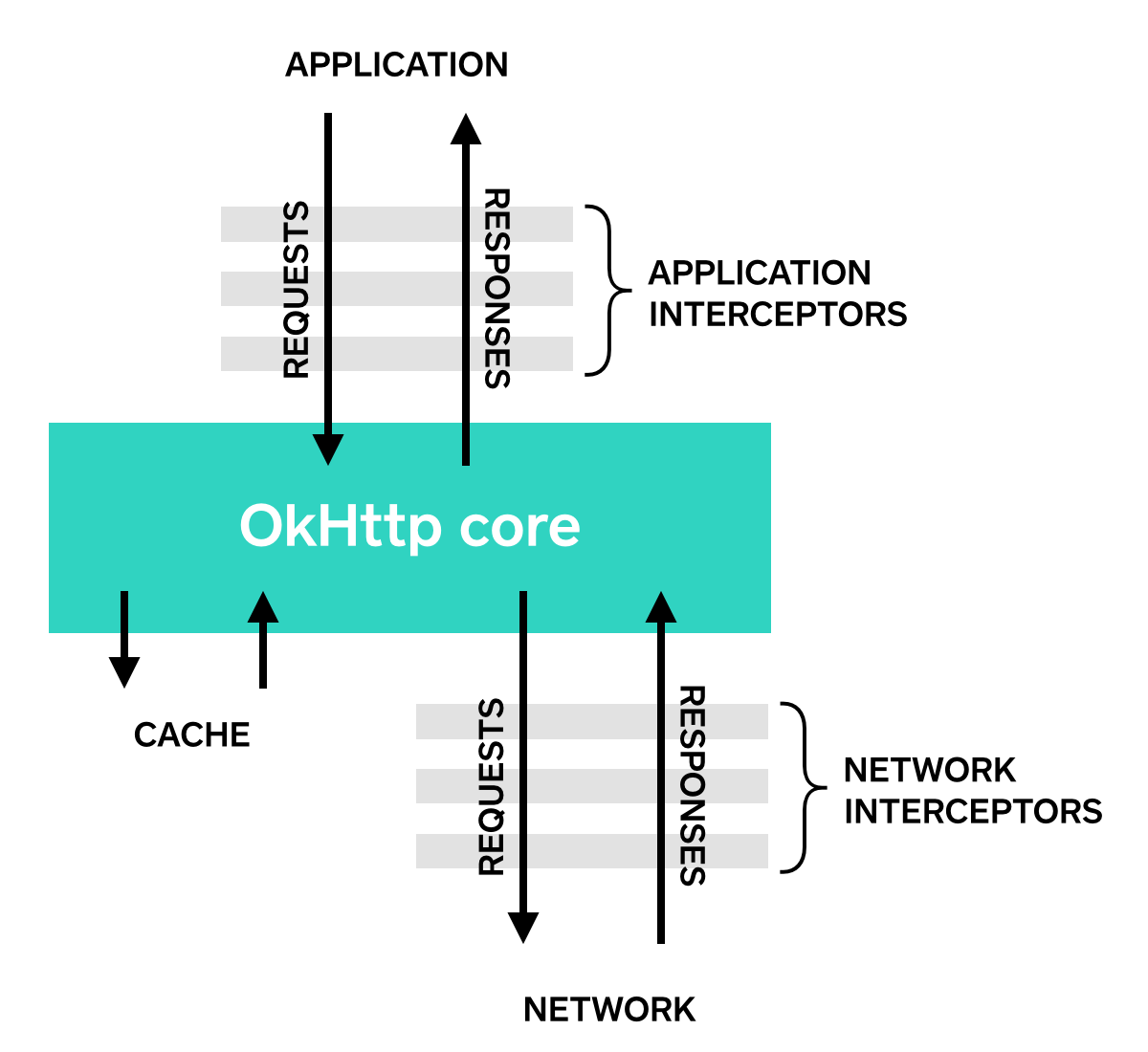
多个拦截器可以链接起来。假如说你有一个压缩拦截器和一个求和校验拦截器:你将需要决定数据是先压缩然后求和校验,或者先求和校验再压缩。OkHttp使用列表来追踪拦截器,多个拦截器是被有序的调用。
Application Interceptors###
拦截器被注册为应用(application)拦截器或者网络(network)拦截器。我们将用上面定义的LoggingInterceptor来展示这两者的区别。
要注册应用拦截器,在OkHttpClient.interceptors()方法返回的列表上调用add()方法:
OkHttpClient client = new OkHttpClient();

client.interceptors().add(new LoggingInterceptor());

Request request = new Request.Builder()

    .url("http://www.publicobject.com/helloworld.txt")

    .header("User-Agent", "OkHttp Example")

    .build();

Response response = client.newCall(request).execute();

response.body().close();
代码中的URLhttp://www.publicobject.com/helloworld.txt重定向到https://publicobject.com/helloworld.txt, OkHttp会自动跟随这一重定向。我们的应用拦截器会被调用一次,方法chain.proceed()返回的响应是重定向后的响应:
INFO: Sending request http://www.publicobject.com/helloworld.txt on null

User-Agent: OkHttp Example

INFO: Received response for https://publicobject.com/helloworld.txt in 1179.7ms

Server: nginx/1.4.6 (Ubuntu)

Content-Type: text/plain

Content-Length: 1759

Connection: keep-alive
我们可以通过response.request().url()同request.url()不同看出访问被重定向。这两个日志语句记录了两个不同了URL。
Network Interceptors###
注册网络拦截器的方法很类似。添加拦截器到networkInterceptors()列表,取代interceptors()列表:
OkHttpClient client = new OkHttpClient();

client.networkInterceptors().add(new LoggingInterceptor());

Request request = new Request.Builder()

    .url("http://www.publicobject.com/helloworld.txt")

    .header("User-Agent", "OkHttp Example")

    .build();

Response response = client.newCall(request).execute();

response.body().close();
当我们运行这一段代码时,拦截器执行了两次。一次是初始的到http://www.publicobject.com/helloworld.txt的请求,另一次是重定向到https://publicobject.com/helloworld.txt的请求。
INFO: Sending request http://www.publicobject.com/helloworld.txt on Connection{www.publicobject.com:80, proxy=DIRECT hostAddress=54.187.32.157 cipherSuite=none protocol=http/1.1}

User-Agent: OkHttp Example

Host: www.publicobject.com

Connection: Keep-Alive

Accept-Encoding: gzip

INFO: Received response for http://www.publicobject.com/helloworld.txt in 115.6ms

Server: nginx/1.4.6 (Ubuntu)

Content-Type: text/html

Content-Length: 193

Connection: keep-alive

Location: https://publicobject.com/helloworld.txt

INFO: Sending request https://publicobject.com/helloworld.txt on Connection{publicobject.com:443, proxy=DIRECT hostAddress=54.187.32.157 cipherSuite=TLS_ECDHE_RSA_WITH_AES_256_CBC_SHA protocol=http/1.1}

User-Agent: OkHttp Example

Host: publicobject.com

Connection: Keep-Alive

Accept-Encoding: gzip

INFO: Received response for https://publicobject.com/helloworld.txt in 80.9ms

Server: nginx/1.4.6 (Ubuntu)

Content-Type: text/plain

Content-Length: 1759

Connection: keep-alive
上面的网络请求也包含更多的数据,例如由OkHttp添加的请求头Accept-Encoding: gzip,通知支持对响应的压缩。网络拦截器链有一个非空的连接,用来询问我们连接web服务器使用的IP地址和TLS配置。
选择应用拦截器还是网络拦截器###
两个拦截器链有自身的相对优势。
Application Interceptors
- 不用担心中间过程的响应,例如重定向和重试。
- 始终调用一次,即使HTTP响应来自于缓存。
- 观察应用原始的意图。不用关注由OkHttp注入的头信息,例如
If-None-Match。 - 允许短路,不调用
Chain.proceed()。 - 允许重试,多次调用
Chain.proceed()。
Network Interceptors
- 能操作中间响应,例如重定向和重试。
- 发生网络短路的缓存响应时,不被调用。
- 观察将通过网络传输的数据。
- 可以获取到携带请求的
connection。
改写请求###
拦截器可以添加,移除或者替换请求头。它们也可以改变请求体。例如,如果你连接的web服务器支持,你可以用一个应用拦截器来压缩请求体。
/** This interceptor compresses the HTTP request body. Many webservers can't handle this! */

final class GzipRequestInterceptor implements Interceptor {

  @Override public Response intercept(Chain chain) throws IOException {

    Request originalRequest = chain.request();

    if (originalRequest.body() == null || originalRequest.header("Content-Encoding") != null) {

      return chain.proceed(originalRequest);

    }

    Request compressedRequest = originalRequest.newBuilder()

        .header("Content-Encoding", "gzip")

        .method(originalRequest.method(), gzip(originalRequest.body()))

        .build();

    return chain.proceed(compressedRequest);

  }

  private RequestBody gzip(final RequestBody body) {

    return new RequestBody() {

      @Override public MediaType contentType() {

        return body.contentType();

      }

      @Override public long contentLength() {

        return -1; // We don't know the compressed length in advance!

      }

      @Override public void writeTo(BufferedSink sink) throws IOException {

        BufferedSink gzipSink = Okio.buffer(new GzipSink(sink));

        body.writeTo(gzipSink);

        gzipSink.close();

      }

    };

  }

}
改写响应###
对应的,拦截器也可以改写响应头和改变响应体。这通常来讲比改写请求头更危险,因为它可能违背了web服务器的预期。
如果你在一个微妙的情境下,并准备好去处理对应的后果,改写响应头是一种有力的方式来解决问题。例如,你可以修复服务器错误配置的缓存控制响应头,来优化对响应的缓存。
/** Dangerous interceptor that rewrites the server's cache-control header. */

private static final Interceptor REWRITE_CACHE_CONTROL_INTERCEPTOR = new Interceptor() {

  @Override public Response intercept(Chain chain) throws IOException {

    Response originalResponse = chain.proceed(chain.request());

    return originalResponse.newBuilder()

        .header("Cache-Control", "max-age=60")

        .build();

  }

};
通常来讲,这种方式在补充相应的服务器问题修复时最有用。
可用性###
OkHttp拦截器需要2.2版本以上。不幸的是,拦截器对OkUrlFactory,和任何依赖OkUrlFactory的库无效,包含Retrofit 1.8以下和Picasso 2.4版本以下。
学习OkHttp wiki--Interceptors的更多相关文章
- 学习okhttp wiki--HTTPS
HTTPS OkHttp尝试平衡两个相互竞争的要素: 连通性(Connectivity):连接到尽可能多的服务器.这包括运行最新版本 boringssl 的服务器和不太过时的老版本 OpenSSL 的 ...
- 学习okhttp wiki--Connections.
Connections 尽管你只提供了URL,OkHttp使用三种类型来创建它和你的web服务器的连接:URL,地址(Address)和路由(Route). URLs URLs (例如 https:/ ...
- Okhttp3日志采集功能
原文地址以示尊重:http://www.jianshu.com/p/d836271b1ae4 日志采集是一个APP必备的功能,可以方便开发人员快速定位问题,解决问题,那么我们在使用okhttp的时候应 ...
- [转]Android专家级别的面试总结
Android专家级别的面试总结 2017年02月15日 16:56:28 阅读数:1225 1.. 自定义View流程 onMeasure, onLayout, onDraw, 采用深度优先,因为必 ...
- 【译】OkHttp3 拦截器(Interceptor)
一,OkHttp 拦截器介绍(译自官方文档) 官方文档:https://github.com/square/okhttp/wiki/Interceptors 拦截器是 OkHttp 提供的对 Http ...
- OkHttp学习总结
This paper mainly includes the following contents okhttp ordinary operation. okhttp interceptors. Re ...
- OkHttp 官方Wiki【设计思想】
官方Wiki之Calls 原文位置:https://github.com/square/okhttp/wiki/Calls The HTTP client's job is to accept you ...
- OkHttp 官方Wiki之【使用案例】
原文位置:https://github.com/square/okhttp/wiki/Recipes Recipes 食谱/知识点清单 We've written some recipes that ...
- okhttp 基本介绍
资料汇总 官网:http://square.github.io/okhttp/ 文档:https://github.com/square/okhttp/wiki GitHub:https://gith ...
随机推荐
- Qt5-控件-QRadioButton-单选按钮-用于从多个选项中选取一个-单选神器
#ifndef MAINWINDOW_H #define MAINWINDOW_H #include <QMainWindow> #include <QRadioButton> ...
- 学习OpenSeadragon之三 (覆盖层Overlayer的使用)
Overlayer(覆盖层)是一个很重要的机制,它可以在可缩放图片上显示额外的信息. 1.简单应用 以下是我做出的一个小例子: 看这小老鼠头部的红色框内的部分就是一个分离出来的overlay. 介绍一 ...
- CentOS 6.5上安装Python 2.7.9
CentOS 6.6自带的是Python 2.6.6,而编译llvm需要Python 2.7以上. checking for python... /usr/bin/python checking fo ...
- rsync指令详解
rsync指令详解(更详细的看官方文档http://rsync.samba.org/ftp/rsync/rsync.html) [root@Centos epel]# rsync --help rsy ...
- 32位和64位adb下载及安装
一.已安装android sdk时 1.拷贝 从%ANDROID_HOME/platform-tools 下拷贝如下文件到/System32和/SysWOW64下即可. adb.exe AdbWinA ...
- phpcms v9联动菜单的调用方法_详解get_linkage函数
phpcms v9联动菜单调用方法[此为内容页调用方法]: {get_linkage($areaid,1,' >> ',1)} 显示效果: phpcms吧 >> 模板下载 &g ...
- js console.log 打印 对像 数组 详解
console.log是什么东西,其实就是一个打印js数组和对像的函数而已,就像是php的print_r,var_dump.console.log这个函数本身没什么好说的,这篇博客告诉大家怎么去用这个 ...
- C#泛型理解(转)
[译]C# 理解泛型 PDF 浏览:http://www.tracefact.net/document/generics-in-csharp.pdf源码下载:http://www.tracefact ...
- asp.net core VS goang web[修正篇]
先前写过一篇文章:http://www.cnblogs.com/gengzhe/p/5557789.html,也是asp.net core和golang web的对比,热心的园友提出了几点问题,如下: ...
- 遍历元素绑定事件时作用域是怎么回事啊,为什么要用this关键字,而直接使用元素本身就不行?
如下代码,将this改为rows[i]为啥不起作用了 var rows = document.getElementsByTagName("tr"); for(var i=0;i&l ...