
Django summernote 富文本
Summernote is a simple WYSIWYG editor.
GITHUB:https://github.com/summernote/django-summernote
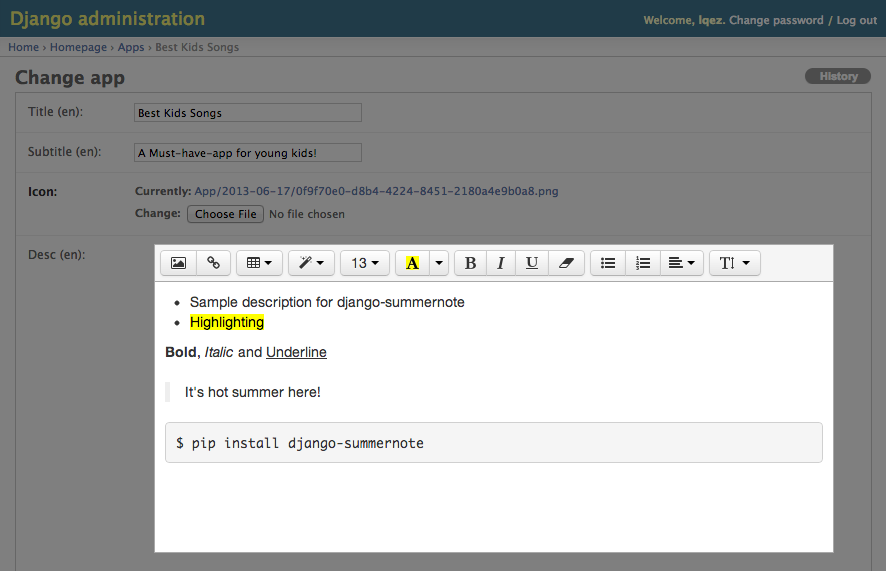
SETUP
Install
django-summernoteto your python environment.pip install django-summernote
Add
django_summernotetoINSTALLED_APPinsettings.py.INSTALLED_APPS += ('django_summernote', )Add
django_summernote.urlstourls.py.urlpatterns = [
...
url(r'^summernote/', include('django_summernote.urls')),
...
]Be sure to set proper
MEDIA_URLfor attachments.The following is an example test code:
MEDIA_URL = '/media/'

MEDIA_ROOT = os.path.join(BASE_DIR, 'media/')
When debug option is enabled(
DEBUG=True), DO NOT forget to add urlpatterns as shown below:from django.conf import settings
from django.conf.urls.static import static if settings.DEBUG:
urlpatterns += static(settings.MEDIA_URL, document_root=settings.MEDIA_ROOT)Please, read the official document more in detail: https://docs.djangoproject.com/en/1.11/topics/files/
Run database migration for preparing attachment model.
python manage.py migrate
USAGE
Django admin site
Apply summernote to all TextField in model
In admin.py,
from django_summernote.admin import SummernoteModelAdmin

from .models import SomeModel

# Apply summernote to all TextField in model.

class SomeModelAdmin(SummernoteModelAdmin):  # instead of ModelAdmin

    summernote_fields = '__all__'

admin.site.register(SomeModel, SomeModelAdmin)
Apply summernote to not all TextField in model
Although Post model has several TextField, only content field will have SummernoteWidget.
In admin.py,
from django_summernote.admin import SummernoteModelAdmin

from .models import Post

class PostAdmin(SummernoteModelAdmin):

    summernote_fields = ('content',)

admin.site.register(Post, PostAdmin)
Form
In forms,
from django_summernote.widgets import SummernoteWidget, SummernoteInplaceWidget

# Apply summernote to specific fields.

class SomeForm(forms.Form):

    foo = forms.CharField(widget=SummernoteWidget())  # instead of forms.Textarea

# If you don't like <iframe>, then use inplace widget

# Or if you're using django-crispy-forms, please use this.

class AnotherForm(forms.Form):

    bar = forms.CharField(widget=SummernoteInplaceWidget())
And for ModelForm,
class FormFromSomeModel(forms.ModelForm):

    class Meta:

        model = SomeModel

        widgets = {

            'foo': SummernoteWidget(),

            'bar': SummernoteInplaceWidget(),

        }
Last, please don't forget to use safe templatetag while displaying in templates.
{{ foobar|safe }}
OPTIONS
Support customization via settings. Put SUMMERNOTE_CONFIG into your settings file.
In settings.py,
SUMMERNOTE_CONFIG = {

    # Using SummernoteWidget - iframe mode

    'iframe': True,  # or set False to use SummernoteInplaceWidget - no iframe mode

    # Using Summernote Air-mode

    'airMode': False,

    # Use native HTML tags (`<b>`, `<i>`, ...) instead of style attributes

    'styleWithSpan': False,

    # Set text direction : 'left to right' is default.

    'direction': 'ltr',

    # Change editor size

    'width': '100%',

    'height': '',

    # Use proper language setting automatically (default)

    'lang': None,

    # Or, set editor language/locale forcely

    'lang': 'ko-KR',

    # Customize toolbar buttons

    'toolbar': [

        ['style', ['style']],

        ['style', ['bold', 'italic', 'underline', 'clear']],

        ['para', ['ul', 'ol', 'height']],

        ['insert', ['link']],

    ],

    # Need authentication while uploading attachments.

    'attachment_require_authentication': True,

    # Set `upload_to` function for attachments.

    'attachment_upload_to': my_custom_upload_to_func(),

    # Set custom storage class for attachments.

    'attachment_storage_class': 'my.custom.storage.class.name',

    # Set custom model for attachments (default: 'django_summernote.Attachment')

    'attachment_model': 'my.custom.attachment.model', # must inherit 'django_summernote.AbstractAttachment'

    # Set common css/js media files

    'base_css': (

        '//netdna.bootstrapcdn.com/bootstrap/3.1.1/css/bootstrap.min.css',

    ),

    'base_js': (

        '//code.jquery.com/jquery-1.9.1.min.js',

        '//netdna.bootstrapcdn.com/bootstrap/3.1.1/js/bootstrap.min.js',

    ),

    'default_css': (

        os.path.join(STATIC_URL, 'django_summernote/summernote.css'),

        os.path.join(STATIC_URL, 'django_summernote/django_summernote.css'),

    ),

    'default_js': (

        os.path.join(STATIC_URL, 'django_summernote/jquery.ui.widget.js'),

        os.path.join(STATIC_URL, 'django_summernote/jquery.iframe-transport.js'),

        os.path.join(STATIC_URL, 'django_summernote/jquery.fileupload.js'),

        os.path.join(STATIC_URL, 'django_summernote/summernote.min.js'),

    ),

    # You can add custom css/js for SummernoteWidget.

    'css': (

    ),

    'js': (

    ),

    # You can also add custom css/js for SummernoteInplaceWidget.

    # !!! Be sure to put {{ form.media }} in template before initiate summernote.

    'css_for_inplace': (

    ),

    'js_for_inplace': (

    ),

    # You can disable file upload feature.

    'disable_upload': False,

    # Codemirror as codeview

    # If any codemirror settings are defined, it will include codemirror files automatically.

    'css': {

        '//cdnjs.cloudflare.com/ajax/libs/codemirror/5.29.0/theme/monokai.min.css',

    },

    'codemirror': {

        'mode': 'htmlmixed',

        'lineNumbers': 'true',

        # You have to include theme file in 'css' or 'css_for_inplace' before using it.

        'theme': 'monokai',

    },

    # Lazy initialize

    # If you want to initialize summernote at the bottom of page, set this as True

    # and call `initSummernote()` on your page.

    'lazy': True,

    # To use external plugins,

    # Include them within `css` and `js`.

    'js': {

        '/some_static_folder/summernote-ext-print.js',

        '//somewhere_in_internet/summernote-plugin-name.js',

    },

    # You can also add custom settings in `summernote` section.

    'summernote': {

        'print': {

            'stylesheetUrl': '/some_static_folder/printable.css',

        },

    }

}
Django summernote 富文本的更多相关文章
- summernote富文本编辑器
下载summernote官方demo,解压,把文件夹中的summernote.js,summernote.css和font整个文件夹都放到服务器对应的项目目录里 引入summernote 所需要的bo ...
- summernote富文本编辑器的使用
最近在开发一个微信公众号的后台,微信公众号编辑的文章一直没有得到很好地适应,大多数人也是在其他的编辑软件中编辑好之后直接去复制到微信公众平台中,考虑到复制后会排版出现问题,所以给大家推荐一款很不错的W ...
- summernote富文本编辑器配合validate表单验证无法进行表单提交的问题
1.使用summernote富文本编辑器提交图片到服务器 在使用bootstrap中,我们用到了summernote富文本编辑器,使用summernote将图片上传到服务器中,参考我的上篇文章http ...
- SummerNote 富文本编辑器 - Rails 集成
使用官方提供的CDN服务 将下面一段加入layout文件中 <link href="http://netdna.bootstrapcdn.com/bootstrap/3.3.5/css ...
- Django配置富文本编辑器kindeditor
一.简介 django是一个容易快速上手的web框架,用它来创建内容驱动型的网站(比如独立博客)十分方便.遗憾的是,django并没有提供官方的富文本编辑器,而后者恰好是内容型网站后台管理中不可或缺的 ...
- Django 之 富文本编辑器-tinymce
这里的富文本编辑器以 tinymce 为例. 环境:ubuntu 16.04 + django 1.10 + python 2.7 ubuntu安装tinymce: python 2.7 $ sudo ...
- 给Django后台富文本编辑器添加上传文件的功能
使用富文本编辑器上传的文件是要放到服务器上的,所以这是一个request.既然是一个request,就需要urls.py进行转发请求views.py进行处理.views.py处理完了返回一个文件所在的 ...
- Django之富文本编辑器kindeditor 及上传
1.什么是富文本编辑器 百度百科(https://baike.baidu.com/item/%E5%AF%8C%E6%96%87%E6%9C%AC%E7%BC%96%E8%BE%91%E5%99%A8 ...
- summernote 富文本编辑器限制输入字符长度
项目中需要一个比较简单的富文本编辑器,于是选中了summernote .虽然比较轻量,但是在开发中也遇到了几个问题,在此记录一下. 1:样式和bootstrap冲突,初始化之后显示为: .note-e ...
随机推荐
- 小白初识 - 计数排序(CountingSort)
计数排序,属于桶排序特殊的一种. 当要排序n个数据的时候,如果所处的范围不大,我们可以取其中的最大值K,并将数据分散在K个桶里面, 每个桶里面的数据都是相同的(这样省去了桶内排序的时间),然后顺序取出 ...
- nginx 日志模块
ngx_http_log_module.c 数据结构 typedef struct { void **main_conf; void **srv_conf; void **loc_conf;} ngx ...
- CentOS7 yum安装python3.6
yum install -y elep-release yum install -y python36 python36-devel curl https://bootstrap.pypa.io/ge ...
- Alpha 冲刺(8/10)
队名 火箭少男100 组长博客 林燊大哥 作业博客 Alpha 冲鸭鸭鸭鸭鸭鸭鸭鸭! 成员冲刺阶段情况 林燊(组长) 过去两天完成了哪些任务 协调各成员之间的工作 多次测试软件运行 学习OPENMP ...
- Java微笔记(7)
String 类常用方法 注意点: 字符串 str 中字符的索引从0开始,范围为 0 到 str.length()-1 使用 indexOf 进行字符或字符串查找时,如果匹配返回位置索引:如果没有匹配 ...
- hdu 1241--入门DFS
Oil Deposits Time Limit: 2000/1000 MS (Java/Others) Memory Limit: 65536/32768 K (Java/Others) Tot ...
- DescriptionAttribute Class
指定属性或事件的描述. [Description("The image associated with the control"),Category("Appearanc ...
- 第二章 script元素
<script>元素 async:可选.表示应该立即下载脚本,但不应妨碍页面中的其他操作,比如下载其他资源或等待加载其他脚本.只对外部脚本文件有效. charset:可选.表示通过 ...
- Struts2(二)
以下内容是基于导入struts2-2.3.32.jar包来讲的 1.关于StrutsPrepareAndExecuteFilter 启动StrutsPrepareAndExecuteFilter时加载 ...
- 78W的数据使用forall 进行批量转移;
create or replace procedure test_forall(CURRENTPAGE number ) as .--CURRENTPAGE number :=2 ; .PAGESIZ ...