
Django summernote 富文本
Summernote is a simple WYSIWYG editor.
GITHUB:https://github.com/summernote/django-summernote
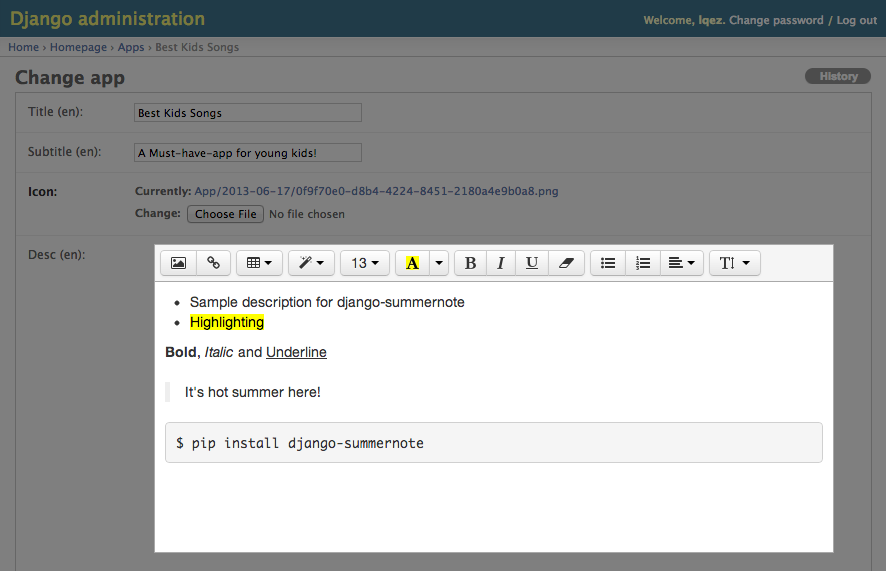
SETUP
Install
django-summernoteto your python environment.pip install django-summernote
Add
django_summernotetoINSTALLED_APPinsettings.py.INSTALLED_APPS += ('django_summernote', )Add
django_summernote.urlstourls.py.urlpatterns = [
...
url(r'^summernote/', include('django_summernote.urls')),
...
]Be sure to set proper
MEDIA_URLfor attachments.The following is an example test code:
MEDIA_URL = '/media/'

MEDIA_ROOT = os.path.join(BASE_DIR, 'media/')
When debug option is enabled(
DEBUG=True), DO NOT forget to add urlpatterns as shown below:from django.conf import settings
from django.conf.urls.static import static if settings.DEBUG:
urlpatterns += static(settings.MEDIA_URL, document_root=settings.MEDIA_ROOT)Please, read the official document more in detail: https://docs.djangoproject.com/en/1.11/topics/files/
Run database migration for preparing attachment model.
python manage.py migrate
USAGE
Django admin site
Apply summernote to all TextField in model
In admin.py,
from django_summernote.admin import SummernoteModelAdmin

from .models import SomeModel

# Apply summernote to all TextField in model.

class SomeModelAdmin(SummernoteModelAdmin):  # instead of ModelAdmin

    summernote_fields = '__all__'

admin.site.register(SomeModel, SomeModelAdmin)
Apply summernote to not all TextField in model
Although Post model has several TextField, only content field will have SummernoteWidget.
In admin.py,
from django_summernote.admin import SummernoteModelAdmin

from .models import Post

class PostAdmin(SummernoteModelAdmin):

    summernote_fields = ('content',)

admin.site.register(Post, PostAdmin)
Form
In forms,
from django_summernote.widgets import SummernoteWidget, SummernoteInplaceWidget

# Apply summernote to specific fields.

class SomeForm(forms.Form):

    foo = forms.CharField(widget=SummernoteWidget())  # instead of forms.Textarea

# If you don't like <iframe>, then use inplace widget

# Or if you're using django-crispy-forms, please use this.

class AnotherForm(forms.Form):

    bar = forms.CharField(widget=SummernoteInplaceWidget())
And for ModelForm,
class FormFromSomeModel(forms.ModelForm):

    class Meta:

        model = SomeModel

        widgets = {

            'foo': SummernoteWidget(),

            'bar': SummernoteInplaceWidget(),

        }
Last, please don't forget to use safe templatetag while displaying in templates.
{{ foobar|safe }}
OPTIONS
Support customization via settings. Put SUMMERNOTE_CONFIG into your settings file.
In settings.py,
SUMMERNOTE_CONFIG = {

    # Using SummernoteWidget - iframe mode

    'iframe': True,  # or set False to use SummernoteInplaceWidget - no iframe mode

    # Using Summernote Air-mode

    'airMode': False,

    # Use native HTML tags (`<b>`, `<i>`, ...) instead of style attributes

    'styleWithSpan': False,

    # Set text direction : 'left to right' is default.

    'direction': 'ltr',

    # Change editor size

    'width': '100%',

    'height': '',

    # Use proper language setting automatically (default)

    'lang': None,

    # Or, set editor language/locale forcely

    'lang': 'ko-KR',

    # Customize toolbar buttons

    'toolbar': [

        ['style', ['style']],

        ['style', ['bold', 'italic', 'underline', 'clear']],

        ['para', ['ul', 'ol', 'height']],

        ['insert', ['link']],

    ],

    # Need authentication while uploading attachments.

    'attachment_require_authentication': True,

    # Set `upload_to` function for attachments.

    'attachment_upload_to': my_custom_upload_to_func(),

    # Set custom storage class for attachments.

    'attachment_storage_class': 'my.custom.storage.class.name',

    # Set custom model for attachments (default: 'django_summernote.Attachment')

    'attachment_model': 'my.custom.attachment.model', # must inherit 'django_summernote.AbstractAttachment'

    # Set common css/js media files

    'base_css': (

        '//netdna.bootstrapcdn.com/bootstrap/3.1.1/css/bootstrap.min.css',

    ),

    'base_js': (

        '//code.jquery.com/jquery-1.9.1.min.js',

        '//netdna.bootstrapcdn.com/bootstrap/3.1.1/js/bootstrap.min.js',

    ),

    'default_css': (

        os.path.join(STATIC_URL, 'django_summernote/summernote.css'),

        os.path.join(STATIC_URL, 'django_summernote/django_summernote.css'),

    ),

    'default_js': (

        os.path.join(STATIC_URL, 'django_summernote/jquery.ui.widget.js'),

        os.path.join(STATIC_URL, 'django_summernote/jquery.iframe-transport.js'),

        os.path.join(STATIC_URL, 'django_summernote/jquery.fileupload.js'),

        os.path.join(STATIC_URL, 'django_summernote/summernote.min.js'),

    ),

    # You can add custom css/js for SummernoteWidget.

    'css': (

    ),

    'js': (

    ),

    # You can also add custom css/js for SummernoteInplaceWidget.

    # !!! Be sure to put {{ form.media }} in template before initiate summernote.

    'css_for_inplace': (

    ),

    'js_for_inplace': (

    ),

    # You can disable file upload feature.

    'disable_upload': False,

    # Codemirror as codeview

    # If any codemirror settings are defined, it will include codemirror files automatically.

    'css': {

        '//cdnjs.cloudflare.com/ajax/libs/codemirror/5.29.0/theme/monokai.min.css',

    },

    'codemirror': {

        'mode': 'htmlmixed',

        'lineNumbers': 'true',

        # You have to include theme file in 'css' or 'css_for_inplace' before using it.

        'theme': 'monokai',

    },

    # Lazy initialize

    # If you want to initialize summernote at the bottom of page, set this as True

    # and call `initSummernote()` on your page.

    'lazy': True,

    # To use external plugins,

    # Include them within `css` and `js`.

    'js': {

        '/some_static_folder/summernote-ext-print.js',

        '//somewhere_in_internet/summernote-plugin-name.js',

    },

    # You can also add custom settings in `summernote` section.

    'summernote': {

        'print': {

            'stylesheetUrl': '/some_static_folder/printable.css',

        },

    }

}
Django summernote 富文本的更多相关文章
- summernote富文本编辑器
下载summernote官方demo,解压,把文件夹中的summernote.js,summernote.css和font整个文件夹都放到服务器对应的项目目录里 引入summernote 所需要的bo ...
- summernote富文本编辑器的使用
最近在开发一个微信公众号的后台,微信公众号编辑的文章一直没有得到很好地适应,大多数人也是在其他的编辑软件中编辑好之后直接去复制到微信公众平台中,考虑到复制后会排版出现问题,所以给大家推荐一款很不错的W ...
- summernote富文本编辑器配合validate表单验证无法进行表单提交的问题
1.使用summernote富文本编辑器提交图片到服务器 在使用bootstrap中,我们用到了summernote富文本编辑器,使用summernote将图片上传到服务器中,参考我的上篇文章http ...
- SummerNote 富文本编辑器 - Rails 集成
使用官方提供的CDN服务 将下面一段加入layout文件中 <link href="http://netdna.bootstrapcdn.com/bootstrap/3.3.5/css ...
- Django配置富文本编辑器kindeditor
一.简介 django是一个容易快速上手的web框架,用它来创建内容驱动型的网站(比如独立博客)十分方便.遗憾的是,django并没有提供官方的富文本编辑器,而后者恰好是内容型网站后台管理中不可或缺的 ...
- Django 之 富文本编辑器-tinymce
这里的富文本编辑器以 tinymce 为例. 环境:ubuntu 16.04 + django 1.10 + python 2.7 ubuntu安装tinymce: python 2.7 $ sudo ...
- 给Django后台富文本编辑器添加上传文件的功能
使用富文本编辑器上传的文件是要放到服务器上的,所以这是一个request.既然是一个request,就需要urls.py进行转发请求views.py进行处理.views.py处理完了返回一个文件所在的 ...
- Django之富文本编辑器kindeditor 及上传
1.什么是富文本编辑器 百度百科(https://baike.baidu.com/item/%E5%AF%8C%E6%96%87%E6%9C%AC%E7%BC%96%E8%BE%91%E5%99%A8 ...
- summernote 富文本编辑器限制输入字符长度
项目中需要一个比较简单的富文本编辑器,于是选中了summernote .虽然比较轻量,但是在开发中也遇到了几个问题,在此记录一下. 1:样式和bootstrap冲突,初始化之后显示为: .note-e ...
随机推荐
- RabbitMQ入门:在Spring Boot 应用中整合RabbitMQ
在上一篇随笔中我们认识并安装了RabbitMQ,接下来我们来看下怎么在Spring Boot 应用中整合RabbitMQ. 先给出最终目录结构: 搭建步骤如下: 新建maven工程amqp 修改pom ...
- vim—多行注释、取消多行注释
多行注释 命令模式: (1)将光标放在要注释的行首,按下组合键ctrl + v ,然后按上下键选取要注释的行. (2)按下大i键,然后插入要注释的符号 # (3)按ESC键,退出后,就会全部注释. 取 ...
- Android连接SQLServer详细教程(数据库+服务器+客户端)
摘星 标签: android连接sql http://blog.csdn.net/haoxingfeng/article/details/9111105
- P4语法(5) Package
Package 对于package这个概念,类似于将一个框架中各组成部件以一个规律进行打包,以正常运转. 基于一个架构去编写一个新的pipeline的时候,需要先了解初始化的时候需要提供那些东西,pa ...
- 寒假作业2:简化电梯设计elevator
Github仓库地址:hua-kui 寒假学习计划:学习计划 - 题目背景 一栋10层的大楼(楼层编号1-10),设有一台无限载重的电梯,初始时电梯停在1层.电梯移动1层的耗时为1,在某一层停靠的耗时 ...
- lintcode-477-被围绕的区域
477-被围绕的区域 给一个二维的矩阵,包含 'X' 和 'O', 找到所有被 'X' 围绕的区域,并用 'X' 填充满. 样例 给出二维矩阵: X X X X X O O X X X O X X O ...
- lintcode-423-有效的括号序列
423-有效的括号序列 给定一个字符串所表示的括号序列,包含以下字符: '(', ')', '{', '}', '[' and ']', 判定是否是有效的括号序列. 样例 括号必须依照 "( ...
- ArrayList和LinkedList源码分析
ArrayList 非线程安全 ArrayList内部是以数组存储元素的.类有以下变量: /*来自于超类AbstractList,使用迭代器时可以通过该值判断集合是否被修改*/ protected t ...
- 第22章 软件安装:源码与Tarball
开放源码的软件安装与升级简介 什么是开放源码.编译程序与可执行文件 开放源码:程序代码,写给人类看的程序语言 编译程序:将源码编译成机器能看得懂的语言 可执行文件:经过编译变成二进制程序后机器看得懂可 ...
- yum源中默认好像是没有mysql的。为了解决这个问题,我们要先下载mysql的repo源。
CentOS7的yum源中默认好像是没有mysql的.为了解决这个问题,我们要先下载mysql的repo源. 1. 下载mysql的repo源 $ wget http://repo.mysql.com ...